Advanced Claude Code Usage: Installation, Permission Modes, and Hooks Explained
A hands-on guide to installing, configuring, and advancing Claude Code for developers in China.
The article outlines the complete path for developers in China to use Claude Code: install via NPM with a VPN, use the open-source CC Switch to edit local settings.json and switch model providers to avoid ban risk, then leverage permission modes, CLAUDE.md, Hooks, and MCP. It emphasizes Claude Code isn't tied to Claude models and can connect to DeepSeek, Kimi, GPT, etc.
Claude Code is an agentic coding tool launched by Anthropic that can read codebases, edit files, run commands, and integrate with development tools. It is essentially a vertical-domain agent focused on solving programming problems. For developers in China, installation and configuration often run into network and account restrictions. This article draws on hands-on experience to walk through the key steps from installation to advanced usage.
Installation and Configuration: Avoiding the Pitfalls of the Official Approach
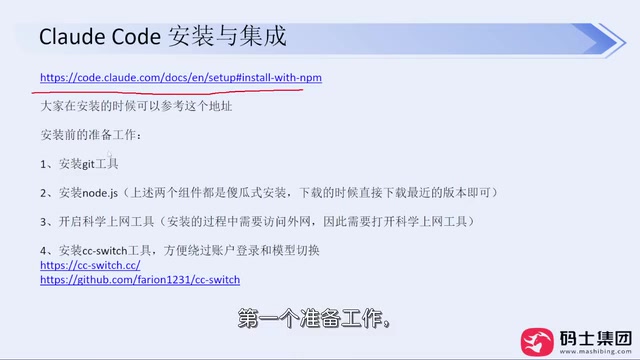
The official documentation recommends several installation commands, but in the Chinese network environment, using the official scripts directly often results in permission errors or download failures. A more reliable path is to install via NPM: npm install -g @anthropic-ai/claude-code. The prerequisite is that Git and Node.js are already installed, and that your VPN/proxy tool is enabled—this step has a major impact on the success rate.
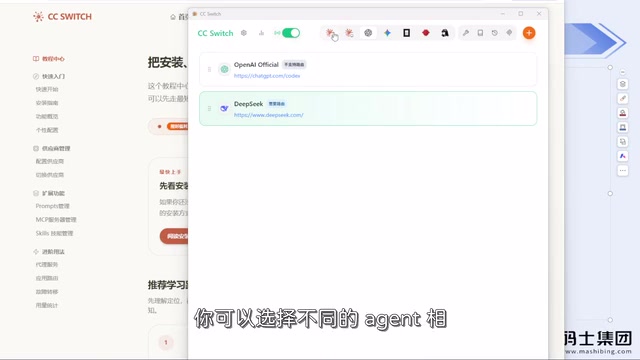
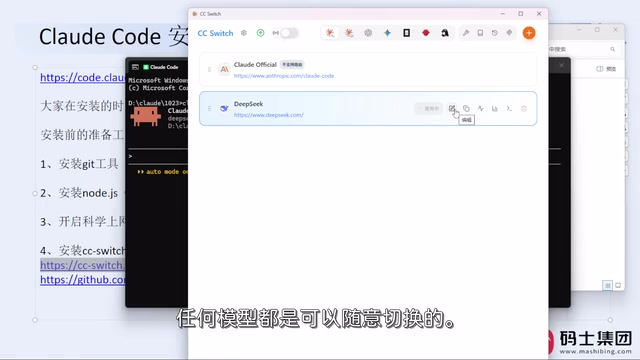
After installation, don't rush to type claude to log in. The official login supports subscription accounts, Console accounts, or cloud provider accounts, but users in China logging in via account may face the risk of being banned. A more recommended approach is to pair it with the open-source tool CC Switch: it is essentially a visual editor for local configuration files that helps you switch model providers (such as DeepSeekAd, Kimi, GPT, etc.) in ~/.claude/settings.json, thereby bypassing the official account login flow. CC Switch itself requires no login and consumes no extra tokens—it simply modifies local configuration.
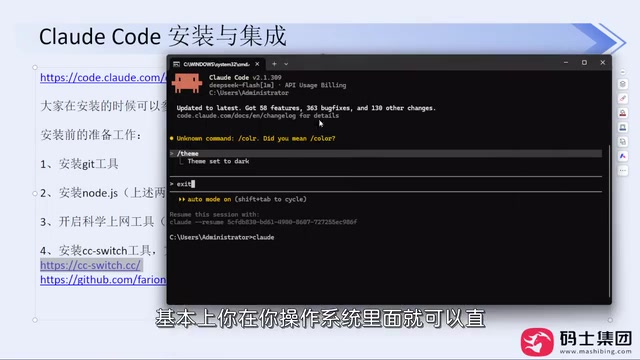
Once CC Switch is configured, type claude in the terminal again to select a trusted folder and theme, then enter the interactive interface. At this point, even if you're using a non-Claude model, Claude Code works fine—it only handles agent orchestration, while the model API is configured by you.
The relationship between NPM and Node.js: NPM (Node Package Manager) is the package management tool bundled with Node.js. The -g in npm install -g means global installation, which links the package's executable entry point into the system PATH so that you can invoke claude directly from any directory. This is also why Node.js must be installed first—NPM is distributed together with Node.js.
The role of ~/.claude/settings.json: This is the user-level configuration file for Claude Code, where ~ represents the current user's home directory. The file stores runtime parameters such as model providers, API endpoints, and key references in JSON format, and is read at startup to override default behavior. CC Switch can "switch models" precisely because it rewrites the fields in this file, without any interaction with official servers.
Permission Modes: Controlling the Agent's Boundaries of Action
Claude Code involves permission control when editing files and executing commands. By default, it asks the user whether to allow an operation, such as writing a file or running a shell command. This design prevents the agent from accidentally modifying critical files or performing dangerous operations.
In practice, you can adjust the permission mode based on your level of trust. For controlled local development environments, you can relax the confirmation frequency for certain operations; for production-related codebases, strict confirmation is recommended. Understanding permission modes helps strike a balance between efficiency and safety, especially in automated workflows.
CLAUDE.md: Injecting Context into Your Project
CLAUDE.md is a Markdown file in the project root directory used to provide project-level context to Claude Code. It can include project structure descriptions, coding standards, common commands, testing methods, and more. Claude Code reads this file at startup to better understand the task background.
When writing CLAUDE.md, focus on "what the agent needs to know to work efficiently." For example, specify build commands, code style constraints, directory conventions, and files that should not be modified. This can significantly reduce back-and-forth clarification and make Claude Code's output more aligned with the actual project.
Hooks: Inserting Automation at Key Points
Hooks allow custom scripts to be triggered at lifecycle events in Claude Code, such as before or after tool calls, or at the start or end of a session. This provides extension points for automated validation, logging, and environment preparation.
A typical use case is automatically running formatting or lint checks after file edits to ensure the agent's changes comply with team standards. Hooks are also configured in local settings and require some scripting ability, but they can effectively improve the reliability of collaboration.
How Hooks work with permission modes: Hook triggers and permission decisions occur within the same lifecycle. For example, in the pre-tool-call event, a script can read the parameters of the operation about to be executed and decide whether to allow or block it. Combined with permission modes, you can change "ask the user every time" to "let the script decide automatically according to rules," preserving safety boundaries while reducing interaction interruptions. Note that Hook scripts run with local permissions, so avoid hardcoding sensitive credentials in them.
Model Selection and MCP Integration
Claude Code does not force you to use Claude models. Through CC Switch or by directly editing the configuration file, you can connect to models that support APIs, such as DeepSeek, Kimi, and GPT. Domestic models like the newer versions of DeepSeek perform well on programming tasks and are generally sufficient for daily coding, documentation, and requirements analysis. The extreme capabilities shown on model leaderboards may not be needed in most real-world scenarios—just choose based on your habits.
MCP (Model Context Protocol) provides a standard way to connect external tools and data. Through MCP, Claude Code can access databases, API documentation, or other services, extending its information-gathering scope. For development tasks that require cross-system operations, MCP reduces the cost of manual switching.
MCP architecture: Model Context Protocol uses a client-server model. Claude Code acts as an MCP client and communicates with MCP servers via standardized JSON-RPC messages; each server exposes several "tools" or "resources," such as querying a database or retrieving documentation. Servers can be provided by third parties or written yourself using the official SDK. Compared with writing custom integrations for each external system, MCP allows the same set of interfaces to be reused by different agents—which is why it is regarded as the "standard for agent tool integration."
Practical Recommendations
The core obstacles for developers in China using Claude Code lie in installation and account setup. Prioritizing NPM installation paired with CC Switch for model configuration management can avoid most ban and network issues. Once you're in actual development, make good use of CLAUDE.md to convey project context, control agent behavior through permission modes and Hooks, and combine with MCP to expand capability boundaries—this lets Claude Code truly integrate into your daily programming workflow. The tool itself is just an agent, model choice is flexible, and the key is to establish a stable, controllable usage environment.
One-line Summary
A hands-on guide to installing, configuring, and advancing Claude Code for developers in China.
Paragraph Summary
The article outlines the complete path for developers in China to use Claude Code. For installation, it recommends abandoning official scripts in favor of global NPM installation with a VPN/proxy; for login, it recommends using the open-source tool CC Switch to edit the local settings.json and switch model providers, avoiding the ban risk of official account login. Once in use, the author introduces four key capabilities: permission modes control the confirmation level for file editing and command execution, CLAUDE.md injects context into the project, Hooks insert automated scripts at lifecycle events, and MCP standardizes connections to external tools like databases and APIs. The article emphasizes that Claude Code is not tied to Claude models and can connect to DeepSeek, Kimi, GPT, etc., with the core being to establish a stable and controllable usage environment.
Related articles
Codex and AI Coding Agents in Practice: A Complete Guide from Prompts to MCP
A Codex-centered guide to agentic coding: Task-Context-Output prompts, AGENTS.md project memory, plan mode, skills, characterization vs. spec tests, permissions and config.toml, MCP tool calls, plus secrets safety and context management.

GPT-6 Security Model and the AI Attack-Defense Escalation: This Week in AI
This week in AI: OpenAI's GPT-6 Saber found 948 Linux kernel root-escalation paths; Cursor deploys full apps from one sentence; Binance details a social engineering attack; C++26 fails ISO vote.
KIKUmap: Manage Your Claude and ChatGPT Conversations with Mind Maps
KIKUmap is a macOS menu bar app that visualizes Claude and ChatGPT conversations as mind maps with real-time status. Free and open source.