KIKUmap: Manage Your Claude and ChatGPT Conversations with Mind Maps
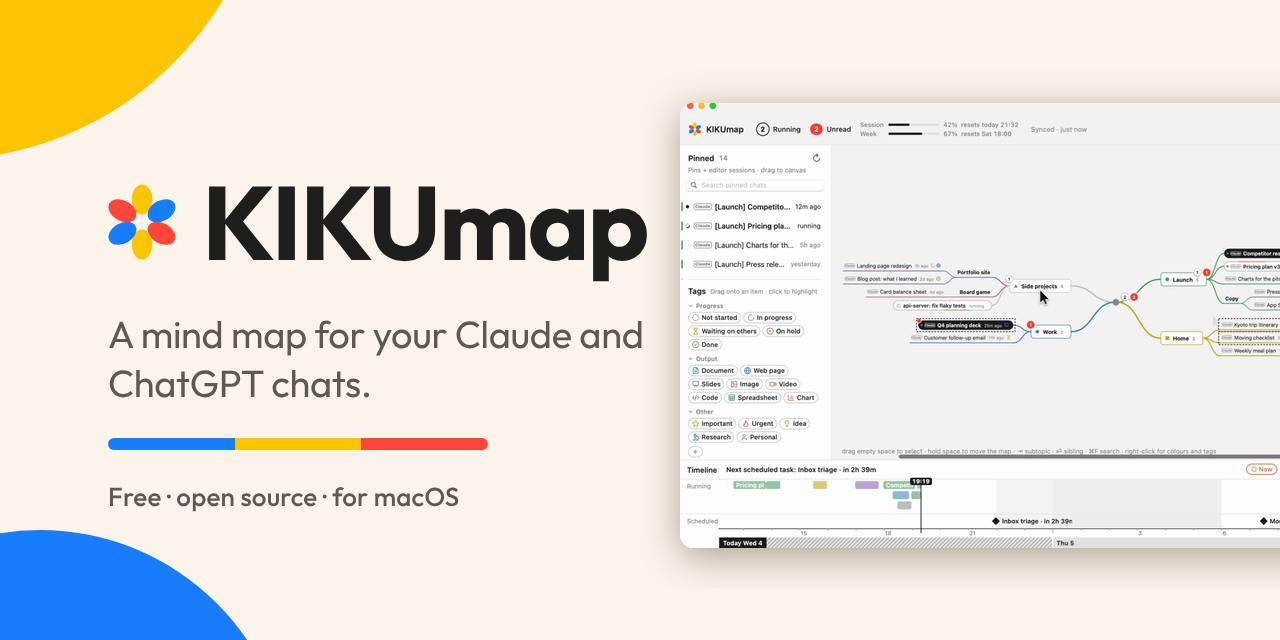
KIKUmap visualizes Claude and ChatGPT conversations as mind maps, centered on the macOS menu bar and open source.
KIKUmap is a macOS menu bar app and desktop widget that solves scattered AI conversations and unclear status during multitasking. It abstracts each Claude and ChatGPT conversation as a mind map node, labels statuses in real time, and supports drag-and-drop grouping. Free and open source on GitHub, it received 87 votes and ranked 14th on Product Hunt. Its differentiation is treating conversations as connected nodes rather than a linear list, with a menu bar entry point reducing switching costs.
Why Do You Need to Manage AI Conversations?
As AI assistants like Claude and ChatGPT become deeply integrated into workflows, the number of conversations users open simultaneously has skyrocketed. A typical knowledge worker might be handling code debugging, copywriting, data analysis, and other tasks at the same time, with each task corresponding to a separate AI conversation. These conversations are scattered across different tabs or history logs, each in a different state: some are generating replies, some are finished and waiting to be reviewed, and some need to be restarted because the context has grown too long.
According to KIKUmap, a new product on Product Hunt, it aims to solve exactly this pain point: visualize Claude and ChatGPT conversations as a mind map, so you can see at a glance which conversations are running, which are complete, and which are waiting for your reply.
What Is KIKUmap?
KIKUmap is a macOS menu bar app and desktop widget positioned as a "mind map for AI conversations." Its core features include:
- Status visualization: Displays the real-time running status of each Claude or ChatGPT conversation (in progress, completed, waiting for input).
- Mind map layout: Arranges conversations as nodes on a canvas, which users can freely drag and group to form a knowledge map that matches their own thinking habits.
- Menu bar and widget: Lives in the menu bar for quick access at any time; the desktop widget makes status clear at a glance.
- Free and open source: The code is hosted on GitHub under an open-source license, allowing users to review, modify, or contribute.
The product received 87 votes and 7 comments on Product Hunt, ranking 14th for the day, in the categories of open source, artificial intelligence, GitHub, and menu bar apps. The maker is Yang Tang.
Menu bar app is a lightweight application form on macOS: it has no traditional Dock icon or main window, and instead resides in the system menu bar at the top right of the screen; clicking the icon opens a dropdown panel. These apps typically use few resources and launch quickly, making them suitable as entry points for status viewing or quick actions (such as timers, clipboard tools, and system monitors). Compared with standalone window apps, the advantage of a menu bar app is that it is always visible and can be summoned with one click without interrupting the current workflow; the tradeoff is limited display space, so complex interactions require additional pop-up windows. KIKUmap chose this form precisely to let users quickly grasp conversation status without switching browser tabs.
Desktop widget is a persistent information card that can be placed directly on the desktop since macOS 14 Sonoma, and can also be placed in Notification Center. Widgets are mainly read-only displays; clicking can jump to the corresponding app. Their data is periodically refreshed by the host app through the WidgetKit framework, and the refresh frequency is limited by system scheduling rather than being real-time. This means widgets are suitable for showing an "overview" rather than a "precise real-time" status. Understanding this mechanism helps set reasonable expectations: the KIKUmap widget provides a quick glimpse of conversation status, and when more granular operations are needed, users still need to return to the menu bar or main interface.
Differentiation from Similar Tools
There are already many AI conversation management tools on the market, but most focus on conversation history search or prompt library management. KIKUmap's uniqueness lies in treating conversations as thinking nodes rather than a simple linear list. This design echoes the characteristics of human associative thinking: a complex project often involves multiple conversation threads that have logical connections, and a mind map can express these relationships more naturally.
In addition, KIKUmap chooses the macOS menu bar as its entry point, reducing switching costs. Users do not need to open a browser or standalone app; clicking the menu bar icon gives them the full picture. Its open-source nature also means it may attract the developer community for secondary development, such as adding support for more AI platforms or custom status rules.
Mind map is a visual structure that organizes information around a central node and radiates outward through branches; typical features include nodes, connections, hierarchy, and free layout. Compared with linear lists, it emphasizes relationships between pieces of information rather than their order. In information management, mind maps are often used for brainstorming, knowledge organization, and project breakdown. KIKUmap abstracts each AI conversation as a node and allows drag-and-drop grouping, essentially turning a "collection of conversations" into an editable relationship graph, letting users organize tasks by spatial position rather than chronological order. This is similar to the idea of Kanban, but emphasizes free topology rather than fixed columns.
Open-source license refers to a licensing method in which software source code is made public and others are allowed to view, modify, and redistribute it, such as MIT, Apache 2.0, and GPL. Different licenses impose different levels of constraints on derivative works: permissive licenses (such as MIT) allow closed-source commercial use, while copyleft licenses (such as GPL) require derivative works to also be open source. For tool products, open source means users can audit data processing logic (for example, whether conversation content is uploaded to the cloud), patch or extend functionality themselves, and it also facilitates community contributions for multi-platform support. For a tool like KIKUmap that involves AI conversation data, open source is also an endorsement of privacy transparency.
Potential Limitations and Use Cases
Currently, KIKUmap only supports macOS and explicitly targets only Claude and ChatGPT. Users of other AI assistants cannot benefit for now. Mind map interaction may seem redundant when there are few conversations, but its value only becomes apparent once the number of conversations exceeds a certain point (for example, when working on more than 5 tasks simultaneously).
Use cases include:
- Multitaskers: Advancing multiple projects at once and needing to switch context quickly.
- Researchers and creators: Needing to track the evolution of multiple conversations under the same topic.
- Open-source enthusiasts: Wanting to customize their own AI workflow tools.
Conclusion
KIKUmap starts from a niche pain point: status management and spatial organization of AI conversations. It does not try to be an all-in-one AI client; instead, in a lightweight, open-source, and visual way, it offers macOS users a new approach to conversation management. For heavy users who rely deeply on Claude and ChatGPT, this tool is worth watching. The product is now live on Product Hunt and provides an official website link for downloading and trying it out.
One-line Summary
KIKUmap visualizes Claude and ChatGPT conversations as mind maps, focusing on the macOS menu bar and open source.
Paragraph Summary
KIKUmap is a macOS menu bar app and desktop widget designed to solve the pain point of scattered AI conversations and unclear status during multitasking. It abstracts each Claude and ChatGPT conversation as a node on a mind map, labels statuses such as in progress, completed, or waiting for input in real time, and supports drag-and-drop grouping to form a knowledge map that matches personal habits. The product is free and open source, with code hosted on GitHub, and received 87 votes and ranked 14th on Product Hunt. Its differentiation lies in treating conversations as connected thinking nodes rather than a linear list, and using a menu bar entry point to reduce switching costs. Limitations are that it only supports macOS and two platforms, and its value is limited when there are few conversations; it is suitable for multitaskers, researchers, and open-source enthusiasts.
Related articles

Hugging Face Executive Warns: Cyberattacks Are Eroding the Openness of Open-Source AI
Hugging Face executive Irene Solaiman warns that rising cyberattacks on open AI platforms may force stricter security limits, threatening the openness of the open-source community and affecting the developer ecosystem.
Google Cloud Launches Healthcare Version of Gemini: Integrating Clinical Data and Automating Workflows
Google Cloud releases healthcare version of Gemini, focusing on unified clinical data and automated workflows to reduce administrative burnout. Analysis of positioning, challenges, and the healthcare AI landscape.
OpenAI's Free AI Course Goes Into Comm…
OpenAI's Free AI Course Goes Into Communities: Helping Caregivers Bring ChatGPT Into Daily Life
OpenAI Academy offers free, hands-on ChatGPT workshops for caregivers in five U.S. cities, helping non-technical people build practical AI skills for daily life. This article analyzes the training model, caregiver scenarios, and implications for AI adoption.