After GPT-6 Ultra's Launch: A Complete Guide to Plus/Pro Subscriptions

Bilibili tutorial: from registering a Google account to topping up GPT membership via Alipay, plus how to choose among Go, Plus, and Pro tiers.
Based on Bilibili creator "23111"'s tutorial, this article covers registering a Google account from scratch and using it to log in to GPT, completing a membership subscription via Alipay, and breaking down the use cases for Go, Plus, and Pro. Plus at $20/month is recommended as the balanced first choice for most users; Pro comes in $100 and $200 tiers with Codex quotas of 5x and 20x Plus, suited to heavy Codex users and developers.
GPT-6 Ultra's release has prompted many people to re-examine their AI toolchain, but the subscription barriers that come with it are also giving users headaches. Bilibili creator "23111" released a hand-holding tutorial that covers everything from registering a Google account from scratch to completing a GPT membership subscription via Alipay, and breaks down the use cases for the Go, Plus, and Pro tiers—all without ever handing over your account credentials. This article is based on that video and incorporates screenshot information to explain the key steps.
1. Starting from Scratch: A Practical Path Around Phone Verification
The first step in the video is registering your own Google account, then using it to log in to GPT with one click. The creator recommends using Google Chrome, clicking your avatar, selecting "Add account," then "Create account" and "For my personal use." You can enter any name, and for age it's recommended to put something in the 18–20 range. The key detail: if you use the US template during registration, the page will automatically show a US flag icon, meaning the account's region is the US; you can also directly use a +86 phone number to receive the verification code. After entering the code, click the "Skip" button at the bottom, and your Google email is registered.
Next, open the GPT website and choose "Log in with Google account," again with an age in the 20 range. The GPT account obtained this way can be used directly to log in on Codex. The creator emphasizes that at no point do you need to hand over your account credentials, which is an important selling point for users concerned about account security.
2. Choosing a Plan Before Subscribing: Go, Plus, or Pro?
Currently, paid plans for individual users mainly come in three tiers: Go, Plus, and Pro, with Pro further split into $100/month and $200/month tiers. What people commonly refer to as "5x" and "20x" means Codex usage equivalent to 5 times and 20 times the Plus membership quota.

Go: The Entry Tier for Light Users
Go is priced lower per month and is positioned as a lightweight plan. It suits scenarios like casual chatting, editing text, and occasional Codex use. But if you need to run projects for extended periods or handle complex tasks, Go isn't well suited as your main workhorse. The creator mainly recommends it for users with limited budgets and lighter usage frequency.
Plus: The Balanced Tier Most People Should Try First
Plus costs $20 per month and is the plan the creator most recommends for most people to try first. Daily chatting, writing, file analysis, image generation, plus Codex-assisted programming—common study and work needs can all start here. Content creators can use it to revise scripts, process materials, and generate accompanying images; office scenarios can analyze documents and process data; those wanting to learn programming can have it guide them through it directly. Considering features and price together, Plus is a relatively balanced choice.
But if you want to use GPT-6 Ultra, Plus may not be enough. The creator suggests: for daily assistance with work, study, and programming, you can start with Plus; if you need GPT-6 Ultra, or need to have it run continuously for several hours a day, then look at the Pro tier.
Pro: The Advanced Tier for High-Frequency Users and Developers
There are three notable aspects of Pro's 5x and 20x tiers. First is higher usage and voice usage time, suited to scenarios where you communicate by voice while having it handle work—the $200 tier offers unlimited voice access. Second is access to the Codex Spark research preview model open to Pro, focused on fast feedback and suited to scenarios requiring frequent revisions and back-and-forth code debugging. Third is the Codex quota: the 5x tier is 5 times Plus, and the 20x tier is 20 times. The creator describes it as "pedal to the metal without worrying about the cost," and it often resets the count at irregular intervals.

The creator recommends Pro for three groups: heavy users who interact with Codex at high frequency every day; software developers, because Plus is basically insufficient for software development and only Pro can meet the need; and people whose work generates extremely high value, for whom Pro can call on the most powerful GPT-6 Ultra to assist with work. If the time it saves you each month and the work it completes already exceed the monthly fee, Pro is more worthwhile.
What is Codex? In this article, "Codex" appears repeatedly and is key to understanding the differences between plans. Codex is OpenAI's code generation and agentic programming tool, which can understand natural language instructions and directly write, modify, and run code. It's often used by developers for prototyping, debugging, and automation tasks. Unlike the web version of ChatGPT, it leans more toward "continuously executing tasks," so it consumes far more compute resources than ordinary conversation. This is also why plans are distinguished by "Codex usage is 5x/20x that of Plus"—for heavy users who have Codex running for hours every day, quota is often a more realistic bottleneck than model capability.
What do Token and "getting a Token" mean? The Token here is not the text unit used in LLM billing; it's a one-time credential string used by third-party top-up platforms to identify an order or account. After the user logs in and clicks "Get Token," the platform generates a string of characters (including parentheses); the user copies it and pastes it back on the top-up page, and the platform uses it to associate the email to be topped up and create an order. The entire process does not involve submitting your GPT account password to the platform—this is the technical basis for the process's emphasis on "security." However, the Token itself is still bound to the account, and if leaked it could be used by others to operate orders, so when copying and pasting, confirm that the page source is trustworthy.
What does "research preview model" mean? The article mentions that Codex Spark, available on the Pro tier, is a "research preview" model. Such models are typically in an early-access stage: features may be incomplete, output stability may be lower than official releases, and the company may adjust or discontinue them at any time without formal SLA guarantees. They're suited to trying things out and rapid iteration scenarios, but it's not advisable to rely on them entirely for critical production workflows. This also explains why the capability is placed on the Pro tier rather than opened to everyone—it's both value-add for high-paying users and a controlled way to test.
3. Alipay Subscription Walkthrough: Token Pasting and Payment Verification
After visiting the GPT9.3C website provided by the creator, you'll see the available products; using Plus as an example, click into it to reach the top-up interface. First click "Official Login"; after logging in you'll see that the current plan is the free version. Return to the top-up interface and click "Get Token"; a string of garbled characters will appear—select and copy all of it (including parentheses), then return to the top-up interface and paste it into the input box. Verify the email to be topped up, click confirm, then click "Proceed to payment" to create an order.
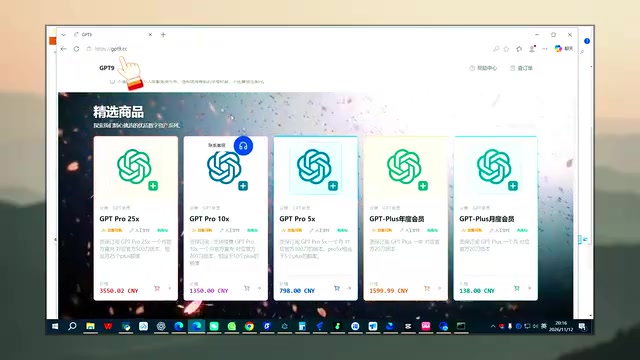
The video shows that this channel supports WeChat Pay, and after payment you only need to wait one to two minutes for the top-up to succeed. When verifying, if the interface hasn't refreshed yet, it will prompt you to get Plus—meaning you don't have a membership yet; after refreshing, click your avatar, and if a Plus membership badge appears next to the account avatar, the top-up was successful.
It's worth noting that users must judge the stability and security of such third-party top-up channels themselves. The creator's core selling point is that you never hand over your account password, but when it comes to payments and account operations, it's still advisable to carefully verify the email and order information.
4. Subscription Advice from Multiple Perspectives
According to Bilibili creator "23111"'s tutorial and contemporaneous discussions on YouTube channels about GPT-6 Ultra subscriptions, the cross-verified consensus is: Plus remains the top choice for most ordinary users, and Pro's value is concentrated in high-frequency Codex use and software development scenarios. The point of divergence is the reliability of third-party top-up channels—some argue such channels are convenient but carry account risks, while other users believe that as long as you don't hand over your password, it's relatively controllable. A unique observation from a single source is the creator's claim that the Pro tier "often resets the count at irregular intervals"; this claim currently lacks official documentation to support it, so users should treat it as reference rather than a promise.
For users new to the GPT ecosystem, it's recommended to first use Plus to get everyday workflows running, confirm your usage intensity, and then decide whether to upgrade to Pro. Software developers and heavy Codex users can go straight to Pro's 5x tier, while the 20x tier is better suited to high-intensity scenarios with several hours of continuous running every day.
One-line Summary
Bilibili creator tutorial: from registering a Google account to topping up GPT membership via Alipay, plus how to choose among the Go, Plus, and Pro tiers.
Paragraph Summary
Based on Bilibili creator "23111"'s hand-holding tutorial, this article walks through the complete process of registering a Google account from scratch and using it to log in to GPT, then completing a membership subscription via Alipay, with a focus on breaking down the use cases for the Go, Plus, and Pro tiers. Plus at $20/month is recommended as the balanced tier most users should try first; Pro comes in $100 and $200 tiers, with Codex quotas of 5x and 20x Plus respectively, suited to high-frequency Codex users, software developers, and high-value work scenarios. The article also reminds readers that the stability and security of third-party top-up channels require their own judgment, and suggests first using Plus to get everyday workflows running before deciding whether to upgrade.
Related articles

ChatGPT Plus Subscription Pitfall Guide: Go/Plus/Pro Tier Comparison and Quick Activation
A complete ChatGPT Plus subscription guide based on a Bilibili tutorial: from registering an account, comparing Go/Plus/Pro tiers, to the practical steps for quickly completing your subscription.

GPT-6.2 Sol/Astra Released! A Step-by-Step ChatGPT Plus Subscription Guide and Tier Comparison
GPT-6.2 Sol/Astra is out—here's a ChatGPT Plus subscription guide: register an account, compare Go/Plus/Pro tiers, and subscribe in a minute.
Comparing Three Channels for Subscribing to GPT Plus in China: Is Website Top-Up the Easiest?
How to subscribe to GPT Plus in China? This article compares website top-up, credit card, and mobile top-up channels—process, cost, and risk—with steps and tips to help you choose wisely.