Agent Skill Getting Started: Understanding Structure, Principles, and Customization from Scratch

Agent Skill explained: a structured folder with SKILL.md at its core that far outperforms plain prompts.
This article breaks down Agent Skills for absolute beginners. Using a professional skill analogy, it explains that a Skill is a folder containing a required SKILL.md file plus optional references, scripts, and assets directories. SKILL.md consists of metadata (name and trigger description) and instructions (execution rules). The key distinction from prompts: a Skill can not only "say" things but also "do" things, "look up" references, and "use assets" — making it capable of complex automated workflows that prompts alone cannot handle.
Why Agent Skills Are Suddenly Everywhere
With tools like Claude Code, OpenCloud (nicknamed "Crayfish" in the community), Hermes Agent, and a wave of other Agent platforms gaining traction, Skills — as one of their core mechanisms — are being talked about more than ever. Many beginners share the same confusion: What exactly is a Skill? How is it different from a regular prompt? Why is it supposedly more powerful?
This article is adapted from a hands-on course designed for absolute beginners. Using intuitive analogies, it pulls back the curtain on Agent Skills. The whole approach covers three things: understand Skills, customize Skills, and discover useful Skills. This article focuses on the first two — getting the structure and principles down clearly.
Claude Code is Anthropic's AI coding assistant for developers, known for its powerful code comprehension and generation capabilities. OpenCloud ("Crayfish") and Hermes Agent are AI Agent platforms that have emerged both domestically and internationally, focused on letting non-technical users build automated workflows through configurable skill modules. What these tools share is combining large language models (LLMs) with Tool Use capabilities — meaning AI no longer just answers questions, but can carry out a series of consecutive actions on a user's behalf. The Skill mechanism was designed precisely in this context: it serves as a standardized interface connecting "user intent" with "Agent execution," allowing the same capability to be reused, shared, and continuously improved without rewriting prompts from scratch every time.
Understanding Skills Through a "Professional Skill" Analogy
Skill translates literally to "skill" — and the concept really isn't abstract. Everyone has professional skills in their own field. Students write essays, solve math problems, and handle English assignments. Developers understand requirements, write code, and debug issues. These are human skills. Applied to AI, they become an Agent's Skills. Whatever skills a person can have, an Agent can be given — same logic, same structure.
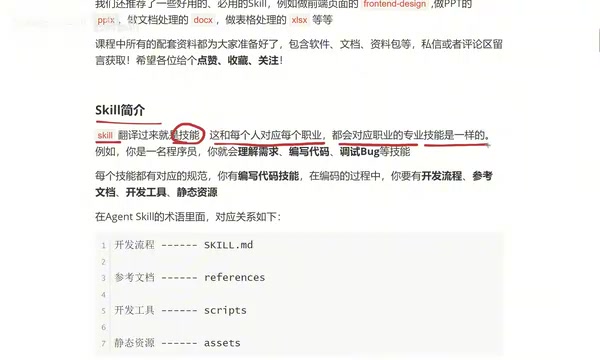
The key insight is: every skill comes with its own set of standards. Take a developer's coding skill as an example. Before you actually write a single line of code, you need a few things in place: a development workflow (clarify the business logic first — what to build first, what comes next, how components relate), reference documentation (API docs or requirement specs), development tools (IDEA for Java, VS Code for frontend or Python), and static assets (images, audio, video, and other media used in a project). With these four things in place, you can actually ship something.
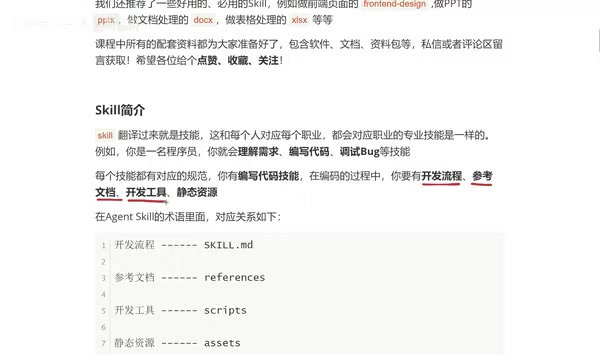
The Skill File Structure: The Four-Piece Kit
Translating that "professional skill framework" into Agent Skill terminology, the mapping is remarkably clean:
- Development workflow → SKILL.md (the core skill definition file)
- Reference documentation → references (a folder for reference materials)
- Development tools → scripts (a folder for scripts)
- Static assets → assets (a folder for media and resources)
Pack all of this into a single folder, and that folder is a complete Skill.
One thing worth emphasizing: only SKILL.md is required. The other three — references, scripts, and assets — are all optional, added only when needed. Some skills won't use any of them; others will use all three. Whether you need them depends entirely on what the skill does and how it operates. This is especially important for beginners — don't let a complex directory structure intimidate you. At its core, a Skill is just one file.
Dissecting a Real Skill Example
The course uses a "Restaurant Marketing Materials Design" Skill as a walkthrough, with all content written inside a SKILL.md file. It's organized into two main sections.
Metadata
The top of the file is called metadata, and it contains the skill's name and description. The description is written plainly: "Generate brand-aligned design concepts for restaurant marketing materials. When a user mentions creating a specific type of material (e.g., poster, roll-up banner, packaging box), output design concepts for that material." This description essentially tells the Agent: what this skill is called, what it can do, and when it should be triggered.
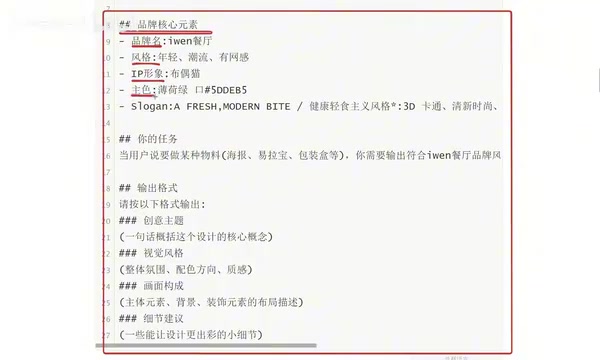
Instructions Section
Everything below the metadata belongs to the instructions. Instructions are fundamentally the same as natural language messages you'd send to an LLM in a chat — every sentence is a directive. In this example, the instructions carefully specify:
- Core brand elements: brand name, visual style, IP mascot, primary color palette, slogan
- Task definition: when a user requests a specific type of material, output concepts that match the restaurant's style
- Output format: what each section should look like — creative theme, visual style, composition, and detail recommendations
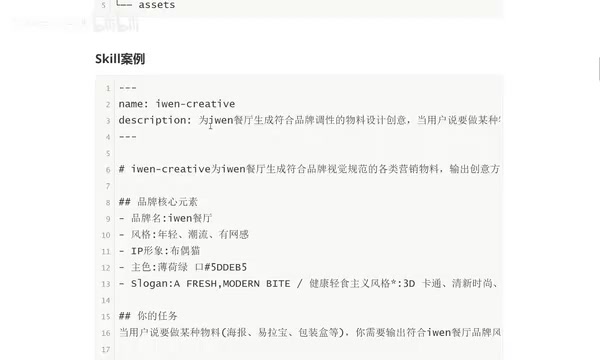
A useful rule of thumb: the more specific your description, the closer the output will be to what you actually want. This is the essence of customizing a Skill.
What's the Real Difference Between a Skill and a Prompt?
After seeing the instructions section, many people will immediately say: "Isn't this just a prompt?"
The honest answer is — it does look similar, but a Skill's capabilities go far beyond a plain prompt. The difference lies in the structure: a prompt is typically just a block of text, whereas a Skill has SKILL.md as its "prompt-like" core file, plus the ability to attach references, scripts, and assets as extension folders. This means a Skill can reference external documents, execute scripts to perform real actions, and draw on static media resources — enabling complex tasks that a prompt simply cannot accomplish.
In short: a prompt can only say things, while a Skill can say, do, look things up, and use assets. That's the fundamental reason Skills are more powerful and applicable to a wider range of scenarios.
The scripts folder is where Skills truly surpass ordinary prompts, and it's worth explaining on its own. A script is essentially a piece of executable code — common forms include Python scripts, shell commands, or JavaScript files. When an Agent runs a Skill, it doesn't just "output text" — it can actually invoke these scripts to perform operations. Examples include automatically compressing images, calling third-party APIs to fetch data, batch-renaming files, or triggering a local application. This "write code + execute code" capability transforms a Skill from a "smart chat window" into an automated assistant that can run an entire workflow end to end. The references folder, meanwhile, works like giving the Agent a "reference manual" — you can include product documentation, brand guidelines, industry glossaries, and more, so the Agent has authoritative sources to draw from rather than relying entirely on what the model learned during training. Together, these two components are the underlying reason Skills can handle complex, real-world business scenarios.
Practical Value and What Comes Next
Once you understand the structure, the real-world uses for Skills become very concrete. For example, given a simple prompt — "Make a promotional poster for Wellington steak at a restaurant, only ¥38, first come first served" — a properly configured Skill will automatically generate poster concepts that align with the brand's style, positioning, and target audience.
Beyond building your own, the community has a large collection of high-quality, ready-to-use Skills worth grabbing directly — Skills for building frontend pages, generating PowerPoint presentations, processing documents, handling spreadsheets, and more. For anyone looking to get up to speed quickly, a smooth learning path is to start with ready-made Skills, then gradually learn to customize Skills for your own business needs.
To wrap up, here's the core mental model: Skill = a folder, with a required SKILL.md, plus optional references / scripts / assets — essentially a structured prompt with superpowers. Keep that model in mind, and whether you're reading someone else's Skill or writing your own, everything will feel a lot more manageable.
Related articles

Felix Rieseberg Personal Homepage
Felix Rieseberg's personal homepage sparks attention on Hacker News. This article covers the Slack engineer's technical background, the rise and fall of nativefier, and the value of a developer homepage as a tech calling card.

@ai-sdk/vue 3.0.306 Patch Release Syncs with [email protected] Update
@ai-sdk/vue 3.0.306 released, synced with [email protected]. A routine patch release for the Vercel AI SDK ecosystem with no public API changes; the Vue adapter layer stays version-aligned with the core package.

Gemini 4 Argon API Launches: The Era of Million-Token Output Begins
Google launches Gemini 4 Argon with sparse MoE architecture, up to 1M output tokens, and a 68.90% Vals Index score, available across API, AI Studio, and the Gemini app.