Agent Skills Architecture Deep Dive: From Description to Directory Structure — Clearing Up Common Misconceptions

Agent Skills is a standardized folder format for extending AI Agents, centered on a SKILL.md description file read by the model.
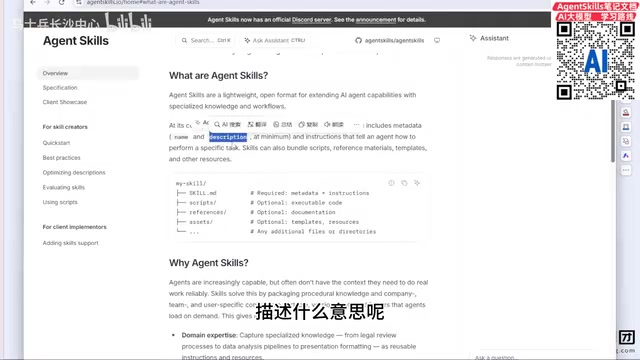
This article systematically explains the definition, structure, and common misconceptions around Agent Skills. Agent Skills is a lightweight open format that equips AI Agents with callable capabilities. Each Skill's core is a SKILL.md file with name and description as the minimum required fields — crucially, description is written for the LLM to read, not humans, serving as the direct basis for the model to discover and invoke available tools (analogous to tool descriptors in Function Calling). A complete Skill can also include scripts, references, and templates, making it a folder rather than a single md file — a subtle but important distinction from the oversimplified claim widespread online.
What Are Agent Skills?
Agent Skills is a lightweight, open format for extending AI Agent capabilities with specialized knowledge and workflows. In simple terms, it allows an Agent to iteratively develop various skills tailored to specific needs, enabling complete end-to-end business development for a given project.
Many developers have misconceptions about Skills, so it's worth going back to the official documentation. The official description of Skills isn't overly complex — at its core, it's a standardized way to "equip" an Agent with capabilities. When tackling a complex project, you can have an Agent call different Skills to handle different business modules independently.
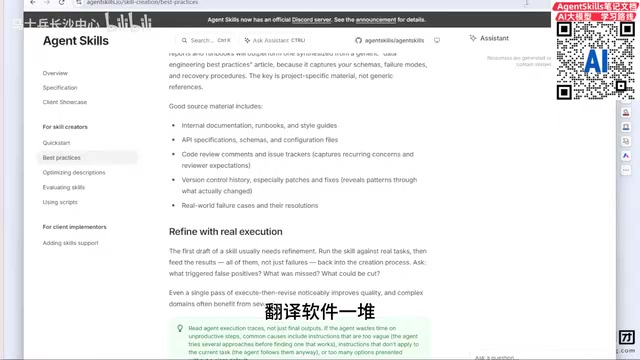
If reading English documentation feels daunting, translation tools are perfectly fine as a supplement. The official docs are always the most reliable source when learning a new technology — translation software is just there to lower the barrier, not as an excuse to skip the official site.
The concept of Agent is central to modern AI engineering. It refers to an AI system capable of autonomous planning, tool invocation, and completing complex tasks across multiple steps — distinct from a standard conversational model that handles single-turn Q&A. A typical Agent loop looks like: perceive input → form a plan → invoke tools/skills → observe results → continue reasoning, until the task is complete. Skills are the standardized encapsulation of "callable capabilities" within this loop. Different frameworks use different names for similar concepts — LangChain calls them Tools, AutoGPT calls them Commands, and the Agent Skills discussed here are the format specification adopted by specific platforms (such as AI IDEs like Trae). Understanding how Agents execute helps you more accurately understand where Skills fit and what their role boundaries are.
The Core of a Skill: SKILL.md and Metadata
At the heart of every Skill is a SKILL.md file containing the necessary metadata. The two most fundamental fields — the bare minimum required — are:
- name: The name of the skill
- description: A description of the skill
These two fields are the minimum requirement for creating or using online Skills. Understanding the role of description is key to understanding the entire Agent development paradigm.
Who Is Description Actually Written For?
Here's a critical but easily overlooked insight: description is not written for humans — it's written for the large language model.
Developers familiar with LLM development should recognize the concept of a "tool." A tool is essentially a function or method, and when defining one, you typically add a descriptor using JSON Schema notation, including a name and description. This description plays an extremely important role across the entire LLM ecosystem.
Here's why: Models like DeepSeekAd, Kimi, Doubao, GPT, and Claude are purely analytical engines — they're a "brain" with no built-in extra functionality. When you ask a model to help with a task, it has no inherent awareness of what tools, methods, features, or skills are available to it.
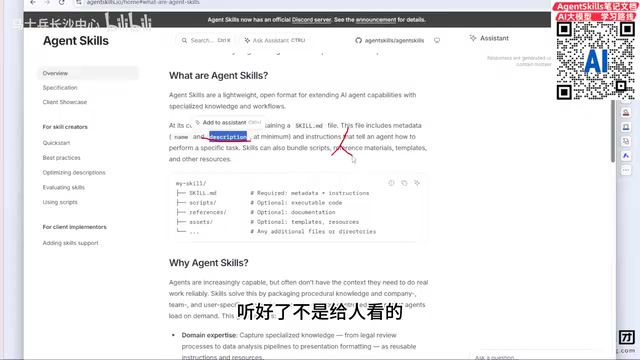
This is exactly why description exists — the model reads the description to determine what a given Skill is capable of. Only by reading those descriptions can the model "discover" available Skills and invoke them appropriately when the right scenario arises.
It's worth emphasizing: this logic doesn't apply only to descriptions within Skills. Every place a description appears carries the same importance. Even in the era of Vibe Coding (AI-assisted development), where hand-writing code is less common, these fundamental components are still worth every developer's careful attention.
This mechanism has a specific technical name in the LLM field: Function Calling or Tool Use. The workflow goes like this: when making a request to an LLM, the developer passes in the name, description, and parameter schema for all available tools; the model interprets the user's intent, finds the most appropriate tool through semantic matching, and returns a structured invocation instruction (including the tool name and argument values); the host program then executes the actual function and passes the result back to the model. Throughout this process, the quality of the description directly determines whether the model can correctly "recognize" the right tool — a vague or inaccurate description can cause the model to invoke the wrong Skill, or fail to notice that a Skill even exists. This is precisely why, even in the Vibe Coding era, writing high-quality descriptions by hand remains one of the core responsibilities developers cannot outsource.
The Directory Structure of a Complete Skill
Beyond the required SKILL.md, a fully-featured Skill directory can include the following optional components:
- scripts: External execution scripts, such as Python scripts or batch commands
- references: Additional reference resources, such as data files
- templates / assets: Templates and other assets, such as static pages and stylesheets
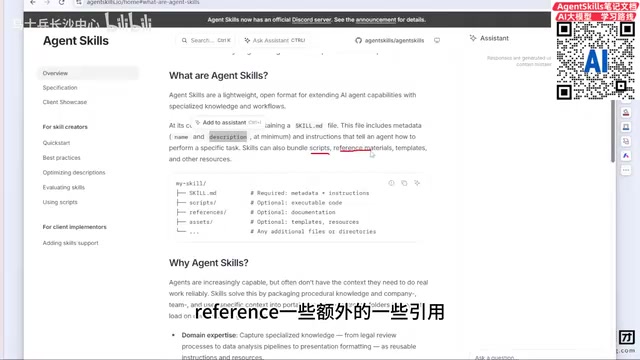
The minimum requirement is just a SKILL.md to get a Skill running — everything else is optional. That said, if you want to get the most out of a Skill, it's worth filling in as many components as the use case demands.
Of course, everything should be driven by actual requirements. If you're building a simple weather query Skill with straightforward logic and a readily available open-source API, there's no need to introduce references, scripts, or other extra structure — keep it lightweight. Whether you need a full directory depends entirely on the complexity of the real-world use case.
Clearing Up Misconceptions: Is a Skill Just an .md File?
A claim circulating online goes something like: "A Skill is basically just an md file." Is that accurate?
The answer is: not quite.
According to the official documentation, a Skill is fundamentally a folder. In addition to SKILL.md, it can contain scripts, references, templates, and other files.
In practice, you'll often encounter Skills that consist of nothing but a single md file — but that's simply the minimal form, and you shouldn't equate the definition of a Skill with "a single file." A more accurate mental model is: a folder containing SKILL.md along with optional extended resources.
Summary
Understanding Agent Skills comes down to three key points: it's an open format for extending Agent capabilities; its core is the name and description fields in SKILL.md, where description serves as the invocation cue read by the model — not by the human; and it is fundamentally a folder, not a single file. Getting these foundational concepts right will help you avoid pitfalls down the road as you work with tool calling, progressive disclosure, and Multi-Agent architecture design.
Related articles

Chain of Thought Isn't Just for AI: How Humans Can Use CoT to Improve Thinking Quality
Chain of Thought isn't just a prompt trick for large models. Starting from a Hacker News discussion, this article analyzes why CoT works for human thinking too, breaks down actionable ways to transfer it, and highlights the key differences between human CoT and machine CoT.
Cloudflare Teams Up with OpenAI: Closi…
Cloudflare Teams Up with OpenAI: Closing the Loop from Vulnerability Discovery to Defense with AI
Cloudflare uses OpenAI Daybreak to investigate security vulnerabilities and generate reviewable remediation plans, while developers use Codex to boost coding efficiency and quality.

Orca Multi-Agent Orchestration in Practice: A Guide to Parallel Collaboration with Claude and Codex
Orca is Stable AI's free open-source agent workbench supporting 34 agents like Claude Code and Codex in parallel. Learn its Git worktree isolation, multi-model orchestration, and mobile management.