Agent Skills from Beginner to Practitioner: Mechanism Breakdown and Engineering Implementation Guide

Agent Skills are essentially folders containing SKILL.md, effective through description matching and progressive disclosure.
The article clarifies a common misconception about Agent Skills: it is not a single Markdown file, but a folder that must contain a fixed-name SKILL.md and can also carry scripts, reference materials, and templates. SKILL.md requires at least name and description metadata, which the model relies on to determine which skills exist and whether to invoke them, so the more detailed and accurate the description, the higher the matching success rate—this is the most common pitfall. Its core mechanism is progressive disclosure: the Agent gradually loads content on demand to control context consumption. Developers should put commonly used guidance up front and explicitly specify the invocation paths and trigger conditions of subsidiary resources in SKILL.md. The article also provides the standard directory structure, writing principles, practical verification ideas, and a learning path, emphasizing that understanding the folder structure, writing a good description, and following progressive disclosure are the keys to improving results.
Agent Skills are becoming a key mechanism for extending AI Agent capabilities, but many developers misunderstand them—equating them simply with a Markdown file. Based on technical tutorial content, this article systematically breaks down the correct usage of Agent Skills, from clarifying concepts and core mechanisms to engineering implementation.
What Are Agent Skills? First, Correct a Common Misconception
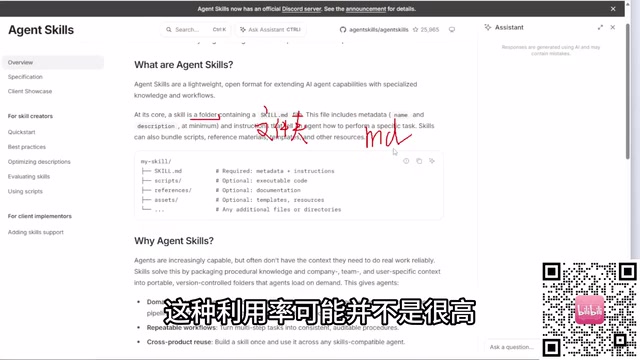
When learning about Agent Skills, many people's first reaction is "isn't it just an MD file?" This understanding is wrong. According to the official documentation, a Skill is essentially a folder, not a single Markdown file. This folder must contain a file named SKILL.md (the filename is fixed and cannot be changed), and can also contain scripts, reference materials, templates, and other resources.
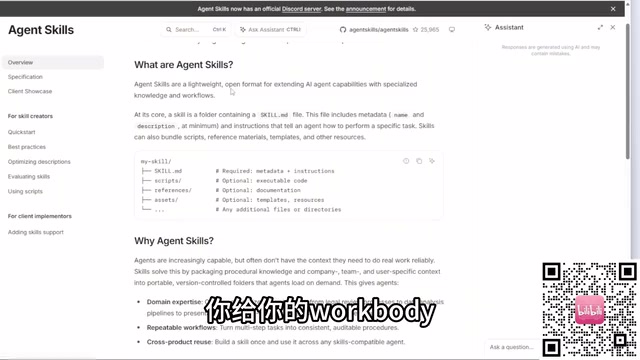
If you only write an MD file, the utilization rate of the Skill will be very limited, and the functionality it can accomplish will be greatly reduced. Correctly understanding its structure is the prerequisite for subsequent engineering implementation.
What Problems Do Agent Skills Solve?
Agent Skills is a lightweight, open format for extending AI agent capabilities with specialized knowledge and workflows. It gives Agents additional "skill packs" in specific task scenarios, enabling them to execute specialized operations more accurately.
SKILL.md must contain at least two types of metadata: name and description. This is the key to how large models identify and invoke Skills—the model itself does not know which Skills exist in the current environment and must rely on the name and description to judge.
Here is a high-frequency pitfall: many developers find that Skills don't match during task execution, and the root cause is often that the description is not detailed enough. The name itself carries limited information, and the model cannot determine the functional boundaries based on the name alone, so the description must clearly state "what problem this Skill can solve." The more accurate the description, the higher the matching success rate.
Core Mechanism: Progressive Disclosure
The core mechanism of Agent Skills is "Progressive Disclosure." Simply put, the Agent does not load all the content of a Skill at once, but gradually reads relevant information as needed by the task. This design both controls context consumption and allows Skills to carry more complex knowledge and workflows.
For developers, this means the organization of a Skill needs to align with this mechanism: put the most commonly used guidance in prominent positions, place detailed resources (scripts, templates, sample data) in subsidiary directories, and explicitly point to them in SKILL.md—telling the Agent which file in which folder should be invoked when handling what task. Without such directional instructions, the Agent cannot determine on its own which resources to use.
Context window and token budget are prerequisites for understanding the value of progressive disclosure. The context window of a large model refers to the total number of tokens that can be accommodated in a single inference, including system prompts, conversation history, tool return results, and loaded Skill content. A token is the smallest unit of text processed by the model, roughly equivalent to a few characters in English or one word in Chinese. Although window capacity has continued to expand in recent years, it is still limited, and cost and latency rise with length. If an Agent mounts dozens of Skills at the same time and stuffs all the scripts and reference materials of each Skill into the context at once, it will quickly squeeze out the space used for actual reasoning, causing key instructions to be diluted or even truncated. Progressive disclosure is designed for this: in the initial stage, only the name and description of each Skill are placed in the context (extremely small in size); when the model determines that a Skill is relevant, it then reads the body of SKILL.md as needed, and further loads specific resource files according to the guidance. This layered loading makes context usage grow in sync with task complexity rather than with the total number of Skills.
How to Customize Skills: Directory Structure and Writing Essentials
A complete Skill folder usually contains the following parts:
- SKILL.md: Required file, containing the name, description, and operational guidance
- scripts: Executable scripts, supporting Batch commands, Python scripts, etc.
- references: Documentation and reference materials
- assets: Templates, resources, data samples, style files, etc.
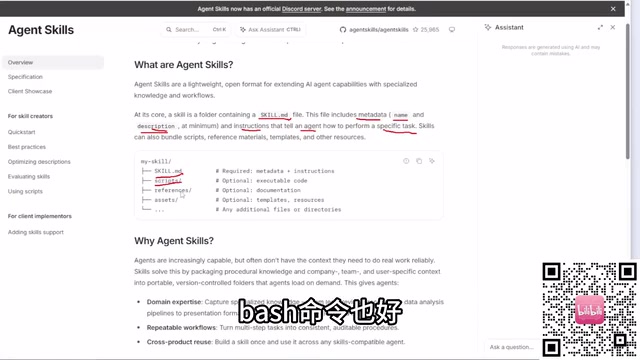
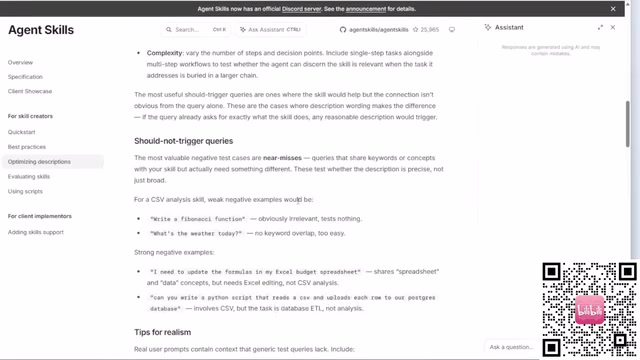
There are two key principles when writing. First, the description should describe as thoroughly as possible what problem the current Skill can solve—this is the lifeblood of successful matching. Second, if other folders or files are referenced, the invocation path and trigger conditions must be explicitly specified in SKILL.md. The "Best Practice" section of the official documentation specifically lists these usage specifications and the principles for optimizing descriptions, and is worth reading carefully before starting.
The metadata of SKILL.md is usually written at the beginning of the file in the form of YAML front matter, that is, a key-value block wrapped by two --- lines, followed by the Markdown body as operational guidance. This format is widely adopted in static site generators and various AI Agent frameworks; the parser can first read only the name and description in the front matter for retrieval and matching without loading the body. Understanding this is very helpful for troubleshooting: if the front matter format is incorrect (for example, missing separators, incorrect indentation, or no space after a colon), parsing may fail, manifesting as the Skill not being recognized at all, rather than merely inaccurate matching. In addition, the name should remain short, stable, and semantically clear, avoiding vague abbreviations; for the description, it is recommended to use a "verb + object + scenario" sentence pattern, covering the applicable tasks and inapplicable boundaries of the Skill, and listing typical trigger keywords when necessary to improve the model's selection accuracy among candidate lists.
Project Practice and Effect Demonstration
The practical session in the tutorial applies the above principles to a complete project: from creating the Skill folder, writing SKILL.md metadata and guidance, organizing scripts and resource directories, to actually invoking it and observing the Agent's task execution results. The value of the practical part lies in verifying a judgment—whether a Skill can be correctly matched and invoked almost entirely depends on the quality of the description and the clarity of resource pointing.
For learners who want to get started quickly, the recommended learning path is: first browse the official website to understand the definition and structure, then read the best practices chapter to master writing specifications, and finally run through the complete chain of "definition—matching—execution" through a small project. The official website information is the most complete and up-to-date source; with browser translation tools, English documentation will not pose a substantial obstacle.
Final Thoughts
The barrier to Agent Skills is not high, but the cognitive bias of "treating it as an MD file" will make subsequent work twice as hard for half the result. Understand the folder structure, write a good description, and follow the progressive disclosure mechanism—if these three things are done well, the matching rate and execution effect of Skills will improve significantly.
One-line Summary
Agent Skills are essentially folders containing SKILL.md, effective through description matching and progressive disclosure.
Paragraph Summary
The article clarifies a common misconception about Agent Skills: it is not a single Markdown file, but a folder that must contain a fixed-name SKILL.md and can also carry scripts, reference materials, and template resources. SKILL.md requires at least two types of metadata, name and description, which the model relies on to determine which skills exist in the environment and whether to invoke them. Therefore, the more detailed and accurate the description, the higher the matching success rate—this is the most common pitfall. Its core mechanism is progressive disclosure, where the Agent gradually loads content on demand to control context consumption. Developers should put commonly used guidance up front and explicitly specify the invocation paths and trigger conditions of subsidiary resources in SKILL.md. The article also provides the standard directory structure, writing principles, practical verification ideas, and a learning path, emphasizing that understanding the folder structure, writing a good description, and following progressive disclosure are the keys to improving results.
Related articles

Chain of Thought Isn't Just for AI: How Humans Can Use CoT to Improve Thinking Quality
Chain of Thought isn't just a prompt trick for large models. Starting from a Hacker News discussion, this article analyzes why CoT works for human thinking too, breaks down actionable ways to transfer it, and highlights the key differences between human CoT and machine CoT.
Cloudflare Teams Up with OpenAI: Closi…
Cloudflare Teams Up with OpenAI: Closing the Loop from Vulnerability Discovery to Defense with AI
Cloudflare uses OpenAI Daybreak to investigate security vulnerabilities and generate reviewable remediation plans, while developers use Codex to boost coding efficiency and quality.

Orca Multi-Agent Orchestration in Practice: A Guide to Parallel Collaboration with Claude and Codex
Orca is Stable AI's free open-source agent workbench supporting 34 agents like Claude Code and Codex in parallel. Learn its Git worktree isolation, multi-model orchestration, and mobile management.