Agentic AI Tool Design: The More Critical Piece Than Prompts

The root of an Agent's misbehavior often lies in tool design, not the System Prompt.
The article argues that when an AI Agent underperforms, people habitually rewrite the System Prompt, but the real problem often lies in tool design. The model can only see a tool's name, description, and parameter schema, and vague naming makes every call a coin flip. The author offers six engineering recommendations: write tool descriptions as handover docs for a new colleague; design few but refined high-level tools grouped by task while separating read and write operations; keep only the necessary fields in return values to save Tokens; make error messages explain the cause and give alternatives; provide idempotency keys and dry_run for write operations; and enforce step, timeout, and cost limits at the code level rather than the model level. The core conclusion is — to debug an Agent, first read failure logs and start with the tools, rather than repeatedly modifying the Prompt.
When an AI Agent misbehaves, most people's first instinct is to rewrite the System Prompt. But the truth is often buried deeper: the problem lies in the tools — their naming, parameter structure, and the information returned when things go wrong. This observation seems plain, yet it hits the core pain point of current Agent deployment.
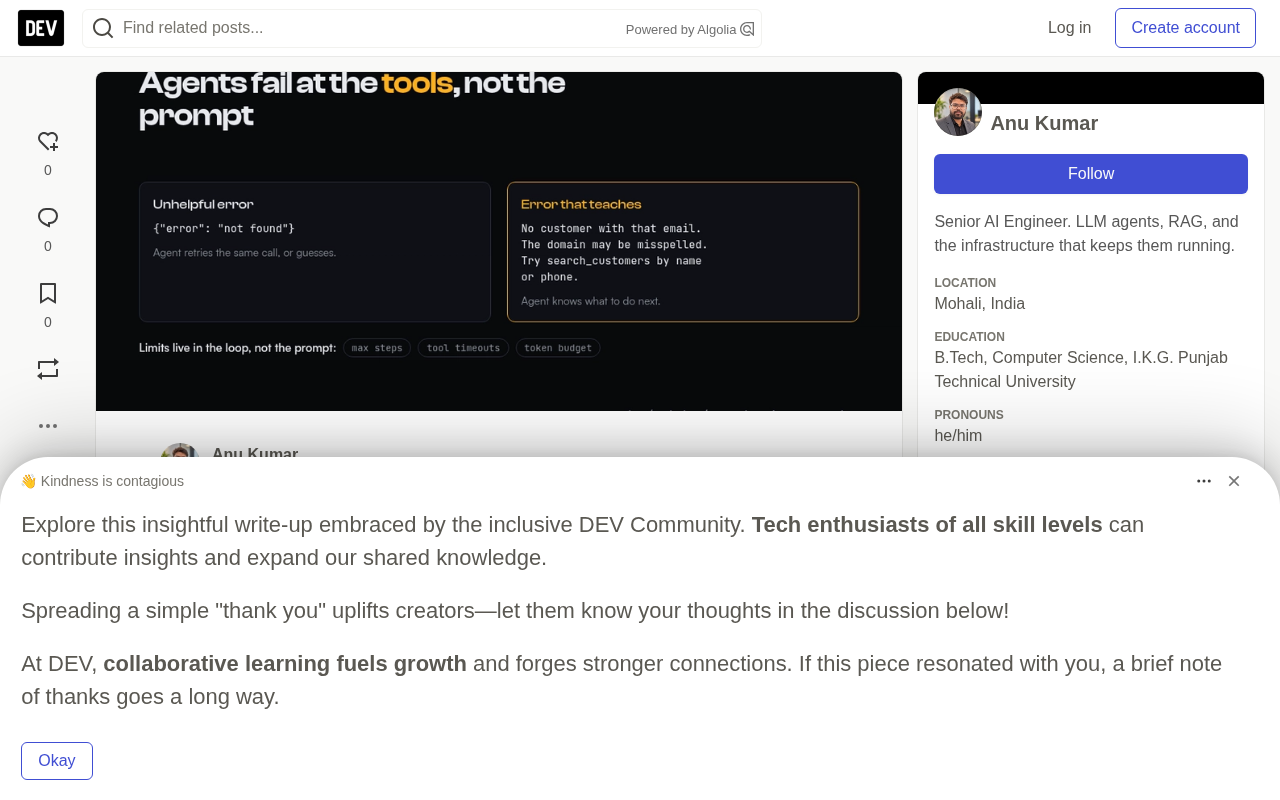
Tools Through the Model's Eyes: Just Names and Descriptions
An Agent chooses tools based on only three things: the name, the description, and the parameter Schema. Beyond that, it cannot see any internal implementation details.
This means if you provide two tools with similar names and descriptions like search_customers and find_customer, every call the model makes is essentially a coin flip. This ambiguity directly leads to unpredictable behavior.
The solution is to write tool descriptions as if they were handover docs for a new colleague: what the tool does, when to use it, when not to, and what counts as a reasonable parameter. "Search customers" is just a label; but "Find customers by name, email, or phone. Use before any operation that requires customer_id. Supports partial name matching." is a real instruction. This distinction directly determines whether the Agent can reliably pick the right tool.
What Is a Parameter Schema
A parameter schema is typically described in the form of a JSON Schema, specifying each parameter's name, type (string, integer, enum, etc.), whether it is required, its value range, and format constraints. The model does not "see" the function's internal implementation; it only knows that "calling get_recent_orders requires passing customer_id (string) and days (integer)." Therefore, the quality of the Schema design directly determines whether the model can correctly construct the call: if days has no stated unit or default value, the model might pass 7 or "last week"; if customer_id has no format annotation, the model cannot tell whether to pass a database primary key or a business identifier. Treating the Schema as an interface contract, giving every field a clear description and examples, is a key part of making tool calls stable.
Few But Refined High-Level Tools
Tool granularity is another common pitfall. Suppose a user asks "What did this customer buy last week?" If the available tools are list_orders, get_order, and list_order_items, the Agent needs to call a long chain in sequence — each call is a round trip, more context Tokens, and one more chance to err.
But a single get_recent_orders(customer_id, days) tool accomplishes it in one step. According to the original author's analysis, this "group by task" design dramatically reduces call chain length and failure surface.
But don't go to the extreme either. A tool that both reads and writes data is hard to describe clearly and hard to control risk around during approval steps. The core principle is to group by task while separating read operations from write operations.
Return Values Should Serve the Model, Not Expose the Raw API
Many developers habitually dump the full response of the underlying API straight to the Agent — this is a hidden cost black hole. A JSON record with forty fields consumes Tokens on every call while burying the three or four fields that actually matter in noise.
The original article offers several practical suggestions: remove fields the Agent will never use; where possible, replace opaque IDs with names, but keep IDs when downstream tools need them; limit the number of items returned in lists and state it explicitly — for example, "Showing 20 of 312 results, please narrow your search or use page=2 to continue."
These details seem trivial, but cumulatively they have an enormous impact on the Agent's decision quality and operating cost.
Error Messages Are Instructions
After reading the error message returned by a tool, the Agent uses it to decide its next action. A bare error (such as {"error": "not found"}) provides no information, and the Agent will either repeat the same call or make up an answer on its own.
A valuable error message should explain what went wrong and what alternative to try. The contrast example given in the original article is very intuitive:
# Unhelpful
{"error": "not found"}

# Helpful
{"error": "There is no customer with the email ravi@exmple.com. The domain may be misspelled. Try looking it up by name or phone via search_customers."}
The latter not only tells the Agent "not found," but also points out the likely cause and the next action. This design approach upgrades error handling from "reporting an error" to "guiding."
Make Write Operations Safely Retryable
Agents will retry. A network timeout can occur after the request has already reached the server. Any tool involving write operations should accept an Idempotency Key to ensure that the same call executed twice produces only one effect.
That said, parameter validation should be done inside the tool rather than trusting the model to pass reasonable values. For high-risk operations, provide a dry_run flag so the Agent can first show "what will happen" without actually executing. Together, these mechanisms form a safety net that keeps the Agent's uncertainty within controllable bounds.
How Idempotency Keys Work
An idempotency key is a unique identifier (usually a UUID) generated by the caller and sent to the server along with the write operation. Before processing the request, the server first checks whether this key has appeared before: if it's the first time, it executes normally and records the result together with the key; if the same key arrives again, indicating a retry, the server directly returns the result of the first execution without reproducing side effects. This way, even if the Agent sends the same "refund" or "create order" operation twice due to a timeout or network blip, the business layer only takes effect once. This is especially important for Agent scenarios because it cannot reliably distinguish between "the request wasn't sent" and "the response wasn't received," and the idempotency key delegates that judgment to the server.
Put Limits Outside the Model
Ask the model to "execute at most ten steps," and sometimes it will execute thirty. This is an inherent limitation of current models. The reliable approach is to enforce it at the code level of the run loop: maximum steps, timeout per tool, Token or cost budget.
When a limit is triggered, stop execution and return the partial results already completed, with a concise explanation. A justified partial answer is far better than an Agent that loops infinitely until it is killed externally.
The Run Loop (Agent Loop) and Budget Control
An Agent's execution is essentially a loop: the model outputs a tool call → the system executes it → the result is fed back to the model → the model decides the next step, until it gives a final answer or triggers a stop condition. Putting the maximum number of steps, timeouts, and cost budgets in the code of this loop means that no matter what the model "intends," the loop will be forcibly interrupted once a threshold is hit. These thresholds should be set according to business scenarios: user-facing real-time Q&A might allow only 5–8 steps and a dozen seconds; background batch tasks can be more relaxed. Returning the partial results already available upon interruption is more valuable than letting the Agent freeze or loop infinitely, because at least the user gets a usable intermediate answer.
Read Failure Logs First, Then Change the Prompt
The original article ends with a practical suggestion: before modifying the Prompt again, read several complete records of Agent failures. You will usually find that it misread a tool, got overwhelmed by a tool's output, or repeatedly retried on an error it couldn't understand. The root of these problems lies in tool design, not the Prompt itself.
The value of this judgment framework is that it pulls Agent debugging off the mysticism of "tweaking the Prompt over and over" and back onto an engineering track. A tool's name, description, parameters, return values, and error messages — every link in the chain is something that can be systematically optimized.
One-line Summary
The root of an Agent's misbehavior often lies in tool design, not the System Prompt.
Paragraph Summary
The article points out that when an AI Agent underperforms, people habitually rewrite the System Prompt, but the real problem often lies in tool design. The model can only see a tool's name, description, and parameter schema, and vague naming makes every call a coin flip. The author gives six engineering recommendations: write tool descriptions as handover docs for a new colleague; design few but refined high-level tools grouped by task while separating read and write operations; keep only the necessary fields in return values to save Tokens; make error messages explain the cause and give alternatives; provide idempotency keys and dry_run for write operations; and enforce step, timeout, and cost limits at the code level rather than the model level. The core conclusion is — to debug an Agent, first read failure logs and start with the tools, rather than repeatedly modifying the Prompt.
Related articles

Chain of Thought Isn't Just for AI: How Humans Can Use CoT to Improve Thinking Quality
Chain of Thought isn't just a prompt trick for large models. Starting from a Hacker News discussion, this article analyzes why CoT works for human thinking too, breaks down actionable ways to transfer it, and highlights the key differences between human CoT and machine CoT.
Cloudflare Teams Up with OpenAI: Closi…
Cloudflare Teams Up with OpenAI: Closing the Loop from Vulnerability Discovery to Defense with AI
Cloudflare uses OpenAI Daybreak to investigate security vulnerabilities and generate reviewable remediation plans, while developers use Codex to boost coding efficiency and quality.

Orca Multi-Agent Orchestration in Practice: A Guide to Parallel Collaboration with Claude and Codex
Orca is Stable AI's free open-source agent workbench supporting 34 agents like Claude Code and Codex in parallel. Learn its Git worktree isolation, multi-model orchestration, and mobile management.