AgentScope 2.0 Step-by-Step Tutorial: Building Enterprise-Grade Multi-Agent Systems from Scratch
AgentScope 2.0 tutorial: build conversational and streaming Agents from scratch with Message at the core.
Based on a Bilibili tutorial, this article walks through AgentScope 2.0, Alibaba Tongyi Lab's open-source multi-agent framework. It covers the production-oriented positioning—observable, intervenable, trustworthy—the architectural mainline where user input is packaged as Message and passed to the Agent, the two-layer Message structure of Blocks and roles, and the three elements: model (OpenAI interface standard), Agent (the shell wrapping the model), and Event (streaming output and behavior control). Two hands-on examples—a basic conversational Agent and a streaming Agent—are analyzed, highlighting the design philosophy of keeping complexity inside the framework while leaving simplicity to developers, and noting that orchestration and deployment remain the real tests for enterprise scenarios.
AgentScope 2.0 Step-by-Step Tutorial: Building Enterprise-Grade Multi-Agent Systems from Scratch
If you're looking for a multi-agent development framework that's quick to deploy and production-ready, AgentScope 2.0, open-sourced by Alibaba's Tongyi Lab, is well worth a serious look. Bilibili creator "Zhibo AI" has released what they call "the most comprehensive and detailed AgentScope 2.0 tutorial on all of Bilibili," covering everything from basic concepts and environment setup to two runnable conversational agent examples—a complete path from zero to one. This article is based on the core content of that tutorial, distilling AgentScope 2.0's key design ideas and practical essentials, with some additional analysis of where the framework fits in.
What Is AgentScope 2.0: A Production-Oriented Multi-Agent Framework
According to the tutorial, AgentScope is a production-oriented multi-agent development framework open-sourced by Alibaba's Tongyi Lab, with version 2.0 released in May 2026. Its core selling point is helping developers quickly build "observable, intervenable, and trustworthy" agent applications.
Let's break down these keywords: observable means the agent's runtime process is transparent—developers can see what it's thinking at each step and what it's calling; intervenable means you can step in and correct the agent's behavior when necessary; and trustworthy points to the stability and security requirements of production environments. This positioning clearly distinguishes it from some research- or demo-oriented agent frameworks, with a stronger emphasis on real-world engineering.
The tutorial summarizes several major advantages: simple and easy to use (build a simple agent in 5 minutes), good ecosystem integration, flexible orchestration support, and full-chain support from deployment to observability.
Installation and Architecture: Message Is the Core That Runs Through Everything
Installation
Installing AgentScope requires a Python environment first. Once configured, you can install directly with pip, or clone the repository from Git and run a local install from the corresponding folder. Both approaches lead to the same goal: getting the framework into your development environment.
Architectural Mainline
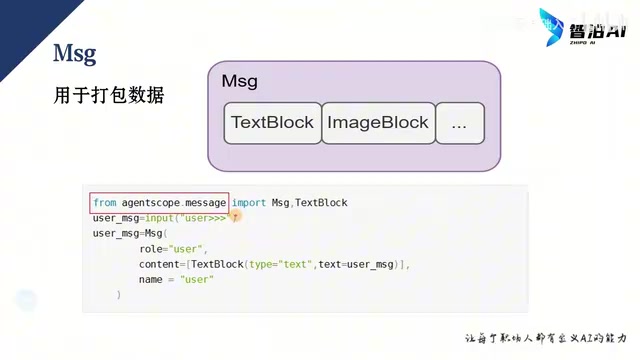
The tutorial explains AgentScope's architecture with a clear data flow: user input is packaged into a Message and passed to the Agent; the Agent parses it and passes it to the large language model; the model likewise returns a Message, which is unpacked and displayed to the user. This pattern isn't just used for user–Agent interaction—Agent-to-Agent interaction and Agent-to-RAG-system interaction all happen through Messages as well.
In other words, Message is the "universal language" of the AgentScope world. Understand Message, and you understand the framework's skeleton.
The Two-Layer Structure of Message
A Message is composed of internal "blocks." Different data types correspond to different blocks: text is wrapped in a Text Block, images in an Image Block, and multiple blocks are passed to the Message as a unified list. At the code level, the flow is: import Message and Text Block from agentscope.message, capture user input, instantiate a Message, and pass in two key parameters—role and the block list. role indicates who sent the message and has three possible values: User, System, and Agent.
Block is the atomic data unit of AgentScope's message system. Each modality corresponds to a Block type: text to TextBlock, images to ImageBlock, and audio, video, and so on each have their own Block implementations. The content field of a Message is essentially a list of Blocks, so a single message can carry mixed content such as text and images (multimodal messages). The advantage of this design is that the framework doesn't need to define separate message types for each modality internally—Agents and models only need to handle each Block type separately, and extending to new modalities requires only adding a Block subclass without changing the message structure.
The three values of role correspond to the role conventions in the OpenAI Chat Completions protocol: user represents human input, system represents system-level instructions (typically used to set an Agent's behavioral boundaries), and assistant (corresponding to Agent in AgentScope) represents replies produced by the model or agent. Once you understand this, the Message structure is essentially an abstract encapsulation of the mainstream LLM conversation protocol.
Breaking Down the Three Elements: Model, Agent, and Event
Model: The OpenAI Standard Is Your Passport
There's an easily misunderstood point about model loading in AgentScope: OpenAIChatModel imported from agentscope.model doesn't specifically mean OpenAI's models—it means calling via the OpenAI interface standard. Since this standard is widely supported, the vast majority of models can be accessed through it.
In practice, you need a "passport" (think of it as Config), passing in the API Key and request endpoint when instantiating. The tutorial example requests an Alibaba Cloud endpoint, calls the Tongyi Qianwen model, passes in a specific model name such as Qwen 3.6 Plus, and sets the stream parameter to True to enable streaming output. This model object is essentially the communication configuration with the cloud model, not the large language model itself.
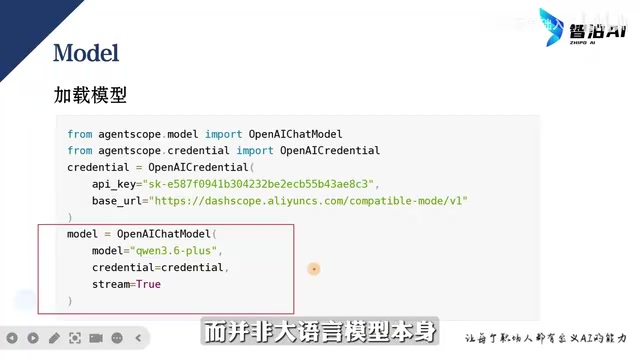
The OpenAI interface standard refers to the Chat Completions API protocol defined by OpenAI: the request body contains fields such as model, messages (an array of messages composed of role/content), and stream, and the response body returns a choices array. Since this protocol has become the de facto standard, Tongyi Qianwen, DeepSeekAd, Moonshot, Zhipu, and a large number of open-source model services (such as vLLM and Ollama's compatible endpoints) all provide OpenAI-compatible interfaces. That's why AgentScope can access the vast majority of models with a single class, OpenAIChatModel—you just need to replace base_url (the request endpoint) and api_key, and specify the specific model_name.
Streaming output (stream=True) is implemented based on Server-Sent Events (SSE): the server pushes a data: event immediately after generating each token, and the client parses and concatenates them one by one. This is also why in streaming mode you don't get a complete string but a series of incremental fragments—AgentScope's Event mechanism is exactly the encapsulation of this process.
Agent: The Shell Wrapped Around the Model
A large language model can only output text; it needs an Agent to handle string parsing and tool calling for it. After importing the Agent class from agentscope.agent, instantiate it by passing in a name, a system prompt (instructions the Agent must remember or follow), and the previously configured model—and an Agent is created. The role of the system prompt shouldn't be underestimated; it effectively defines the Agent's behavioral boundaries.
Event: The Driving Force Behind Streaming Output
Large models predict token by token. If you wait for the complete answer to be generated before returning it, the user is left waiting. Streaming output lets the model return each segment as it's generated, greatly improving the reading experience. More importantly, model behavior can be managed and controlled during streaming—the Event mechanism was created precisely for this: the model packages each segment into an Event Trunk and returns it.
Asynchronous programming (async/await) is a fundamental requirement of the AgentScope runtime. Streaming output is essentially a process of continuously waiting for network data to arrive; if implemented in a synchronous blocking way, the thread can't do anything else while waiting. async/await lets the event loop handle other tasks while waiting for I/O, thereby supporting concurrent multi-Agent collaboration. Both examples in the tutorial use async def to define the conversation method and await when calling the model, and starting them requires an asynchronous entry point like asyncio.run()—you can't call them synchronously directly.
Event Trunk can be understood as the envelope for a single data fragment in a streaming response: it carries a type identifier (such as text increment, tool call, reasoning process, etc.) and the corresponding data payload. Developers iterate over the event stream and check whether it contains a data field to decide which fragments to display and which to intercept or log—this is exactly where AgentScope's claimed "intervenability" lands at the streaming level.
Hands-On with Two Examples: A Regular Conversational Agent and a Streaming Agent
Example 1: Basic Conversational Agent
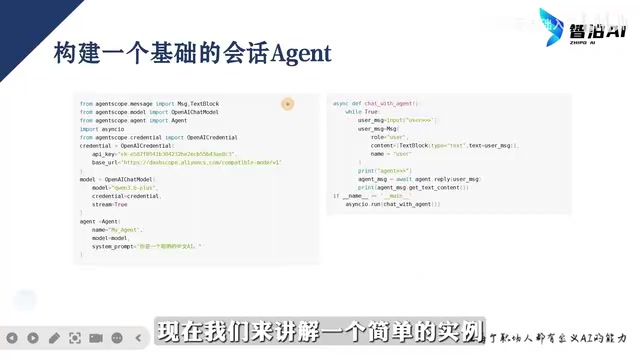
The first example builds a non-streaming chat Agent. You need to import Message, Text Block, OpenAIChatModel, Agent, and an async programming library—because the example has suspending operations, it must run asynchronously. The code structure is fully consistent with the explanation above: instantiate the passport, the model, and the Agent, then define a conversation method. Inside the method is a loop that supports continuous conversation; user input is captured and packaged into a Message, and await waits for the model's return and prints the content. Since it's an async method, you must use an async startup method at runtime rather than calling it directly.
In the tutorial demo, entering "Hello" results in a relatively slow model response—precisely because streaming output isn't enabled.
Example 2: Streaming Output Agent
The second example enables streaming on top of the first. Library imports and the construction of the passport, model, and Agent are completely identical; the only difference is setting stream to True when passing in the model, and using Event to capture event blocks after getting the model's return: check whether the event block contains a data element, and if so, it's non-empty—print its internal content.
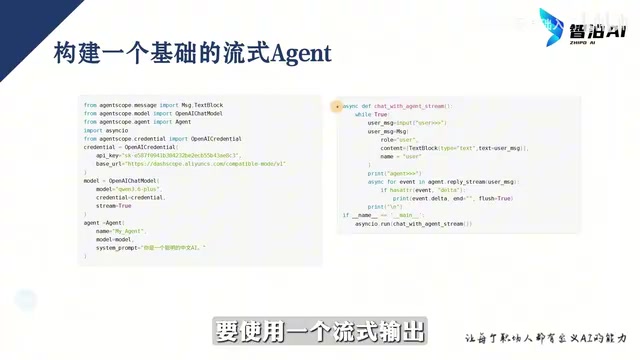
In the demo you can see the model popping out content piece by piece—the English part at the front is the model's thinking and planning process, and the main answer comes after. The tutorial suggests using a longer question to observe the streaming process, as the effect is more obvious.
Insights from the Framework's Design
From these two examples, one design orientation of AgentScope 2.0 stands out: keep complexity inside the framework and leave simplicity to developers. Message unifies all interaction formats, the model layer uses the OpenAI standard to smooth over differences between vendors, the Agent layer encapsulates parsing and tool calling, and the Event layer simultaneously solves streaming output and behavior control. For enterprise teams looking to quickly validate multi-agent solutions, this set of abstractions lowers the barrier to entry.
Of course, the two basic conversational examples are just the beginning. The "agent orchestration" and "cloud deployment" mentioned in the tutorial title are the real tests in enterprise scenarios—especially in orchestration logic and observability for multi-Agent collaboration. Whether AgentScope can deliver on its "production environment" promise still needs to be verified in more complex business pipelines. For developers, laying a solid foundation in these four areas—Message, model configuration, Agent, and Event—before tackling orchestration and deployment is a reliable path.
One-line Summary
AgentScope 2.0 tutorial: with Message as the core, build conversational and streaming Agents from scratch.
Paragraph Summary
This article, based on a Bilibili tutorial, walks through AgentScope 2.0, the multi-agent framework open-sourced by Alibaba's Tongyi Lab. It first introduces its production-oriented positioning—observable, intervenable, trustworthy—then breaks down the framework's architectural mainline: user input is packaged into a Message and passed to the Agent, which then interacts with the model; a Message consists of Blocks such as Text/Image, and role has three values: User, System, and Agent. It then explains the three elements: the model layer accesses various models via the OpenAI interface standard and configures keys and endpoints through a passport; the Agent is the shell wrapping the model, responsible for parsing and tool calling; and the Event mechanism supports streaming output and behavior control. Finally, it presents two hands-on examples—a basic conversational Agent and a streaming Agent with stream enabled—and notes the design orientation of keeping complexity inside the framework and simplicity for developers, while reminding readers that orchestration and deployment are the real tests in enterprise scenarios.
Related articles
ICLR 2027 Is Still Sending Rejection Letters: Academia's Long Struggle with AI-Generated Slop
ICLR 2027 continues to issue desk rejects for low-quality submissions, with Reddit voicing support. This article analyzes the initial screening pressure on academic conferences amid the flood of AI-generated papers, the incentive distortions in evaluation systems, and how researchers should respond.
Anthropic India Predates Claude? A Curious Case Sparked by a Name
Reddit users discovered an Indian company named Anthropic that predates the AI company Anthropic, sparking discussions on brand naming and trademark protection. This article explores the story and its implications.
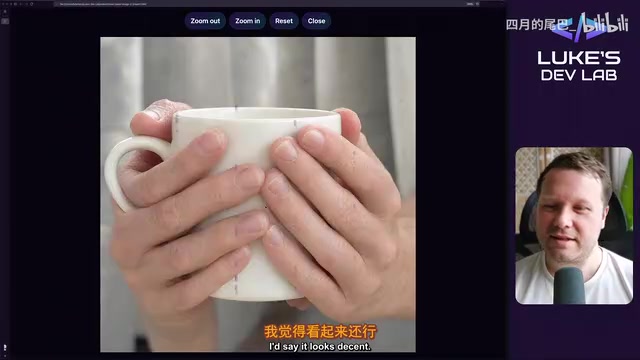
Qwen Image 2.1 Local 32-Test Review: Counting Fails, Anime Style Surprisingly Strong
Bilibili UP host Luke's DevLab ran 32 local tests of Qwen Image 2.1 on an RTX 5090: spelling and spatial layout are reliable, apple counting fails, anime style beats realistic human anatomy, and geometry like bicycle wheel spokes is a clear weak spot. A purple mark suspected to be training data residue appears repeatedly in generated images.