AI Agent Auto-Fills Timesheets: Webhook + MCP Power Law Firm Billing Drafts

Law firms and consultancies can use a Webhook-triggered, MCP-connected AI Agent to auto-draft billable timesheets, reviewed by humans the next day.
The AI-MCP Agent Use Case Library showcases a no-code canvas Agent that auto-drafts billable time entries. An enterprise's end-of-day system triggers the Agent via Webhook, which connects through MCP to two tool servers — a productivity suite for reading calendars, messages, and meetings, and an accounting system for writing entries. The Agent infers billable matters from real activity and generates drafts for human review, with no chat interface and full run-traceable logging and cost annotations.
AI Agent Auto-Fills Timesheets: Webhook + MCP Power Law Firm Billing Drafts
One of the biggest headaches for consultants each week isn't meeting clients — it's staring at a blank timesheet on the weekend trying to remember "what exactly was I doing at 3 PM on Wednesday?" The latest installment of the AI-MCP Agent Use Case Library shows how an Agent built on a no-code canvas can fully automate this: drafting billable time entries at the end of each workday, leaving only a human review before submission the next morning.
According to platform developer George Snyder in the video, this Agent's positioning is clear: "The most valuable Agents are often the ones quietly handling the grunt work nobody wants to do." It has no chat interface, no manual user trigger — it's launched entirely by the enterprise's own systems at the end of each day.
Trigger Design: Not a Chat Box, but a Webhook
The most distinctive aspect of this workflow is its entry point. Traditional Agents usually start with a dialog box, but this Agent's entry point is a Webhook trigger — the enterprise's internal end-of-day system automatically sends a consultant's name to the Agent, and the Agent immediately gets to work.
Snyder describes the Webhook as "a private, secure door only the enterprise's own systems can use": external systems can't summon this Agent at will — only internal systems holding the key can. The trigger configuration also needs to define two things: how to parse the incoming consultant name, and whether the Agent replies immediately or runs silently in the background.
The significance of this design: the timing of timesheet filing isn't decided by humans but by business rhythm. Consultants don't need to remember "to click a button before leaving work" — the system pushes the task on schedule, and the Agent takes over automatically.
A Webhook is an HTTP callback-based event notification mechanism: when a specified event occurs in a system, it proactively sends an HTTP request (typically carrying a JSON payload) to a pre-configured URL, thereby invoking the recipient's processing logic. Compared to polling, Webhooks are "push" rather than "pull," resulting in lower latency and less resource overhead. In this case, the payload carries the consultant's name. Since requests can only be initiated by systems holding a key or passing whitelist validation, the Webhook naturally forms an access boundary — exactly what Snyder calls a "private, secure door." In enterprise integration practice, Webhooks are often used as the glue connecting HR systems, finance systems, ticketing systems, and automation platforms.
Dual Tool Servers: Letting the Agent "See" a Real Day
To draft accurate time entries, the Agent must know what the consultant actually did that day. As demonstrated in the video, the Agent connects to two tool servers via MCP (Model Context Protocol):
- Productivity suite: Provides tools for reading calendars, messages, and meeting notes, giving the Agent visibility into the consultant's full-day activity;
- Accounting system: Provides a time-entry tool — the Agent writes drafted entries directly into the accounting system, pending human review.
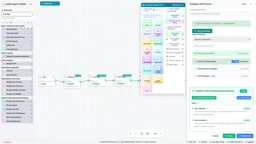
The key here is that the Agent doesn't "guess" or fabricate time entries — it infers the billable project and matter number for each time block based on calendar events, actual message exchanges, and meeting records. Every entry is tied to a specific matter, with humans making the final call.
MCP plays the role of connection layer as an open standard — it lets the Agent invoke real system capabilities in a standardized way, rather than relying on fragile custom integrations.
MCP (Model Context Protocol) is an open standard proposed and open-sourced by Anthropic in late 2024, designed to establish a unified interface between LLM applications and external data sources and tools. It uses a client-server architecture: the Agent acts as a client communicating with one or more MCP servers via standardized JSON-RPC messages, with each server responsible for exposing specific "tools," "resources," and "prompts." Compared to the previous approach of hand-writing adapter code for each third-party system, MCP makes tool integration plug-and-play and reusable across vendors. The "productivity suite server" and "accounting system server" mentioned above are two independent MCP servers that the Agent invokes on demand during reasoning.
Live Run: From Auto-Trigger to Reviewable Draft
The video demonstrates a complete run: the end-of-day system automatically sends consultant Dana Lee's name — no forms, no one at a keyboard.
The run record appears in the Agent Sessions panel, and opening it reveals the Agent's actual work process — it reviewed Dana's calendar and messages, then entered billable time entries, each linked to a corresponding matter, awaiting Dana's review the next day.
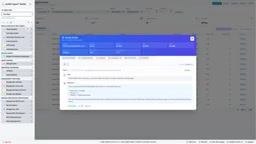
Every run is logged, with an extremely low cost annotation attached. This means enterprises can trace the input, output, and cost of each Agent session — an auditability that is indispensable for professional service industries with high compliance requirements.
Why This Case Matters
The value of this case isn't in its technical complexity but in the deployment paradigm it demonstrates: no chat interface, auto-triggered between systems, drafts only — no final approval.
For professional service firms that bill by the hour — consultancies, law firms, accounting firms — under-reporting time is direct revenue loss. This Agent's positioning sits precisely between "automation" and "human review" — it takes on the most tedious recall and data-entry work, but the final decision remains in human hands.
At the end of the video, Snyder emphasizes that the entire process was "completed on a single canvas, without writing a line of code." This hints at a current trend in Agent-building tools: integrating Webhook triggers, MCP tool connections, LLM reasoning, and output writing into visual orchestration interfaces, lowering the barrier to enterprise adoption.
When an Agent can be automatically invoked by a company's existing systems and works on real data sources, only then does it truly transform from a "demo" into "infrastructure." Timesheet drafting is just one entry point — the same pattern can be applied to expense reports, customer follow-up notes, project status updates, and any administrative chore that "everyone hates doing but has to do."
"No-code canvas" refers to a tool form for building automated workflows through visual node connections, with typical examples including n8n, Zapier, Make, and various Agent orchestration platforms. Its core value lies in abstracting trigger conditions, data transformations, model calls, and external API writes into draggable nodes, allowing business users to chain complete workflows without writing code. This model lowers the barrier for enterprises to validate AI scenarios but also brings governance challenges in version management, access control, and observability — making node-level logging, run-cost annotation, and audit trails decisive factors in whether such platforms can enter production environments.
Background
In the professional services industry, "billable hours" is the basic unit of revenue accounting: consultants, lawyers, and accountants bill for time spent on client matters, typically measured in 6-minute increments (0.1 hours) and tied to a specific matter number. Under-reported, late-reported, or misclassified time directly causes revenue loss and client billing disputes. This is precisely why this scenario has special requirements for automation — it needs to be accurate enough to be trusted, yet must retain a human review step to meet billing and compliance responsibilities. Understanding this business context is essential to seeing why the Agent in this article is deliberately designed to "draft only, not finalize": it replaces low-value labor like memory and data entry, not professional judgment itself.
One-line Summary
Law firms and consultancies can use a Webhook-triggered, MCP-connected AI Agent to auto-draft billable time entries, with human review the next day.
Paragraph Summary
The AI-MCP Agent Use Case Library demonstrates a timesheet-filing Agent built on a no-code canvas: an enterprise's end-of-day system triggers a run by automatically sending a consultant's name via Webhook, and the Agent connects to two tool servers through MCP — a productivity suite for reading calendars, messages, and meeting notes, and an accounting system for writing time entries. The Agent infers billable items based on the consultant's actual activities that day and binds them to corresponding matters, generating drafts for review rather than submitting directly. The entire process has no chat interface, requires no user action, and every run has a traceable session log and cost annotation — meeting the auditability requirements of professional service firms. The author argues that the value of this model lies in demonstrating a deployment paradigm of "auto-triggering between systems, drafting only, no final approval," which can be reused for administrative tasks such as expense reports, customer records, and project updates.
Related articles

A Single Prompt Triggers a Global PHP Security Storm: Is AI a Savior or a Hidden Risk?
A single AI prompt triggered a global PHP security crisis affecting Wikipedia and the Internet Archive. This article reviews the incident, analyzes the OpenAI-Amazon controversy, and explores the security paradox of lowered vulnerability discovery barriers in the AI era and developer response strategies.

When AI Is Taken Away: How Reliance on Shortcuts Undermines Your Problem-Solving Resilience
A study of 1,222 people found that after using AI to answer questions, once AI was removed, people gave up on more problems than a control group that never used AI. The article analyzes the impact of AI reliance on learning resilience and metacognition, and explores design implications for AI learning tools.

Carta and NewView Partner to Let Startup Employees Cash Out Equity Early
Carta and NewView Capital partner to simplify startup tender offers, helping employees sell equity early. Analysis of the mechanism, liquidity pain points, and impact.