AI Agent Automatically Reviews Microsoft 365 Sign-in and MFA Logs: A Real-World Test

AI Agent autonomously audits Microsoft 365 MFA logs and delivers actionable security recommendations, lowering the ops barrier without replacing engineers.
A security engineer demonstrated handing Microsoft 365 MFA and sign-in log reviews entirely to an AI Agent. The Agent interpreted conversational instructions, executed a full "gather evidence → cross-reference official docs → output recommendations" workflow, and proactively distinguished between "no errors" and "MFA never enforced" — avoiding a classic configuration blind spot. Its final output included an actionable checklist flagging a Graph account with no authenticator registered, interruption errors, and "Keep me signed in" items requiring review. The engineer concluded that AI lowers the operational barrier rather than replacing security judgment, shifting the engineer's role from manual log review to auditing the Agent's work.
When an AI Agent Takes Over Tenant Security Auditing
Among the day-to-day tasks of managing a Microsoft 365 tenant, troubleshooting user sign-in anomalies and multi-factor authentication (MFA) issues tends to be time-consuming and tedious. A security engineer recently demonstrated a fresh approach in a hands-on test: handing these tasks directly to an AI Agent.
The instructions he gave were conversational — asking the Agent to check whether any users had recently experienced MFA or sign-in issues, identify who needed closer attention, and cross-reference its findings against official Microsoft documentation. In other words, instead of manually combing through logs line by line, the engineer let the Agent first understand the intent, then autonomously conduct the investigation.

This demo is the second installment in an "Agent in the Tenant" series, with a straightforward premise: can AI genuinely take on the repetitive review work that defines security operations?
How the Agent Actually Works
Upon receiving the instruction, the Agent didn't jump straight to a conclusion. Instead, it demonstrated a clear, step-by-step reasoning process. It explained upfront that it would "first check local reports and logs, then compare suspicious patterns against Microsoft's recommendations." This "gather evidence → cross-reference → output recommendations" chain mirrors exactly how a human analyst would approach the same problem.

Throughout execution, the Agent continuously pulled data while providing a running commentary on what it was doing. It retrieved roughly 11 days' worth of log records and made a preliminary assessment that activity during that period was not particularly frequent. More noteworthy was one specific judgment call: the Agent proactively verified whether MFA was actually being enforced — because "no errors reported" and "MFA was never enforced to begin with" represent two completely different security states.

This distinction is critical. Many security blind spots arise precisely from the illusion that "everything looks fine." The fact that the Agent could proactively identify this kind of logical trap suggests it isn't merely performing keyword searches — it's operating with a degree of security semantic understanding.
MFA is one of the core lines of defense in the Microsoft 365 security framework. It requires users to verify their identity through a second method after entering their password — typically an Authenticator App push notification, SMS code, or hardware token. Microsoft 365 administrators can enforce MFA for all or specific users via Conditional Access Policies, but misconfigurations can result in MFA being merely "recommended" rather than truly enforced. The Agent's proactive distinction between "no MFA errors" and "MFA was never enforced" directly targets this common configuration blind spot: the former means MFA is functioning correctly, while the latter means the entire verification layer is effectively non-existent — an attacker only needs to steal a password to bypass it entirely.
The Output: Not Just Finding Problems, But Telling You What to Do Next
The Agent ultimately produced an actionable checklist. The top issue it flagged was: a Graph-related account had no authenticator registered, along with several interruption-related errors and some "Keep me signed in" items requiring follow-up review.
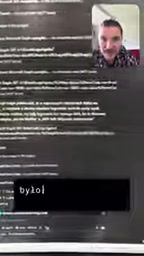
In other words, the Agent didn't just identify "where the problems are" — it told the administrator directly "what to check next." This closed loop from discovery to recommendation is precisely the critical step that transforms raw log data into operational action.
The Graph API (Microsoft Graph) is the unified interface through which the Microsoft 365 platform exposes its data and operational capabilities, covering user accounts, email, calendars, Teams messages, and security logs. Security reviews of Graph-related accounts are especially important: service accounts or app registrations with Graph API access that lack a registered authenticator or MFA protection become a serious liability if credentials are compromised. An attacker could programmatically read or modify tenant data at scale, with a blast radius far exceeding that of a typical user account. The Agent's decision to flag "Graph-related account with no authenticator registered" as the top issue reflects a deliberate, targeted security prioritization — not a generic compliance checkbox.
Will Security Engineers Be Replaced?
The most interesting moment in the demo was the question the author posed himself: "Does this mean I'm no longer needed as a security engineer?"
His answer was clear-eyed: of course people are still needed. But the real value lies in this — he doesn't need to have expert-level knowledge of every technical detail to use the Agent to configure and manage his own tenant. What AI lowers is the barrier to entry, not the need for human judgment.
This reflects a pragmatic view of AI: the tool's value isn't to make you omniscient or to automate everything with a single click. It's to let you move work forward even when you're not a complete expert in the domain — and to learn along the way. For small teams or administrators wearing multiple hats, the model of "having a knowledgeable assistant at your side" is far more realistic than chasing full automation.
What This Kind of Practice Signals
A few trends emerge from this real-world test. In enterprise security operations, AI Agents have become capable of completing the full chain: "interpret a vague instruction → conduct autonomous investigation → cross-reference official standards → output actionable recommendations." They're not handling isolated commands but investigation tasks that carry contextual awareness and security domain knowledge.
Of course, the demo was limited in scope — the log volume and complexity were modest, and the author himself noted that his own login habits are "consistently secure," so there wasn't much for the Agent to uncover. The real test will come in larger, more complex tenant environments, where the question is whether the Agent can maintain judgment accuracy and whether its recommendations hold up under compliance scrutiny.
But the direction is clear: AI is no longer just a chatbot that answers questions. It is becoming an operational partner that can take hands-on action with professional perspective. The security engineer's role will gradually shift from "personally digging through logs" to "reviewing and deciding on the Agent's work output."
Related articles

Felix Rieseberg Personal Homepage
Felix Rieseberg's personal homepage sparks attention on Hacker News. This article covers the Slack engineer's technical background, the rise and fall of nativefier, and the value of a developer homepage as a tech calling card.

@ai-sdk/vue 3.0.306 Patch Release Syncs with [email protected] Update
@ai-sdk/vue 3.0.306 released, synced with [email protected]. A routine patch release for the Vercel AI SDK ecosystem with no public API changes; the Vue adapter layer stays version-aligned with the core package.

Gemini 4 Argon API Launches: The Era of Million-Token Output Begins
Google launches Gemini 4 Argon with sparse MoE architecture, up to 1M output tokens, and a 68.90% Vals Index score, available across API, AI Studio, and the Gemini app.