AI Agent Calls Real SolidWorks: An Open-Source Modeling Assistant for STEM Students
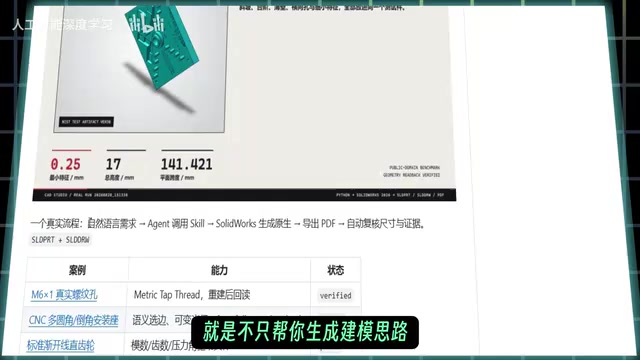
Open-source project lets an AI Agent call real SolidWorks to model and self-check results.
This article introduces an open-source GitHub project with 1.3k stars whose core is letting an AI Agent directly invoke real SolidWorks software to perform mechanical modeling tasks rather than just suggesting approaches. It supports the full workflow from natural-language requirements to 3D model creation, assembly, drawing generation, and file export. To address the common "looks done but unusable" problem, the project includes result verification that checks model dimensions, rebuild status, and export validity, forming an execution-and-check loop. It suits mechanical engineering students and frequent SolidWorks users as an auxiliary tool, though complex assemblies and non-standard designs still need human review. Overall, it represents a vertical exploration of deep AI–CAD integration.
In an era where AI coding assistants are everywhere, an open-source project shared on Bilibili is setting its sights on a more niche field: mechanical modeling. This project, which has already gathered 1.3k stars on GitHub, stands out for letting the AI Agent do more than just "talk through" modeling ideas—it directly calls the real SolidWorks software to perform modeling tasks. For mechanical engineering students and engineers who use SolidWorks regularly, this could mean a change in how coursework and everyday modeling get done.
From "teaching you how" to "doing it for you": a substantive leap for the Agent
Traditional AI-assisted modeling tools mostly stop at offering step suggestions or generating operation guides. What this project demonstrates is the ability to take a user's description of a part's shape and dimensions, plan the modeling steps, create the 3D model, and then go on to handle assembly, drawing generation, and file export.
The key to this shift is "execution." The AI is no longer a knowledge base but an operator capable of driving professional software. The project interacts with SolidWorks through an Agent mechanism, translating natural-language requirements into actual file outputs, which to some extent lowers the barrier to getting started with modeling.
AI Agent refers to a system architecture that can perceive its environment, plan autonomously, and call tools to execute multi-step tasks in pursuit of a goal. Unlike single-turn Q&A chatbots, an Agent typically includes modules for task planning, tool invocation, memory, and reflection, allowing it to carry out operations continuously in a real software environment and adjust its strategy based on feedback. In this project, the Agent's job is to "break down natural-language requirements into an executable sequence of SolidWorks operations," and its reliability depends on the stability of the tool interface, the correctness of step planning, and the ability to catch abnormal states. This also explains why such projects generally need an extra verification step—the more autonomous the Agent, the greater the chance it drifts off target when something goes wrong.
Not just "done," but "done right": a result verification mechanism
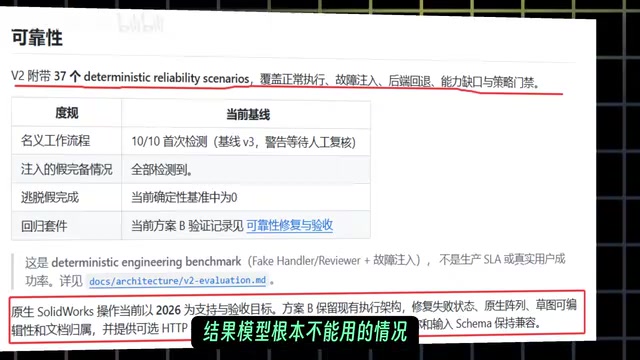
A common pitfall when AI executes tasks is that something "looks finished but is actually unusable." This project addresses that pain point with a verification stage: the Agent checks whether the tool ran successfully, and further validates model dimensions, rebuild status, and the validity of exported files.
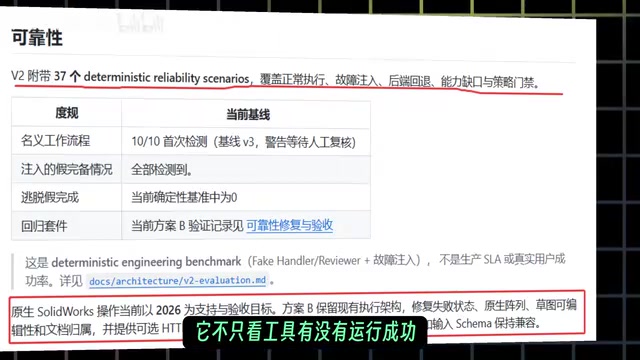
This design approach deserves credit. In mechanical modeling, dimensional deviations or rebuild failures can throw off everything downstream in assemblies and drawings. The project tries to give the AI a "self-check" capability to avoid, as much as possible, situations where "the AI says it's done, but the model is completely unusable." This kind of closed-loop verification is an important step in moving AI Agents from demos to practical use.
Rebuild Status is the most direct signal in SolidWorks for judging whether a model is healthy. When a user changes dimensions, features, or reference relationships, the software recalculates the feature tree; if a feature fails due to geometric conflicts, lost references, or over-defined constraints, the model shows a rebuild error or warning, and what looks like a complete model is in fact unusable. So when the Agent checks rebuild status, it is effectively confirming that the entire feature chain can still be solved correctly after parameter changes. Together with dimension validation (comparing key geometric quantities against requirements) and export file validity checks (confirming that outputs such as STEP and drawings can be opened normally), these three form the minimum viable quality loop in mechanical modeling scenarios.
Who should pay attention to this project?
According to the original post, the project is especially suited to mechanical engineering students and users who frequently use SolidWorks for coursework and mechanical modeling. For scenarios that require quickly validating design ideas or generating batches of simple part models, having an AI Agent step in can save time on repetitive operations.
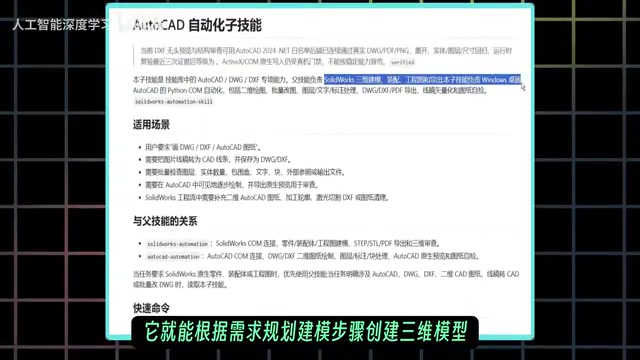
That said, it should be viewed with a healthy dose of realism: current AI still has clear limits in understanding complex assemblies and non-standard design intent. The project is better suited as an auxiliary tool than a full replacement for manual modeling. Users still need some modeling fundamentals so they can review what the AI produces.
A vertical exploration within the open-source ecosystem
Reaching 1.3k stars on GitHub shows that this direction hits a real need for many developers and engineers. Compared with general-purpose AI coding assistants, vertical-domain Agents have to deal with software API calls, geometric data parsing, error handling, and other specialized problems. The technical bar is higher, but the practical value is also clearer.
Looking at industry trends, deep integration of AI with professional CAD software is becoming a hot area of exploration. This project offers a reference sample: how to make an Agent reliably execute tasks in a real software environment and guarantee result quality through verification mechanisms. For developers interested in putting AI into practice, its architectural approach also offers some useful lessons.
CAD software API invocation is the technical foundation of this kind of vertical Agent. SolidWorks provides a COM interface and API that allow external programs to create sketches, add features, read mass properties, and export files—covering almost all manual operations. But API invocation comes with obvious barriers: parameter units and coordinate systems must match strictly, the order of feature creation affects success, and errors surface as exceptions or return codes with limited information. For an Agent to work reliably in this environment, it must map natural-language intent onto a legal sequence of API calls and judge the return value of every step. This is precisely the core difference between a vertical Agent and a general-purpose coding assistant—the latter only needs to generate code, while the former must also ensure the code actually runs in real software.
Usage tips and caveats
The original post mentions that the documentation and installation links have been compiled by the sharer. Interested readers can check the comments section of the original video to find them. When trying it out, it's advisable to start with simple parts, observe whether the AI's step planning and verification logic meet expectations, and then gradually move on to more complex tasks. Also pay attention to SolidWorks version compatibility and any permission configuration the Agent may need during operation.
Overall, this project demonstrates a pragmatic path for applying AI Agents in STEM modeling: rather than pursuing a fully automatic "black box," it uses a verifiable execution workflow to make AI an engineering assistant that can actually do hands-on work. For mechanical engineering students and SolidWorks users, it's worth keeping an eye on.
Related articles
Cerebras CS-4 Stuns with Launch: The 4-Trillion-Transistor Wafer Monster That Crushes GPUs in Inference Speed
Cerebras CS-4 wafer-scale engine launched: 4 trillion transistors, 900,000 AI cores, inference an order of magnitude faster than GPUs. Modular power rack plus compute backpack design, 3D vertical stacking, and half-millimeter power delivery—online in minutes.

Apple's M6 Chip Lands in iMac: A Week in Review of Performance Upgrades and AI Controversy
Apple launches new iMac and MacBook Pro with M6 chip, N1 wireless chip brings speed gains; OpenAI claims three major discoveries but faces academic skepticism; data centers become a U.S. midterm election issue; Anduril teams up with Qualcomm for all-American laptops.

AI Cracks the Quasi-Riemann Hypothesis? A Mathematician's Account of a Stunning Moment
Number theorist Alex recounts on Lex Fridman's podcast the shocking experience of AI proving the quasi-Riemann hypothesis, plus Fermat's Last Theorem formalization and Navier-Stokes within a month, explaining the signal-processing intuition behind the Riemann hypothesis and the boundaries of AI breakthroughs in mathematics.