AI Agent Custom Tool Development Guide: Boost Efficiency by One-Click Reuse of Repetitive Tasks

Learn to build custom AI agent tools that turn repetitive tasks from 30-minute waits into 5-second one-click reuse.
This guide explains how to develop Custom Tools for AI agents to encapsulate repetitive workflows. By solidifying validated reasoning into deterministic scripts, you can cut task execution from 30 minutes to seconds. It covers AGENTS.md registration, tool directory setup, AI-assisted tool development, and model selection strategies.
After using AI extensively in daily work, many people run into a common pain point: for those repetitive tasks, you have to copy and paste carefully optimized prompts every single time, and the AI has to reason from scratch and regenerate code each time—wasting both money and time. This article systematically explains how to develop Custom Tools for AI agents to encapsulate repetitive workflows and achieve one-click reuse.
Two Core Pain Points of Repetitive Tasks
Take automated test development as an example. A common requirement is converting Excel-format test cases into Markdown format, with strict formatting requirements for each case after conversion. To ensure the output meets specifications, you usually need to maintain a set of carefully crafted prompts.
But when such tasks need to be performed repeatedly, two obvious problems emerge:
First, the constant copy-pasting is tedious. Every time you have to dig out the corresponding prompt, find that section of rules, then paste and execute it. When you have many such tasks, you might even need a dedicated "prompt notebook" to manage them.
Second, execution is too slow and too expensive. This is the core pain point. When an agent executes a task, it goes through a complete reasoning chain: first analyzing what format the Excel is in and how to read it, then asking the LLM how to proceed and generating a reading script; then performing format analysis to identify the meaning of each column—case category, data environment, numbering, test focus, and so on; finally having the LLM generate and execute the conversion script.
AI Reasoning Chain and Token Consumption Mechanism
When an AI agent executes a task, every interaction with the LLM consumes Tokens—the fundamental unit for LLM billing and performance. A Token is not simply equivalent to a "character count" but rather a basic encoding unit in the model's Vocabulary: in English, one Token roughly equals 0.75 words, while in Chinese, a single character typically corresponds to 1-2 Tokens. Behind a "simple" task often lies multiple rounds of reasoning: the model needs to first understand the context, formulate a plan, generate code, and verify results—each step being a separate API call. Taking GPT-4o or Claude Sonnet as an example, a complex task may trigger dozens of model calls, each with latency (typically 1-10 seconds) and cost. In multi-turn conversations, Token usage also grows linearly with the number of turns because the full historical context must be carried along.
More critically, agents lack cross-session "procedural memory"—they can remember conversation history, but they don't automatically accumulate the reusable code generated last time as a starting point for next time. The mechanism behind this is that LLMs are essentially Stateless—each session starts fresh from a blank context, and intermediate products from historical tasks (such as validated reading scripts) are not persisted as callable assets. This is precisely the value of custom tools: solidifying already-validated reasoning results into deterministic code, bypassing repeated reasoning, and letting "dynamic thinking" happen only once.
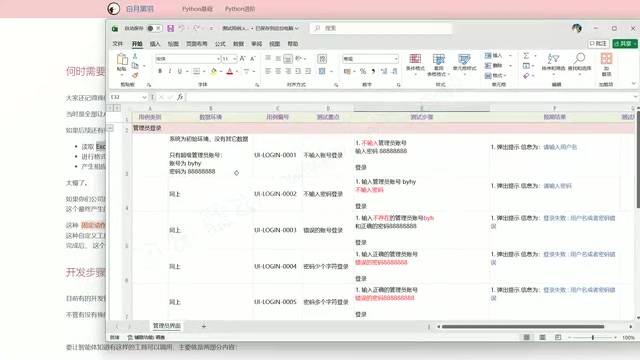
The key issue is that these three steps involve multiple interactions with the LLM, and each interaction is time-consuming. Moreover, the agent doesn't "remember" the work it did last time—even if it already wrote the reading script and conversion script last time, it starts all over again this time. In an actual demonstration, even with sped-up playback, such a simple task still took about 30 minutes to complete.
Solution: Encapsulate Fixed Actions with Custom Tools
If your company's or project's Excel test case format is fixed (which is indeed the case most of the time), there's absolutely no need to make the AI rethink everything each time. We can preserve the conversion script and let the AI call it repeatedly—this qualifies as a kind of "fixed action."
Core idea: Encapsulate the three actions—reading Excel, format analysis, and generating the conversion script—into a single script, so the agent knows "when encountering this type of task, just call this tool directly." Once encapsulated, a single-sentence prompt lets the agent call the tool and complete the conversion within four or five seconds, with no long wait and more stable results.
The Relationship Between Custom Tools and the MCP Protocol
It's worth noting that the "custom tool" introduced in this article is a lightweight local script encapsulation approach, which is a different level of concept from Anthropic's MCP (Model Context Protocol). MCP is a standardized protocol that allows AI models to connect to external data sources and tool services through a unified interface, suitable for complex scenarios requiring cross-system integration (such as connecting to databases or calling enterprise APIs). Its core design philosophy is "tools as services"—each tool runs as an independent server, communicating with the AI client via the JSON-RPC protocol, with standardized input/output format declarations (Schema), so the AI can automatically discover and understand the capability boundaries of the tools. Similar to it is OpenAI's Function Calling mechanism; both aim to standardize and make composable the interaction between models and external systems, but MCP places greater emphasis on cross-vendor, cross-platform universality.
The approach in this article is more lightweight: place a Python script in a fixed directory and tell the agent how to call it through a context document—no server infrastructure to deploy. For individual developers or small teams, this "Convention over Configuration" approach is often a more practical starting point—first use scripts to encapsulate and get the business logic running, then upgrade to formal tool-calling frameworks like MCP or Function Calling when there's a need for scaling. The two approaches are not mutually exclusive and can migrate smoothly as business complexity grows.
Support Across Mainstream Agents
Regarding support for custom tools across various agents, we need to distinguish two situations:
- Built-in support: Such as OpenCode, whose official documentation specifically provides a development mode for Custom Tools—just register in the fixed format.
- No built-in support: Such as Codex (now merged into ChatGPT), which currently has no built-in custom tool support.
But the good news is that almost all mainstream agents support project context documents (such as AGENTS.md, CLAUDE.md, etc.). Even without a built-in custom tool feature, you can achieve the same effect by clearly writing out the tool's existence and calling method in the context rules document.
Three Practical Steps: Building a Custom Tool System from Scratch
The entire development workflow can be summarized in three steps, and the barrier to entry is not high.
Step 1: Register the Tool Directory in the Context Rules Document
In the agent's context rules document (such as AGENTS.md), add a declaration telling the agent: "I provide a set of tools, each group placed in a subdirectory. Please call different tools as needed to complete tasks based on user requirements."
The Technical Principles of Context Rules Documents
Context rules documents like AGENTS.md, CLAUDE.md, and GEMINI.md are essentially a "system prompt persistence" mechanism. Mainstream agents (such as Claude Code, Cursor, OpenCode) automatically inject these files from the project root directory into the System Prompt when starting a session, making them prior knowledge for the model's reasoning. Different tools vary slightly in the scope of document reading: some only read files in the project root directory, while others recursively scan for files with the same name in subdirectories, creating a "hierarchical rule override" effect—rules in subdirectories can override or supplement the global rules in the root directory, suitable for scenarios in large Monorepos where different submodules have differentiated conventions.
The System Prompt is a special input layer distinct from user conversation. It is fed to the model at the very beginning of each session with higher priority than ordinary conversation content, akin to giving the model a "work manual." This means the tool descriptions, calling conventions, and project constraints you write in the document are "read in" by the model before each conversation begins, without users needing to repeat them. This mechanism stems from the standardized "Agentic Workflow" practices promoted by companies like Anthropic and OpenAI, aiming to keep AI behavior consistent in long-term projects. Once you understand this principle, you'll find that the clearer the document and the more specific the trigger keywords, the more predictable the agent's behavior—essentially, you're writing the agent's "operating system configuration" in natural language.
Here you need to specify a tool directory, such as tools (the name can be customized, like mytools or ai_tools, as long as it's consistent with the document), then list the currently provided tools one by one with descriptions.
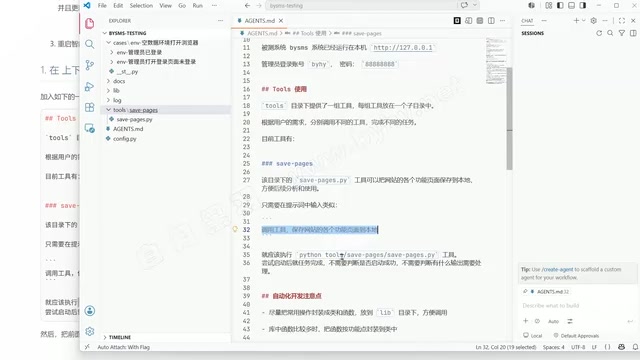
Taking the existing save_pages tool in a web automation project as an example, the description could be written like this: "The save_pages.py tool in this directory can save various functional pages of a website locally. Just input something like 'Call the tool to save the website's functional pages locally' in the prompt to execute it."
The key here is providing a trigger scenario description—telling the agent to automatically call the corresponding tool when similar keywords appear in the user's prompt, so the user doesn't have to manually type commands.
Step 2: Create the Tool Directory and Place Script Files
Create the tools directory according to the name agreed upon in the document, then set up a subdirectory for each tool and place the corresponding Python script (such as save_pages.py) inside, so that prompts correspond one-to-one with actual files.

Once configured, just input natural language like "Call the tool to save website pages" (it doesn't need to match the document description word for word—the agent has sufficient semantic understanding), and it will automatically locate and execute the tool. As for model selection, calling an already-encapsulated tool doesn't involve complex reasoning, so the lowest-cost Flash-class model will suffice, further reducing usage costs.
The Technical Background of Flash-Class Low-Cost Models
The "Flash-class models" mentioned in the text refer to the lightweight versions in Google's Gemini series (such as Gemini 1.5 Flash and Gemini 2.0 Flash), which are typically priced at 1/10 to 1/20 of flagship models (such as Gemini Ultra or GPT-4o). Such models compress parameter scale through techniques like Knowledge Distillation and Quantization: Knowledge Distillation lets the small model learn the output distribution of the large model rather than raw labels, allowing it to retain core capabilities while drastically reducing the number of parameters; Quantization compresses model weights from 32-bit floating point to 8-bit or even 4-bit integers, significantly reducing memory footprint and inference latency. The two techniques work together to greatly optimize the inference speed and cost of Flash-class models, at the cost of some concession in complex logical reasoning and long-context understanding.
But for tasks like "executing known scripts," lightweight models are more than sufficient—because the key steps in calling a tool (understanding intent, locating the tool, passing parameters) require far less semantic understanding complexity than "generating code from scratch." This model selection strategy reflects an important principle in AI engineering: match model capability to task complexity, avoiding using a cannon to kill a mosquito. Domestic counterparts to lightweight models include Kimi's moonshot-v1-8k and DeepSeek's deepseek-chat (the standard version rather than the reasoner version), which are equally suitable for tool-calling scenarios and can be the top choice in cost-sensitive production environments.
Step 3: Develop New Tools with AI and Automatically Update Documentation
Now let's develop a brand-new Excel-to-Markdown tool. There's a clever trick here: developing the tool itself can also be handed off to the AI.
Just give the agent a prompt that clarifies the following three points:
- Based on the test case file format under
docs, write a Python tool that converts Excel cases into the specified Markdown format; - The tool should support specifying an output path; if the user doesn't specify one, it defaults to saving in the same directory as the original file;
- After completion, update
AGENTS.mdto add a trigger scenario description for the tool.
In practice, using a domestic model with strong coding capabilities (such as Kimi K2) works well for this task. The agent will automatically break down the task into: examining the project structure and test case format → writing the conversion code → testing the tool's functionality → updating AGENTS.md—the entire process requires no manual intervention.
The final generated documentation will clearly state the tool's function, command-line usage, trigger keywords, and details such as "if no output path is specified, the converted file is saved alongside the original file, with the same filename but the extension changed to .md"—ready to use out of the box.
Three Things to Watch Out for in Use
1. Always restart the agent after modifying configuration. After updating the context rules document, you need to restart the agent or start a new session. This is because the system prompt is only read at session initialization; modifying files during runtime does not trigger a hot reload. Some agents (such as Cursor) support automatically detecting file changes and re-injecting, but tools like OpenCode do not automatically re-read—you must manually restart for new rules to take effect. Make it a habit: after each modification of AGENTS.md, the first thing to do is reopen a new session to verify whether the rules take effect.
2. Confirm the task format is stable enough before encapsulating. Custom tools are suitable for repetitive tasks with fixed formats and stable workflows. If the Excel format changes, you just need to modify the corresponding script; for daily use, it can be a once-and-for-all solution.
3. Make good use of low-cost models for tool calls. Executing an encapsulated tool doesn't involve complex reasoning, so a low-cost model will suffice—ensuring effectiveness while further reducing API costs.
Summary
The essence of custom tools is turning the dynamic reasoning process of "having the AI rethink every time" into the deterministic execution of "directly calling a ready-made script." This transformation has a classic counterpart concept in software engineering: upgrading "interpreted execution" to "compiled execution"—solidifying validated logic in advance and skipping the repeated translation overhead at runtime. The benefits are very intuitive: execution time compressed from 30 minutes to 4-5 seconds, operation changed from repeated copy-pasting to a single-sentence trigger, and results are faster and more stable.
For developers and engineers who use AI extensively at work and face repetitive tasks, mastering the development method of custom tools is a practical path to improving efficiency. The core isn't about how to write the conversion code itself (AI assistance already makes this easy), but rather how to make the agent aware of the tool's existence and when to call it—that's where the real value of the entire solution lies.
Key Takeaways
- The essence of custom tools: Solidifying dynamic AI reasoning into deterministic script calls to solve the efficiency and cost problems of repetitive tasks
- Three-step implementation path: Register the tool in the context rules document → create the tool directory and place scripts → use AI assistance to develop new tools and automatically update documentation
- Model selection principle: Use lightweight low-cost models (Flash-class) for tool-calling scenarios, and reserve flagship models for complex reasoning—match compute power to task complexity
- Distinguishing technical levels: The approach in this article (local scripts + context documents) is a lightweight starting point, while the MCP protocol is the upgrade path after scaling; the two can migrate smoothly
- Key considerations: You must restart the session after modifying the context document; only encapsulate tools for repetitive tasks with stable formats
Related articles

Databricks Genie: The AI Analytics Assistant That Tripled a Marketing Team's Data Usage
Databricks' AI analytics assistant Genie tripled marketing team data usage. Discover how this conversational NL2SQL tool lowers the data access barrier and what it means for enterprise AI adoption.

How The Oregon Trail Became a Cultural Icon for Generations
How The Oregon Trail grew from educational software into a multigenerational cultural icon — through classrooms, "You have died of dysentery," and shared childhood memories.

Health Benefits Platform Thatch Hits $1B Valuation as Healthcare Costs Surge
Thatch raises $108M and hits a $1B valuation, backed by a16z, Index Ventures, and General Catalyst, as surging U.S. healthcare costs drive demand for flexible benefits platforms.