AI Agent Engineering in Practice: The Complete Path from Demo to Maintainable Product

Break down the complete engineering workflow and key principles for an Agent project from a runnable demo to a long-term maintainable product.
Based on a complete video project case, this article systematically reviews the key stages of Agent project engineering, covering task definition, project conventions, Workflow/Agent architecture, Tools and Skills, Context and Memory, structured Prompts, Test and Eval, and post-launch observability, forming a reusable framework that turns an Agent demo into a maintainable product.
Many developers can already call models, write prompts, and wire up a few tools to build an Agent demo that runs. But once they move into a real project, they get stuck on how to structure directories, how to divide modules, and when to use a Workflow versus an Agent. In a recent tutorial, a Bilibili creator used a complete video project case to connect the entire flow from requirement definition to deployment monitoring. This article is based on the core framework of that tutorial and, combined with an engineering practice perspective, breaks down what really separates an Agent project that "runs" from one that is "maintainable long-term."
Define the task first, then design the Agent
The tutorial emphasizes right at the start: the first step is not writing code, but clarifying what problem the Agent is actually meant to solve. Many people want to build an all-purpose Agent from day one—one that can search, write articles, analyze data, and even make slides. It sounds powerful, but this kind of project is the easiest to lose control of, because it has no clear task boundary.
Before starting a project, write down at least five things: what the goal is, what input the user will provide, what the final output is, what the Agent can decide on its own, and what counts as task success. Take an AI popular-science video Agent as an example: the user inputs a topic, it first searches for materials, then checks official documentation and news to judge reliability, then organizes viewpoints, generates a voiceover script, and outputs a storyboard. At the same time, boundaries must be added—automated search and organization are fine, but publishing content, deleting files, or calling services that incur costs must be confirmed by the user.
Once the goal is vague, Tools, Skills, and Memory will keep piling up, and in the end you won't even know why the system needs them.
Project conventions: make your rules legible to the Agent
Once the goal is set, creating the project and configuring Git and environment variables is the foundation. The tutorial specifically recommends adding an agents.md file—think of it as a project manual written for an AI developer: how directories are organized, where code goes, which files must not be modified casually, what tests must be run after adding features, whether new dependencies can be installed automatically, and what to check before a Git commit. This way, when you later ask the Agent to modify the project, it doesn't have to re-guess your rules every time.
On the security side, API keys should not be written into source code. Put real keys in .env, and keep a .env.example so others know which environment variables are needed without seeing the real keys. .env must be added to .gitignore. This step may not look like part of the Agent itself, but it determines whether the project will become messier and messier over time.
Architecture design: Workflow and Agent each play their part
An Agent project intended for long-term maintenance should at least distinguish these directories: agents, tools, skills, workflows, prompts, context, memory, tests, and evals.
The most easily overlooked point is the difference between Workflow and Agent. Workflow governs the order in which things execute; Agent is responsible for how to judge when encountering uncertain problems. In the video project, the Research Agent looks up materials, the Script Agent writes the voiceover, and the Storyboard Agent handles the storyboard. If Research doesn't find enough reliable sources, should it keep searching or go straight to writing the script? If the Script fails Eval twice in a row, should it regenerate or go back to Research for more materials? These belong to the orchestration logic of the Workflow.
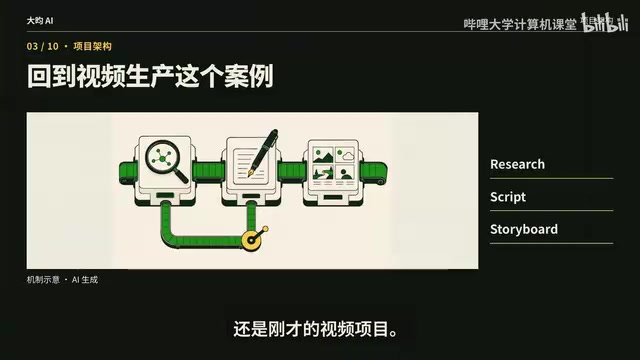
The principle given in the tutorial is clear: deterministic processes go to the Workflow, and only the parts that require judgment go to the Agent. This way, when you later add or replace a particular Agent, you won't have to tear down the entire task chain and start over. Architecture isn't about splitting directories more finely to look more professional; every directory should correspond to a real responsibility. When the project is small, it can start simple, and once the task chain becomes more complex, you can split out independent modules. What you really need to avoid is piling all business logic into a single Agent file.
The five elements of an Agent definition: Role, Goal, Instructions, Tools, Output Schema
When defining an Agent, it's recommended to specify five items: Role, Goal, Instructions, Tools, and Output Schema.
Take the Research Agent as an example: Role is AI technology researcher; Goal is to obtain reliable materials; Instructions clearly state to prioritize official and first-hand sources, mark conflicting information, and never treat uncertain information as fact; Tools can include web search, web reading, and GitHub search; Output Schema is fixed into core conclusions, key fact sources, disputed information, and items to be confirmed.
Why is Output Schema important? Because there is usually a Script Agent downstream that continues processing the result. If the Research Agent freely outputs a long block of text every time—sometimes leading with conclusions, sometimes pasting links first, sometimes mixing uncertain information into the body—the next layer will have a hard time parsing it reliably. Many Agent projects become stable not necessarily because they switched to a stronger model, but because the Agent's boundaries became clearer and its inputs and outputs became more standardized.
Tools and Skills: don't confuse capability with method
Tools are the Agent's hands and feet. Searching the web, reading and writing files, querying databases, calculating, and calling APIs all belong to Tools. An important principle is: a Tool should do only one clear thing as much as possible. Don't build a "do_everything" tool that can search, write files, and query databases all at once—the Agent itself must understand the purpose of each tool when selecting one. The more complex the tool and the harder its description is to write, the higher the probability of calling it incorrectly.
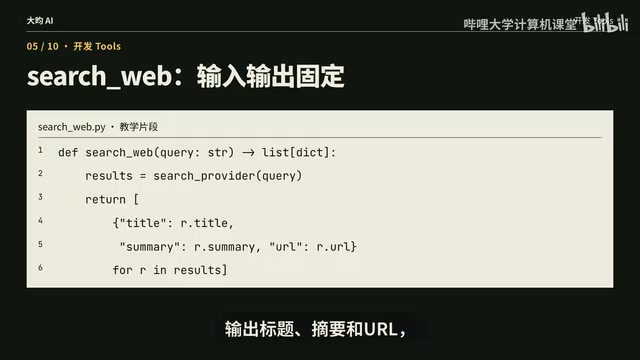
A Tool should ideally have clear inputs and outputs. For example, search_web takes a query as input and outputs titles, summaries, and URLs, rather than returning a pile of natural language in an unstable format. Every Tool should be independently testable, so that when the Agent has a problem, you can first confirm whether the Tool is broken or the Agent picked the wrong Tool.
Skills are often confused with Tools. Just remember one sentence: a Tool is a capability, a Skill is a method for completing a task. Searching the web is a Tool, reading a web page is a Tool, and saving a file is also a Tool, but "researching a new AI product" can be a Skill—it fixes a mature process: search first, then find official documentation and GitHub, supplement with news and community discussion, read multiple sources to verify conflicting information, and finally organize it into a research report. Tools answer "can I do this thing"; Skills answer "how should this thing be done more reliably." Once a project truly starts accumulating capabilities, what it accumulates shouldn't just be more and more Tools—what has real reuse value is more and more validated Skills.
Context and Memory: first solve what the current task needs to know
Many people think that as soon as they build an Agent, it must have long-term memory and must use a vector database. The tutorial's view is: not necessarily. The first thing an Agent project must solve is what it actually needs to know for this task—the topic the current user gave, the materials the Research Agent just found, the data returned by Tools, the versions the Script Agent has already written, and which step the current Workflow has reached. All of these belong to Context.
Then decide which information after the task ends is truly worth keeping: what copywriting style the user prefers long-term, which topics have already been done, and what fixed rules a certain project has—these may enter Memory. A temporary web page returned by a certain search, expired intermediate results, and one-off error messages don't need to be stored long-term. Context and Memory are best designed separately. In the early stage of a project, JSON, SQLite, or ordinary files are enough; only when there is a real need for large-scale cross-task retrieval should you consider a vector database. It's not that the more an Agent remembers, the smarter it is—remembering the wrong things will make later tasks harder and harder to correct.
Structured Prompt management: don't stuff all rules into a single System Prompt
In real projects, it's not recommended to stuff all rules into one giant System Prompt. You can split it into System, Task, Constraints, Examples, and Output Schema: System handles the role and long-term rules, Task handles the current task, Constraints specify what must not be done, Examples show the model what a good result looks like, and Output Schema fixes the final output structure.
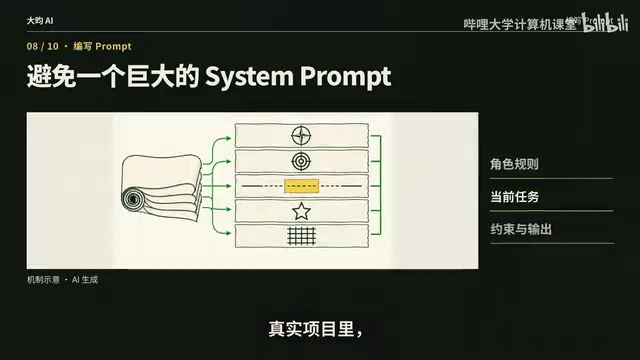
This way, when you modify a certain part later, you know exactly what you changed, and it's easier to test which rule affected the result. For example, if you find that the Research Agent always writes unconfirmed information as fact, you should prioritize modifying Constraints rather than rewriting the entire Prompt. Prompts should also be version-controlled, because in essence a Prompt is not just a few sentences casually written during a chat—it is part of the Agent's program logic.
Test and Eval: working code doesn't mean a well-done task
This is one of the biggest divides between an Agent demo and a real project. Traditional software does Tests: whether functions run, whether APIs report errors, and whether Tools return correct data—all of these certainly need to be tested. But Agents have a special problem: working code doesn't mean a well-done task.
The Research Agent successfully generates a 2,000-word report with no errors, and all function tests pass, but it may cite outdated information or even present speculation as fact. From a program perspective it succeeded; from a business perspective it actually failed. So besides Tests, you also need Eval: prepare a fixed set of real tasks and specifically evaluate factual accuracy, hallucination, tool selection, task completion rate, output structure, cost, and speed.
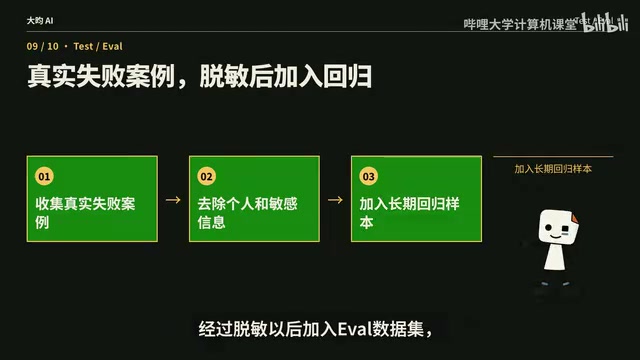
The tutorial gives an example: prepare 50 real topics as fixed inputs, and rerun them every time you change the model, modify the Prompt, or add a Skill. If Prompt A has an 82% task success rate and Prompt B raises it to 91% while average cost also drops, then you can be fairly confident that this change is a real improvement. Otherwise, "I feel like it got a little smarter" has no engineering meaning. The Eval test set should ideally be fixed and version-controlled, and you can even desensitize real online failure cases and add them to the Eval dataset. In one sentence: whether it runs is judged by Test; whether it does well is judged by Eval.
Eval and Test are often used interchangeably in engineering contexts, but they address different problems. Test belongs to the realm of traditional software engineering and verifies deterministic logic—whether a given input returns the expected output, whether boundary conditions are handled, and whether exceptions are caught. Results are usually binary pass or fail. Eval originates from model evaluation practice and targets probabilistic, open-ended outputs that cannot be judged right or wrong with simple assertions. It therefore requires scoring rubrics, reference-answer comparison, or LLM-as-Judge and other means to produce statistical metrics such as accuracy and completion rate. In Agent projects, an Eval dataset is usually a fixed set of task inputs and corresponding scoring rules, rerun every time the model, Prompt, or tools change to observe whether metrics improve. The value of Eval lies in turning "it feels better" into comparable quantitative conclusions, but its limitations should also be noted: the scoring criteria themselves may be biased, and a model judge may favor certain output styles. Therefore, Eval results should be used together with manual spot checks rather than completely replacing human judgment.
Deployment and observability: launch is not the end, but the beginning of iteration
A project can run locally, in Docker, or in a cloud environment, but after launch there is another very important layer: Observability. At minimum, you should know what task the user gave, where the Workflow has progressed, what choices the Agent made, which Tool was called, what the Tool's input and return were, and what the final output was, while also recording tokens, latency, cost, error rate, and task success rate.
An Agent is not a traditional deterministic program; the same task may produce different results depending on the model, context, or Tool state. For example, if the user says the result is wrong, you open the Trace and find that the Agent's judgment was actually fine—the search Tool returned an outdated web page. In that case, you should fix the Tool or the data source, not keep modifying the Prompt. Without Trace Log and Eval, it's easy to modify the Prompt every time a problem occurs, and the result becomes messier and messier.
Trace is the core vehicle of observability. In traditional distributed systems, Trace records the service nodes and latency that a request passes through, and is used to locate performance bottlenecks. In Agent scenarios, however, Trace records a finer-grained decision process: user input, each step of the Workflow, at which node the Agent made what judgment, which Tool was called, the Tool's input and return, the final output, and the token consumption, latency, and cost of the entire chain. A typical Trace data structure is a tree or nested spans—the top level is one task, child nodes are stages and tool calls, and each span carries a timestamp, status, and metadata. With such records, when troubleshooting you can quickly distinguish whether it was a model judgment error, a Tool returning wrong data, or a gap in the Workflow orchestration logic. Common implementations in the industry include the OpenTelemetry standard and its extensions in LLM applications, as well as the built-in Trace panels of various Agent development frameworks. Without Trace, the causes of Agent failures are almost impossible to reproduce, and iteration can only rely on guesswork.
A reusable Agent engineering framework
Connect the whole process: first define requirements and success criteria, then establish project conventions and architecture; Workflow governs process, Agent governs judgment; Tools provide basic capabilities, Skills provide validated methods; Context governs the current task, Memory stores information truly worth keeping long-term; Prompt constrains behavior, Test ensures the code runs, and Eval judges whether the Agent actually does well; finally, continuous optimization through deployment, Trace, and monitoring.
Once this set is truly established, your Agent will slowly transform from a demo that runs into a product that is maintainable, extensible, and can genuinely be handed to others to use. The real problem Agent engineering must solve is not how to make a model call a tool once, but how to make an uncertain AI reliably complete deterministic business tasks over the long term.
One-line Summary
Break down the complete engineering workflow and key principles for an Agent project from a runnable demo to a long-term maintainable product.
Paragraph Summary
Based on a complete video project case, this article systematically reviews the key stages of Agent project engineering. It begins by emphasizing the need to define task boundaries and success criteria to prevent an all-purpose Agent from spiraling out of control; then introduces project conventions such as the agents.md manual and secure key management. Architecturally, it distinguishes Workflow for deterministic processes from Agent for uncertain judgment, and breaks down the responsibilities of directories such as agents, tools, and skills. Agent definitions should clearly specify the five elements of Role, Goal, Instructions, Tools, and Output Schema; Tools are capabilities and Skills are reusable methods, and the two must not be confused; Context handles the current task, while Memory keeps only long-term valuable information; Prompts should be structured and version-controlled. The article particularly emphasizes that Test ensures code runs and Eval judges whether the task is done well, and that after launch, Trace and monitoring should form an iterative loop of run—record—evaluate—modify.
Related articles

Codex in Practice: A Complete Guide to Enterprise-Grade Agent Skills Development
An in-depth analysis of a Bilibili Codex practical course covering core capabilities, agents.md configuration, MCP protocol, multi-agent collaboration, and enterprise plugin development—building a complete framework for enterprise AI coding tool adoption.

A Beginner's Guide to LLM Fine-Tuning: From Principles to Industry Implementation
Starting from the layered structure of general LLMs, this guide systematically covers the motivations, cost comparisons, and applicable scenarios of LLM fine-tuning, with three open-source cases: Bencao, LawGPT, and FinGPT, illustrating implementation paths in healthcare, law, and finance.

Claude Code in Practice: From Installation to MCP, Skills, and SubAgents
Claude Code tutorial: NPM install with Node.js prerequisites, using CC Switch to bypass account login and avoid bans, permission modes, built-in commands, MCP, Skills, SubAgents, and CLAUDE.md project files—helping developers move from natural language chat to structured AI coding workflows.