Claude Code in Practice: From Installation to MCP, Skills, and SubAgents

Key to Claude Code adoption: stable install, bypass login, and use built-in components over pure natural language prompts.
Based on a Bilibili public course, this article outlines how teams in China can adopt Claude Code. NPM is recommended over PowerShell/CMD for installation, requiring only Node.js 22+ and Git; account login carries ban risks, and CC Switch can configure API Keys for DeepSeek, Zhipu, or custom relays to skip login. At the usage level, pure natural language prompts are limited—what drives efficiency is permission modes, built-in commands, MCP, Skills, SubAgents, and CLAUDE.md: MCP connects external systems, Skills distill reusable workflows, SubAgents handle decomposition, and CLAUDE.md provides long-term memory and team consistency. The article notes that ban risks and cache hit rates are colored by personal practice.
Claude Code is becoming the mainstream choice for development teams in China adopting AI-assisted coding. According to observations from this public course on Bilibili, many companies have set hard requirements for the proportion of AI-generated code—some as low as 50%, others as high as 90% or even 100%—and Claude Code is one of the most widely adopted tools for this purpose. But many people still use it the same way: "ask it to write something in natural language"—which actually doesn't work well. What really drives the efficiency gap is using its built-in components: permission modes, built-in commands, MCP, Skills, SubAgents, and project-level files like CLAUDE.md.

Installation: Why NPM Is Recommended Over PowerShell
The official documentation offers several installation methods. On Windows, you can run the corresponding commands in PowerShell or CMD. But based on the host's practical experience, these two methods are not reliably successful due to network environment factors. A more stable path is installing via NPM—the official site's "Advanced Settings" section explicitly lists this command, and as long as your network proxy is configured properly, it basically won't fail.
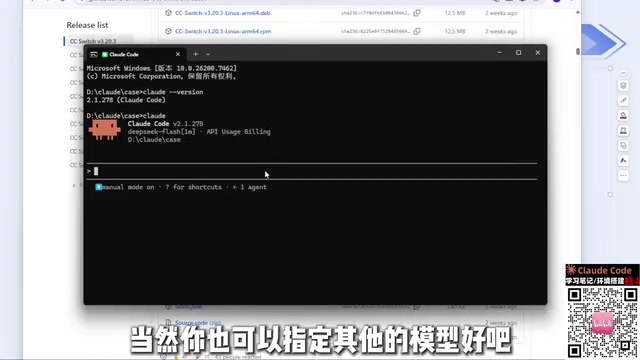
There are only two prerequisites: Node.js version 22 or above (the latest is now 24, so just install the newest), and Git. Both are straightforward installers where you just click Next; if your C drive is tight on space, you can change the installation directory. After installation, verify with claude --version—if it outputs a version number normally, your environment is ready.
Bypassing Account Login to Avoid the Risk of Being Banned
Account login is another common pitfall. The host mentioned that he and many other students have had their official accounts banned from logging in directly, and even configuring an API Key in environment variables carries risk. A more recommended approach is to use an open-source tool like CC Switch: it was originally a project on GitHub and is now also available as a website. Download the Windows MSI installer and double-click to install.
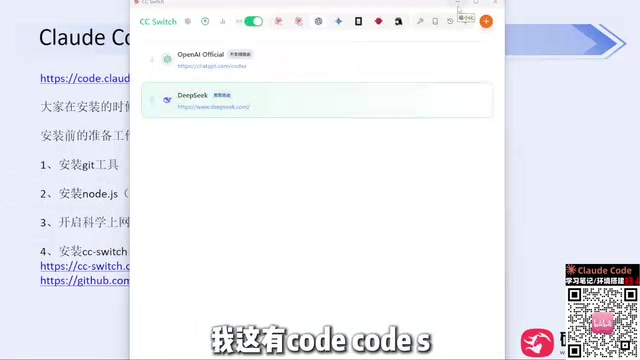
Once open, you can switch between Claude Code, Codex, and other tools, and add providers with the plus button—mainstream vendors like DeepSeekAd and Zhipu are in the list; just enter your API Key and save. For third-party relay services, you can use "Custom Configuration" to fill in the API address and Key. After configuration, restart Claude Code—the login step will be skipped entirely, and since there's no account, there's no risk of being banned. The host says he hasn't been banned in months using this method.
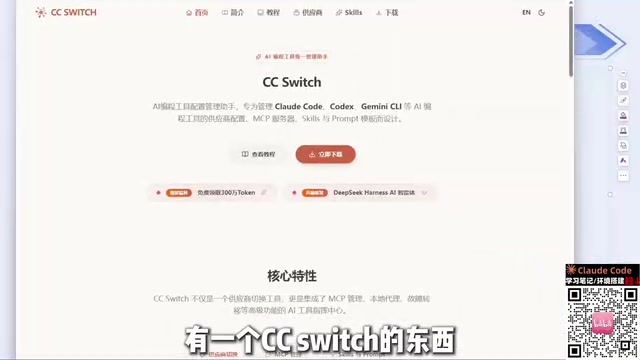
Note that Codex's configuration is in a separate tab. After switching tools, make sure the corresponding section has the Key filled in, otherwise you'll encounter a "configured but not working" situation. The host also recommends buying VPN/proxy tools monthly rather than annually, since such services are frequently blocked and annual payments carry higher risk.
From Natural Language to Structured Prompting: Recalibrate from Lesson One
After installation, most people's first reaction is "help me develop a Snake game." The problem with this pure natural language prompt is that it doesn't define any scope—the model can only guess the tech stack and feature boundaries. Newer versions of Claude Code have started proactively asking about implementation approach (e.g., choosing the simplest HTML) and gameplay features, which is itself a remedy for vague prompts.
The host's advice is to actively leverage Claude Code's built-in components rather than cramming all your intent into a single prompt. The six modules covered in the course outline—installation and integration, permission modes and built-in commands, MCP, Skills, SubAgents, and CLAUDE.md files—are essentially all levers for providing structured context to the model.
Permission Modes: Controlling What It Can Do
Permission modes determine how autonomously Claude Code can execute commands and read/write files. The first time you enter a directory, it asks whether you trust the current folder, followed by theme style and login method selection. Setting permission boundaries properly avoids accidental operations and reduces the friction of manual confirmation at every step—this is the setting that makes the biggest difference in everyday user experience.
Claude Code's permission system roughly has several tiers: in default mode, every command execution or file modification requires confirmation; acceptEdits mode automatically approves file edits but still intercepts command execution; plan mode only performs read-only analysis and outputs plans without making any changes; and bypassPermissions (commonly known as YOLO mode) skips all confirmations and carries the highest risk—recommended only in isolated environments or containers.
Beyond mode switching, you can also use permissions.allow / deny rules in settings.json for fine-grained control—for example, allowing npm test, prohibiting rm -rf, or restricting access to specific directories. Combining modes and rules appropriately can greatly reduce interruptions while maintaining safety, which is one of the main reasons different users have noticeably different experiences.
MCP and Skills: Connecting External Capabilities
MCP (Model Context Protocol) solves the problem of "letting Claude Code reach external systems" by exposing databases, APIs, and internal tools to the model in a standardized way. Skills, on the other hand, are more about distilling reusable operation workflows into skill packages, so the model executes specific tasks according to established procedures. Combined, Claude Code transforms from "a chat box that can write code" into an execution entity that can integrate with real engineering environments.
SubAgents are used for task decomposition: breaking complex requirements into sub-agents that process in parallel or in stages, with the main agent responsible for orchestration. The host dedicates a separate section to SubAgents in the course, indicating their significant weight in real projects—especially in scenarios where requirements are clearly bounded and can be split into multiple independent subtasks.
CLAUDE.md: Project-Level Long-Term Memory
CLAUDE.md is a documentation file placed in the project to tell Claude Code about the repository's tech stack, directory conventions, build commands, and forbidden zones. Compared to repeating context in every conversation, writing it into CLAUDE.md is a one-time investment with long-term returns, and it's also the foundation for ensuring output consistency during team collaboration.
MCP was proposed and open-sourced by Anthropic in late 2024, using a client-server architecture: Claude Code acts as the client, communicating with MCP Servers via a standardized JSON-RPC protocol, and the Server exposes capabilities like database queries, file systems, and third-party APIs in three forms: "tools," "resources," and "prompts." This means that as long as someone writes an MCP Server, any model or client supporting MCP can call it plug-and-play, without needing separate integration for each tool. The community already has a large number of ready-made Servers covering common scenarios like GitHub, Slack, Postgres, and browser automation.
Skills are closer to "operation manuals + scripts" packaging: a Skill is typically a set of instruction files with explanations and executable resources, loaded only when the model determines a task matches, thereby avoiding keeping large amounts of procedural content permanently in context. The two have different roles—MCP extends "what can be operated," while Skills distill "how it should be done." Together they form a complete engineering capability.
CLAUDE.md is loaded hierarchically: files in the project root directory are automatically read when entering that directory; subdirectories can have local CLAUDE.md files overriding conventions for specific modules; and user-level global configuration goes in ~/.claude/CLAUDE.md for personal preferences that apply across projects. In practice, what you should write in it is the information that "causes repeated errors if not written": package managers and build scripts, code style and naming conventions, directories not to be modified, and testing and pre-commit check processes.
For maintenance, treat it as a living document: whenever you find Claude Code making similar mistakes, add the corresponding constraints and gradually converge. Content shouldn't be too long, otherwise it eats into the context budget; high-priority rules should be placed earlier. When collaborating as a team, including it in version control ensures consistent behavior across all members and CI environments.
Model Selection and Cost Perception
The host mentioned that DeepSeek's Harness performs better in cache hit rates, while using other agents results in somewhat lower cache hit rates—this is a noticeable difference in practice. As for model capabilities, his judgment is: current mainstream models are already sufficient for daily tools and work, so there's no need to obsess over which is stronger; domestic models are completely adequate for basic work. He also mentioned that Codex may require a one-time basic login when used, which differs from Claude Code's approach and needs separate attention.
It should be noted that the above experiences are strongly colored by personal practice. Conclusions about ban risks and cache hit rates come from long-term observation by a single user, and results may vary under different network environments and account statuses. Installation paths and configuration methods, however, can be safely followed according to the official documentation.
One-line Summary
Key to Claude Code adoption: stable installation, bypassing login, and using built-in components instead of pure natural language prompts.
Paragraph Summary
Based on practical experience from a Bilibili public course, this article outlines the adoption path for using Claude Code in China. For installation, NPM is recommended over PowerShell/CMD, with only Node.js 22+ and Git as prerequisites; account login carries ban risks, and CC Switch can be used to configure API Keys for DeepSeek, Zhipu, or custom relay services to skip login entirely. At the usage level, it points out that pure natural language prompts have limited effectiveness—what really drives efficiency is permission modes, built-in commands, MCP, Skills, SubAgents, and project-level files like CLAUDE.md: MCP connects external systems, Skills distill reusable workflows, SubAgents handle task decomposition, and CLAUDE.md provides long-term memory and team consistency. The article also reminds readers that conclusions about ban risks and cache hit rates are colored by personal practice.
Related articles
 Tech Frontiers
How Do You Stop AI Agent Emails From Sounding Like AI? One Developer's Solution
AI agent emails always sound like AI? A developer shares reright: a rewrite step that validates numbers, names, and links, preventing humanizers from tampering with key info. Test data and integration details inside.
 Tech Frontiers
Starlink Mobile: SpaceX's Carrier Ambitions and the 5G Deployment Challenge
SpaceX plans to make Starlink Mobile a mainstream carrier, deploying thousands of direct-to-cell satellites and building a terrestrial 5G network to challenge AT&T, Verizon, and T-Mobile. This article analyzes its dual-track strategy, 5G deployment challenges, and the competitive landscape.
 Tech Frontiers
OpenAI Raises Another $11 Billion, Valuation Hits $1.25 Trillion
OpenAI has raised an additional $11 billion in a new funding round at a valuation of $1.25 trillion. The deal is not yet closed and is expected to be completed in the coming weeks, further consolidating its leading position in AI.