AI Agent Tool Calling in ~12 Lines of Code: Function Calling with Claude and OpenAI

Build an AI Agent tool-calling loop in ~12 lines of Python — Claude and OpenAI share identical logic, just different names.
This article demystifies AI Agents: LLMs don't execute code — they select functions from a tool menu and issue call requests, while Python handles actual execution and returns results by ID in a loop. Claude's `tool_use` and OpenAI's `function_call` follow identical logic with only minor naming differences. In practice, tool errors should be returned as results rather than exceptions for a better UX; Pydantic's strict mode only guarantees structural correctness, so business rules must live in tool code, not prompts. The most common production bug is mixing up IDs across API calls. The entire loop fits in ~12 lines of code.
An Overhyped Concept: The True Nature of Agents Is Tool Calling
Many people overcomplicate AI Agents, but once you strip away the frameworks, the core logic is surprisingly simple. Eldan, an instructor with over a decade of FAANG experience at companies like Apple and Microsoft, puts it plainly in the second session of his applied series: large language models (LLMs) don't execute code — they only issue calls.
This is the first-principles understanding of Agents. When a user asks "Where is my order?", the model doesn't magically know the answer. Instead, it selects the get_order function from the tool menu you provided. Your Python application queries the order database, then returns the result (e.g., shipping status) to the model API along with the same call ID and conversation history. Finally, the model composes a natural language response: "Your order has been shipped."
The entire flow can be summarized in one sentence: The model asks, Python executes, you answer by ID, and it completes in a loop. That's the entire backbone of Agent tool calling — far less complex than imagined.
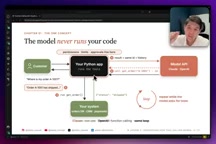
Same Loop, Two Naming Conventions: Claude vs. OpenAI
The instructor emphasizes a commonly confused point: Claude and OpenAI follow exactly the same loop logic — they just use different terminology and field names.
When the model issues a call request
- In Claude, this is called
tool_use, appearing inside a block in the response content. Input parameters are already a ready-to-use dictionary, and the ID field istool_use_id. - In OpenAI, this is called
function_call, located in the output item of the response. Parameters are a JSON string that must be parsed withjson.loads, and the ID field iscall_id.
When returning results
- Claude returns results in the form of
tool_result; - OpenAI returns them as the output of a
function_call.
Loop termination conditions
- Claude checks whether
stop_reasonequalstool_use; - OpenAI checks whether the output contains a function call.
For tool choice, both share the same concepts — auto, required, none — and both default to automatic mode. Once you understand this "same structure, different names" mapping, migrating code across platforms is nearly effortless.
Defining Tools and Enforcing Schema Strictness
A tool definition is essentially just a regular Python function with a clear description and a strict schema. The course uses order lookup as an example: initialize the Anthropic client and system prompt, simulate an order database with a simple dictionary (which could be any real database or CRM system in production), then implement the get_order function.
A key engineering detail is the error handling strategy: when an order ID doesn't exist, the function doesn't throw an exception and break the flow — instead, it returns the error message as a result (with an is_error flag) back to the model. This way, the user doesn't get a blunt 400 error but rather a friendly message like "I couldn't find that order — could you double-check the ID?" This is a production-worthy practice worth adopting.
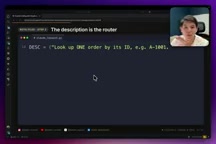
The most important parts of the schema definition include: type as object, declaring the order_id field in properties, marking required fields with required, and using additionalProperties: false to prevent extra fields from being passed. Claude calls the parameter field input_schema, while OpenAI calls it parameters, but the strict mode works the same way in both. One tool, two forms, identical core.
JSON Schema is a specification for describing JSON data structures, widely used for API parameter validation. In tool-calling scenarios, the additionalProperties: false constraint is especially critical: it tells the model "only pass in the fields you've declared," preventing the model from hallucinating extra parameters that would cause downstream function errors. The required array explicitly lists all mandatory fields, allowing the model to self-check parameter completeness before generating a call request. Unlike request body validation in REST APIs, the schema here is not only a server-side guard but also the model's sole source of information for "understanding how to use the tool" — the more precise the description, the lower the chance the model picks the wrong tool or fills in the wrong parameters. This is why the course emphasizes that tool descriptions and schema definitions deserve equal care: the former tells the model when to use a tool, the latter tells it how to use it.
~12 Lines of Code to Run the Agent Loop
The loop implementation is remarkably lean. The core is a for loop that runs at most five turns, calling the model each turn and appending the response to the messages history — because the API itself is stateless, and developers must manually maintain context.
The logic is straightforward: if stop_reason is not tool_use, the task is complete and we return the text result; otherwise, filter out all tool call requests, execute the corresponding functions one by one, then push the tool results back into messages for the next iteration.
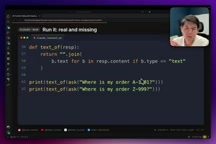
In actual testing, querying an existing order returns a real status like "shipped" or "processing"; querying a non-existent order (e.g., ID 999) returns "I couldn't find that order — please verify the ID." The OpenAI-side code differs in only three places: using json.loads to parse parameters, handling the error field, and passing call_id — the rest of the logic is virtually identical.
The statelessness of the API is the fundamental reason why you must manually maintain the messages history. Every LLM API call is independent — the server retains no information from the previous turn. This is fundamentally different from stateful services (like a Web server that maintains sessions). As a result, developers must serialize the complete conversation history — including user input, model responses, tool call requests, and tool results — and send everything with every request. This also means that as the number of conversation turns grows, token consumption per request increases linearly. Long conversations require additional consideration for context window size limits and truncation strategies. The five-turn loop cap is a practical safeguard against the model getting stuck in a tool-calling infinite loop, consuming excessive tokens and time.
Using Pydantic to Guarantee Output Structure: From "It Works" to "It's Reliable"
Tool calling alone isn't enough. When you need to structure a support ticket, it's time to bring in Pydantic's BaseModel. The course defines a Ticket class: category uses Literal to restrict values to shipping, billing, or other; order_id is an optional string; urgent is a boolean.
Claude uses messages.parse with output_format=Ticket to get structured output, while OpenAI uses responses.parse with text_format=Ticket. Both return a parsed_output directly, with fields strictly matching the predefined schema.
The instructor offers a sharp warning: strict mode only guarantees "structurally correct" output — not "business correct" output. A perfectly formatted call can still cancel an already-shipped order or match the wrong customer. Business rules should therefore be written inside tool code, not in prompts — because code is testable and measurable, while prompts can't guarantee consistency.
Pydantic is a widely used data validation library in the Python ecosystem. Its BaseModel allows developers to define data structures declaratively and performs automatic type checking and data conversion at runtime. In the LLM output parsing context, it solves a core problem: model output — whether natural language or a JSON string — is inherently untrusted. Directly accessing fields after json.loads is brittle and prone to crashes from typos in key names or type mismatches. By passing a Pydantic model to the SDK's parse method, the SDK automatically converts the model structure into a JSON Schema under the hood, forces the model to output in that format, and then deserializes the result into a strongly typed Python object. The use of Literal types is especially important: it restricts field values to a finite enumeration, completely eliminating issues caused by the model outputting variant strings like "Ship", "Shipping", or "已发货" that would break downstream if-else logic.
Advanced Challenges and Common Errors
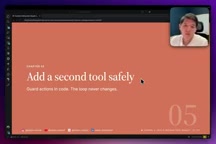
The course leaves a hands-on exercise: add a cancel_order tool and require it to refuse to cancel already-shipped orders. In the instructor's reference implementation, the cancel function first checks the order status — if already shipped, it raises a message suggesting a return instead; otherwise, it sets the status to cancelled. This captures the real decision-making ability of an Agent: given the instruction "cancel these two orders," the model suggests a return for the already-shipped one and executes the cancellation for the unshipped one.
Finally, the instructor summarizes the most common production-level error in tool calling: responding to a tool call with the wrong ID.
- Claude will report
400 unexpected tool_use_id; - OpenAI will report
400 no tool output found for function call.
The root cause is usually mixing up IDs across multiple API calls, causing context to break and responses to go out of sync. Just remember one sentence: The model asks, your Python executes, and you answer by ID in a loop.
The next session will move into Agentic SDKs (Claude Agent SDK and OpenAI Agent SDK), which have already encapsulated the hand-written loop logic covered here — and that's exactly the truth behind AI Agents: seemingly complex on the surface, but elegantly simple at the core.
Related articles

Chain of Thought Isn't Just for AI: How Humans Can Use CoT to Improve Thinking Quality
Chain of Thought isn't just a prompt trick for large models. Starting from a Hacker News discussion, this article analyzes why CoT works for human thinking too, breaks down actionable ways to transfer it, and highlights the key differences between human CoT and machine CoT.
Cloudflare Teams Up with OpenAI: Closi…
Cloudflare Teams Up with OpenAI: Closing the Loop from Vulnerability Discovery to Defense with AI
Cloudflare uses OpenAI Daybreak to investigate security vulnerabilities and generate reviewable remediation plans, while developers use Codex to boost coding efficiency and quality.

Orca Multi-Agent Orchestration in Practice: A Guide to Parallel Collaboration with Claude and Codex
Orca is Stable AI's free open-source agent workbench supporting 34 agents like Claude Code and Codex in parallel. Learn its Git worktree isolation, multi-model orchestration, and mobile management.