AI Agents for Beginners: Goals, Tools, and the Reasoning Loop Explained

AI Agents don't just answer questions — they autonomously plan and execute multi-step tasks.
This article explains the core difference between AI Agents and regular chatbots: while chatbots stop at question-and-answer, agents autonomously execute multi-step tasks toward a goal. It breaks down the three key components — goal, tools, and reasoning loop — and demonstrates how to build a Gmail + Google Calendar personal assistant in under four minutes using BASE44 Super Agents, with zero code. The agent can handle cross-tool tasks like finding free time slots and emailing a summary, and can be scheduled to run automatically every weekday morning. Beginners are advised to start with a single-purpose agent; the goal–tools–reasoning loop framework applies across any platform.
From Chatbots to AI That Actually Gets Things Done
Most people still use AI the same way: open a chat window, type a question, get a decent answer, close the tab, and go back to doing the actual work themselves. In other words, AI helps you think — but doesn't help you finish.
AI Agents are designed to change exactly that. Instead of just giving you an answer, an agent can take that answer and act on it — handling repetitive communication, replying to emails, scheduling meeting invites, and running the workflows you've always meant to automate but never got around to.
The simplest way to understand an AI Agent is this: it takes action, rather than just answering questions. A regular chatbot waits for your prompt, gives you a response, and the interaction typically ends there. An agent, by contrast, can be given a goal and then complete the multiple steps needed to achieve it — without you guiding it hand by hand.

The Three Core Components: Goal, Tools, and Reasoning Loop
Strip away the technical jargon, and every AI Agent comes down to three things:
- Goal: What you want it to work toward.
- Tools: What lets it actually do things — like checking an inbox, reading a calendar, or sending an email.
- Reasoning Loop: The process of deciding what action to take next based on the information it has.
This reasoning loop is the most fundamental difference between an agent and a regular AI conversation. It works like this: review the goal → choose a first step → execute an action → check the result → decide the next step — and repeat until the task is done or it hits something it can't handle.
Think of it like how a person approaches a task: you know what you want to achieve, you use the tools available, and you adjust based on what actually happens. That's exactly where a single prompt falls short — ask a question, get an answer, and the interaction is over. An agent can keep executing steps, with each result informing the next decision.
Two Basic Types of Agents
It's worth knowing that agents generally fall into two categories:
- Manually triggered: Runs when you give it a task — you still initiate the process yourself.
- Autonomously running: Works automatically based on triggers or schedules — checking something every morning, reacting when information comes in, or handling repetitive tasks while you're away.
This autonomous capability is precisely why agents have become so important recently. Tasks that used to require someone sitting at a computer, reviewing information and clicking through steps one by one, can increasingly be handed off to an agent to handle on its own.
The reasoning loop is technically known as the "ReAct" framework (Reasoning + Acting), and it's the underlying operating model for most AI agents today. Specifically, at each step the large language model generates two types of output: a "Thought" (analysis of the current state) and an "Action" (calling a specific tool). After the tool returns a result, the model incorporates that result into its context and begins another round of thinking and acting — until it determines the task is complete. This also explains why agents sometimes seem to "take the long way around" — at each step they're making a locally optimal decision based on current information, rather than pre-planning the entire path. Understanding this helps you write better task descriptions: the clearer the goal and the more explicit the constraints, the easier it is for the model to make the right choice at each reasoning step, and the higher the overall task completion rate.
Building with BASE44 Super Agents: A Hands-On Demo
A lot of people hear "tool integration," "schedules," and "automation" and assume it must involve heavy technical setup. The demo here uses BASE44 Super Agents specifically because it's designed to remove those barriers — it's an agent layer built directly into the BASE44 platform, with no local server required, no manual API key management, and no configuration files to write.

The setup breaks down into three steps:
Step 1: Write a Clear Task Description
After creating a new agent, writing the task description is the most critical part of the entire setup — it sets the goal and keeps the reasoning loop running. If the role is vague, the agent will lack direction whenever it needs to make a decision.
In the demo, the agent is set up as a personal assistant focused on email and calendar: check Gmail and Google Calendar when asked, summarize relevant content, and handle simple actions like drafting emails and checking availability. The scope is clear without being overly complex.
Step 2: Connect the Tools
In the plugins tab, connect Gmail and Google Calendar — both can be done with a single click and will show as "Active / Connected" once set up. No token generation, no API key handling, no technical configuration files. The same agent can also connect to Slack, Notion, Google Drive, and more, making it adaptable to different types of work.
Tools play the role of giving a language model "hands and feet." At their core, each tool is a function or API interface the model can call. The model uses tool descriptions to understand what each tool does and what parameters it takes, then decides during the reasoning loop when to call which tool. Platforms like BASE44 can offer "one-click connection" because they handle the tedious steps of OAuth authorization, API key management, and data format conversion under the hood — all the user sees is a toggle switch. If you're building an agent on another platform (like LangChain, AutoGen, or the OpenAI Assistants API), you'll typically need to manually define each tool's name, functional description, and parameter structure. This is why the quality of tool descriptions directly affects agent performance — when descriptions are unclear, the model may select the wrong tool or call it with incorrect parameters.
Step 3: Give It a Task and Watch the Reasoning Loop in Action
Start with a quick test: ask it to check tomorrow's calendar and tell you what's scheduled. Notice that you only tell it what you want to know — you don't instruct it to "open Google Calendar" or tell it how to search. The agent already knows which tool can answer the request.
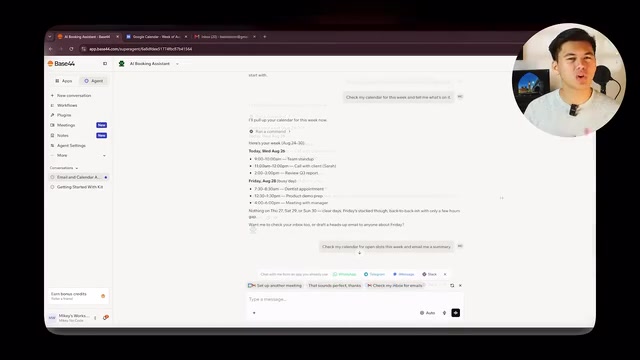
Then give it a real task: find the open time slots this week, then email me the results. This requires more than one action, which lets the reasoning loop run in full. After sending, the agent reads the goal, determines which tool is appropriate, reads the calendar and gets the results, then checks whether the task is complete. Finding that it still needs to send an email, it switches to Gmail and finishes the job.
At no point did we tell it which plugin to use, when to switch, or how to execute each action — we only described the outcome we wanted. In under four minutes, a functional agent with a clear role, two connected tools, and the ability to complete multi-step tasks was up and running, with zero code written.
Making the Agent Run on Its Own
At this point the agent can do the work, but there's still one limitation: you have to manually trigger it each time. To make it feel more like a real assistant, you need the "autonomously running" mode mentioned earlier.
In the demo, a recurring task is described directly in the conversation: check the calendar every weekday at 8 AM and send an email summary. BASE44 recognizes this as a task that should run automatically, confirms the schedule, and shows it as active in the automations tab.
From that point on, the agent no longer needs you to trigger it manually — every weekday morning it automatically checks the calendar, gathers the information, and sends the summary. Even if you close your laptop and walk away, it keeps working.

This is the AI Agent concept fully realized: it has a goal, it has the tools it needs, and it can complete tasks autonomously and continuously. The same configuration can be applied to almost any repetitive workflow.
Practical Advice for Beginners
This zero-to-working walkthrough points to a clear starting path: start small, get one useful agent running reliably, then expand. Rather than chasing a massive automation system with hundreds of complex nodes, start by building a single-purpose assistant that genuinely saves you time.
One caveat worth noting: the original video has a strong promotional tone (with repeated mentions of a paid masterclass and monetization topics). Keep your focus on the methodology itself: goal, tools, and reasoning loop — these three elements are the universal framework for understanding and building any AI Agent, regardless of which platform you use.
Related articles

How Big Can Stars Really Get? The Physical Limits of the Largest Stars
Red supergiants are the largest stars by volume, with radii up to 2,000 times the Sun, engulfing the inner solar system. But there is no precise upper limit on stellar size—models predict up to 15,000 solar radii. The most massive blue stars are far smaller than red supergiants—biggest and heaviest are two different things.

Apple HomeView Smart Display Full Feature Breakdown: Wall-Mount or Desktop, $299
Apple launches HomeView, a $299 smart display with wall-mount and desktop options, 12MP camera for facial recognition, smart home control, music playback, and recipe step-by-step cooking. Full breakdown of watch faces, apps, privacy, and cooking integration.

Where Did the Promised New Studio Go? Craft Computing Answers After Five Years
Craft Computing's host responds to viewer questions: the new studio promised five years ago was shelved as construction costs soared from $30,000 to $75,000, and was replaced by a 168-square-foot garage conversion.