AI Agents Keep Forgetting? One File Fixes It Permanently
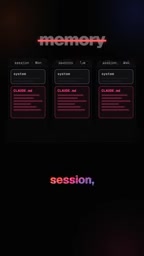
Solve AI coding agent cross-session amnesia with a versioned Markdown context file.
AI coding agents start from scratch each session, repeatedly asking how to run tests or using the wrong package manager due to misjudgment. The article explains this isn't a lack of intelligence but the absence of stable context injection. The fix: maintain a Markdown file in the project root—Claude Code reads claude.md, Codex and Cursor read agents.md, unified via symlink. Include build/test/lint commands, conventions code can't express, and pitfalls; avoid empty culture manifestos. Start with init, delete half the redundant content, iterate as agents repeat mistakes, then commit to version control. Essentially, good notes replace a good memory.
Every day you open your IDE, and the AI agent acts like it's its first day on the job: repeatedly asking how to run tests, or even using the wrong package manager. The root cause is that LLMs themselves have no cross-session memory. But a simple Markdown file can solve this—solidify the key project information and let the agent automatically read it before each session.
The Core Problem: Agent "Amnesia"
AI coding agents start as a blank slate in every new session. According to analysis from a YouTube channel, a typical scenario is: on Monday the agent asks "How do I run the tests?", on Tuesday it repeats the same question, and on Wednesday it stops asking and just runs npm install—but your project uses pnpm. This kind of "knowing better" is more dangerous than repeated questions. The root of the problem isn't that the agent isn't smart enough—it's the lack of a stable context injection mechanism.
The Solution: claude.md and agents.md
Different tools have different conventional context files: Claude Code reads claude.md, while Codex, Cursor, and others read agents.md. To avoid maintaining two files, you can link the two with a symlink.
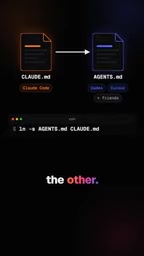
Key insight: This is not a "memory" feature. Before each session starts, the harness pastes the entire file content into the prompt and then waits for your input. So the file content must be concise and actionable.
A symlink is a special file that doesn't store actual content but points to the path of another file. On Unix/Linux/macOS, create one with ln -s claude.md agents.md; on Windows, use the mklink command with Developer Mode enabled. This way, claude.md and agents.md are effectively the same content—modify either one and the other stays in sync, saving you the trouble of maintaining two files. Note: some editors or git may display symlinks differently; before committing, confirm the repository correctly tracks the link itself rather than the content it points to.
Harness refers to the host program or framework that runs the AI agent, responsible for managing the session lifecycle, assembling prompts, calling the model, and executing tools. It determines how context is injected: before each session begins, the harness sends the full text of claude.md or agents.md to the model as part of the system prompt, and only then waits for user input. Therefore, this file's content consumes the model's context window—the more verbose it is, the fewer tokens remain for the actual task and code. This is why the article emphasizes "concise and actionable." Injection mechanisms vary slightly across harnesses, but the core logic is the same.
What to Write in the File
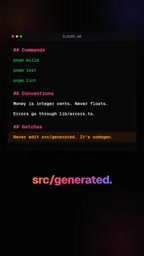
- Build, test, and lint commands: Explicitly state the package manager and script names.
- Conventions that code can't express: For example, naming rules, the meaning of directory structures, architectural decisions.
- Pitfalls: For example, "never manually edit the generated folder."
What Not to Write in the File
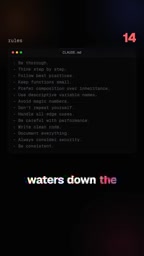
A three-thousand-word team culture manifesto? Every additional rule dilutes the weight of the others. And phrases like "write clean code" aren't instructions—they're wishes. The agent can't execute vague expectations.
Workflow: From init to Slimming Down
- Run the slash command
init(e.g., in Claude Code) to generate an initial file. - Delete half of the content: Agent-generated content is often redundant; keeping specific commands and key conventions is enough.
- Iterate and supplement: If the agent makes the same mistake twice, write the correct approach into the file.
- Commit to version control. This way, every work tree and every agent instance can read the latest rules.
Work tree in Git refers to an independent working directory associated with the same repository, commonly used with the git worktree command or in parallel multi-branch development. Each work tree has its own filesystem view but shares the same .git object database. When multiple agent instances work in parallel across different work trees, each reads the claude.md or agents.md in its own directory. After committing the context file to version control, newly created work trees automatically check out the latest version, ensuring every agent instance gets consistent rules and no branch is still using outdated conventions.
The Essence: Good Notes Replace a Good Memory
This method doesn't give the agent memory—it provides a carefully maintained set of "good notes." Feynman-style simplicity applies here: every rule should have a clear action orientation. After a few iterations, the agent no longer asks "How do I run the tests?"—it just executes the correct command.
This approach doesn't depend on a specific toolchain; any AI coding environment that supports context injection can adopt it. The key is to make project knowledge explicit and versioned, so the agent gets the latest handbook every time it "shows up for work."
Related articles

The Gemini 4 Trio and 3.8 Flash: A Full Comparison of Positioning, Pricing, and Benchmarks
A comparison of Gemini 4 Neon, Carbon, Argon, and Gemini 3.8 Flash: positioning, context, API pricing, Artificial Analysis and Arena benchmark scores, and available entry points.

AI Coding Model Leaderboard: Opus 5.5 Crowned, Gemini Neon Stages a Comeback
Tech blogger Matthew Berman releases an AI coding model tier list: Claude Opus 5.5 holds S-tier, Gemini Neon surprises with A-tier, OpenAI Astra lands B-tier. How do open-source models like DeepSeek fare? We break down the scoring logic and practical takeaways.

New Jersey Joe Sandwich: Meat and Coleslaw on Triple-Decker Rye
New Jersey Sloppy Joe isn't a ground beef burger—it's triple-decker rye bread with meat, Swiss cheese, and coleslaw, plus Russian dressing. Learn the authentic Essex County method and family recipe.