AI Coding for Real Engineers: Build Your Own Seven-Stage Workflow
Build your own seven-stage AI coding workflow instead of relying on off-the-shelf frameworks.
AI Hero's *AI Coding for Real Engineers* (Version 2) argues that developers should own a sustainable, iterable AI coding workflow rather than passively adopting frameworks like GSD or SpecKit. The course centers on a seven-stage process covering requirements grilling, research, prototyping, documentation, issue breakdown, agent implementation, and review. Its standout concept is "AFK" (Away From Keyboard) — letting the implementation stage run autonomously in the background so developers can work in parallel with AI. A 20,000-line hands-on playground project is included, and students can use their own codebase. The goal: confidently wield any coding agent to consistently ship high-quality code.
Why Engineers Need to Own Their AI Coding Workflow
AI Hero's AI Coding for Real Engineers course (Version 2) makes a bold claim: as a developer, you should own your coding workflow — not passively adopt someone else's framework.
The course instructor brings 30 years of industry experience and has observed a massive leap in the capabilities of coding agents since around last December — both in what they can build and how fast they can build it. This surge has spawned a wave of complex frameworks built around AI coding agents, such as GSD, SpecKit, and BeMad.
The instructor's core argument, however, is this: while these ready-made frameworks are useful, the truly sustainable approach is to learn a process you can iterate on, adapt, and ultimately make your own. And the foundation of that process is genuine engineering skill, heuristics, and knowledge-building.
The Seven-Stage Workflow and the Core "AFK" Philosophy
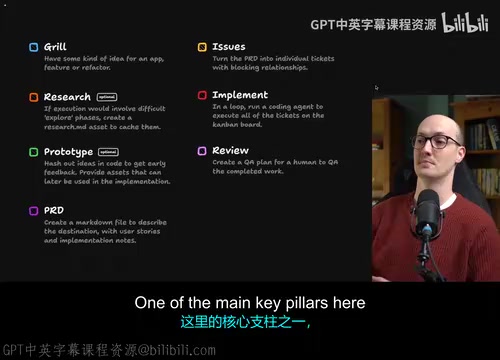
By the end of the course, you'll have developed a seven-stage workflow that looks roughly like this:
The Seven Stages
- Grilling / Interviewing: Deep-diving into requirements for clarity
- Research: Investigating technical approaches and feasibility
- Prototyping: Rapidly validating ideas
- Creating Documentation: Producing guiding documents
- Converting to Issues: Breaking documents into actionable tasks
- Implementing Issues: Having the agent write the code
- Review: Reflecting on and checking the output
One of the most critical pillars of the entire workflow is making the "Implementation" step run completely AFK (Away From Keyboard).
A common frustration people have is sitting there watching an agent work. The point of AFK is — you don't have to. You can parallelize your work with the agent, letting AI continuously produce code in the background while you do something else. This is one of the system's core ideas.
The instructor is candid, though: getting an agent to consistently and reliably produce high-quality code is not easy — and that's exactly where real engineering skills come in. AFK doesn't mean "hands off forever"; it means efficient parallelism built on a solid process.
A Coding Agent is an autonomous coding system built on top of a large language model. It accepts natural language instructions and can automatically handle code generation, debugging, refactoring, and cross-file operations. Unlike standard code completion tools (like GitHub Copilot's inline suggestions), coding agents have multi-step planning capabilities — they can decompose complex tasks, invoke tools (such as terminal commands, file systems, or browsers), and adjust their strategy based on execution results. Representative products include Cursor Agent, Devin, and Claude Code. The frameworks mentioned — GSD, SpecKit, and BeMad — are workflow frameworks built around these agents, designed to lower the barrier to working with them through standardized prompt templates and workflow orchestration. The tradeoff, however, is that they lock developers into a specific usage paradigm that's hard to customize.
A 20,000-Line Code Playground for Hands-On Practice
To make learning truly practical, the course isn't just lectures — it's packed with interactive exercises. Students get access to a playground application of roughly 20,000 lines of code, where they build real features hands-on.
Two Learning Paths
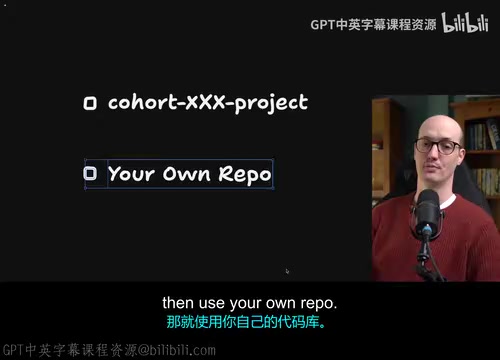
The instructor deliberately offers a choice — you don't have to use the course's repo:
- Use the course project: Follow along at the course's pace with the best available support. Ideal for beginners or those new to AI coding.
- Use your own repo: Apply exercises (like building a feature or writing a PRD) directly to your own codebase. Better suited for experienced developers who are eager to apply what they learn immediately and don't mind slightly less support.

The course project itself is written in TypeScript, Node, and React, but the instructor emphasizes you don't need to be fluent in these technologies to follow along. All playground setup is walked through step by step — no need to worry about configuration.
What You'll Be Able to Do When You're Done
The course sets very concrete goals: by the end, you'll be able to pick up any coding agent, wrap it in a workflow, and consistently ship code in your own codebase.
Specific capabilities include:
- Faster delivery: Achieve unprecedented efficiency by parallelizing your work with AI
- Knowing when to step in: Understanding when to intervene as a human — to prototype, do research, and apply your own taste and judgment to the project
- A healthier codebase: The course emphasizes that agents perform best in well-maintained codebases
- End-to-end planning ability: Write PRDs, break them down into issues, and plan out large batches of work for the agent
The value of this methodology isn't in teaching you how to use one specific tool — it's in helping you build a transferable, evolving personal engineering workflow. In an era where coding agents are advancing rapidly, the idea of "owning your own process" may prove far more durable than any single framework.
A PRD (Product Requirements Document) is a structured document in software engineering used to describe feature goals, user scenarios, acceptance criteria, and scope boundaries. In traditional development, a PRD is written by a product manager and handed to engineers. In an AI coding workflow, the PRD takes on a new role — it becomes the key vehicle through which humans communicate intent to the agent. A well-written PRD can be broken down into a series of actionable Issues, which the agent works through step by step to turn vague business requirements into verifiable code deliverables. This workflow operationalizes the division of labor — "humans handle planning and judgment, AI handles execution" — and forms the core logic behind stages four through six of the seven-stage workflow.
Related articles

CSS Anchor Positioning: A New UI Positioning Approach Without JavaScript
A deep dive into CSS Anchor Positioning: from anchor-name and position-anchor to the anchor() function, position-area shorthand, position-try-fallbacks, anchor-size, and upcoming anchor queries.

New AI Chart Interaction: Continuous Follow-up Questions and Visualization in Conversation
Explore a new AI interaction method for continuously generating charts in conversation. Use the /visualize command to ask follow-up questions and visualize answers in the same chat window, improving data analysis efficiency.

Cursor Merges Into X Subscription: Paid Plans Share Unified Usage Pool, Grok Model Coding Usage Doubled
Cursor joins The X Subscription with a unified usage pool and doubled Grok coding quota. Third-party models shift to API pricing. Existing users can keep or migrate plans.