AI-Led Testing in Practice: Building a Test Workbench with Claude Code + DeepSeek

Build an AI-led testing workbench with Claude Code and DeepSeek — concept to hands-on setup.
This article, based on an AI automation testing bootcamp, explains the key difference between AI-led and AI-assisted testing: the former has AI independently handle the full test lifecycle while humans focus on review and oversight. It presents a five-layer workbench architecture — IDE, Claude Code as the agent client, DeepSeek as the reasoning engine, a configuration bridge, and an output assets layer — along with a practical walkthrough of environment setup including Node LTS selection, npm mirror configuration, and Claude Code installation.
The software testing industry is undergoing an AI-driven paradigm shift. We used to treat AI as an assistive tool — but the new direction is to let AI take the lead across the entire testing workflow. This article is based on the first session of an AI automation testing bootcamp by Bilibili creator Beima, covering the conceptual distinction of "AI-led testing" and a complete walkthrough of setting up the testing workbench environment.
From Driver Assistance to Autonomous Driving: Two Common Misconceptions in Testing
The clearest analogy for AI-led testing is the evolution of self-driving cars. Early driver assistance features — like lane keeping and cruise control — kept the driver's hands on the wheel at all times. The human remained in control; AI merely helped. True autonomous driving (like the driverless taxis and delivery vehicles already operating in Changsha and Wuhan) is AI-led, with humans intervening only at critical moments.
The same distinction applies to software testing. The instructor highlights two common misconceptions: the first is thinking that "using AI at work means you're doing AI testing" — that's just AI assistance, an outdated mindset. The second is the opposite extreme: handing everything over to AI, including online monitoring, CI/CD continuous integration, and automated regression — which is equally wrong, because every action AI takes carries significant time and token costs.
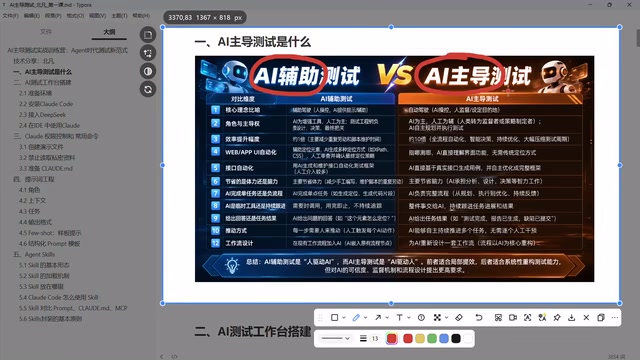
Three Core Characteristics of AI-Led Testing
Drawing from the course content, AI-led testing can be distilled into three key points:
- AI leads, humans assist: The AI is in control — not a back-and-forth between human and AI.
- AI completes the entire task flow independently: From design to execution, the AI finishes the work before handing it off for human review or decision-making.
- Humans need system-level oversight capabilities: Managing the process and reviewing outcomes while AI is executing.
One important nuance: traditional automation testing skills don't become obsolete — they get repositioned. Their primary value will converge around regression testing scenarios.
The Five-Layer Architecture: What Is an AI Testing Workbench?
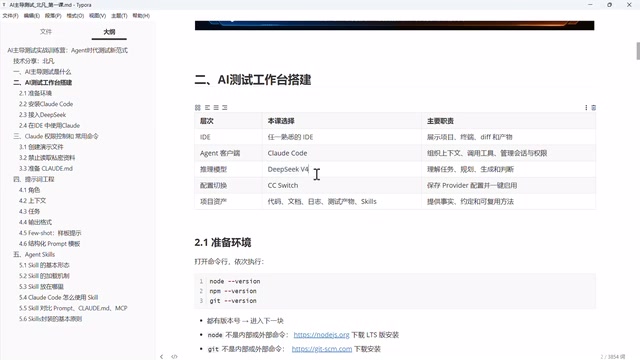
Large models like DeepSeekAd and Doubao are "smart" — they can reason and think — but they can't necessarily control a browser or run interface tests. To transform AI from "can think" to "can act," you need to build an AI testing workbench. Think of it as giving a brain a pair of arms: AI can actually execute test cases, observe results, and refine its test plans.
This workbench is organized into five layers, with the following core components:
IDE: The Unified Display Window
The IDE serves as the display window for the entire workbench. The course doesn't mandate a specific one. Its core functions include presenting the project, providing a terminal for running commands, comparing differences between each agent output (e.g., determining whether the AI genuinely redesigned test cases or just recycled old ones), and file viewing and editing. VS Code is an excellent choice, but to be clear — the IDE itself is not the agent.
Claude Code: The World's Top Agent Client
For the agent client layer, the course recommends Claude Code as the top choice. The instructor's reasoning: from prompt engineering and built-in tooling to agent orchestration logic, Claude Code ranks among the best in the world.
Regarding circulating concerns about a "backdoor," the course clarifies: Claude Code is a U.S. product that explicitly does not serve users in China. The so-called backdoor is actually a mechanism to identify and block Chinese users. Since we're not using Anthropic's accounts or models — only its tooling and client — this risk doesn't apply to us.
An Agent is a foundational concept in AI: it refers to an AI system capable of autonomously perceiving its environment, forming plans, and executing multi-step tasks — unlike a standard chat model that only answers one question at a time. In a testing context, the agent client acts as a scheduling layer between the brain and the tools. It receives high-level instructions (e.g., "test the login feature"), then independently breaks them down into subtasks: invoking browser control tools, generating test scripts, reading execution results, analyzing failures, and adjusting strategies — all without step-by-step human intervention. Claude Code, as a command-line agent client, has built-in capabilities for file read/write, terminal execution, and code search, and has been optimized through specialized prompt engineering for coherent multi-step programming and testing tasks. Understanding the separation between "client" and "model" is important: Claude Code is the execution framework, DeepSeek is the reasoning engine, and they connect via API — which is why you can use the Claude Code toolchain without an Anthropic account.
DeepSeek: A Domestic Model as the Core Engine
The model layer powering the workbench uses DeepSeek. The course mentions that DeepSeek has been updated to its V4 official release, with solid performance, fast inference, and low pricing. The biggest advantage of using a domestic model is that data stays within China — no political or legal risks, and no worry about account bans. Other domestic models like Qianwen, Xiaomi AI, Zhipu, and MiniMax are equally viable, as long as you're on a relatively recent version.
Configuration Switching Tool and Output Assets
Since Claude Code is a foreign command-line tool that isn't easy to configure directly, a configuration switching tool is needed to connect DeepSeek to it. The fifth layer is output assets — automation code, requirements analysis documents, test execution logs, artifacts, and skills. These don't need to be created manually; they gradually accumulate as the other layers are set up, forming the core assets of the testing project.
Hands-On Setup: Basic Environment Configuration
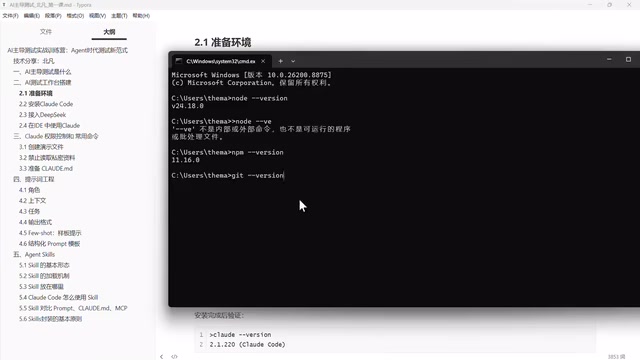
With the concepts clear, it's time for environment setup. Three things are needed: Node, npm, and Git. npm installs alongside Node, so no separate action is needed there. Git, however, is a must-install — testers who have only done functional testing may never have touched code or version control, making this step easy to overlook.
Verification is simple: open a terminal and run node, npm, and git separately. If version numbers display correctly, the installation is ready.
A Critical Detail When Choosing the Node Version
When downloading Node, there's one important detail: always choose the version with the LTS (Long-Term Support) blue badge, not the green "latest" version. The latest version is short-term maintenance only and may lose support after a while. The course recommends versions like v24.19 (LTS).
The only strict version requirement is for Node: it must be an LTS release. The v24 series (e.g., 24.18, 24.19) is fine, but versions like v14 — which have reached EOL (End of Life) — are absolutely not acceptable. Git and the configuration switching tool have no strict version requirements.
When downloading, choose the installer based on your OS: Windows users can double-click a standard installer; Apple M-series chips (M1/M2/M3/M4) should select the ARM package; older x64 machines should select x64. NVM (Node Version Manager) is a great tool, but for simplicity, a direct installer works fine — a blue-badge LTS version will remain usable for 5 to 10 years.
LTS (Long-Term Support) is a key concept in Node.js version management. Node.js follows an odd/even versioning rule: even-numbered versions (e.g., v18, v20, v22, v24) enter the LTS phase and receive 30 months of security maintenance and bug fixes; odd-numbered versions (e.g., v19, v21) are maintained for only 8 months as "preview" releases. EOL (End of Life) means a version has lost all official support — continuing to use it exposes you to unpatched security vulnerabilities. Using an EOL version in engineering projects is classic technical debt: it may work fine today, but dependency libraries gradually stop testing compatibility with older versions, and community support dries up when production issues arise. Choosing an LTS version is a baseline principle for production environments — and equally applicable to local setups like an AI testing workbench that need to run stably over the long term.
Configuring npm Mirror Acceleration
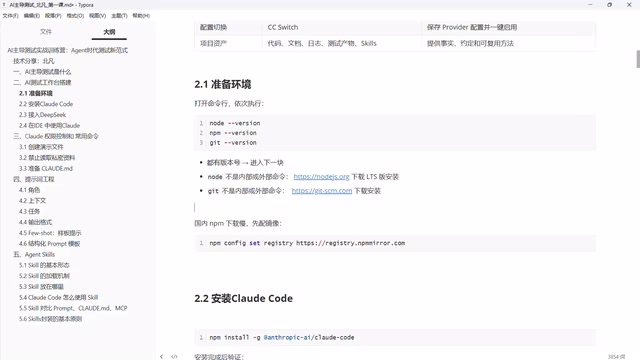
The npm registry is hosted overseas, making direct downloads very slow — especially on mobile broadband. After installing Node, you must configure a domestic mirror CDN. This only needs to be done once and is idempotent (running it multiple times causes no issues).
npm (Node Package Manager) is the package manager for Node.js. Its official registry server is in the United States, resulting in high latency, slow downloads, or even timeouts from within China. Configuring mirror acceleration works by pointing npm's download source to a domestic CDN node (such as the Taobao mirror at registry.npmmirror.com). All package requests are routed to domestic servers first, which sync from the official registry — users experience domestic network speeds. The configuration command is typically npm config set registry https://registry.npmmirror.com, which writes to the user-level config file and takes permanent effect. For corporate intranets or proxy environments, a private npm repository (such as Nexus or Verdaccio) can be configured as a proxy using the same principle. Note that mirrors have a slight sync delay — in rare cases, a newly released package may not yet be available on the mirror, in which case you can temporarily switch back to the official registry for a single install.
Installing and Verifying Claude Code
Once the environment is ready, install Claude Code via npm. If you skipped the mirror configuration, downloading from overseas will be extremely slow — that's why mirror setup and the install command are a natural pair. The install command can be run repeatedly and will always update to the latest version (the demo upgraded from version 220 to 227 during the course), without any destructive side effects. After installation, run the verification command to confirm success.
Note that Claude Code can't be used immediately after installation, because it refuses to serve users in China — registration, login, and usage are all blocked. The fix is the next step: connecting a domestic model like DeepSeek to Claude Code.
Summary
The value of this session lies in clarifying one key insight: AI testing doesn't mean "using AI at work" — it means letting AI independently lead the entire testing workflow, while humans step back into review and oversight roles. On the technical side, the course lays out a clear combination: Claude Code as the top-tier agent client, domestic models like DeepSeek as the core reasoning engine — balancing capability with compliance. For testers coming from a purely functional testing background, setting up the Node/npm/Git environment and configuring mirror acceleration is the first step. The real power comes later, with model integration and full workbench assembly.
Related articles

Random Pruning of the DPO Computation Graph: 1.4x Training Speedup and Lower Peak Memory
DPO training too slow and memory-hungry? This paper proposes a random pruning framework for the DPO computation graph, sampling independently across position, sequence, and branch dimensions; branch pruning achieves a 1.426x step-time speedup and cuts training time by about 30%, with in-depth attribution of memory and time gains.

Why Does JEPA Underperform MLM in Longitudinal EHR Representation Learning?
New study compares JEPA and MLM for longitudinal EHR representation learning on MIMIC-IV: three JEPA variants train stably without collapse but underperform MLM; target size, not heterogeneity, drives prediction error.

Transfer Learning + Visible Light Communication: A New Approach to Energy-Efficient Indoor Positioning
A study proposes a transfer learning-based visible light communication indoor positioning method, achieving 47% accuracy improvement on the BOSCH factory dataset, 67.5% model efficiency under high noise, and introducing the ME composite metric for energy-efficient positioning in energy-constrained industrial IoT scenarios.