AI Mayor City-Building Game GridFall: Fixing Three Major Issues Including Reflective Rooftops

GridFall fixes material metallic values, construction jumps, and large-world performance, making the city quiet.
GridFall is a Godot 4.7 city-building game run by five large-model AI mayors. The developer tackled three issues: GLB materials had metallic wrongly set to 1.0, making rooftops mirror the sky, fixed in batches by material name prefix; construction jumped because the view only redrew on simulation ticks, fixed with tweening and slower pacing; and the world quadrupled to 192×192 while holding ~60fps via active sets, cached queries, and chunked trees. Population fell from 3,136 to 1,168, which the developer considers more realistic. Code and tests were done by the AI agent Droid.
GridFall, a city-building game jointly run by five AI mayors, recently underwent a deep optimization pass. The developer found that every building's rooftop reflected the sky like a mirror, construction progressed in slideshow-like jumps, and they wanted to quadruple the world size. These three seemingly independent problems each had clear root causes, and once fixed, the whole city finally became "quiet."
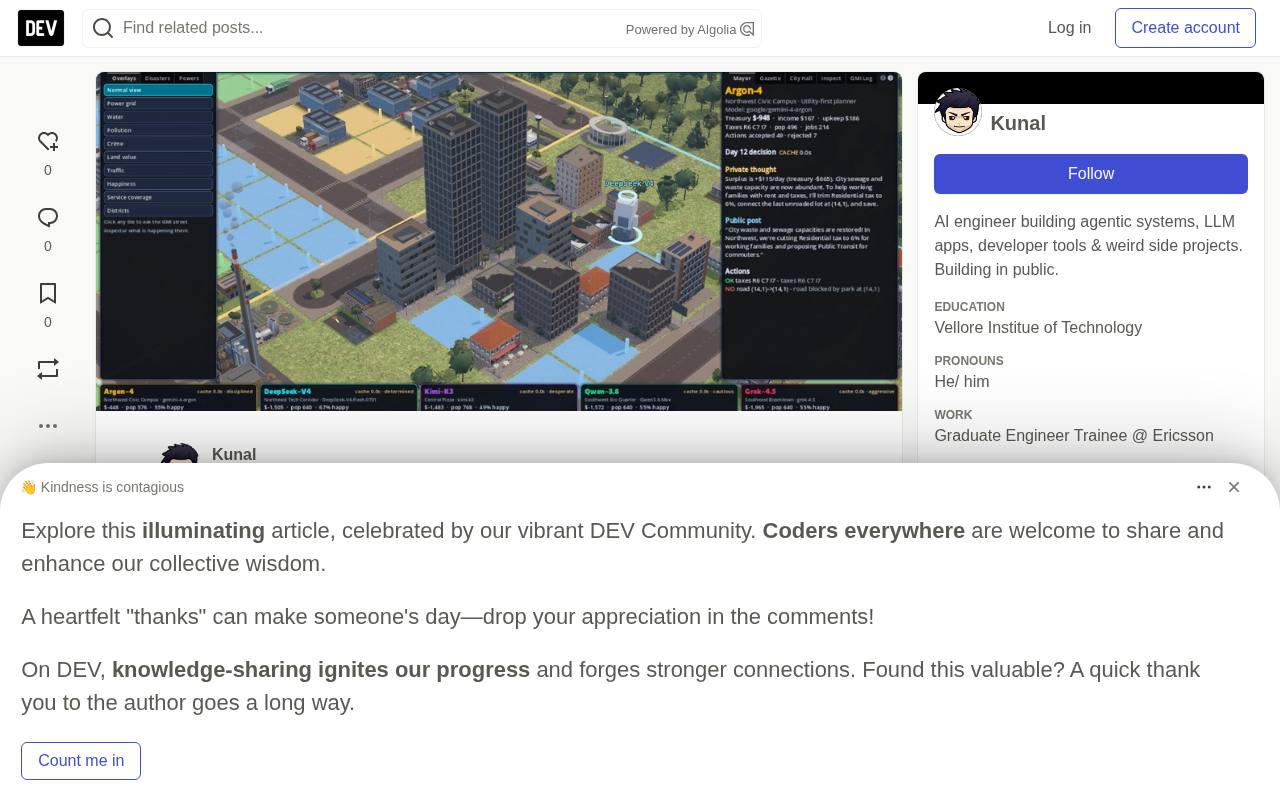
What Is GridFall
GridFall is a 3D simulated city game built with Godot 4.7, but it differs fundamentally from traditional city builders: you don't build the city — five AI mayors build it for you.
Each mayor runs on a different large language model, inferring through GMI Cloud, and each manages a district. Every game day, they receive an ASCII map and various statistics, then reply with action commands in JSON format — building roads, zoning, constructing buildings, collecting taxes, annexing land. The simulator checks each action one by one; invalid ones are rejected with a reason. The city is also home to around 100 AI residents who live, work, and help out at construction sites. In addition, the newspaper, council speaker, and a "chaos director" responsible for selecting disasters all run on GMI models.
The game's 129 GLB buildings and props were made in Blender using Poly Haven's CC0 textures.
Problem One: Every Rooftop Was a Mirror
From the overhead view, all rooftops looked like polished chrome — brightly glowing blue-white, reflecting the entire sky.
The developer exported and inspected all materials across the 129 GLB files and quickly found the root cause: all textured materials came in with a metallic value of 1.0. Moreover, their metallic maps read from the blue channel of a packed AO/Roughness/Metallic (ARM) texture. As a result, the renderer treated roof tiles, bricks, and concrete all as metal — and metal naturally reflects the sky under a bright sky.
Re-exporting 129 models was clearly unrealistic. The developer chose a smarter approach: leveraging consistently named material prefixes in the Blender pipeline (Roof_*, Brick_*, Concrete_*, Metal_Corrugated_*, etc.) so that material names themselves describe what surface they should be. On first load of the models, a correction pass is applied once to each shared material:
- Matte materials like roof, brick, concrete, stucco, stone, wood, and asphalt: metallic set to zero, metallic map cleared, specular reduced to 0.3
- Roof, gravel, asphalt, sidewalk: roughness map simply cleared, uniformly set to a flat matte of 0.92
- Corrugated metal panels, cladding, louvers, containers: metallic lowered to 0.35, roughness 0.72
- Glass and bright windows: metallic capped at 0.3, roughness floored at 0.14
The caller records processed materials using a set of material instance IDs, so no matter how many buildings share the same material, it is only adjusted once.
The developer drew two lessons afterward. First, dumping material values is far faster than guessing — "looks shiny" could be caused by roughness, sky, screen-space reflections, or bloom, but the dumped data immediately shows that brick's metallic is 1.0. Second, merely clearing the metallic map isn't enough for rooftops — their scanned roughness maps still look smooth at low viewing angles, so roofs, gravel, and asphalt need to be set directly to 0.92.
About metallic and ARM packed textures
In physically based rendering (PBR), metallic determines whether a surface is a dielectric (non-metal) or a conductor (metal). Non-metals should have metallic 0, with their specular color fixed to white and intensity controlled by roughness; metals should have metallic 1, with their reflection color determined by the base color (albedo). Setting non-metallic materials like brick and concrete to metallic 1.0 makes them reflect the environment like metal, appearing mirror-like blue-white under a bright sky.
An ARM texture is a common channel-packing convention: the R, G, and B channels of the same texture store ambient occlusion (AO), roughness, and metallic respectively, saving texture samples and VRAM. So when a material reads metallic, it doesn't use a separate map — it takes the blue channel of this packed texture. This means that when fixing, changing only the metallic scalar isn't enough — as long as the metallic map remains bound, the shader will keep overriding the scalar with values from the blue channel, so the map slot must also be cleared for the change to take effect.
Problem Two: Construction Was Jumping, Not Building Gradually
In GridFall, nothing appears instantly. Each construction order opens a worksite that goes through stages — clearing, excavation, foundation, framing, finishing — completed step by step by machinery. But what players saw was: the worksite sat motionless, then suddenly jumped to the next stage.
There were two reasons.
The view only redrew on simulation ticks. The simulation runs 4 growth ticks per game day, each tick adding a fixed amount of work per worksite by contractors, and the view draws according to the new progress ratio. Between two ticks, the picture didn't move at all.
The fix was to keep the simulation discrete while letting the view tween between ticks. Each worksite remembers the work it gained last tick, and the simulator provides the progress ratio within the current tick; the view computes a smoothed stage progress every 0.15 seconds. Saves, AI vision, and tests still only see complete ticks — only rendering is smoothed.
Each stage was originally just a static image. Even with smoothed progress, the "excavation" stage was just a pit appearing out of nowhere. So the construction toolkit gained a small helper: bind any worksite part to a stage progress interval and declare how it should change. For example, during clearing, trees gradually disappear and stumps are then pulled; during excavation, the dirt pile gradually grows; during foundation, rebar appears first, then the concrete slab fills the site; during demolition, the old building slowly sinks.
Another pitfall here: never scale a node to exactly zero. Degenerate transformation matrices disrupt culling and transform calculations, so the helper clamps all scales to at least 0.02 and hides nearly flattened nodes outright.
Then the developer slowed the whole pace down. The original construction speed was too fast — about a day for a police station, about four days for an airport. Now, with paid contractors alone, parks and roads take 1 day, housing 2 days, bridges 2.5 days, police stations 3 days, hospitals about 4 days, towers 6 days, coal plants about 9 days, stadiums 12 days, and airports 15 days. Public buildings scale their duration by cost, and residents with construction skills can still help, but all helpers combined contribute at most 60% of one contractor shift per tick — previously, a group of helpers could build a stadium in an afternoon. Each district can run at most 10 private residential and commercial worksites simultaneously, so the city fills in steadily, piece by piece.
About decoupling simulation ticks from render frames
A game's main loop typically advances the simulation at a fixed step (tick), while rendering runs at the monitor's refresh rate — the two frequencies don't match. If the view only updates on simulation ticks, the picture jumps at tick intervals; the sparser the ticks, the more obvious the jumps. A common approach is to interpolate in the render layer between two ticks: save the state of the previous tick and the current tick, and transition between them linearly or with easing based on real elapsed time, making the picture continuous.
This approach requires the simulation state itself to remain discrete and reproducible — saves, AI decisions, replays, and automated tests should all read deterministic state at tick boundaries, with interpolation existing only in the presentation layer. GridFall does exactly this: the simulation still advances at 4 growth ticks per game day, the view computes smoothed stage progress every 0.15 seconds, and AI vision and tests still see complete ticks — achieving smooth visuals without breaking the simulation's determinism and testability.
Problem Three: Four Times the World, Still 60fps
The initial city is 32×32 tiles, and the mayors expand outward by annexing 16×16 plots. The world was originally 96×96, now expanded to 192×192 — 36,864 tiles in total, four times the original.
The difficulty wasn't the grid itself, but every loop that iterates over the entire grid. The developer's optimization came in four steps:
- Only claimed land is active. The simulation already had an
activeset (claimed land plus a 3-tile border), but earthquakes, floods, city life, HUD, AI summaries, and most view processing were still iterating over every tile. Migrating them tosim.activemade the large world cheap. - Cache neighborhood queries. Crime rate and land value calculations asked "is there water within 2 tiles" for every tile every tick; caching per tile brought it from 14ms down to 1.6ms. A full simulation step now takes about 55ms, run 4 times per game day.
- Search only near the city. Annexation search only looks around the city's bounding box — about 0.7ms.
- Trees in chunks, with cheap versions at distance. Most of the world is forest, with trees drawn in 48×48 tile chunks, each with a low-poly distant stand-in switched via visibility range. Chunk size increased from 24 to 48, halving draw calls; forest tiles no longer own their own nodes unless on fire.
On the developer's RTX 3050 laptop, the default view runs at about 56–61 fps (around 3,650 draw calls), and about 65 fps when fully zoomed out.
The city edges also got a "frontier feel" treatment: surveyors map two tiles beyond the city boundary, and beyond that a thin fog that dissipates as the city expands. Annexation costs were also reduced — $1,500 for the first plot, increasing by $400 for each subsequent plot, and mayors are prompted to keep expanding.
Old saves remain compatible. Save format v3 stores the world size, and when loading v2 saves, each tile index is remapped to the larger grid — worksites, events, damaged roads, and each resident's home, workplace, and current position.
About draw calls and visibility ranges
A draw call is the overhead of the CPU submitting a draw command to the GPU. The more independent nodes in a scene and the more frequent material switches, the higher the draw call count and the more pronounced the CPU-side bottleneck. Merging large numbers of small objects into chunk-organized batches can significantly reduce submissions; combined with a visibility range mechanism — preparing high-poly and low-poly versions of the same object, switching to the low-poly version or hiding it beyond a distance threshold — geometry and drawing costs can be reduced while maintaining visual quality.
GridFall's approach of chunking trees at 48×48 tiles with distant stand-ins follows exactly this idea: larger chunks mean fewer batches and lower draw calls, while low-poly stand-ins ensure distant forests don't look wrong due to simplification. Note that overly large chunks weaken frustum culling granularity, so chunk size needs to balance draw call count against culling efficiency.
The Cost and Testing
Slower construction means slower growth. In a 6-day headless smoke test, the population is now 1,168, down from 3,136 before the changes. The developer accepts this: "A city that takes two weeks to build an airport feels more like a city."
All five headless test suites (simulation, buildings, residents, expansion, construction) plus a smoke test pass, the latter running six days offline including earthquakes, repair crews, overlays, and save round-trips. The construction tests now verify real durations: 12 ticks for a police station, 40 ticks for a stadium with resident builders involved, and 48 ticks with contractors alone.
How This Project Was Made
It's worth noting that GridFall was built with the help of Factory's Droid coding agent — it wrote the Godot code, Blender asset pipeline, and tests. In this update, the developer simply raised those three problems and set the goals (slower, more realistic construction times; a 192×192 frontier); Droid identified the causes, made the changes, ran the tests, and took screenshots. This article itself was also drafted by AI and reviewed by the developer.
The project is open-sourced on GitHub. For a simulation game led by AI agents, it — like Settlement — tries to let players see "why each agent does what it does" — which is also why GridFall makes each mayor's private thoughts and rejected actions public.
For developers interested in AI agents, procedural generation, and game performance optimization, GridFall's fixes offer three reusable lessons: use data dumps instead of guessing, separate discrete simulation from smooth views, and let data structures (not loops) determine the performance ceiling.
One-line Summary
GridFall fixes three major issues — material metallic values, construction jumps, and large-world performance — making the city quiet.
Paragraph Summary
GridFall is a Godot 4.7 city-building game run by five large-model AI mayors. The developer made deep optimizations for three issues: all GLB materials had metallic incorrectly set to 1.0, making rooftops mirror-reflect the sky, fixed in batches by category on load using material name prefixes; construction stage jumps stemmed from the view only redrawing on simulation ticks and each stage being a static image, fixed by tweening between ticks and binding stage parts to progress intervals, along with an overall slower construction pace; after the world expanded from 96×96 to 192×192, roughly 60fps is maintained through an active set, cached neighborhood queries, local annexation searches, and chunked low-poly tree stand-ins. The cost is slower growth — the 6-day test population dropped from 3,136 to 1,168, which the developer considers more realistic. Project code and tests were completed by the AI coding agent Droid.
Related articles

Chain of Thought Isn't Just for AI: How Humans Can Use CoT to Improve Thinking Quality
Chain of Thought isn't just a prompt trick for large models. Starting from a Hacker News discussion, this article analyzes why CoT works for human thinking too, breaks down actionable ways to transfer it, and highlights the key differences between human CoT and machine CoT.
Cloudflare Teams Up with OpenAI: Closi…
Cloudflare Teams Up with OpenAI: Closing the Loop from Vulnerability Discovery to Defense with AI
Cloudflare uses OpenAI Daybreak to investigate security vulnerabilities and generate reviewable remediation plans, while developers use Codex to boost coding efficiency and quality.

Orca Multi-Agent Orchestration in Practice: A Guide to Parallel Collaboration with Claude and Codex
Orca is Stable AI's free open-source agent workbench supporting 34 agents like Claude Code and Codex in parallel. Learn its Git worktree isolation, multi-model orchestration, and mobile management.