AI + Playwright Automated Testing: A Framework That Writes Its Own Test Cases

Playwright's out-of-the-box setup, smart waits, and native AI support are making it the new standard for Web automation testing.
This article systematically compares Playwright and Selenium across six dimensions. Playwright bundles its own browsers and sets up with a single command, eliminating driver compatibility issues. Its built-in auto-wait and BrowserContext isolation greatly improve script stability, and it runs roughly 30–50% faster. Most critically, Playwright's official CRI and MCP tools let LLMs directly control browsers to execute tests — enabling a new workflow where humans describe intent and AI generates and runs the test cases.
Why Automated Testing Has Entered a New Era
Selenium has long been the go-to choice for Web automation testing, but that's starting to change. According to analysis from technical creators on Bilibili, nearly all Web automation projects are expected to shift toward Playwright starting this year, with Selenium gradually fading out. This isn't driven by a single factor — it's the combined effect of improvements across environment setup, execution efficiency, AI support, and more.
For anyone looking to get started with Web automation testing, this trend marks a critical decision point: if you're starting from scratch, learning Playwright alongside AI tools may be far more valuable than continuing to invest in Selenium. This article draws on original shared content to systematically break down Playwright's core advantages over Selenium, and how AI is reshaping the way test cases are written.
Environment Setup: From Three Components to Out-of-the-Box Ready
Selenium's traditional workflow requires installing three components: the Selenium library itself, the target browser, and the corresponding browser driver (WebDriver). The biggest pain point with this setup is version compatibility — if the browser version and driver version don't match, the entire environment breaks down, and a significant amount of time gets burned on debugging the setup.
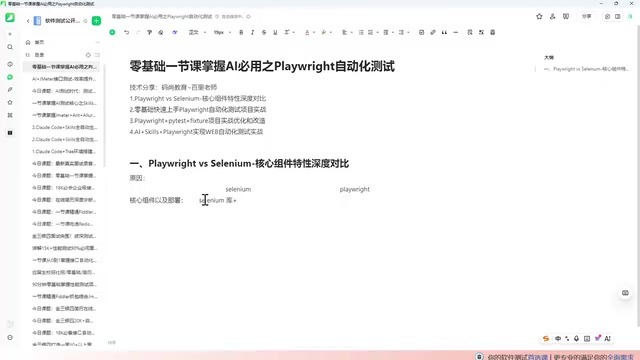
Playwright simplifies this considerably. It essentially only needs two things: the Playwright library and its built-in browsers. The browsers are bundled — no need to install them separately or match driver versions. The entire setup can be completed with a single command (playwright install), making it truly out-of-the-box. For beginners, eliminating the environment configuration headache alone is a significant efficiency gain.
Smart Waiting and Context Isolation
One unavoidable challenge in Web automation is handling element waits. Selenium provides three types of waiting mechanisms: explicit wait, implicit wait, and forced wait (sleep) — all of which require manually written code to control. Poor wait logic directly undermines script stability.
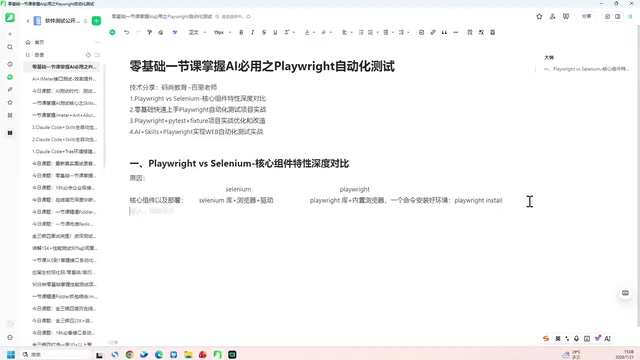
Playwright has a built-in intelligent auto-wait mechanism. Before interacting with an element, it automatically determines whether a wait is needed and handles it accordingly — no manual explicit or implicit waits required. This directly improves script stability and lowers the barrier to writing reliable tests.
The Difference in Context Isolation
Another key difference is context isolation. Selenium operates on WebDriver instances — each test has its own WebDriver, but there's essentially no isolation at the context level. Playwright introduces the BrowserContext mechanism specifically for context isolation: state such as cookies, cache, and login sessions can be kept completely independent between different tests, with no interference.
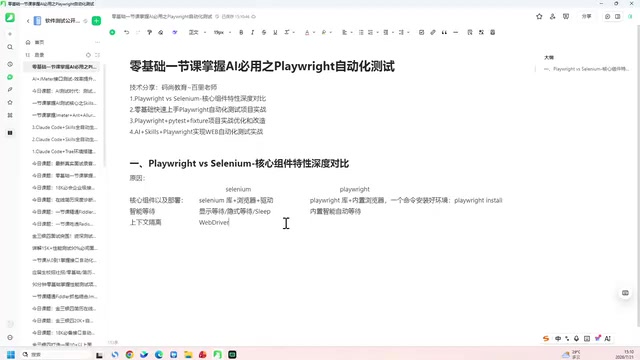
This isolation is especially useful when running parallel tests or simulating multi-user scenarios, effectively preventing tests from contaminating each other. The practical benefits are best appreciated in real-world scenarios.
BrowserContext is a Playwright-exclusive abstraction layer that sits between the Browser instance and Page (tab). A single Browser can spawn multiple BrowserContexts, and each Context has its own isolated cookie storage, LocalStorage, Service Worker registrations, and network interception rules. This is conceptually similar to a browser's "incognito window," but fully controlled in code. In CI/CD environments, test suites often spin up dozens of Pages in parallel. If those Pages share a single Context, cookies written by test A could be read by test B, causing test results to interfere with each other and making failures hard to reproduce. Playwright's recommended approach is to give each test case its own dedicated BrowserContext, which is destroyed after use — ensuring complete state isolation between test cases while avoiding the high overhead of launching an entire browser process per test.
Execution Speed and Code Generation
In terms of execution speed, Selenium uses a multi-handshake communication model with considerable waiting overhead, which limits its overall throughput. Based on figures from the original presentation, Playwright runs approximately 30% to 50% faster than Selenium — a significant time saving at scale when running large test suites.
On the code generation front, Selenium primarily relies on its IDE, which has relatively limited capabilities. Playwright provides a Code Generator (codegen) tool that not only records user interactions but also generates code in multiple languages, including Python, Java, C#, and other mainstream options.
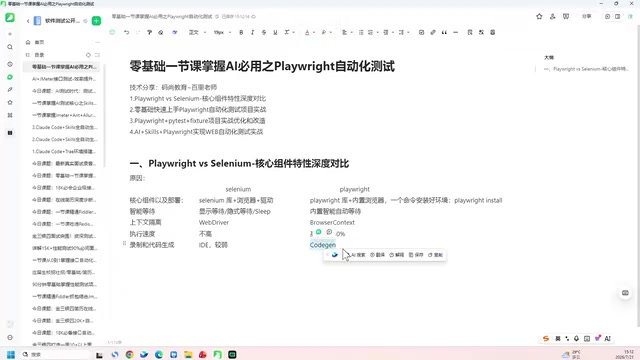
For teams with members using different tech stacks, multi-language support translates to lower migration and collaboration costs.
AI Integration: The Core Shift in Testing Frameworks
The most fundamental difference between Playwright and Selenium lies in native AI support. Selenium has virtually no AI integration, while Playwright's team has officially released two AI-oriented tools: Playwright-CRI and Playwright-MCP. These tools make it remarkably easy for AI to operate browsers, and they're a major reason why Playwright is considered the next-generation testing framework.
This brings about a conceptual shift: in real projects, testers are already writing far less code by hand, and increasingly relying on AI to generate test logic. In other words, humans describe the testing intent, and AI translates that intent into executable test case code.
Getting Started with Zero Prior Experience
This AI-driven workflow also simplifies the learning path. The advice from the original presentation is this: you don't need to master every code detail. Instead, focus on three things to get up and running:
- Know how to set up and configure the environment (one command does it);
- Understand Playwright's basic concepts and core components;
- Be able to write basic invocation logic.
Once you have these fundamentals, you can hand off complex test cases to AI. All you need to do is clearly communicate your requirements to the AI and let it generate and refine the code. This model lowers the barrier to entry for automation testing and lets testers focus on test strategy and scenario design rather than repetitive code details.
Playwright-MCP (Model Context Protocol) is an official Playwright tool built on the MCP protocol proposed by Anthropic. MCP is a standardized interface protocol that allows large language models (LLMs) to invoke external tools in a structured way, rather than generating arbitrary shell commands to interact with the environment. Playwright-MCP wraps browser operations — such as clicking, filling forms, taking screenshots, and retrieving page structure — into a set of MCP tools, enabling MCP-compatible models like Claude to directly "control" a browser and execute test flows without requiring a human to write scripts line by line. This is fundamentally different from the earlier paradigm of "having AI generate code and then running it manually" — here, AI is the primary agent executing the tests, not merely a code generation assistant. Playwright-CRI (Chrome Remote Interface) is more of a lower-level debugging protocol integration, primarily aimed at scenarios that require fine-grained control over the browser's internal state.
Summary: Recommendations for Choosing Your Stack
Overall, Playwright has clear advantages over Selenium across six dimensions: environment setup, smart waiting, context isolation, execution speed, code generation, and AI support. For anyone planning to get started with Web automation testing, beginning directly with Playwright and AI tools is the choice most aligned with current trends.
It's worth noting that the content of this article is primarily drawn from a single Bilibili creator's presentation, and some figures (such as the 30%–50% speed improvement) are experiential estimates from the presenter. Actual results will vary depending on the project and scenario — it's advisable to validate in your own environment before making a technical decision.
Related articles

AI Reverse-Engineers Monitor Firmware in 15 Minutes — Has the Hacking Barrier Been Flattened?
A security researcher used AI to reverse-engineer Dell monitor firmware in 15 minutes—entropy analysis, key extraction, MD5 verification—revealing encryption design flaws.

Mistral Voxtral 3: Real-Time Voice at 4 Cents per Minute, Challenging OpenAI
Mistral Voxtral 3 cuts real-time voice agent costs to 4 cents per minute, bundling three speech recognition models, a speech generation model, and a real-time voice toolkit, supporting 50+ languages and self-hosting. This article analyzes its pricing structure, sub-second response performance, and its strategic divergence from OpenAI and Gemini on data privacy versus out-of-the-box convenience.

WebMCP: Every Website as Its Own MCP Server, So AI Agents No Longer Rely on Screenshots
WebMCP lets websites expose tools via the document.modelcontext API, becoming directly callable MCP servers. This article explains its architecture, the Claude Code remote-debugging demo, Chrome's current support stage, and its impact on the agent ecosystem.