WebMCP: Every Website as Its Own MCP Server, So AI Agents No Longer Rely on Screenshots

WebMCP lets websites declare capabilities as MCP tools, so agents can call them directly without screenshot guessing.
The article introduces WebMCP, an emerging browser capability: websites can explicitly expose their own toolset through the document.modelcontext API, letting AI agents call page functions directly like a traditional MCP server instead of relying on screenshots, coordinate clicks, and DOM guesswork. Its invocation semantics stay consistent with MCP, and it also offers a declarative approach to remain compatible with traditional agents that don't support the protocol, reflecting a progressive-enhancement philosophy. In the demo, Claude Code takes over the browser through Chrome's Remote Debugging Protocol and calls the MCP server of any tab. Chrome has advanced WebMCP from the Origin Trial stage to a browser settings toggle, but the API is still early-stage, with cross-browser standardization as its design goal. The article argues it benefits automated testing and RPA in the short term and, in the long term, will push web pages from "human-readable" toward a dual identity of "agent-invokable."
Traditional AI agents operating web pages in the browser rely on screenshots, coordinate-based clicks, and DOM guesswork. This approach is fragile, inefficient, and nearly powerless against dynamic pages. WebMCP proposes another path: let websites actively declare what they can do, turning a web app into an MCP server that can be called directly.
From guessing at screenshots to declaring tools: a shift in interaction paradigm
Most browser agents today work by "looking" at the page—taking a screenshot, handing it to a vision model to judge button positions, then simulating clicks. This chain is long, high-latency, and breaks entirely the moment the page is redesigned.
The core change in WebMCP is that a website can explicitly expose its own toolset. You tell the agent "there's a search interface here" and "an order can be created here," and the agent can call them directly just like a traditional MCP server, without having to understand pixels and layout.
According to the video, this capability is implemented through an API called document.modelcontext, which lets agents list and invoke the tools a page exposes. This means front-end developers, beyond designing the interface, also need to think like they're designing a REST API about "how an agent can use my page."
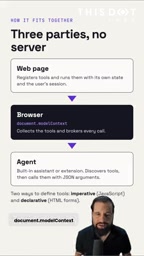
MCP (Model Context Protocol) is an open protocol proposed by Anthropic in late 2024, designed to let AI models discover and invoke external tools and data sources in a unified way. Its core abstraction is the "server": an MCP server declares to clients which tools, resources, and prompt templates it provides, and the client issues structured calls accordingly rather than relying on natural-language guessing. WebMCP reuses this semantic model, only swapping the host of the "server" from a back-end process to the web page itself. Understanding the tool registration and discovery mechanism of traditional MCP is therefore the prerequisite for understanding why the WebMCP invocation experience "looks very much the same."
API form: a calling experience consistent with MCP
The author emphasizes that WebMCP's invocation style "looks very much like using traditional MCP." This is good news for developers already familiar with the MCP ecosystem—there's no need to learn a new conceptual model, as the semantics of tool registration, discovery, and invocation carry over almost unchanged to the browser environment.
In addition to imperatively exposing tools through document.modelcontext, WebMCP also offers a declarative approach. The value of the declarative path lies in compatibility: even if a visitor uses a traditional agent (one that doesn't support the WebMCP protocol), the website still works normally, and won't be shut out to legacy agents because of the extra adaptation.
This "progressive enhancement" design philosophy is worth noting. It lowers the barrier for a website to adopt WebMCP—you can start with a layer of declarations, then gradually evolve toward full tool exposure.
Hands-on demo: Claude Code driving a web page via remote debugging
The video shows the demonstrator operating their own website with Claude Code, completed "strictly through the WebMCP API."
The key mechanism is the control channel: Claude takes over the browser through Chrome's Remote Debugging Protocol. Once the connection is established, it can request the MCP server of any tab and interact with the page the way it would with a traditional MCP server.
There's a structural change here that's easy to overlook. Traditional MCP servers connect to back-end services—databases, internal APIs, third-party systems. WebMCP moves MCP's foothold forward to the front-end application itself. What the agent gains is not just "automation capability" but also an understanding of the website's functionality: what this page can do, what constraints exist, and which operations are safe.
For agents, this approaches a kind of "self-describing interface"; for developers, it's extending the web page from "a UI for humans" to "an interface for agents."
Current stage: from Origin Trial to a browser settings toggle
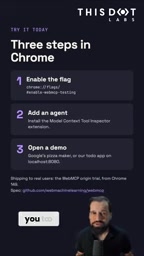
WebMCP is not yet mature. According to the video, Chrome has advanced this capability from the Origin Trial stage to one where it can be enabled directly through browser settings.
This stage positioning matters: an Origin Trial usually means the API is still changing, whereas reaching a settings toggle indicates the implementation is relatively stable, though the standard is still being developed. The author also explicitly notes that WebMCP is "still in its early stages."
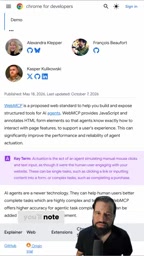
Chrome is officially publishing related materials, which can serve as a starting point for deeper understanding.
Another key piece of information is cross-browser intent. The author explicitly states that "this isn't just a Chrome thing"—WebMCP is designed to be available across all browsers. If this goal is realized, it could become a cross-browser standard for agent interaction rather than a private feature of any single browser—which is hugely significant for the ecosystem.
Origin Trial is a time-limited trial mechanism Chrome offers for Web platform features still being incubated: developers must register a token for their origin to enable the API on a small scale in a real user environment and collect feedback. Its existence usually means the specification is still evolving and the interface may undergo breaking changes. In contrast, a "browser settings toggle" is an experimental feature entry point for ordinary users (such as chrome://flags), indicating the underlying implementation is fairly complete and can be stably enabled—but it does not equate to standardization being complete. There's still a way to go before entering a formal W3C specification and being implemented by other browser engines, which also explains why the article emphasizes that it is "still in its early stages."
What it means for developers and the agent ecosystem
In the short term, WebMCP's most direct value is in automated testing and RPA scenarios. Tool declarations are far more stable than screenshot clicks, and cheaper to maintain.
In the medium term, it changes the boundary of collaboration between websites and agents. When a website proactively offers structured capabilities, agents no longer need to "reverse-engineer" the UI, but can execute tasks directly based on a contract. This is a substantive change for e-commerce, SaaS, and enterprise intranet applications.
In the long term, the author makes a fairly confident judgment: "I think a lot of websites will come with WebMCP built in," and says this will make the interaction experience between agents and websites "very rich." This is not merely a technical upgrade, but the evolution of web pages from "human-readable" toward a dual identity of "agent-invokable."
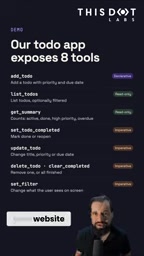
For developers, the move worth making is: start with one of your own internal projects, expose one or two read-only tools with document.modelcontext, and observe how agents behave and fail when calling them. The declarative approach costs less and is a good first step for validation.
For product teams, the question becomes: if agents are a new kind of user, what should my website expose, what should it hide, and how should it authenticate? Figuring these out before WebMCP becomes widespread will be far more comfortable than catching up afterward.
Background notes
Chrome's Remote Debugging Protocol (Chrome DevTools Protocol, CDP) is the low-level control interface the browser exposes externally; developer tools, Puppeteer, Playwright, and other tools are all built on top of it. By launching Chrome with --remote-debugging-port, external programs can enumerate tabs, inject scripts, and read network and console information. In the WebMCP demo, CDP plays the role of "transport channel": the agent first uses it to access the browser context, then accesses the toolset exposed by document.modelcontext within the page, thereby stitching together the control plane of browser automation and the tool-invocation plane of MCP.
One-line Summary
WebMCP lets websites proactively declare capabilities as MCP tools, so agents can call them directly without screenshot guessing.
Related articles

Amphibious Transforming Drone: Beyond 100x Power Savings, What Are the Real Needs?
Is the amphibious transforming drone just a gimmick? Starting from the 100x power difference of the M4 Morphobot, explore real application scenarios and thesis topic ideas, analyzing boundary conditions where pure drones and pure ground robots both fail.

Warhound Raises $200 Million: Genetically Engineered "War Dogs" Paired with Anduril Gear
Warhound raises $200M, backed by Ben Lamm and Palmer Luckey, to genetically engineer dogs for military and law enforcement use and equip them with Anduril gear. This article analyzes its technology direction, funding logic, and ethical controversy.

Claude API Comes to Google Cloud: IAM Integration and SDK Access Guide
Anthropic hosts the full Claude API on Google Cloud with IAM-controlled permissions and unified billing. This guide covers the Vertex AI and Anthropic-hosted entry points, IAM role configuration, and SDK access.