AI-Powered APP Reverse Engineering: Using LLMs to Automatically Patch Browser Environments

Using LLMs to automate browser environment patching reduces APP reverse engineering from days to hours.
This article demonstrates a complete workflow for APP reverse engineering using AI tools like OpenCode with GPT-5.5 or DeepSeek. The process covers packet capture analysis, Hook-based parameter tracing, algorithm extraction, and the key innovation: using LLMs to automatically patch browser environments. By leveraging pre-built Skill workflows and prompt engineering, the traditionally tedious environment patching work is compressed from hours to minutes.
Introduction: Crawler Reverse Engineering Enters the AI Era
Traditional APP crawler reverse engineering has always been an extremely high-barrier technical field, requiring developers to master a series of complex skills including JavaScript reverse engineering, Hook techniques, algorithm reconstruction, and browser environment patching. With the advancement of large language models, a new workflow is emerging—using AI to assist with the most time-consuming parts of reverse analysis.
This article is based on a practical case shared by a Bilibili content creator, outlining a complete workflow for APP reverse engineering that combines AI tools (such as OpenCode paired with GPT-5.5 or DeepSeekAd models). Important disclaimer: This article analyzes crawler reverse engineering methodology purely from a technical learning perspective. Any crawling activities should comply with the target platform's robots protocol, user agreements, and relevant laws and regulations. Do not use these techniques for illegal data collection or commercial exploitation.
Pre-Reverse Engineering Environment Setup
To perform reverse debugging on H5-packaged APPs, you need to prepare three categories of tools: hardware and development environment, debugging tools, and the AI toolchain.
Technical Background on H5-Packaged APPs and WebView Debugging
H5-packaged APPs refer to applications developed using web technologies like HTML5, CSS3, and JavaScript, then wrapped into native APPs through WebView containers (such as Android's WebView component or iOS's WKWebView). Common frameworks include Cordova, Ionic, and uni-app. The core business logic of these APPs runs inside the WebView, which means you can connect directly via Chrome DevTools' remote debugging protocol (chrome://inspect) to inspect network requests, DOM structure, and the JavaScript execution environment. This characteristic makes H5-packaged APPs relatively easier to reverse engineer compared to purely native APPs (which require decompiling SO libraries or DEX files). However, the generation logic for encrypted parameters is often hidden within obfuscated JavaScript code, still presenting significant analytical challenges.
Hardware and Development Environment
- PyCharm: For writing and running Python code
- Rooted Android device: The case study uses a rooted Android 13 physical device (emulators also work)
- WebView debugging plugin: Once installed, allows Chrome browser's remote debugging to take over H5 pages on the phone
AI Toolchain Configuration
This is the core variable in this practical exercise. The author uses OpenCode as the AI programming tool, configured with the GPT-5.5 model, while also noting that domestic models like DeepSeek and Kimi perform well in testing.
OpenCode is a terminal-based AI programming assistant that supports connecting to multiple large language models as backend inference engines. Its core value lies in allowing developers to interact with AI directly from the command line—reading local files, executing code, and modifying project files—forming a complete "conversation-execution-verification" loop. Unlike traditional ChatGPT web conversations, OpenCode can directly manipulate the local file system, meaning AI can read exported JS files from reverse engineering, automatically create environment patching scripts, and run Node.js to verify results, all without manual copy-pasting, dramatically improving workflow efficiency.
Furthermore, the author emphasizes the concept of "Skills" (workflows)—pre-packaging processing logic and prompts so that AI can automatically complete repetitive tasks following preset procedures.
This combination of "prompt engineering + AI automation" is precisely what distinguishes the new generation of reverse engineering workflows from traditional manual approaches.
Packet Capture and Encrypted Parameter Identification
After connecting to the phone via Chrome browser's remote debugging feature, the browser interface mirrors the phone screen in real-time. The author demonstrates packet capture analysis using community comment data from a specific APP.
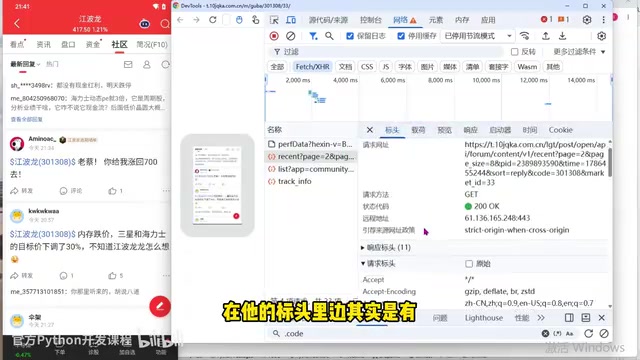
Discovering Key Encrypted Parameters
After packet capture, a special encrypted parameter was found in the request Cookie (called the v parameter in the video), along with a corresponding hexin-type field in the request Headers. The author points out: if this value is not included, the server returns empty data. Through comparison, the v value in the Cookie is bound to the Header value—this is the so-called "control parameter" and the core target of the entire reverse engineering effort.
Once this key parameter is located, the next task is to reconstruct its generation algorithm.
Hook Tracing and Algorithm Reconstruction
Pinpointing the Generation Location via Hook
The author employed a classic Hook approach: first injecting a Hook script in the console, clearing the original Cookie logic, then tracing the source of the v parameter layer by layer. Through breakpoint debugging, the parameter was ultimately found to be generated by a loop-controlled method (r = g.xxx() in the video).
Application of Hook Techniques in JavaScript Reverse Engineering
Hook technology is a core means of tracking data flow in reverse engineering. In JavaScript reverse engineering scenarios, the most common Hook methods include: rewriting document.cookie's setter/getter to monitor Cookie read/write operations; overriding XMLHttpRequest or fetch methods to intercept network requests; and using Object.defineProperty to hijack property access on specific objects. For example, the classic way to Hook Cookies is:
Object.defineProperty(document, 'cookie', {
  set: function(val) {
    if (val.indexOf('target_parameter_name') !== -1) {
      debugger;
    }
    return val;
  }
});
When the target parameter is written to a Cookie, the code automatically pauses at debugger, and the developer can trace back through the Call Stack layer by layer to ultimately locate the parameter's generation function. This method is more precise and efficient than global keyword searching.
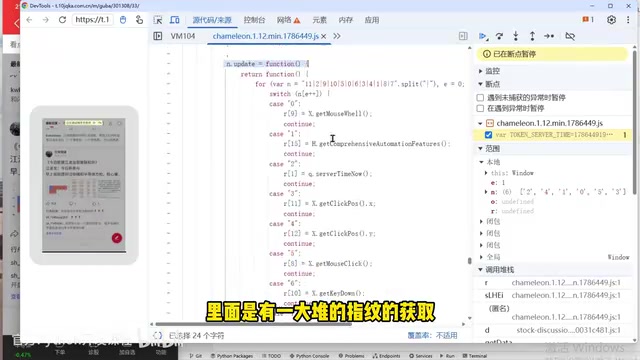
Extracting Core Encryption Algorithm Code
After locating the generation algorithm, the author exported the relevant encryption methods (such as the update method and its dependent g object) in their entirety. An important lesson here: debugging directly with IR (Intermediate Representation) doesn't work well—you must first organize the code completely before analyzing it.
Control Flow Obfuscation Technical Analysis
The author also mentions that such code is often processed with control flow obfuscation, making the structure quite complex. Control flow obfuscation is one of the most common JavaScript code protection techniques. Its principle is to break apart originally linear code logic, wrap it in switch-case statements inside a while loop, and control the execution order of code blocks through a state variable (usually an array). For example, steps A→B→C→D that originally executed sequentially become something like while(true){switch(state[index++]){case '3':A;break; case '1':C;break;...}} after obfuscation. This makes the execution flow extremely difficult to follow during static analysis, requiring developers to use dynamic debugging (stepping through breakpoints) to reconstruct the actual business logic. Common obfuscation tools include obfuscator.io, jsfuck, and proprietary hardening solutions from major platforms.
Processing this type of obfuscated code using traditional "extract code + patch environment" methods is extremely laborious. When running the exported algorithm in a standalone script, errors appeared as expected—indicating missing browser environment objects, preventing normal result generation. This leads to the most critical part of this practical exercise.
AI-Automated Browser Environment Patching: The Core Highlight
Patching browser environments (such as window, document, prototype chains, and various function protections) has always been the most tedious and time-consuming part of reverse engineering. The author demonstrates how to use large language models to automate this step.
Technical Details of Browser Environment Patching
When JavaScript code extracted from a browser runs independently in a Node.js environment, it throws errors due to missing browser-specific global objects. Objects that typically need to be simulated include: window (global scope), document (DOM operations), navigator (browser information like userAgent and platform), location (URL information), and screen (screen resolution). Deeper detection mechanisms include: prototype chain integrity verification (e.g., whether Object.getPrototypeOf(navigator) points to Navigator.prototype), function toString protection (checking whether native code's toString() returns '[native code]'), Canvas fingerprinting, WebGL fingerprinting, and headless browser detection (e.g., checking whether navigator.webdriver is true). High-quality environment patching requires precisely simulating these details; otherwise, the server's anti-crawling mechanisms will identify it as a non-genuine browser environment.
Two Prompts to Handle Environment Patching
The author's approach is remarkably simple—have the AI read the JS file, then give the following instructions:
Step 1: Have AI read our JS file
Step 2: Based on this JS file, this JS is missing browser environment objects. Please patch the environment and verify whether the output is correct.
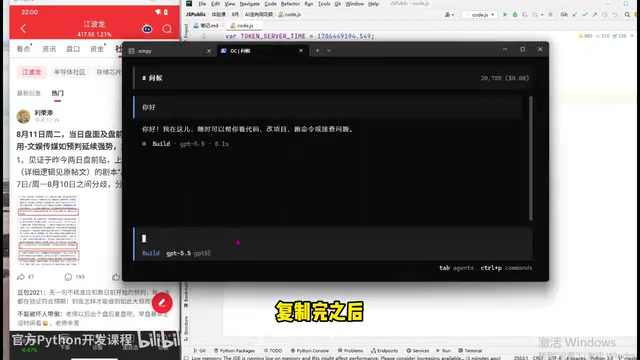
The Power of Skill Workflows
An even more efficient approach is using pre-written Skills. The author demonstrates his custom environment-patching Skill, where AI automatically executes the following workflow:
- Read the JS file for initial verification
- Collect missing environment information (such as prototype chains, descriptors, function protections, etc.)
- Automatically patch with high-fidelity browser environment simulation
- Clean up temporary files and run tests to verify results
Methodology of Skill Workflows and Prompt Engineering
A Skill is a workflow encapsulation mechanism in AI programming tools, essentially a set of predefined prompt templates and execution steps. It's similar to function encapsulation in traditional programming—solidifying verified best practices into repeatable, callable processes. A good Skill typically includes: clear input definitions (e.g., "read the specified JS file"), step-by-step execution logic (e.g., "first identify missing environments → then generate simulation code → finally verify results"), and exception handling strategies (e.g., "if execution errors occur, analyze the error message and patch the corresponding environment"). This methodology borrows from the DevOps concept of "Infrastructure as Code"—transforming experience into executable, version-controlled, shareable automated processes, enabling knowledge reuse at scale.
The author emphasizes that the AI-generated environment is "high-fidelity to a real browser," even surpassing the quality of manually written code, capable of handling multiple anti-crawling mechanisms including prototype chain detection. However, he also acknowledges that whether AI can produce high-quality code largely depends on the level of upfront debugging and Skill refinement—for instance, the case encountered a Headless detection pitfall that required additional guidance for AI to handle.
Ultimately, the script successfully produced correct results, compressing the entire environment patching process from the traditional hours-long effort down to just a few minutes.
Technical Reflection: How AI Changes the Reverse Engineering Workflow
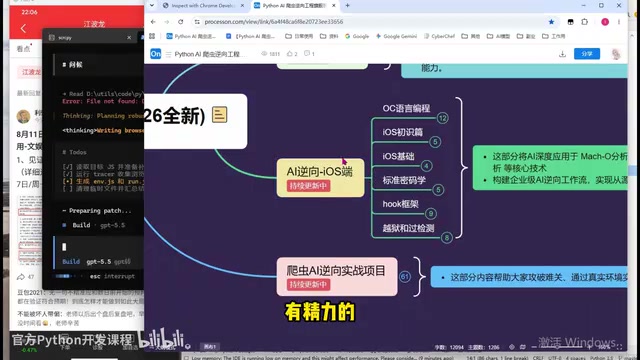
From this case study, it's clear that AI hasn't replaced the reverse engineer's core capabilities—packet capture analysis, parameter identification, Hook tracing, and algorithm recognition still require human-led judgment. What AI truly changes is execution-level efficiency:
- Environment patching automation: Delegating the most tedious grunt work to large language models
- Skill reusability: A successfully debugged workflow can be repeatedly applied to different targets
- Lowering the learning barrier: Beginners can understand the entire reverse engineering process more quickly with AI assistance
The author mentions that manually completing an APP reverse engineering project used to take 4-5 days, but now with AI and Skills it only requires 2-3 hours. This efficiency improvement is very real.
Capability Boundaries of Human-AI Collaboration
It's worth noting that this human-AI collaboration model has clear capability boundaries. AI excels at pattern-based, rule-driven work—such as patching missing environment variables based on error messages, or generating simulation code based on known patterns. The creative judgment in reverse engineering—such as determining which parameter is a key encrypted field, deciding which level to approach the Hook from, or identifying anti-debugging traps in the code—still heavily depends on the engineer's experience and intuition. Future development may see AI providing assistance at the "understanding" level as well (such as automatically identifying obfuscation patterns and suggesting reconstruction strategies), but at the current stage, AI primarily plays the role of "efficient executor" rather than "decision-maker."
Compliance Boundaries to Be Aware Of
It's important to emphasize that the techniques described in this article are a clear double-edged sword. Crawler reverse engineering itself is a neutral technical capability, but using it to bypass financial or e-commerce platform risk control mechanisms for large-scale data collection may cross legal boundaries. According to Article 285 (Illegal Intrusion into Computer Information Systems) and Article 286 (Destroying Computer Information Systems) of the Criminal Law of the People's Republic of China, as well as the Cybersecurity Law, Data Security Law, and Personal Information Protection Law, unauthorized access to others' system data or circumventing technical protection measures may constitute criminal offenses. Learners should apply these techniques only for legitimate purposes such as security research and compliance testing, and avoid venturing into gray areas.
Conclusion
The rise of AI-powered reverse engineering marks the crawler field's transition from the "pure manual era" to the "human-AI collaboration era." Mastering the AI toolchain and learning to encapsulate reusable Skill workflows is becoming a new core competency for reverse engineers. But the stronger one's technical capabilities become, the more important it is to uphold compliance boundaries—a principle that every practitioner should remember.
Related articles

Mistral Voxtral 3: Real-Time Voice at 4 Cents per Minute, Challenging OpenAI
Mistral Voxtral 3 cuts real-time voice agent costs to 4 cents per minute, bundling three speech recognition models, a speech generation model, and a real-time voice toolkit, supporting 50+ languages and self-hosting. This article analyzes its pricing structure, sub-second response performance, and its strategic divergence from OpenAI and Gemini on data privacy versus out-of-the-box convenience.

WebMCP: Every Website as Its Own MCP Server, So AI Agents No Longer Rely on Screenshots
WebMCP lets websites expose tools via the document.modelcontext API, becoming directly callable MCP servers. This article explains its architecture, the Claude Code remote-debugging demo, Chrome's current support stage, and its impact on the agent ecosystem.
MCP Protocol-Driven AI Testing Agent: …
MCP Protocol-Driven AI Testing Agent: Automated Execution, Diagnosis, and Reporting
Introduces an MCP protocol-based AI testing Agent: using FastMCP to expose PyTest execution tools, running Llama 3.2 3B locally with Ollama for failure diagnosis, automatically generating timestamped reports and comparing them with historical results to create a closed loop of test execution, root cause analysis, and fix tracking.