AI SDK tool-bash Package Update: Dependency Upgraded to ai@7.0.170
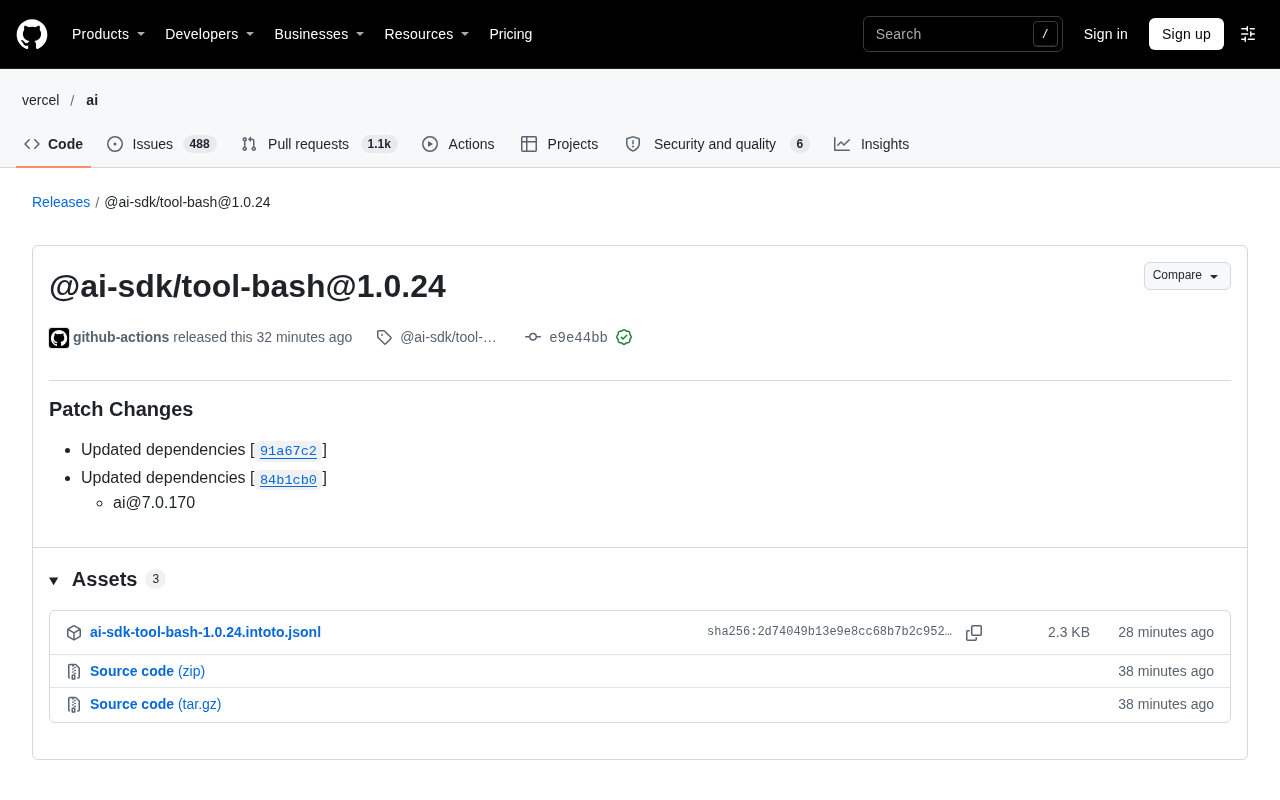
@ai-sdk/tool-bash releases patch 1.0.24, only syncing dependency ai@7.0.170, with low upgrade risk.
The article introduces the release of @ai-sdk/tool-bash 1.0.24. Marked as a patch change, it contains no new features or breaking changes; the only substantive change is updating the core ai dependency to 7.0.170. The article explains what a patch version means under semantic versioning, noting that the toolkit's own API is unchanged but the underlying ai package update may indirectly affect runtime behavior. The release was automated by the github-actions bot with GPG-signed commits, which can serve as supply chain audit evidence. The author also analyzes from a dependency chain perspective, noting that the toolkit's release cadence follows the core ai package with limited room for independent evolution. Finally, upgrade advice is given: it is a low-risk update; verify dependency compatibility in a development environment first, then decide whether to push to production.
The @ai-sdk/tool-bash package in the AI SDK ecosystem has released version 1.0.24. This is a patch update whose main change is synchronizing the upstream dependency version. For developers using this toolkit, understanding the specifics of this update and its scope of impact helps determine whether upgrading is necessary.
Core Content of the Version Update
According to the release notes on GitHub, @ai-sdk/tool-bash@1.0.24 is marked as Patch Changes. This means the update contains no new features or breaking changes and is a maintenance-oriented version iteration.
The release notes list two dependency update entries, corresponding to commits 91a67c2 and 84b1cb0. One of them updates the dependency to ai@7.0.170. In other words, this toolkit itself has no code logic adjustments—its changes come from the core ai package it depends on.
What a Patch Update Actually Means
In the Semantic Versioning (SemVer) system, patch versions are typically used to fix issues or synchronize dependencies. For toolkits like @ai-sdk/tool-bash, a version change in the ai dependency may indirectly affect runtime behavior—even if the toolkit's own API hasn't changed, updates to the underlying ai package may bring bug fixes or subtle behavioral adjustments.
If developers have already pinned the ai version in their project, they should watch for potential conflicts in the dependency tree when upgrading this toolkit. Conversely, if the project always tracks the latest patch version of ai, this update can generally be integrated smoothly.
Semantic Versioning (SemVer) specifies version numbers in the form MAJOR.MINOR.PATCH: a major version change indicates incompatible API changes, a minor version indicates backward-compatible new features, and a patch number is used only for backward-compatible bug fixes. In the npm ecosystem, range specifiers like ^1.0.24 allow patch and minor upgrades by default, while ~1.0.24 allows only patch upgrades, and an exact version fully locks the version. Therefore, determining whether a patch update is "safe" requires looking not only at the package's own code but also at whether its dependencies have been loosened or tightened—if a dependency is declared as ^7.0.0, installation may actually resolve to a version newer than what the release notes mention, which is precisely why lock files (package-lock.json, pnpm-lock.yaml) exist.
Release Process and Trustworthiness
This release was completed by the github-actions bot, and commit e9e44bb carries a verified signature on GitHub with GPG key ID B5690EEEBB952194. The release page also provides 3 assets for download.
From an engineering perspective, the combination of automated releases and signature verification indicates that the package's release process has been incorporated into a standardized pipeline. For teams concerned about supply chain security, this type of signature information can serve as one basis for auditing.
Observations from a Dependency Chain Perspective
@ai-sdk/tool-bash is positioned to provide bash tool capabilities for the AI SDK. Its release cadence largely follows the core ai package. This update advances the dependency to ai@7.0.170, indicating that the maintainers are keeping the toolkit in sync with the core library. The benefit of this follow-the-leader strategy is reduced version fragmentation; the cost is limited room for the toolkit's own independent evolution.
GPG signature verification relies on the publisher signing commits or artifacts with a private key and the verifier checking them with the corresponding public key, thereby confirming that the content indeed came from the party holding that private key and has not been tampered with. Automated releases triggered by GitHub Actions typically use GITHUB_TOKEN or npm's provenance mechanism, the latter of which generates a publicly verifiable build provenance attestation linking the published package to a specific repository, commit, and workflow. For teams concerned about supply chain security, signature verification and provenance checks can be incorporated into the CI process, for example using npm audit signatures to verify the signature integrity of installed packages.
The dependency tree in the JS ecosystem is a nested structure, and different versions of the same package may be pulled in simultaneously by multiple dependents. When @ai-sdk/tool-bash advances ai to 7.0.170 while other parts of the project still depend on ai@7.0.150, the package manager may install two copies, leading to type inconsistencies or split singleton state (e.g., shared configuration objects, non-shared caches). npm uses a nearest-hoisting strategy, pnpm uses strict content-addressed isolation, and yarn's PnP writes no node_modules at all. To troubleshoot such issues, use npm ls ai or pnpm why ai to view the actually resolved versions, and unify versions via the overrides/resolutions fields when necessary.
Upgrade Recommendations
For developers using this toolkit, 1.0.24 is a low-risk update. It is recommended to upgrade in a development environment first and run the existing test suite to confirm that ai@7.0.170 does not conflict with other project dependencies before pushing to production. If the project has a strict dependency version locking policy, you can wait until the next feature release to handle it together.
Note that this release note lists only dependency updates and does not mention any details about behavioral changes or bug fixes. Therefore, the upgrade decision should be based primarily on your version management strategy for the ai package rather than on expecting new features from this toolkit itself.
Related articles
Gemini 4 Hydrogen Hands-On: Google's Fastest and Cheapest AI Model
Hands-on with Gemini 4 Hydrogen: the fastest, cheapest model in the Gemini 4 family. We break down the Carbon/Argon/Hydrogen split, API pricing traps, free-tier limits, and the cost trade-offs of four thinking levels—with a real bug-debugging demo.
Gemini 4 Hydrogen vs Sonnet Comparison Test: Uses Only 1% of Weekly Quota, Performance on Par
Hands-on test: Gemini 4 Hydrogen vs Sonnet on the same CRUD task—Hydrogen used only 1% weekly quota with comparable performance and better UI details, while Anthropic's model used 7%. Developer says daily tasks don't require expensive models.
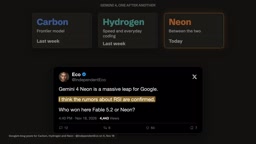
Gemini 4 Neon Released: Beats Opus 5.5 on Multiple Benchmarks, Google Returns to the Top Tier
Google DeepMind releases Gemini 4 Neon: 61 on the Artificial Analysis intelligence index (3rd) and 1st on the coding index, beating Opus 5.5 on multiple benchmarks. $3/$15 per million tokens; available in the Gemini API and AI Studio.