@ai-sdk/workflow-harness 1.0.145 Released: Upgrades to Stable Workflow SDK 5.1.0

@ai-sdk/workflow-harness 1.0.145 patches in stable Workflow SDK 5.1.0 support.
`@ai-sdk/workflow-harness` 1.0.145 is a single-change patch update that officially upgrades its internal Workflow SDK dependency from a pre-release state to the stable 5.1.0 release, reducing runtime unpredictability in production environments. The companion package `@ai-sdk/harness` was published at the same version, reflecting standard monorepo grouped-release practices. The release was triggered by GitHub Actions and verified with GPG signing, meeting baseline supply chain security requirements. As a SemVer patch, it is backwards-compatible — no code changes are needed, though running your full test suite post-upgrade is still advisable.
Release Overview
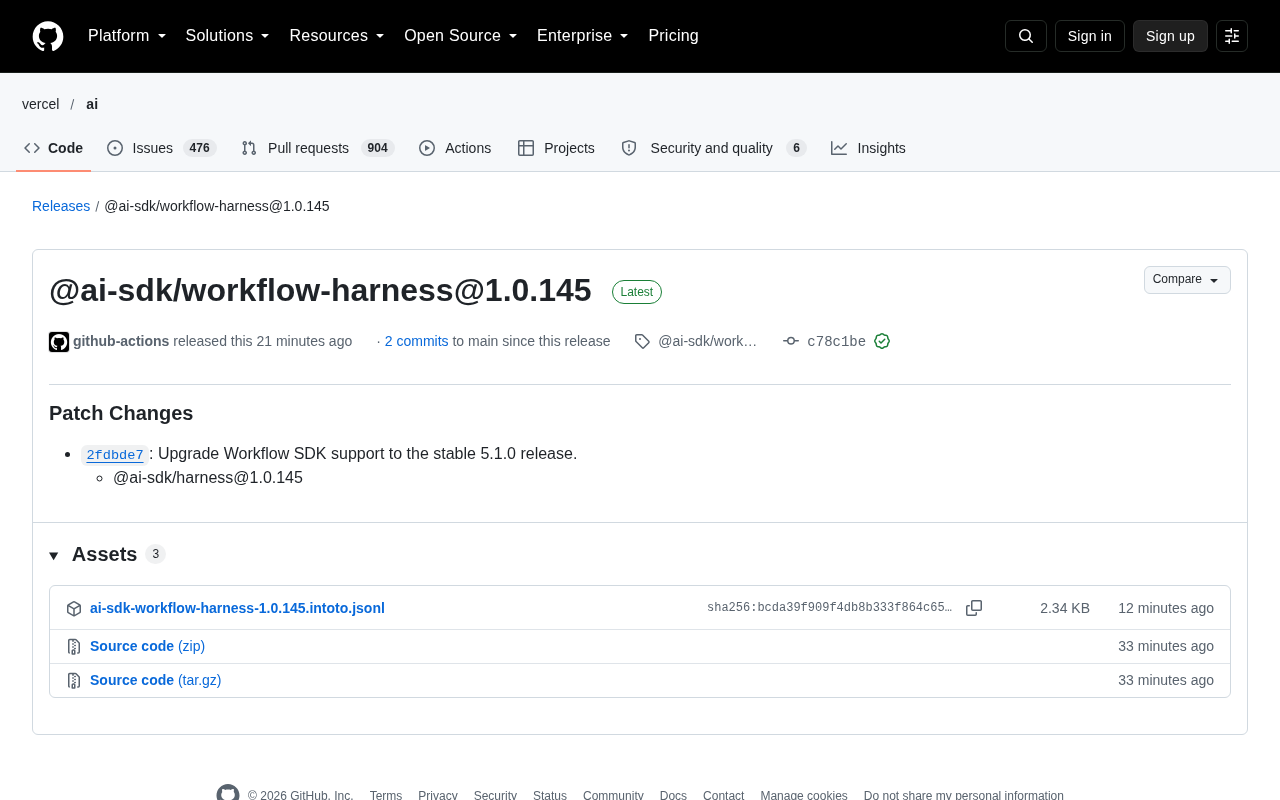
@ai-sdk/workflow-harness has published version 1.0.145, a patch-level update with a single, well-defined change: upgrading Workflow SDK support to the stable 5.1.0 release. This version was published via GitHub Actions automation and verified through GitHub's verified signature mechanism (GPG key ID: B5690EEEBB952194), ensuring the integrity and trustworthiness of the release artifact.
For developers relying on the AI SDK ecosystem for workflow orchestration, patch updates like this may not introduce breaking changes, but they are a critical step toward staying aligned with stable upstream SDK versions.
Key Change: Workflow SDK Upgraded to Stable 5.1.0
According to the release notes, this update contains a single Patch Change:
2fdbde7: Upgrade Workflow SDK support to the stable 5.1.0 release.
In practical terms, this means workflow-harness no longer depends on a pre-release or release-candidate version of the Workflow SDK — it now officially targets the stable 5.1.0 branch. For production users, this reduces the risk of unpredictable upstream SDK behavior, making it a recommended upgrade to follow.
It's also worth noting that the companion package @ai-sdk/harness was published simultaneously at version 1.0.145, keeping version numbers in sync. This grouped release pattern is common in monorepo projects, typically managed by tools like Changesets to coordinate versioning and changelogs across packages.
Release Mechanics and Engineering Practices
A few noteworthy engineering details stand out in this release:
Automated Publishing
The release was triggered by the github-actions account, with commit hash c78c1be, sitting just 2 commits ahead of the main branch at the time of release. This reflects a highly automated CI/CD pipeline — frequent, lightweight version iterations with minimal manual intervention.
Signature Verification
The commit was signed using GitHub's trusted signing mechanism and carries a verification badge under vigilant mode. As software supply chain security becomes increasingly critical, signed releases help consumers confirm that artifacts have not been tampered with.
GitHub's Vigilant Mode is an account-level security setting. When enabled, GitHub displays an "unverified" warning on any commit that cannot be matched to a registered GPG or SSH public key, while verified commits display a green "Verified" badge. For CI bot accounts (such as github-actions[bot]), GitHub uses its own hosted GPG keys (e.g., B5690EEEBB952194 in this case) to sign auto-generated commits. Consumers can verify the signature chain directly via the GitHub API or UI, establishing a traceable root of trust from source code to published artifact at the supply chain level.
Patch Semantics
Incrementing only the patch segment follows the Semantic Versioning (SemVer) principle of "backwards-compatible bug fixes." Developers should theoretically be able to upgrade without modifying existing code. That said, it is still recommended to run your full test suite after upgrading to verify consistent behavior from the underlying SDK.
@ai-sdk/workflow-harness and @ai-sdk/harness are managed together under a monorepo architecture. Tooling like Changesets can automatically generate version bumps and CHANGELOG entries for multiple sub-packages after a single PR merge, then trigger a unified npm publish via GitHub Actions. This pattern eliminates version inconsistencies that arise from manually publishing packages one by one, and makes grouped releases the standard practice for projects of this type. The core Changesets workflow is: developers attach .changeset/*.md files to their PRs declaring the affected scope and change level (major/minor/patch); on the release branch, CI aggregates these files, bumps versions accordingly, and clears the changeset records.
Recommendations for Developers
If you are using @ai-sdk/workflow-harness to build testing or orchestration environments for AI workflows, this upgrade is worth following. Pinning your dependency to the stable Workflow SDK 5.1.0 helps ensure more predictable runtime behavior and lays the groundwork for future feature updates.
Since the original release notes are minimal, developers interested in what specifically changed in 5.1.0 compared to prior versions are encouraged to consult the Workflow SDK's own changelog for a complete picture of features and fixes.
Note: This article is based on the publicly available GitHub Release notes. The official Patch Changes entry is the authoritative source of record.
Related articles

Gaussian Process Bandit Optimization: Exploration Strategies and Inference Regret Guarantees
Cumulative regret guarantees in Bayesian optimization fail to reflect final recommendation quality. This article examines a new study that provides inference regret guarantees for Gaussian process bandit optimization through exploration query strategies and fill distance analysis, validated on hyperparameter optimization and control tasks.

The Most Detailed Codex Guide on Bilibili: From Installation to Real-World Practice
The most detailed Codex guide on Bilibili: from app store installation to daily work mode configuration, with a real coffee shop project demonstrating file organization, data extraction, dashboard creation, and other practical tasks. Learn to use Plan Mode and desktop pets to leverage Codex efficiently.

Appearance Compensation in Volume Rendering: Why RGB Accuracy Cannot Guarantee Density Correctness
Volume rendering research reveals that volumetric data perfectly reproducing external RGB views may still contain density errors: appearance compensation can double central density and keep external rays unchanged even when L2 error exceeds 14.52%. Density recovery depends on appearance capacity, spatial resolution, and measurement design.