AI Video Beginner's Guide: Cloud vs. Local Deployment — A Full Breakdown of Cost, Speed, and Quality

Cloud AI video vs. local deployment: a 100x cost gap explained with a full breakdown of speed, quality, and model rankings.
This article compares cloud platforms and local deployment for AI video generation, centered on the impossible triangle of cost, speed, and quality. Cloud offers instant access to top-tier models but charges by the second; local deployment trades upfront hardware cost for near-zero marginal cost, with quantization and acceleration techniques that dramatically cut generation time at some quality loss. The 2026 model tier list shows closed-source Seedance 2.5 leading overall, with open-source MiniMax H3 as the standout. Recommendations are tiered: beginners should start in the cloud, quality-first users should prioritize cloud, and teams should split workloads between both to control costs at scale. Local also offers privacy, looser content moderation, and no queue times.
The same 10-second AI video cost nearly ¥100 on a cloud platform, but only ¥0.80 in electricity when run locally — a gap of over 100x. This was the provocative question Bilibili creator Nelly raised in her latest video: for someone just getting started with AI video, should you buy a cloud subscription or set up local deployment yourself?
This article won't walk you through parameter tuning or button-clicking. Instead, it helps you understand the underlying logic of each approach and how to choose the one that fits your situation best.
Cloud vs. Local: The Fundamental Difference
Many people assume "making AI videos" just means opening Kling, Seedance, or Hailuo and clicking a button — but the underlying mechanics actually determine your entire cost structure.
After training a video model, companies typically deploy it on their own compute clusters and sell access via API. This means the same model often appears across a dozen or more platforms — including the model developer's own official platform, as well as aggregator platforms like Lovart and TabNow that bundle multiple third-party models. Users don't need any specific hardware; all the compute comes from the vendor's infrastructure. The trade-off is that you pay for every generation.
Global compute is currently scarce, and AI video is extraordinarily compute-intensive. With Seedance 2.5, for example, generating a fully maxed-out 30-second 1080P clip can cost nearly ¥170 with a single click. As a result, almost all online platforms recover costs through membership tiers or credit subscriptions.
Open-source models work differently. "Open-source" means the model weights are publicly available for download — anyone can deploy them locally for free, and the technical community can build on them further. The quantization and acceleration techniques discussed later in this article are direct products of the open-source ecosystem. That said, open-source doesn't automatically mean free: if an open-source model is deployed on a platform's own servers for you to use, you'll still pay. True zero-cost usage only happens when you run everything on your own local hardware.
What are model weights? Weights are the core concept for understanding the open vs. closed-source divide. A weight file is essentially the set of billions of numerical parameters saved after a neural network finishes training — typically ranging from tens to hundreds of gigabytes. Closed-source model weights are kept strictly confidential and can only be accessed via the company's API. Open-source models host their weight files on platforms like Hugging Face for anyone to download. Once downloaded, you need an inference framework (such as ComfyUI or Diffusers) to run the model locally — this process is what we call "local deployment." After the initial download, each subsequent generation only consumes local electricity, with theoretically unlimited usage. This is the fundamental reason local deployment has near-zero marginal cost.
2026 Model Tier List: How Big Is the Gap Between Open and Closed Source?
Based on public rankings from platforms like Arena AI and her own hands-on experience, Nelly compiled a 2026 tier list of mainstream AI video generation models.
Overall, closed-source models still have a slight edge over open-source. In the open-source camp, MiniMax's H3 stands out as the clear leader. On the closed-source side, Seedance remains dominant, though several top players are locked in fierce competition just below.
Looking at the top tier (T0): Seedance 2.5 delivers the highest image quality; H3, the Gemini series, and other leading models are closely bunched together; and Seedance 2.0, while slightly behind, remains a go-to choice for many creators. The author openly acknowledges this ranking isn't definitive and may vary by use case.
The Impossible Triangle: Cost, Speed, and Quality
The core decision between cloud and local comes down to three factors — cost, speed, and quality — which currently form an "impossible triangle" where you can't fully optimize all three at once.
Cost: Cloud Charges by the Second, Local Approaches Zero
Cloud platform pricing generally tracks closely to the underlying API rates: Seedance 2.5 averages roughly ¥2/second, Seedance 2.0 about ¥1/second, and H3 and Gemini series around ¥0.60–0.80/second. Subscription memberships are typically more cost-effective than buying equivalent credits outright — as long as you actually use up your monthly quota. During competitive periods, platforms often run price wars worth taking advantage of.
The upfront cost of local deployment depends on your hardware. If you already have a capable discrete GPU, starting cost is essentially zero. If you don't, you're looking at a meaningful hardware investment. That said, even lower-end cards like the RTX 3060 or 2060 can run the best open-source model, H3 — the difference lies in speed and quality, not whether it works at all.
Speed: Hardware and Optimization Techniques Are the Key Variables
Generation speed depends first on resolution and duration. On a third-party aggregator platform during off-peak hours, generating a 5-second 720P video takes: H3 and Gemini roughly 2.5 minutes, Seedance 2.5 about 3 minutes, and Wan (One) about 5 minutes.
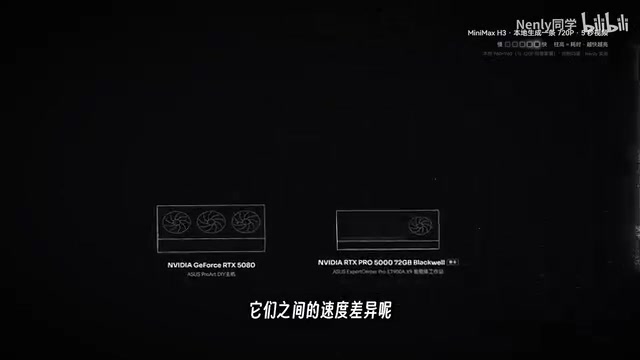
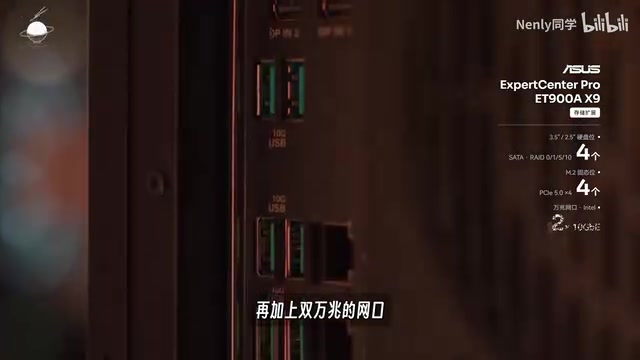
Locally, speed is largely determined by your hardware. The author tested two machines provided by ASUS: an ET900AX9 workstation with dual RTX Pro 5000 GPUs and 144GB of VRAM, and an RTX 5080 desktop. Running H3 at its original precision for 720P output, the workstation took about 6 minutes per card, while the 5080 took just over 10 minutes. The difference comes from core count and VRAM size — more cores mean faster computation, and more VRAM means the model fits in high-bandwidth GPU memory rather than slower system RAM.
The open-source advantage shows up in community optimizations. Applying INT8 quantization drops the 5080 to about 7 minutes and the workstation to about 4.5 minutes — already competitive with mainstream cloud speeds. Adding the community's popular 4-step acceleration scheme cuts generation time to roughly one-quarter of the baseline: about 1.5 minutes on the 5080 and about 1 minute on the workstation — more than twice as fast as the fastest cloud option. The trade-off is some reduction in quality.
How INT8 quantization and step reduction work: These are the two most popular acceleration techniques in the open-source community. Quantization compresses model weights from high-precision floating point (FP16, 16 bits per parameter) to lower-precision integers (INT8, 8 bits), roughly halving file size and VRAM usage while boosting computation speed — at the cost of some numerical precision, which shows up as slight detail degradation in the output. Step reduction targets the diffusion model's generation process: video generation works by iteratively "denoising" from random noise over many steps (standard pipelines may use 50 steps). The 4-step acceleration scheme uses distillation to train a model version that completes the process in just 4 steps, dramatically improving speed — but the reduced iterations also mean less refinement, resulting in more noticeable quality loss than quantization alone.
Quality: Pay More for Better vs. Trade Time for Precision
Cloud quality logic is straightforward — you get what you pay for. The main variables are model choice and resolution: 720P beats 480P, 1080P beats 720P, and prices step up accordingly.

Locally, the logic flips: higher quality is achievable as long as you're willing to wait longer. Generating a 1080P video with H3 takes about 20 minutes on the workstation and about 35 minutes on the 5080. The gap between quantized and original-precision output is actually quite small — for shots without heavy motion, the difference is nearly invisible to the naked eye. The 4-step acceleration scheme introduces a more noticeable, moderate quality loss.
How to Choose: Different Answers for Beginners, Individuals, and Teams
You can't have all three — you're looking for a balance point you can live with. Here's the author's tiered recommendation:
Beginners: If you don't have suitable hardware and aren't sure you'll stick with AI video long-term, start with cloud. Set a small budget, complete one full project, and figure out whether you actually enjoy the process before committing further.
Quality-first individuals: Prioritize cloud, since the highest-quality models are exclusively cloud-based — but go in with eyes open about costs, including the overhead of generating multiple takes to find a keeper.
Quality-flexible individuals: Seriously consider incorporating local deployment into your workflow. The author believes H3 delivers roughly 70–80% of Seedance's quality in many scenarios. If you already have a high-performance PC or are planning an upgrade, local capability is essentially a free bonus.
Teams and companies: The math is completely different. With multiple people generating simultaneously, efficiency and cost multiply by headcount. Burning five figures a day or seven figures a month on professional film projects is a real scenario. The author recommends splitting API budget to also invest in local hardware, then dividing the work: use local for B-roll, environments, and low-motion transitional shots (H3 is nearly indistinguishable from top-tier models in finished cuts, but costs pennies versus dozens of yuan); use local at lower resolution for early-stage concept drafts and idea validation; and reserve cloud for the small number of shots that truly demand maximum quality.
What is "card drawing" (抽卡)? This is industry slang in AI video production, referring to the workflow of generating multiple outputs from the same prompt and selecting the best result. Because current models have significant randomness, the same text description can yield wildly different compositions, motion levels, and lighting details each time. Professional teams typically generate 5 to 20+ versions of a single shot before making a selection. This means actual credit consumption is often several times the amount used in the final cut — a multiplier that must be factored into any cloud cost estimate. Local deployment is especially advantageous for this workflow: with marginal cost near zero, creators can generate freely without letting budget concerns limit how many takes they try, which helps raise the quality ceiling of the final output.
Local's Hidden Value: Privacy, Content Moderation, and Queue Times
Beyond money and time, local deployment offers three things that matter enormously for teams:
- Privacy: Text prompts and visual assets for confidential projects stay entirely on-premises and never reach the cloud.
- Content moderation: Authorized likenesses or content that resembles specific IP is frequently flagged and blocked by cloud platforms' automated filters — local environments are far more permissive.
- Queue times: During peak periods, cloud platforms can have queues stretching one to two days; local deployment keeps your production cadence steady and predictable.
The author also notes that local hardware value grows alongside open-source model progress — today its ceiling is H3, but future open-source releases will bring stronger capabilities to the same machine.
Conclusion: The Two Paths Aren't Mutually Exclusive
Nelly's core message is this: cloud and local aren't an either/or choice. She uses both in her own creative work — whichever one can produce the shot she's after. For where you are right now, the most important thing is finding a starting point that works for you. Once you've put in the hours, it'll become clear on its own which jobs belong in the cloud and which ones belong on local hardware.
Related articles

Amphibious Transforming Drone: Beyond 100x Power Savings, What Are the Real Needs?
Is the amphibious transforming drone just a gimmick? Starting from the 100x power difference of the M4 Morphobot, explore real application scenarios and thesis topic ideas, analyzing boundary conditions where pure drones and pure ground robots both fail.

Warhound Raises $200 Million: Genetically Engineered "War Dogs" Paired with Anduril Gear
Warhound raises $200M, backed by Ben Lamm and Palmer Luckey, to genetically engineer dogs for military and law enforcement use and equip them with Anduril gear. This article analyzes its technology direction, funding logic, and ethical controversy.

Claude API Comes to Google Cloud: IAM Integration and SDK Access Guide
Anthropic hosts the full Claude API on Google Cloud with IAM-controlled permissions and unified billing. This guide covers the Vertex AI and Anthropic-hosted entry points, IAM role configuration, and SDK access.