Alibaba Open-Sources page-agent: Add an AI Operator to Any Website with One Line of Code
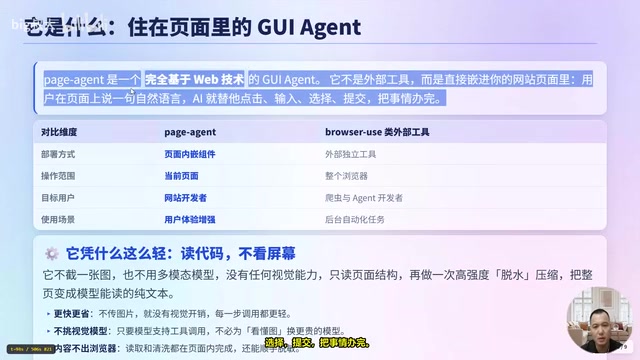
Alibaba's page-agent embeds an AI web operator into any site with a single script tag — no Python or headless browser needed.
page-agent is an open-source in-page AI agent from Alibaba that reads and compresses DOM structure (rather than taking screenshots) to understand and operate web pages — eliminating the need for multimodal models, Python, headless browsers, or any server-side setup. A single script tag is all that's required. It supports 60+ LLMs including local models, includes built-in operation allowlists/blocklists, data masking, and human-in-the-loop confirmation, and suits real-world scenarios like SaaS co-pilots, intelligent form filling, customer service upgrades, and accessibility enhancement. Key limitations include no support for drag-and-drop, right-click menus, or cross-origin frames, and accuracy depends heavily on the page's semantic markup quality.
Why Letting AI Operate Web Pages Has Always Been So Hard
Developers building back-office products have probably all faced a similar request: let a user say a single sentence and have the system automatically run through seven or eight layers of menu operations. The intuitive solution is browser automation — but actually shipping it means you need Python, a headless browser, and a server-side setup all in place before you've written a single line of business logic.
According to a hands-on breakdown by Bilibili creator 大叔大, there are three unavoidable obstacles when trying to let AI operate web pages on a user's behalf. The first is the environment barrier — a web automation stack requires Python, a headless browser, and a server; just setting up the environment turns away half of all developers. The second is cost — screenshot-based approaches that feed images to multimodal models are slow, expensive, and picky about which models they can use. The third is trust — black-box automation clicking around inside a user's own browser with no guardrails makes both users and product teams too nervous to actually deploy it.
At its core, most web-operating AI solves "let the machine run tasks for people," but what website developers actually want is "let users operate my website with a single sentence." That specific need has been sitting in the middle, unaddressed.
page-agent: Embed an AI Operator Directly in Your Page
Alibaba's open-source page-agent (current version V1.12.4, MIT license) takes a different approach. It is a fully web-based GUI agent — not an external tool, but something you embed directly inside your website's page. The user speaks a natural language instruction on the page, and the AI clicks, types, selects, and submits on their behalf to get the job done. The project has accumulated over 29,000 stars in the open-source community. It integrates with a single line of code, supports more than 60 mainstream LLMs, and has zero server-side dependencies.
Compared to external tools like browser-use, the distinction is clear: page-agent is an in-page embedded component while browser-use is a standalone external tool; page-agent manages the current page while browser-use manages the entire browser; page-agent targets website developers while browser-use targets scraping and agent developers; page-agent enhances the user experience while browser-use handles background automation tasks. The two are genuinely on different tracks.
Why It's So Lightweight: Reading Code, Not Looking at the Screen
The key to page-agent's lightweight footprint is this — it reads page structure rather than taking screenshots. It transmits no images, requires no multimodal model, has no vision capability, and instead reads the page DOM structure and performs an intensive "dehydration" compression pass, collapsing the entire page into plain text that a model can read.
This delivers three immediate benefits: faster and cheaper — no image transmission means no vision overhead, making every step lighter; model-agnostic — any model with knowledge and tool-calling capability works, no need to upgrade to a more expensive multimodal model just to "read images"; content never leaves the browser — reading and cleaning all happen within the page, and data masking can be applied in the same pass.
That said, this approach has natural limits: purely visual content like images, canvases, and 3D graphics is invisible to it, and the semantic quality and accessibility of the page directly determines the accuracy of the AI's understanding. The better the semantic markup, the more accurate the results.
"DOM dehydration" refers to extracting interactive elements, semantic tags, aria attributes, and text content from the browser's Document Object Model (DOM) tree, then discarding styles, layout coordinates, decorative layers, and any other information irrelevant to task execution — ultimately producing a compact structured text document to feed to the model. This stands in sharp contrast to traditional multimodal approaches, where each step captures a full-screen pixel image, encodes it as Base64, and attaches it to the request body — single-transmission data volumes often tens of times larger than the plain-text approach, with cost and latency stacking linearly with each step. The prerequisite for the DOM approach is that the page itself has solid semantic markup: buttons use
<button>rather than plain<div>elements, form fields havelabeloraria-labelattributes, and list items have semantic containers. For legacy systems or pages with poor semantics, the "dehydrated" text the AI reads may lack sufficient context — which is the fundamental reason the article recommends adding aria labels.
How Easy Is It Really to Integrate?
The traditional approach requires running three things: installing Python dependencies, starting a browser automation container, and running a headless browser instance. page-agent only needs a single script tag. There are three integration methods; choose based on your project:
- CDN import: Drop in a script tag and you're running — domestic and international mirrors both available, ready to use as soon as the page loads.
- Package manager import: Via NPM, works with front-end build tools, full type hints — more comfortable for engineering-focused projects.
- Local model offline mode: Integrate via local runtimes like Ollama or LM Studio — works without internet or in intranet environments, with data never leaving the machine.
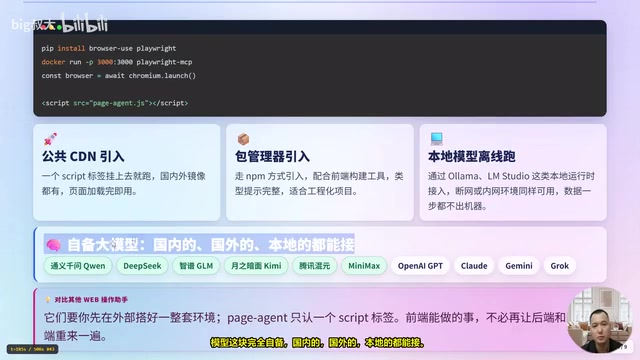
Models are entirely self-supplied, both domestic and international, cloud or local. Domestic options include Qwen, DeepSeekAd, Zhipu GLM, Moonshot Kimi, Tencent Hunyuan, and MiniMax; international options include OpenAI GPT, Claude, Gemini, and Grok. If the front end can handle it, why make the back end and desktop re-implement it?
Ollama and LM Studio are two mainstream local LLM runtimes. Ollama is primarily command-line based, supports popular open-source models like Llama, Qwen, and Mistral, and can pull and start a local HTTP service compatible with the OpenAI interface specification with a single command. LM Studio provides a GUI, suited for users unfamiliar with the command line, and similarly exposes an OpenAI-compatible interface. page-agent simply points its interface address to the corresponding
localhostport to run in a fully offline environment, with all page content and model inference completed on the user's own machine — meeting strict data residency requirements for government and enterprise intranets. This is the underlying logic behind "zero server-side dependencies": since the model can run locally on the same machine as the browser process, the entire automation chain needs no cloud intermediary.
Safety and Control: Allowlists, Masking, and Confirmation — Three Layers of Protection
Easy integration is one thing; confidence to actually deploy is another. page-agent provides four layers of control:
Operation allowlists and blocklists: Sensitive buttons like delete or payment can be blocklisted entirely, preventing the AI from touching them. Conversely, an allowlist can narrow the operable scope to just what you specify.
Data masking: Page content passes through a hook before being sent to the model, automatically redacting phone numbers, email addresses, ID numbers, and bank card numbers. For example, two regex patterns can replace phone numbers and emails with placeholders before the sanitized content is handed to the model.
Knowledge injection: System-level role definitions can be injected, and page-specific context can be injected per URL, helping the AI better understand your business domain.
Human-in-the-loop collaboration: A built-in collaboration panel lets the AI pause and ask the user when uncertain. For example: "Found three matching records — which one should I select?" The user answers "the second one" and execution continues. High-risk operations have two levels of handling — block entirely, or require explicit user confirmation before proceeding. Built-in tools can also be renamed, overridden, or removed entirely.
MCP (Model Context Protocol) is an open protocol proposed by Anthropic in late 2024, designed to establish a standardized context exchange interface between large models and external tools and data sources — analogous to a "USB interface" for the AI world. page-agent ships with an MCP service in its testing phase, meaning it can act as a standard tool node called by agent frameworks that support MCP, while using token verification to restrict caller identity — only applications holding a valid token can drive page operations through this interface. This provides the foundation for page-agent to evolve from a "single-page embedded component" into a "controlled execution node in multi-agent collaboration," and explains the specific implementation behind the article's mention of "only handing control to trusted applications."
Four Typical Deployment Scenarios
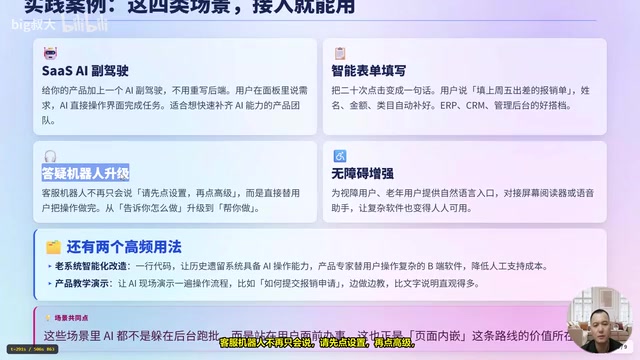
The creator outlined four ready-to-deploy scenarios. SaaS AI co-pilot — no back-end rewrite needed; users state their needs in a panel and the AI directly operates the interface to complete the task, ideal for product teams looking to quickly add AI capabilities. Intelligent form filling — turning 20 clicks into a single sentence: "Fill in last Friday's business trip expense report" automatically populates name and amount, a natural fit for ERP and CRM back-office systems. Customer service upgrade — evolving from "please click Settings, then click Advanced" to actually performing the operation for the user. Accessibility enhancement — providing a natural language entry point for visually impaired users and elderly users, compatible with screen readers and voice assistants, making complex software usable by everyone.
Two additional use cases worth noting: legacy system modernization — a single line of code gives existing systems AI operation capabilities; and product tutorials and demos — having the AI demonstrate operations live is far more intuitive than written instructions. The common thread across all these scenarios is that AI is no longer hiding in the background running batch jobs — it's standing in front of the user, getting things done.
Two Code Snippets to Understand the Integration
Step one: connect a model to execute tasks. Initialization takes four parameters: model name, API endpoint, API key, and language. Then call the execution method with a natural language instruction such as "Fill in last Friday's business trip expense report"; or you can hand the panel to users to state their own needs. Switching to a domestic model only requires changing three lines of configuration.
Step two: expose your internal business capabilities as tools so the AI uses your APIs rather than guessing. For example, define an "order lookup" tool, use schema validation to constrain input parameters (order number must be a string), and make requests to your own API with a cancellation signal during execution. To disable certain capabilities, set the built-in script execution tool to null to remove it entirely.
The key takeaway in one sentence: let it handle in-page automation, keep business logic running through your own APIs, validate inputs with schema constraints, and disable permissions and high-risk actions directly.
Know the Capability Boundaries Upfront
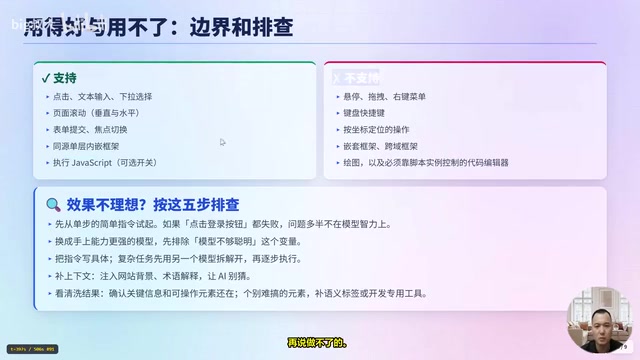
Supported operations: click, text input, dropdown selection, page scrolling (both vertical and horizontal), form submission, focus switching; same-origin single-layer iframes are also handled; JavaScript execution is an optional toggle, disabled by default.
Not supported: hover, drag-and-drop, right-click menus, keyboard shortcuts, coordinate-based targeting, nested frames and cross-origin frames, canvas drawing, and code editors that can only be controlled via script.
When results are unsatisfactory, follow five troubleshooting steps: start with single-step, simple instructions; switch to a more capable model to rule out "not smart enough" as a variable; make complex instructions more specific or break them down into sequential steps; add context injection so the AI doesn't have to guess; finally check the cleaned output to confirm that key information and operable elements are still present. For particularly stubborn elements, add aria labels or develop dedicated tools.
Takeaway: Compressing Web Automation Down to a Single Script Tag
page-agent really does one thing — compresses AI-operated web pages from an external engineering stack into a single script tag. Four keywords summarize it: one-line integration, plain text without vision models, controllable (allowlist/blocklist, data masking, and confirmation — all included), and MIT open source for commercial use.
No Python, no headless browser, no server required — it lowers cost through pure page structure comprehension, making each API call lighter and faster, while delivering full controllability and extensibility suited to real-world business scenarios. For those who want to go further, beyond the core capabilities there is an optional browser extension for continuous tasks across pages and tabs, plus an MCP service in testing that uses token protection to restrict access to trusted applications only. Whether you're building SaaS and want to add a co-pilot, building a back-office system and want to lower the barrier, or running customer support and want to go from "showing users how to click" to "clicking for them" — this is a solid place to start.
Related articles

Amphibious Transforming Drone: Beyond 100x Power Savings, What Are the Real Needs?
Is the amphibious transforming drone just a gimmick? Starting from the 100x power difference of the M4 Morphobot, explore real application scenarios and thesis topic ideas, analyzing boundary conditions where pure drones and pure ground robots both fail.

Warhound Raises $200 Million: Genetically Engineered "War Dogs" Paired with Anduril Gear
Warhound raises $200M, backed by Ben Lamm and Palmer Luckey, to genetically engineer dogs for military and law enforcement use and equip them with Anduril gear. This article analyzes its technology direction, funding logic, and ethical controversy.

Claude API Comes to Google Cloud: IAM Integration and SDK Access Guide
Anthropic hosts the full Claude API on Google Cloud with IAM-controlled permissions and unified billing. This guide covers the Vertex AI and Anthropic-hosted entry points, IAM role configuration, and SDK access.