Android CLI New Skills Explained: How AI Agents Are Accelerating App Development

Google adds AI Skills and remote device streaming to Android CLI to reduce Agent hallucinations and accelerate app development.
Google has rolled out two categories of core updates to the Android developer toolchain: an expanded Android Skills library featuring Play Policy Insights (pre-submission compliance auditing) and Android Profiler (performance and memory debugging), both built on the latest official guidelines to ground AI Agent behavior and reduce hallucinated outputs; and Device Streaming for Android CLI, enabling AI Agents to remotely access real physical hardware — deploying builds, collecting logs, and capturing headless screenshots — just like a locally connected USB device. Skills work across Android Studio, Antigravity, Cloud, Codex, and other tools, and can be installed all at once with `Android Skills Add All`.
Google has brought a set of practical updates to the Android developer toolchain, centered on Device Streaming capabilities in the Android CLI and a series of development Skills designed specifically for AI Agents. The shared goal of these updates is clear: make AI assistants more reliable and effective in real development scenarios, rather than filling knowledge gaps with guesswork and hallucinations.
Expanding the Skill Library: Stopping AI Agents from "Making Things Up"
One of the highlights of this update is Android Skills. Google defines these Skills as a set of "instruction sets" built directly on top of the latest official development guidelines, giving AI Agents the precise workflows and domain expertise they would otherwise lack — thereby reducing hallucinated outputs.
Two Skills in particular are worth highlighting. The first is the Play Policy Insights Skill, which targets a pain point developers commonly report: "submitting to the Google Play Store can be a little scary." It enables Agents to directly audit an app's manifest file, high-risk permissions, and privacy compliance requirements, catching policy violations before Google Play review — improving both submission pass rates and speed.

The second is the Android Profiler Skill, aimed at developers staring at massive performance traces with no idea where to begin. This Skill teaches Agents how to manage Android profiling and debugging workflows — handling system traces, heap dumps, and memory allocations, and diving deep into performance bottlenecks, memory leaks, and app startup issues. Google says running this Skill once leads to more stable apps with fewer crashes and jank.

Get All Skills with One Command
Developers can acquire these Skills — along with dozens of others covering common development challenges — all at once using the Android Skills Add All command in Android CLI. Google has stated it will continue adding new Skills over time. There are also Skills specifically for Wear OS development: creating a Wear app from scratch, incorporating features like Material 3, and ensuring the best possible Wear code is written (Google has produced a dedicated explainer video for this).
Also worth noting is cross-tool compatibility: regardless of whether you're using Android Studio, Antigravity, or third-party tools and Agents like Cloud or Codex, these Skills work across all of them. This open approach signals that Google isn't trying to lock capabilities inside its own IDE — instead, Skills become universal assets callable by any AI Agent.

"AI Hallucination" is especially harmful in code generation and development assistance scenarios: large models may generate code that looks plausible but is actually broken, drawing on outdated API docs or incorrect community posts from their training data. If developers adopt such output without careful review, the consequences range from introduced bugs to security vulnerabilities or failed submissions. By defining Skills as "instruction sets built on the latest official guidelines," Google is essentially anchoring authoritative knowledge sources into the Agent's reasoning process — through mechanisms like Retrieval-Augmented Generation (RAG) or system prompt injection — replacing the model's free association with its training data with controlled, domain-specific knowledge. This approach is commonly referred to in the industry as "Knowledge Grounding."
Android CLI Gets Device Streaming
Another significant update lands in Android CLI itself. As a command-line interface, Android CLI lets AI Agents call upon a wide range of tools — Android Studio, the emulator, Gradle, and more — from a single entry point, helping build higher-quality apps faster.
The newly added Android Device Streaming addresses a longstanding real-world problem: testing on physical devices is critical, but developers don't always have access to the hardware they need. Device Streaming lets you remotely access real physical devices — and now this capability is available directly through Android CLI.
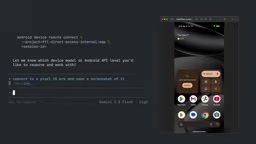
Agents Interact with Remote Physical Devices Just Like Local Ones
Once connected, AI Agents can interact with remote physical devices as if they were plugged in over USB. Specific capabilities include: launching devices, deploying builds, collecting logs, and even capturing screenshots in headless mode — meaning a large volume of repetitive testing work can be handed off to Agents for automatic execution.
The usage model is straightforward: simply instruct the Agent to list all available remote devices, then decide which one to use. For the heavily fragmented Android ecosystem, this kind of remote physical device access can significantly lower the barrier to compatibility testing.
Android Device Streaming is backed by Google's Firebase Test Lab infrastructure — a platform that deploys hundreds of real physical devices across multiple global data centers, covering a broad device matrix from low-end entry-level handsets to flagship models. What developers access through streaming isn't a virtualized environment, but actual hardware running real Android firmware — enabling accurate reproduction of sensor behavior, GPU rendering differences, vendor ROM compatibility issues, and other scenarios that emulators struggle to simulate. "Headless screenshots" refers to programmatically triggered screen captures without any UI interaction, enabling UI regression tests, visual comparison tests, and other automated workflows to run completely without human intervention. For development teams that need to validate layout adaptations across dozens of devices, this capability can dramatically compress the QA cycle.
What This Means for Developers
Putting these updates together, Google is building an AI Agent-centric Android development infrastructure: the Skills library injects authoritative, up-to-date domain knowledge; Android CLI provides a unified tool-calling entry point; and Device Streaming fills the gap in physical device testing.
The value of this approach lies in "grounding" — by anchoring Agent behavior to official guidelines and real devices, it reduces the hallucinations that large models are prone to in specialized development tasks. Across the full workflow — from app submission compliance and performance tuning to cross-device testing — developers get a more reliable AI collaborator, not just a code completion tool.
Google has also made clear that updates to Android Skills, Android CLI, and Android Studio will continue rolling out, and encourages developers to share the development pain points they're currently facing as input for the direction of future new Skills.
"Grounding" is one of the core concepts in current AI Agent engineering practice — it refers to anchoring a model's outputs to externally verifiable information sources, rather than relying entirely on parametric memory. Common grounding techniques include: real-time retrieval of official documentation (RAG), calling tools to obtain real environment state (Tool Use), and constraining Agent actions to observable real systems (such as the physical devices in this article). This Google update simultaneously incorporates all three grounding dimensions: the knowledge dimension (Skills built from official guidelines), the tool dimension (unified invocation through Android CLI), and the environment dimension (Device Streaming providing real device state feedback). Together, they form a fairly complete reliability assurance framework for Agents — and represent the industry's mainstream approach to the question of "how to make AI genuinely useful in specialized vertical domains."
Related articles

Felix Rieseberg Personal Homepage
Felix Rieseberg's personal homepage sparks attention on Hacker News. This article covers the Slack engineer's technical background, the rise and fall of nativefier, and the value of a developer homepage as a tech calling card.

@ai-sdk/vue 3.0.306 Patch Release Syncs with [email protected] Update
@ai-sdk/vue 3.0.306 released, synced with [email protected]. A routine patch release for the Vercel AI SDK ecosystem with no public API changes; the Vue adapter layer stays version-aligned with the core package.

Gemini 4 Argon API Launches: The Era of Million-Token Output Begins
Google launches Gemini 4 Argon with sparse MoE architecture, up to 1M output tokens, and a 68.90% Vals Index score, available across API, AI Studio, and the Gemini app.