Anthropic Engineer Boris's Practical Guide: Getting the Most Out of Claude Code

Anthropic's Boris shares a complete practical guide to using Claude Code as a fully autonomous coding agent.
Claude Code is Anthropic's fully autonomous AI coding agent that works with any IDE or terminal without indexing your code. Engineer Boris recommends starting with codebase Q&A to onboard faster, then using a plan-first workflow with feedback loops like tests or screenshots to improve output quality. CLAUDE.md files and a layered config system let teams share context once and benefit everywhere. The SDK turns Claude Code into a composable UNIX-style tool for CI, incident response, and parallel multi-session workflows.
What Kind of Coding Assistant Is Claude Code, Really?
Boris, a software engineer at Anthropic and one of the developers behind Claude Code, gave a detailed technical talk walking through the core use cases for this AI coding assistant. Unlike previous generations of tools that could only autocomplete a line or two, Claude Code is designed as a "fully autonomous" programming agent — capable of building complete features, writing entire functions and files, and even fixing a whole bug in one shot.
Its biggest strength is seamless integration with your existing toolchain — no workflow changes required. Whether you use VS Code, Xcode, or any JetBrains IDE, and whether you're on a local terminal, a remote SSH session, or inside tmux, Claude Code just works. That universality is exactly why it's spread so widely inside Anthropic — according to Boris, around 80% of the company's technical staff use it every day.
One privacy design worth noting: Claude Code does zero code indexing. There's no remote database, your code stays local, and it's never used to train models. That means no waiting for an indexing process after you download it — it's ready to go out of the box.
Step One: Start with Q&A on Your Codebase
Faced with a tool that's just a prompt input, many new users don't know where to begin. Boris's advice is clear: don't jump straight into editing code — start by asking questions about your codebase.
This is actually the first lesson in Anthropic's technical onboarding for new hires. In the past, it would take two or three weeks to get comfortable with an unfamiliar codebase — lots of asking colleagues questions and digging through code manually. With Claude Code, that ramp-up has shrunk to two or three days.
The power of this Q&A capability goes well beyond simple text search. Ask something like "how exactly is this code being called?" and it will dig into how a class is instantiated and where it's used, delivering a wiki- or documentation-quality answer — not just the result of a Command+F.
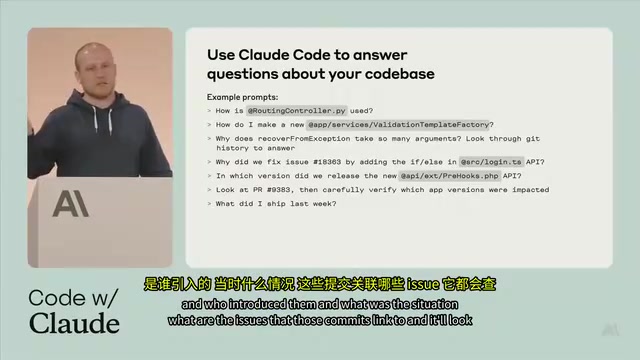
Another technique Boris uses every week is querying Git history. Ask something like "why does this function have 15 parameters and why are the names so weird?" and Claude Code will automatically dig through the Git history, figure out who added each parameter and why, link it back to relevant issues, and give you a summary. Interestingly, the system prompt contains nothing about checking Git history — it just knows how to do it because the underlying model is strong enough. Boris also has it scan logs before weekly standups to automatically generate a "what I shipped this week" summary.
Going Further: Plan First, Then Write Code
Once you're comfortable with Q&A, you're ready to move into code editing. Claude Code's built-in tools are actually quite minimal — a tool for editing files, a tool for running Bash commands, and a tool for searching files. It chains these together on its own to explore the codebase, form a plan, and make changes. You don't need to specify which tool to use.
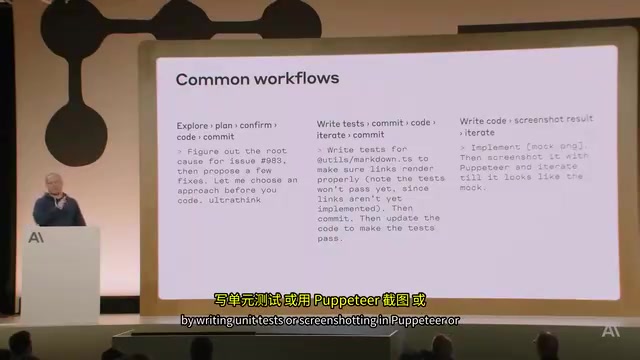
Boris emphasizes one high-leverage technique: have it make a plan for you to review before it starts writing. A lot of people just say "implement this 3,000-line feature" and hope for the best. Sometimes it works, but more often the result drifts far from expectations. Simply adding "think through an approach and make a plan — get my sign-off before writing any code" dramatically improves output quality. You don't even need to explicitly activate Plan Mode; the model understands the intent naturally.
Another incantation Boris uses regularly is "commit push." Claude Code will automatically create a branch, commit, push, and open a Pull Request on GitHub — it reads the Git log to understand the commit format and follows it correctly.
Giving it a feedback loop to check its own work is the key to near-perfect results. Whether it's unit tests, integration tests, Puppeteer screenshots, or iOS simulator screenshots — as long as it can see the output of its own work, it can iterate autonomously. Give it a design mockup and ask it to implement a web UI, and after two or three iterations it often gets surprisingly close.
The reason Claude Code's built-in Bash tool can "automatically create branches, commit, and push" is that it relies on Git's command-line interface. Git worktree is a relatively obscure but critically useful Git feature for parallelization scenarios: it lets a single Git repository have multiple working directories on disk simultaneously, each checked out to a different branch, with no interference between them. Compared to cloning the repository multiple times, worktrees share the same .git object database, saving disk space and avoiding the sync complexity of multiple remote copies. In the "heavy parallel usage" pattern described later in this article, multiple Claude Code sessions each operate on their own worktree within the same repository, allowing multiple independent tasks to progress simultaneously without file conflicts.
Managing Context with CLAUDE.md and Layered Configuration
The richer the context, the smarter Claude Code's decisions. Boris described several ways to inject context, the simplest being a special file called CLAUDE.md placed in the project root — it gets automatically loaded at the start of every session.
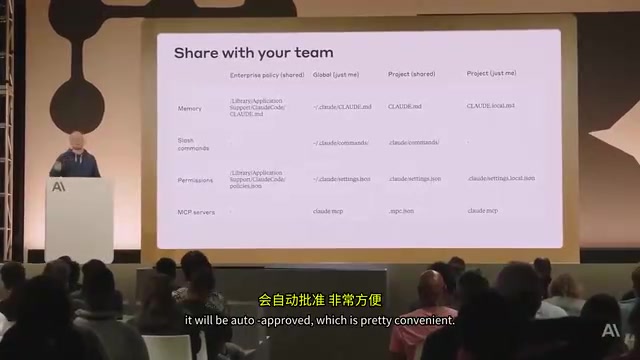
CLAUDE.md is a good place to document: common Bash commands, frequently used MCP tools, architectural decisions, and descriptions of key files. The guiding principle is keep it short — content that's too long wastes context budget and often goes unused. A CLAUDE.md committed to version control can be shared with the whole team; a local version is for personal use only. CLAUDE.md files in nested subdirectories are pulled in on demand as work moves into those directories.
The entire configuration system follows a layered structure: project config is tied to the Git repository, global config applies across all projects, and Enterprise Policies can be pushed to all employees at once. Enterprise Policies are especially powerful — you can auto-approve commonly used test commands for the whole organization, or block URLs that should never be accessed, with no way for employees to override them. MCP servers work the same way: commit an MCP JSON config to the repository and anyone running Claude Code in that repo will be prompted to install it.
Boris recommends starting with shared project context — one person sets it up and the whole team benefits, creating a network effect. To see which memory files are currently loaded, run /memory to view and edit them.
Key Shortcuts and Advanced SDK Usage
The terminal interface is minimal, which means many useful shortcuts are easy to miss. Boris's quick-reference highlights include:
- Shift+Tab: Toggle auto-accept mode — code changes no longer require confirmation one by one (Bash commands still need approval)
- # key: Tell it to remember something — it automatically writes to
CLAUDE.md - ! key: Enter Bash mode to run a local command; the command and its output are added to the context for the next turn
- Esc: Safely interrupt at any time without breaking the session; double-press to return to session history
- Ctrl+R: View full output
- Launch with
--resumeor--continueto pick up where you left off
For images, Claude Code is fully multimodal from the start. You can drag in images, provide a file path, or paste an image directly. Boris often drags in design mockups and pairs them with a dev server so it can iterate against the actual rendering.
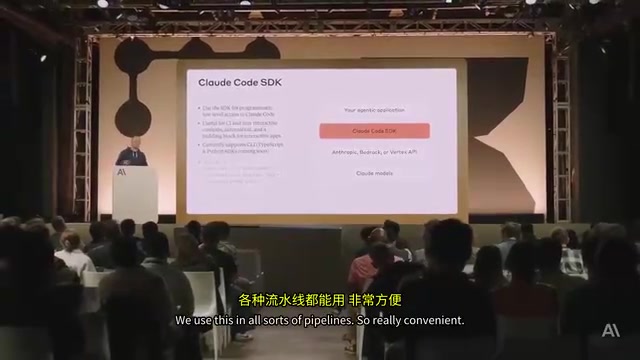
For more advanced usage, there's the Claude Code SDK. The -p flag in the CLI is backed by the same SDK — you can pass prompts, specify allowed tools, and request JSON or streaming JSON output. Boris describes it as "a super-intelligent UNIX tool" — you can pipe the output of git status into it, then filter the results with jq, with nearly infinite composability. Anthropic uses it extensively internally in CI pipelines, incident response, and various workflows — for example, reading a massive log from a GCP storage bucket, piping it in, and having it surface anything worth paying attention to.
The most intensive usage pattern is parallelization: power users open SSH sessions, use tmux to connect to multiple Claude Code sessions simultaneously, pull multiple copies of the same repository, or use Git worktrees for isolation — running several tasks in parallel across the same codebase.
MCP (Model Context Protocol) is an open protocol from Anthropic that standardizes how AI models connect to external tools and data sources. Think of it as a "USB interface" for AI — any tool that implements the MCP server spec can be called directly by any MCP-compatible client (including Claude Code), with no need for custom adapters per tool. The workflow Boris describes — "commit an MCP JSON config to the repo and anyone running Claude Code will be prompted to install it" — is a direct benefit of MCP's standardization: tool configurations can be versioned, shared, and reproduced like code, rather than living as manual per-machine setups. This is also why Boris includes MCP server configuration in both Enterprise Policies and project-level CLAUDE.md management.
tmux is a terminal multiplexer that lets you create and manage multiple independent terminal sessions within a single terminal window, with sessions persisting in the background even after you disconnect. For Claude Code's parallel usage pattern, tmux means you can monitor and switch between multiple active Claude Code sessions within a single SSH connection or local terminal — each session independently handling a different task branch — dramatically improving efficiency when running multiple tasks in parallel.
Why a CLI Tool Rather Than an IDE Integration?
When asked why Claude Code was built as a command-line tool, Boris gave two reasons. First, Anthropic engineers use a wide variety of IDEs — VS Code, Vim, Emacs — and the terminal is the one common denominator. Second, and more forward-looking: "We have a front-row seat to how fast models are improving, and it's very likely that people will just stop using IDEs altogether." With that in mind, the team has deliberately avoided over-investing in UI and higher-level packaging, because at the current pace of model progress, those layers could quickly become irrelevant.
On the implementation side, Boris admitted the hardest part was making Bash commands safe. Bash is inherently dangerous — it can change system state in unexpected ways — but requiring manual approval for every single command would be unbearable. The solution: static analysis to determine which read-only commands can be safely combined, plus a layered permission system that supports whitelists and blacklists at different levels.
The "static analysis to identify read-only commands" mentioned above refers to inferring whether a command will modify system state by parsing the command's structure and semantics — without actually executing it. For example, ls, cat, and grep have no side effects in the vast majority of cases and can be classified as safe read-only operations that get auto-approved; while rm, curl -X POST, and chmod can modify the filesystem or external state and require manual confirmation. This layered permission design strikes a balance between automation efficiency and the risk of unintended changes — and it's the key engineering decision that makes Bash integration genuinely useful rather than merely demo-able.
Related articles

ChatGPT Space Launches: Team Collaboration and New Pages Features Explained
ChatGPT Space is OpenAI's new team collaboration feature with Pages, real-time collaboration, and Slack/Google Drive sync. We break down its privacy design, multi-platform integration, and the full workflow from conversation to document.

Migrating Apache Spark UDFs to GPU Acceleration with AI Agents
NVIDIA developer blog explains how AI Agents rewrite Apache Spark UDFs for GPU acceleration, covering migration criteria, agent rewriting and verification workflows, plus pitfalls like result consistency and CPU-GPU transfer overhead.

Zed Editor v0.40.4-rc2 Released: Usage Credits Now Available Without Upgrading
Zed editor releases v0.40.4-rc2, allowing users to use usage credits for AI features without upgrading to a paid plan, lowering the trial barrier.