Anthropic's Official Guide: 12 New Prompting Rules for Claude Opus 5.5

Anthropic's official 12-tip guide to prompting Claude Opus 5.5 faster and cheaper.
Anthropic released an official prompting guide alongside Claude Opus 5.5, with a core message: old prompting habits may backfire on the new model. The article distills 12 practical tips covering effort level defaults, cache preservation, unified agents.md instruction files, and lightweight prompts like "time matters" for speed gains. It also highlights two key limitations: prompts requesting visible reasoning are now blocked to prevent model distillation, and a fix for the model stopping prematurely on long tasks. The overall direction: Opus 5.5 puts the performance-speed-cost balance front and center, requiring users to update their prompting strategies.
Anthropic's latest release of Opus 5.5 isn't just a model capability upgrade — it comes with a whole new set of changes to how prompting should work. Anthropic published a detailed prompting guide alongside the release, and the most critical signal is this: many practices that worked well on older models may actually cost you more money and run slower on 5.5.
Here are the 12 practical tips from that official documentation that are truly worth your attention — to help you build systems that run faster and cost less.
Starting with "Effort": The New Default Has Changed
Opus 5.5 introduces a setting called effort, which controls how deeply Claude "thinks" before responding. This parameter directly affects the balance between performance and speed.
Tip 1: Start with Medium as Your Default
You might be used to maxing out the effort level, but Anthropic now recommends medium as the default. In official testing, medium hits the sweet spot between performance and speed on Opus. The suggested approach: set it to medium for everyday work, and only dial it up when you genuinely need stronger performance.
Tip 2: Find Your Own Optimal Default Through Testing
While medium is the official recommendation, the optimal setting may vary depending on the type of work you're doing. A more precise approach is to let Opus figure it out itself — give it a real everyday task, run it at each effort level with 5.5, compare the results side by side, and then decide which level should be your default.

Workflow and Cost Optimization
This group of tips all revolve around saving money and reducing friction.
Tip 3: Claude Code Now Reads agents.md
Claude Code now supports reading agents.md — the instruction file used by tools like Codex. If you update to the latest version and connect to a folder without a Claude.md, it will fall back to reading agents.md. For those using multiple coding agents simultaneously, this means you can maintain a single instruction file without having to keep Claude.md and agents.md in sync.
Tip 4: Switching Effort Levels No Longer Clears the Cache
During a conversation, an agent maintains a cache — essentially short-term memory — that helps reduce token usage. Previously, changing the effort setting mid-conversation forced Claude to re-read the entire conversation, clearing the cache and wasting tokens. Opus 5.5 fixes this — the cache is preserved even when you switch effort levels mid-conversation. Note that Anthropic has flagged this as still in beta, so test it in your own environment first.
A note on caching: Cache plays an important role in controlling LLM API costs. When you send a request to Claude, the system prompt, conversation history, and other content are temporarily stored as cache. If the next request overlaps heavily with the previous one, the provider can reuse cached results without recomputing — with corresponding token rates typically dropping significantly (Anthropic's prompt caching can reduce input costs by up to 90%). That's why clearing the cache is expensive: the system has to reprocess the entire conversation, essentially paying twice for content you've already paid for. For long-context agent tasks, a needless cache clear can easily double or more the cost of a single API call.
Tip 5: Make Use of Your Banked Usage Resets
Claude now stores banked usage resets for you. Go to settings → usage, and you'll see a resets box. With the 5.5 launch, you likely received a reset you can trigger for free. The smartest approach: save it for when you actually hit your usage limit, then trigger it immediately to restore your quota. Just watch the expiration date — the one bundled with the 5.5 launch expires on October 23rd.

Handling Opus 5.5's New Behavioral Characteristics
Opus 5.5 has some new changes in how it reasons, and some of them need to be managed through prompting.
Tip 6: Asking It to Show Its Reasoning Will Be Blocked
If your prompt or system prompt asks Claude to write out its full reasoning process before answering, this may be flagged and rejected on 5.5, with an error citing reasoning extraction. This is clearly Anthropic's way of preventing other companies from distilling Opus 5.5. Unfortunately, if you had legitimate use cases for this, that capability is no longer available on the new generation of models.
What is distillation? Distillation refers to using outputs generated by a large, powerful model to train a smaller model, enabling it to approach the larger model's performance on specific tasks at a fraction of the cost. This risk is especially acute with reasoning models — if developers can extract Opus 5.5's full chain-of-thought at scale, they can fine-tune their own smaller models on that data, bypassing expensive API fees. Anthropic's decision to block "show your reasoning" prompts cuts off this pathway at the data source. This mirrors OpenAI's strategy of hiding internal reasoning steps in the o1/o3 model series, reflecting an increasingly convergent approach among leading AI companies to protecting their commercial models.
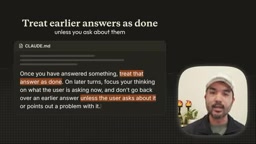
Tip 7: Tell It That Earlier Answers Are Final
In long conversations, Opus 5.5 sometimes revisits its earlier answers during thinking — which gets annoying for brief follow-up questions. The fix is simple: add a couple of lines to the end of your Claude.md telling it to treat earlier answers as finalized unless you explicitly ask otherwise. Or build a small on-demand skill to trigger this behavior as needed.
Tip 8: Have It Maintain a Task Checklist
On very long tasks, Anthropic has observed that 5.5 sometimes stops before finishing. The reason is that it now issues progress updates as it works, and one of those updates may end its turn, causing it to mistakenly believe the task is complete. The fix is equally simple: have Opus maintain a checklist that it checks off as it goes, and verify that checklist at the end of each turn — this makes it much more likely to fully complete the work you've assigned.
Tuning for Speed and Output Quality
Tip 9: Give It a Time Budget
Opus 5.5 can quite accurately track how much time it has spent on a given task. If you need something done within a specific timeframe, simply give it a time budget — for example, "complete the task in three minutes" — and it will adjust its pace to hit that deadline.
Tip 10: Two Words That Speed Things Up
If you can't estimate a reasonable time budget, there's an even simpler option — add "time matters" to your prompt. According to Anthropic's testing, just these two words measurably improves completion speed on 5.5, helping agent teams wrap up faster when time is critical.

Tip 11: Opus Still Has Default Design Patterns
When you ask Opus 5.5 to build a website without giving any design direction, it falls back to the same default style — familiar background screens, italicized words in copy, and so on. Anthropic says this is intentional. Simply telling it to "be less generic" just swaps one default for another. The better approach is to give it a design system, or explicitly list styles you don't want — that's how you get output that matches your brand.
Tip 12: Give It Cropping and Zooming Tools
Opus 5.5 is already quite capable at reading charts and screenshots, but for high-density content like technical drawings, being able to zoom in helps significantly. This not only helps the agent focus on the relevant section, but also reduces token consumption by feeding it a smaller cropped image rather than the full high-resolution original. The approach: equip your agent with free Python libraries Anthropic recommends — PIL and OpenCV — then just send the highest-resolution image you have, and it will crop into exactly the area it needs.
PIL (Pillow) and OpenCV are two of the most widely used image processing libraries in the Python ecosystem. PIL/Pillow focuses on basic image operations — cropping, resizing, format conversion — with clean syntax suited for quick single-image processing. OpenCV is more oriented toward computer vision tasks, supporting edge detection, image segmentation, and other advanced operations, but it's equally effective for region extraction in agent workflows. Beyond reducing token consumption, cropping large images down before feeding them to the model offers an additional benefit: vision models typically achieve higher recognition accuracy on localized details than on full high-resolution images — especially when working with technical drawings, circuit diagrams, or dense tables, where focusing on a key region often yields more accurate output.
Summary
From the lowered effort default to the cache preservation fix, to subtle prompting tricks like "time matters" — these 12 rules for Opus 5.5 point in a clear direction: the model increasingly prioritizes the balance between performance, speed, and cost, and users need to update their prompting habits accordingly. For developers using Claude Code and multi-agent workflows in particular, these adjustments directly affect real-world operational efficiency and your bill.
Related articles

"Black October": Did AI Uncover 3% of All Critical Vulnerabilities Ever?
A Reddit post claims 3% of all critical software vulnerabilities ever were found in the past month, dubbed 'Black October.' We break down the statistical issues, how AI-assisted code auditing accelerates discovery, and how developers should respond.

Microsoft Project Gecko: Using AI to Bridge Language Gaps for African Farmers
Microsoft's Project Gecko launches PharmaChat, letting African farmers ask questions in their native language and get precise video clips and farming book chapters via AI. The project also releases three interactive manuals to advance inclusive AI.

Musk's Space Dominance: How Starlink Throttling Undermines Ukraine's Defense
SpaceX's Starshield throttling disabled Ukraine's high-speed interceptor drones, exposing how Musk's private control over low Earth orbit communications affects battlefield dynamics and national security, and highlighting the risks of commercial space militarization and space governance dilemmas.