AOCI-Code: Giving AI Coding Assistants a Code Map

AOCI-Code uses a persistent, one-line-per-file code map to let AI coding assistants memorize an entire codebase in one read.
AOCI-Code aims to solve the pain point of AI coding assistants re-scanning the codebase with every conversation and guessing when the context can't fit. It generates a one-line summary for each file, stores it in Git alongside the code, and keeps it in sync via a local MCP server, enabling tools like Claude Code, Codex, and Cursor to understand the system structure in a single read. Its core ingenuity is treating index results as version-controllable engineering assets rather than rebuilding them temporarily each session. The author claims the tool is written in Go, can handle codebases of about 500,000 lines, and has around 1,500 GitHub stars, but it's currently in RC stage and uses a source-available license rather than MIT—stability and commercial use restrictions need to be evaluated before deployment.
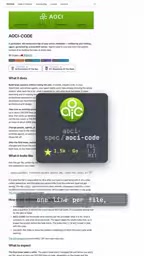
AI coding assistants have a stubborn flaw: they have to re-scan your codebase with every conversation. When there are too many files, the context can't fit them all, and the assistant starts guessing. AOCI-Code (aoci-spec/aoci-code) aims to solve exactly this problem—by drawing a map of the codebase so the agent can memorize the entire system in one read.
What exactly does it do?
AOCI-Code's approach is straightforward: generate a one-line summary for each file in the codebase, store that summary in Git alongside the code, and keep it in sync via a local MCP server.
Agents (such as Cloud Code, Codex, Cursor) no longer need to repeatedly scan the repository—instead, they read this "map" directly and build an understanding of the system structure in one go.
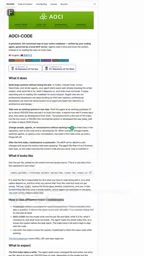
The key to this design is "persistence." The traditional approach re-indexes at the start of every session, which is time-consuming and unstable; AOCI-Code manages the index results as code assets, so version control and incremental updates follow Git. The MCP server is responsible for refreshing the map when code changes, avoiding stale information.
MCP (Model Context Protocol) is an open protocol introduced by Anthropic at the end of 2024, aimed at defining a unified communication standard between large language models and external data sources and tools. Before MCP, every AI coding tool had to implement its own set of interfaces for reading files, invoking commands, and connecting to databases, resulting in severe ecosystem fragmentation. MCP abstracts this into two layers: "server" and "client." The server exposes Resources, Tools, and Prompts, while clients (such as Claude Code, Cursor) are responsible for discovering and invoking them.
AOCI-Code's choice to exist as a local MCP server means it isn't tied to any single IDE. As long as an AI coding environment supports the MCP protocol, it can mount this "code map" directly—no need for the tool author to adapt separately for each editor. This is the fundamental reason it can claim compatibility with Cloud Code, Codex, and Cursor—it's these clients that actually interface with the protocol, not AOCI-Code itself.
Technical Details and Author's Claims
According to the project author's public description, AOCI-Code is written in Go, can handle codebases of about 500,000 lines, and currently has around 1,500 stars on GitHub.
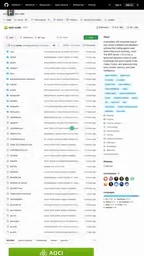
The 500,000-line figure is worth noting. Most AI coding tools run into context window bottlenecks when handling large monorepos. If AOCI-Code can genuinely remain usable at this scale, then its "one line per file" compression strategy is effective. However, this is the author's own claim, and no third-party large-scale validation has been seen yet.
Choosing Go also makes sense: an MCP server needs to run persistently on the local machine and respond quickly, and Go's concurrency model and compiled single-binary deployment offer natural advantages in such scenarios.
Two Limitations to Keep in Mind
The project is currently labeled as being in release candidate (RC) stage, meaning the API and data structures may still change.
More noteworthy is the licensing issue. AOCI-Code uses a source-available license rather than the standard MIT. These two are fundamentally different: source-available means the source code can be viewed, but the rights to use, modify, and distribute it are subject to additional restrictions. For teams looking to integrate it into commercial workflows or build derivative works, the license terms need to be read carefully.

Source-available and open source (such as MIT, Apache 2.0) are superficially similar, but their legal meanings are entirely different. The standard MIT license places almost no restrictions on anyone using, modifying, distributing, or even commercializing the code, as long as the copyright notice is retained; source-available only promises that "you can read the source code," and what exactly you can do with it is entirely specified line by line in the license terms.
Common restrictions include: prohibiting commercial use, prohibiting offering it as a hosted service, limiting the release of derivative works, requiring contributions back under certain scenarios, and so on. Some projects also attach a delayed clause that converts to open source after a certain period (such as BSL). For developers, the key to determining whether you can use it isn't whether "the source is open," but rather reading what's written after "You may not" in the license, line by line. If you plan to embed it into an internal platform or commercial product, it's advisable to confirm with legal first, and contact the author for a commercial license if necessary.
Is this "map" worth using?
AOCI-Code targets a real pain point. As codebases balloon, the declining efficiency of AI coding assistants is a widespread phenomenon—not because the model isn't strong enough, but because it can't "see" the whole picture. Replacing full-text indexing with one-line summaries is essentially lossy compression of the codebase's structural information, sacrificing detail for global vision and read speed.
Whether this trade-off is reasonable depends on your use case. For medium-to-large projects that need agents to frequently understand cross-file dependencies, a persistent code map may significantly reduce the overhead of repeated indexing. But for small projects, or tasks with extremely high demands on code detail precision, the information loss from compression may not be worth it.
The support for the MCP protocol lets this tool connect with mainstream AI coding environments (Cloud Code, Codex, Cursor), which is where its practical value lies. However, the stability of the RC stage and the commercial restrictions of the source-available license are two variables that must be evaluated before deployment.
For now, this is a project worth putting on a watchlist. The idea it represents—turning codebase indexing into a version-controllable engineering asset—may influence the design direction of more AI coding tools.
One-line Summary
AOCI-Code uses a persistent, one-line-per-file code map to let AI coding assistants memorize an entire codebase in one read.
Paragraph Summary
AOCI-Code aims to solve the pain point of AI coding assistants re-scanning the codebase with every conversation and guessing when the context can't fit. It generates a one-line summary for each file, stores it in Git alongside the code, and keeps it in sync via a local MCP server, enabling tools like Claude Code, Codex, and Cursor to understand the system structure in a single read. Its core ingenuity is treating index results as version-controllable engineering assets rather than rebuilding them temporarily each session. The author claims the tool is written in Go, can handle codebases of about 500,000 lines, and has around 1,500 GitHub stars, but it's currently in RC stage and uses a source-available license rather than MIT—stability and commercial use restrictions need to be evaluated before deployment.
Related articles

Dify Low-Code in Practice: Windows Deployment and AI Agent Development for Beginners
This article introduces getting started with the Dify low-code platform deployed in a Windows environment, explaining its visual development, prebuilt integrations, and automated tuning advantages to help developers quickly build AI Agents and lower the development barrier.

Bilibili Hit Tutorial: A Step-by-Step Guide to Building 20+ AI Apps with Dify
Based on a popular Bilibili Dify tutorial, this article covers Dify's core capabilities, Windows Docker deployment, MySQL setup, five app types, model access, and publishing.

What Is Dify? Understanding Why AI Workflows Are Taking Off
What is Dify? This article explains its core value as a visual AI workflow platform—visual canvas, swappable models, knowledge base and RAG, and a hands-on e-commerce workflow demo—plus why AI workflows are booming, common misconceptions, and when they fit.