App Store Launches New Creative Asset Tools: Upgraded App Showcase and Asset Management

Apple adds new creative asset slots, preview tools, and asset library to App Store, broadening app marketing expression space.
Apple recently launched a new App Store creative asset system for developers, covering product page header visuals, search result display assets, and preview tools and Asset Library in App Store Connect. The new asset slots let developers use images and videos to highlight brand identity, promote seasonal campaigns, and complement existing screenshots and preview videos. The preview tool supports dark mode and multiple device orientations, letting developers see actual display effects before submission. Asset Library provides centralized asset management with early upload and review support for easy activation according to marketing calendars. Apple also provides design templates, best practice guidelines, and updated App Review notes on screenshots. Overall, the App Store is evolving from a standardized list to a customizable showcase space, adding new visual competition dimensions that may affect click conversion.
App Store's app presentation is changing. Apple recently rolled out a new creative asset system for developers, covering product page header visuals, search result display assets, and asset preview and management tools in App Store Connect. For developers hoping to stand out in a crowded app market, this isn't just a backend feature update—it means the expressive space for app marketing has been significantly broadened.
Product Pages and Search Results: New Creative Asset Slots
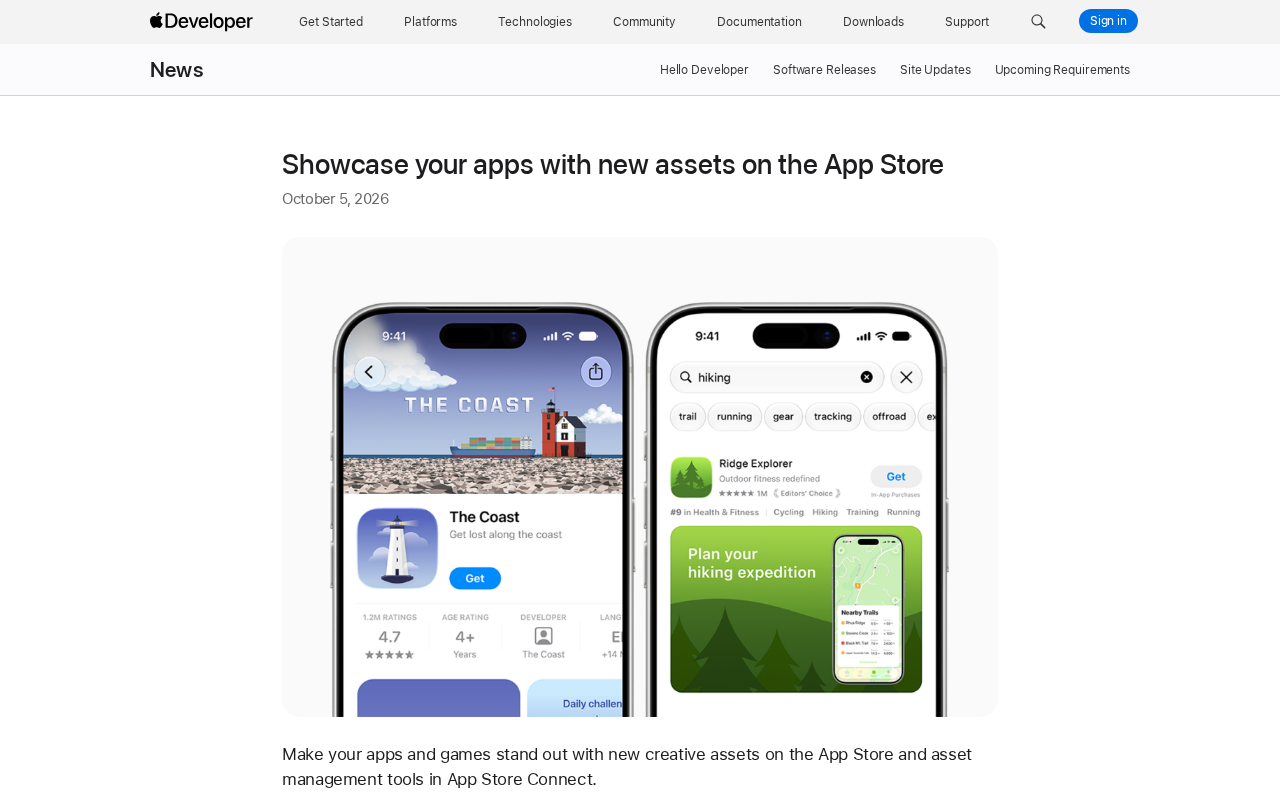
In the past, the visual elements developers could control on the App Store were mainly limited to app icons, screenshots, and app preview videos. Now Apple has opened up new creative asset slots in product page headers and search results, allowing developers to use images and videos to highlight brand identity, promote seasonal campaigns, or showcase new content.
These new assets complement existing preview videos and screenshots rather than replace them. Apple positions them as a way to "provide additional exposure opportunities for apps on the App Store." Developers can create these visual assets using official design guidelines and downloadable templates, lowering the design barrier.
In the product page screenshot, the app "The Coast" uses an illustration-style header visual—a lighthouseAd and cargo ship image that directly conveys the app's character. In the "hiking" search results, "Ridge Explorer" stands out with an editorial recommendation badge and a screenshot reading "Plan your hiking expedition," gaining stronger visual recognition among similar results.
The App Store Product Page is the first dedicated page users see after entering an app through search, recommendations, or external links, typically including modules such as the app icon, name, subtitle, screenshots, preview videos, ratings and reviews, in-app purchase information, and developer information. In App Store Connect, product page metadata can be configured separately by language and region, and supports setting default display versions for different audiences. Previously, the visual elements developers could control were basically limited to three items: icons, screenshots, and preview videos, while the header background and brand visuals of the product page were uniformly determined by the system. The newly added header creative asset slot means developers now have a self-designable brand expression area at the very top of the product page, which can be used to reinforce app character or align with specific marketing moments. Since this position is perceived first when users browse, its impact on first impressions and subsequent click behavior is typically higher than regular screenshots in the middle of the page.
Although display assets in search results and product page assets both serve conversion, their use scenarios and design constraints differ. Search result pages typically present multiple apps in list or card form, where users make horizontal comparisons within an extremely short time, so assets need to maintain recognizability at very small sizes—text should not be excessive, and the main graphic must be prominent enough. Product page header visuals have a larger display area, where vertical compositions and richer layering are easier to see clearly. If developers directly compress product page assets for use in search results, they may encounter issues like blurry text and cropped focal points. Apple's templates and design guidelines typically provide safe areas, minimum font sizes, and whitespace recommendations for both asset types separately—producing by channel according to specs ensures better actual results than a one-size-fits-all approach.
Preview Tool: See Results Before Submitting
New asset slots raise a practical question: how do developers know how their assets will look in actual display environments? Apple has added a preview tool in App Store Connect, allowing developers to see how creative assets, screenshots, and other metadata will appear in product pages and search results before uploading and submitting.
This preview tool supports dark mode and covers different devices and orientations. For apps that need to adapt to multiple screen sizes simultaneously, this means reducing the cycle of repeated submissions, reviews, and revisions. Contrast in light and dark modes, text readability, and cropping effects on different devices can all be verified in advance.
App Store Connect is Apple's unified management backend for developers, where they complete app uploads, build version management, metadata entry, pricing and in-app purchase configuration, TestFlight beta distribution, and App Review submission processes. Previously, once assets were submitted and approved, modifications often required going through another review cycle, so many teams lacked intuitive judgment of asset effects before official launch. The value of the preview tool lies in moving "actual display effects" ahead of submission, allowing developers to check the coordination between assets and screenshots, text, and device frames in a near-real environment. For apps that need to cover multiple device sizes like iPhone and iPad, as well as light and dark modes, advance verification can significantly reduce the probability of repeated submissions due to incompatible assets.
Asset Library: Centralized Management, Advance Planning
The newly added Asset Library in App Store Connect attempts to solve another long-standing pain point—the fragmentation of asset management. Developers can now upload and organize creative assets, screenshots, and app previews in one centralized location, and can even prepare them ahead of actual use time.
A typical scenario Apple provides is: submit a set of creative assets for review today to prepare for a future seasonal marketing campaign, and when the campaign launches, directly activate the already-approved assets. This "review early, activate on demand" process can significantly reduce emergency operations before launch for teams with clear marketing calendars.
Apple has also updated the App Review guidelines regarding screenshot issues to help developers avoid common review obstacles. Reference documents are also available for asset specifications, app preview specifications, and screenshot specifications.
App Review is the review process Apple conducts on apps submitted to the App Store and their metadata. The scope includes not only app functionality and content compliance but also whether display assets like screenshots, preview videos, and description text meet guideline requirements. Common issues include screenshots not reflecting the real app interface, exaggerated claims, unauthorized third-party content, or inappropriate text. If developers submit assets close to a marketing campaign, once rejected, they need to revise and queue for review again, easily missing the scheduled launch date. The "upload and submit early, activate on schedule" process supported by Asset Library essentially moves the review step off the critical path of marketing execution, keeping assets in a usable state before campaigns begin, thereby reducing operational risks before launch.
Practical Impact on Developers
This update sends a clear signal: the App Store is evolving from a "standardized list" to a "customizable showcase space." For indie developers and small-to-medium teams, templates and preview tools lower the barrier to professional visual design; for large teams, Asset Library's centralized management and advance review process better fit marketing collaboration needs.
The addition of asset slots also means a shift in competitive dimensions. When screenshots and preview videos are no longer the only visual battlefield, the quality of header visuals and search result assets may become new variables affecting click conversion. It's worth developers incorporating this into consideration for their next version update or marketing campaign planning.
One-line Summary
Apple adds new creative asset slots, preview tools, and asset library to App Store, broadening app marketing expression space.
Paragraph Summary
Apple recently launched a new creative asset system for App Store developers, covering product page header visuals, search result display assets, and preview tools and Asset Library in App Store Connect. The new asset slots allow developers to use images and videos to highlight brand identity, promote seasonal campaigns, and complement existing screenshots and preview videos. The preview tool supports dark mode and multiple device orientations, letting developers see actual display effects before uploading and submitting. Asset Library provides centralized asset management with early upload and review support, convenient for activating according to marketing calendars. Apple also provides design templates, best practice guidelines, and updated App Review explanations regarding screenshots. Overall, the App Store is evolving from a standardized list to a customizable showcase space, with increased visual competition dimensions that may affect click conversion.
Related articles

Amphibious Transforming Drone: Beyond 100x Power Savings, What Are the Real Needs?
Is the amphibious transforming drone just a gimmick? Starting from the 100x power difference of the M4 Morphobot, explore real application scenarios and thesis topic ideas, analyzing boundary conditions where pure drones and pure ground robots both fail.

Warhound Raises $200 Million: Genetically Engineered "War Dogs" Paired with Anduril Gear
Warhound raises $200M, backed by Ben Lamm and Palmer Luckey, to genetically engineer dogs for military and law enforcement use and equip them with Anduril gear. This article analyzes its technology direction, funding logic, and ethical controversy.

Claude API Comes to Google Cloud: IAM Integration and SDK Access Guide
Anthropic hosts the full Claude API on Google Cloud with IAM-controlled permissions and unified billing. This guide covers the Vertex AI and Anthropic-hosted entry points, IAM role configuration, and SDK access.