WorkBuddy Full Tutorial: Build an AI Office Automation Agent from Scratch

WorkBuddy beginner's guide: installation, three working modes, expert teams, and multimodal practice.
Based on a 198-episode Bilibili WorkBuddy tutorial, this article distills a beginner's path for using AI Agents. It clarifies the difference between traditional LLMs and Agents—the former gives advice, the latter operates computers and delivers results—and gives three reasons to choose WorkBuddy: low barrier, domestically usable, affordable. It covers installation, interface operation, the first folder-organizing task with security tips, compares the three working modes, demonstrates a multimodal pipeline from picture book illustrations to short video, and introduces Experts, Expert Teams, and Skills/Connectors with a Snake game development demo.
WorkBuddy is often described by users as a domestic alternative to Codex—an AI digital employee that can handle tasks for you automatically. The barrier to entry is extremely low: no special network environment required, no complicated configuration to wrestle with. Whether it's writing proposals, building spreadsheets, data analysis, creating posters, writing code, or even taking over a browser to control various software, it delivers results with one click and hands over finished products directly. This 198-episode series from a Bilibili creator walks through everything from installation basics to agent building and workflow configuration. This article distills the core operational path.
The Essential Difference Between Traditional LLMs and AI Agents
Before diving into specifics, it's worth clarifying one concept. Over the past few years, the way most people use AI has been "ask a question, get an answer": give it a messy document and ask it to standardize the format, and it tells you how to do it—but you still have to do the actual work yourself.
AI Agents like WorkBuddyAd are different. Send the same instruction, and it finds that document on your desktop, automatically reformats it, reorders headings, and unifies the text—all you do is wait for the task to finish. As the creator puts it: traditional LLMs excel at Q&A, analysis, and giving advice, while an Agent focuses on driving a task through to a result within the scope you've confirmed and authorized. It's not just a back-and-forth exchange—it's more like a digital employee arranged for you, capable of operating a computer, calling tools, and getting things done directly.
According to the creator's demonstration, similar Agent products include Codex and others, all sharing the characteristic of direct hands-on operation. The recommendation for beginners to start with tools like WorkBuddy is based on three comparisons: low learning curve (just search the product name in a browser to download and install), usable domestically (connectors integrate with common office software like WeCom), and affordable cost (registration grants credits, daily credits are available, and light usage is basically sufficient). Additionally, the built-in Chinese Skill marketplace supports one-click installation of common capabilities, and the Experts module functions like digital employees for different roles that can be called upon directly.
The technical essence of an Agent lies in the combination of "Tool Use / Function Calling" and "task planning." Traditional LLM output is a token sequence that stops at text; an Agent, through a control loop (commonly known as the ReAct pattern: Reasoning + Acting), strings together "think—act—observe" into a closed loop: the model first decides what to do next, generates a structured tool-call request, the runtime environment actually executes it (reading files, clicking the mouse, sending requests), and then feeds the execution result back to the model for further reasoning until the task is complete. This means the model upgrades from "generating answers" to "driving processes," and it also means permission boundaries, operation auditing, and failure rollback become core product design concerns.
Credits and billing mechanics are key to understanding Agent usage costs. Since each loop involves multiple rounds of model calls and tool executions, the token consumption for an Agent completing a task is often several times that of a single-turn Q&A. Platforms therefore tend to present costs through abstract units like "credits," typically calculated based on model call volume, task complexity, or execution time. This is also why the article emphasizes that "simple query tasks are more credit-efficient in Ask mode": reducing unnecessary loop iterations significantly lowers consumption.
Prompt optimization in multimodal generation is not simple synonym rewriting—it's the model reorganizing colloquial requirements into professional descriptions that include structured elements like subject, scene, composition, style, lighting, aspect ratio, and reference media. It essentially has the model perform a "requirement translation" first, converting vague intent into instructions that text-to-image/video models can parse more easily, which is why the quality improvement is especially noticeable in illustration and video scenarios.
Installation and Interface: Get Your First Task Running in Three Steps
The installation process is very simple: search WorkBuddy in your browser, go to the official website, choose the appropriate version (Mac or Windows), download, and double-click to install. Registration grants 2000 credits by default—enough for quite a long time.
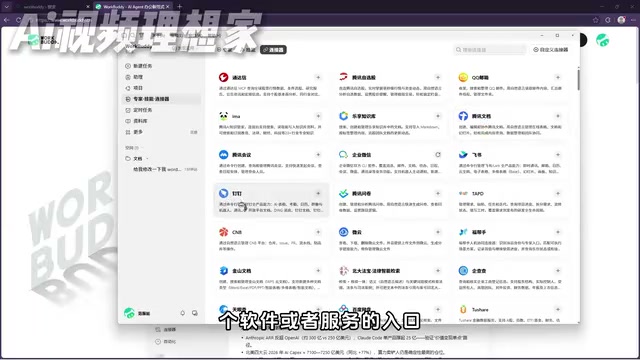
The interface is divided into three main areas: the left side is quick access (navigation to projects, experts, and other modules), the center is the workspace (where all instructions are sent), and the right side is the preview area (results can be viewed directly). Actual operation can be summarized in four steps: open the software, enter content, select a project, get the finished product.
The first lesson's practical task is organizing a messy file folder. Start by selecting the target space, then enter the requirement "organize folder contents by date and category," and click send to see its thinking process and execution process. There's a security detail worth noting here: in permission settings, don't casually enable "allow full access." Keeping it off means it will proactively ask for your permission when sensitive operations are involved—relatively safer.
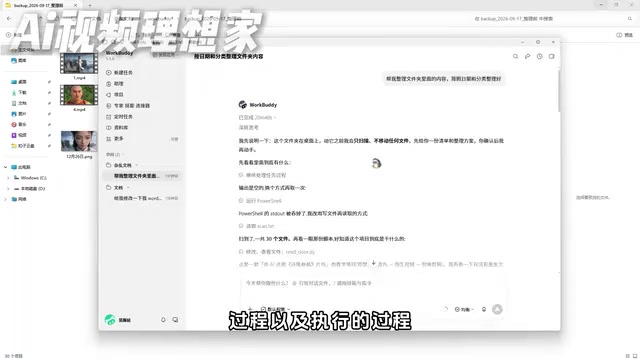
In the creator's demonstration, the entire organizing process consumed only 77 credits, and the completed folder was clearly archived by category—images, materials, scenes, etc.—with each subfolder clickable for viewing.
Three Working Modes: Which Mode for Which Task
WorkBuddy offers three working modes, analogous to three different styles of employee: one who puts their head down and works, one who confirms requirements before acting, and one who only answers questions without acting.
Default mode (execution mode): The most commonly used, suitable for simple and clear daily tasks, completed through direct manual operation. Below it there's also an "enhance prompt" feature—one click optimizes the instruction expression, quite friendly for beginners.
Plan mode: Suitable for complex tasks. After receiving a request, it first asks clarifying questions—for example, if you want a game website, it asks what type of game, what theme, and after several rounds of confirmation provides a complete plan. You confirm it's correct, then execution begins.
Ask mode: The closest to traditional AI, except it can read local files. For example, ask directly "how many materials are in this folder," and it reads the files and gives specific counts of documents, images, and video materials. Simple, straightforward tasks like this are fine in Ask mode—using default mode would be overkill and consume more credits.
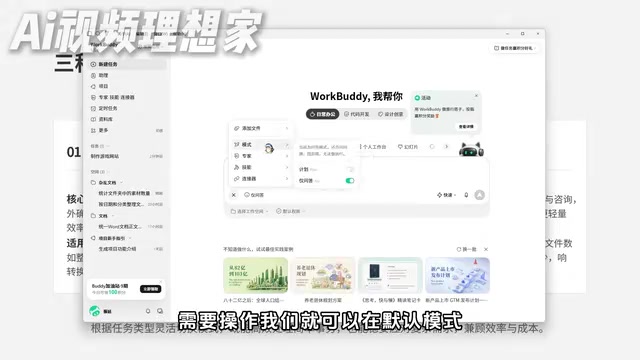
The selection logic is clear: simple, clear tasks use default mode; complex tasks use Plan mode; pure query tasks use Ask mode.
Multimodal in Practice: From Picture Book Images to Short Video
Multimodal capability means it can do anything—not just generate documents, but handle images and video too. The interface provides common entries for document processing, PPT generation, design creativity, video generation, and more.
The creator demonstrated a complete pipeline: first have the AI design a set of children's picture book illustrations on the theme of The Little Match Girl, with a 16:9 aspect ratio, using the "optimize prompt" feature to enrich the description. The optimized prompt specifies key scenes, color style (soft and warm, suitable for young children's picture books), and narrative requirements, and the generated results are noticeably more accurate.

The generated canvas supports local modifications—for example, select unwanted text in the image and send an instruction to remove it; elements are separated independently and can be freely selected with tools; images are saved uniformly in a folder and also support link sharing. Then drag these images into a new project or directly @ the corresponding workspace to have the AI generate a picture book short video. It similarly optimizes the prompt first (adapting for horizontal playback, etc.), then renders an animated short film with transition effects.
The core takeaway from this lesson is just one sentence: whether it's images, video, or documents, the key is writing prompts in sufficient detail, communicating in natural language and iterating repeatedly.
Experts, Expert Teams, and Skills: One Person Becomes a Company
Starting from lesson five, we enter WorkBuddy's core gameplay: the three major capabilities of Experts, Skills, and Connectors.
Experts are equivalent to employees in specific roles. Selecting "Life Assistant" lets you claim coupons with one click; selecting "Senior Development Engineer" invokes a digital role with 10+ years of full-stack experience—send it requirements and it produces code directly.
Expert Teams are a complete team. Take a software development team as an example: the team includes a product manager to define requirements, an architect to design and break down tasks, engineers to implement code, and QA to verify quality. The creator demonstrated the entire process of using it to develop a Snake game: the AI first creates the team, then completes the code, then accepts and delivers—this workflow is almost identical to real-world workflows. You can interrupt and adjust direction at any time, and the final result consumes only a small number of credits. The produced game supports arrow-key controls, grows longer when eating food, and has a polished interface.
Skills can be understood as pre-trained professional tools or work capabilities. The platform includes a built-in Chinese Skill marketplace with one-click installation of common capabilities. Connectors are the entry point for authorizing AI to use a particular software or service—for example, after authorizing WeCom, it can help reply to messages or organize documents based on chat history. These two areas have dedicated explanations later in the series.
Multi-Agent collaboration is the technical paradigm behind "Expert Teams." Its core is role division and message passing: each agent has its own independent system prompt, available toolset, and responsibility boundaries. The product manager Agent clarifies requirements and produces a requirements document; the architect Agent breaks down tasks based on the document; the engineer Agent implements code; the QA Agent performs acceptance testing. A coordinator orchestrates the sequence, aggregates outputs, and decides whose judgment prevails in conflicts. The advantage of this architecture is that each stage has more focused context and clearer responsibilities; the drawback is that long chains amplify error accumulation and credit consumption, so real products often trade off between team size and task complexity.
MCP (Model Context Protocol) is the current universal foundation for connector-type capabilities. Proposed by Anthropic in late 2024, it exposes external data sources and tool interfaces to models in a unified way, enabling the same Agent to connect to software, databases, and internal systems from different vendors without writing separate adapters for each service. The article's mention of "authorizing WeCom to help reply to messages" is exactly this approach in practice: connectors handle authentication and protocol adaptation, while the model only sees standardized tool descriptions. Understanding this also helps assess the upper limit of an Agent product's ecosystem extensibility.
A Few Judgments for Beginners
One viewpoint conveyed by this tutorial is worth pondering: prompts themselves are just ideas and suggestions—suggestions aren't valuable, execution is. The value of Agent-type tools lies precisely in turning ideas directly into actual operations. For most entry-level users, choosing an AI Agent that's easy to deploy, compatible with domestic office scenarios, and cost-controllable is a pragmatic starting point for obtaining a digital employee at low cost. As for tools with greater freedom like Codex, they require understanding code logic and workflow invocation, making them more suitable for technically grounded users.
One-line Summary
WorkBuddy beginner's guide: the operational path from installation and three working modes to expert teams and multimodal practice.
Paragraph Summary
Based on a 198-episode WorkBuddy tutorial on Bilibili, this article distills a beginner-oriented path for using AI Agents. It opens by clarifying the essential difference between traditional LLMs and Agents: the former only gives advice, while the latter can operate a computer, call tools, and directly deliver results within authorized scope—and gives three reasons to choose WorkBuddy: low barrier, domestically usable, and affordable. It then covers installation and the three-step interface operation, the first practical task of organizing a folder with permission security details, compares the applicable scenarios of default, Plan, and Ask modes, and notes that simple queries are more credit-efficient in Ask mode. The multimodal section demonstrates a complete pipeline from The Little Match Girl picture book illustrations to a short video with transitions, emphasizing that prompts must be detailed enough. Finally, it introduces the three core capabilities of Experts, Expert Teams, and Skills/Connectors, showing the multi-role collaboration workflow through Snake game development.
Related articles

Is the Agent Harness Dead? Cursor's Early Engineer Breaks Down the Real Architecture of AI Coding Agents
Cursor early engineer Jediah breaks down the real architecture of the agent harness: why "the harness is dead" is only half right, how the data flywheel lets the harness obsolete itself, and how Grokbot, software factories, and primitive design open new frontiers for agents.

Python Visitor Pattern and Better Alternatives Explained
A deep dive into Python's visitor pattern and four alternatives: method pattern, pattern matching, dictionary mapping, and functools.singledispatch. Choose the best decoupling design by change frequency.

357 Days of Deep Experience: Why Omarchy Made Me Stop Distro-Hopping
A 357-day deep dive into Omarchy: 59-second install, out-of-the-box audio and GPU support, the Quattro QuickShell rewrite migration pains, and why Arch users should try it.