Archon: Teach AI to Operate Your Computer by Screen Recording, Automate Repetitive Work with One Click

Archon lets you teach AI to automate computer tasks by simply recording your screen once.
Archon is a GUI Agent tool that learns to automate repetitive computer tasks through screen recording. Instead of writing scripts, users simply record their workflow once, optionally adding voice annotations, and Archon memorizes the process for future automated execution. It supports use cases like GUI software testing, comment management, and assignment collection, available on both Mac and Windows.
What is Archon?
In daily office work, we all have highly repetitive tasks: downloading files from a specific platform every day, organizing invoices, replying to comments, collecting and distributing assignments... These tasks aren't complex, but they accumulate over time, consuming significant time and energy. If an AI assistant could "understand" screen content and automatically control the mouse and keyboard to complete these tasks, productivity would dramatically improve.
Archon is exactly this kind of GUI Agent tool. A GUI Agent (Graphical User Interface Agent) is an important research direction in the AI field in recent years. Traditional AI automation primarily relies on API interfaces or command-line operations, while GUI Agents simulate human interaction with graphical interfaces—"seeing" screen content to understand the current state, then simulating mouse clicks and keyboard inputs to execute operations. The core of this technology relies on the visual understanding capabilities of multimodal large models (such as GPT-4o, Claude, etc.), enabling AI to "read" buttons, menus, text boxes, and other interface elements just like humans. Since 2024, multiple GUI Agent projects have been released, including OpenAI's Operator, Anthropic's Computer Use, and Google's Project Mariner, marking a period of rapid development in this field.
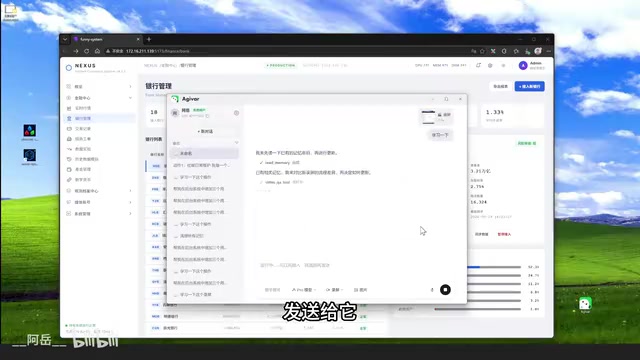
Archon can automatically recognize content on the screen and simulate keyboard and mouse operations to complete various tasks. More importantly, it supports a screen recording teaching mode—you only need to record your operation process once, and Archon can learn it and form a memory, automatically repeating the execution afterward.
Archon is currently available, supporting both Mac and Windows platforms, and can be downloaded directly from the official website.
Core Feature: Screen Recording Teaching Mode
Learn by Recording Once
Archon's biggest highlight is its screen recording learning mechanism. Traditional automation tools often require writing scripts or detailed instruction descriptions, but Archon takes a completely different approach:
- Start recording: Launch Archon's recording function
- Operate normally: Complete your workflow as you usually would
- End recording: Switch to teaching mode and let Archon learn
- Form memory: Archon understands and remembers the entire operation process

This screen recording teaching mode essentially belongs to the "Learning from Demonstration" (LfD) paradigm in AI. This method has years of research history in robotics, with the core idea being that AI learns strategies by observing expert operation trajectories rather than through manually written rules. In the GUI Agent scenario, screen recording data contains rich temporal information: screenshots of each frame, mouse movement trajectories, click positions, keyboard input content, etc. The AI model needs to abstract operational intent and process logic from this data, forming reusable "operation memories." Compared to traditional prompt-based instruction descriptions, this approach has higher information density and is especially suitable for describing complex interactive operations that are "hard to explain but easy to do."
When you need to perform the same operation later, simply prepare the materials, send the command to Archon, and it can complete the task automatically.
Voice Annotations Improve Learning Efficiency
During recording, Archon also supports a voice annotation feature. You can speak at any time to highlight precautions for a particular step, essentially adding real-time annotations during the operation process. This greatly improves AI learning efficiency, helping it understand not only "what to do" but also "why to do it this way" and "what to watch out for."
The voice annotation feature reflects a multimodal information fusion design philosophy. In pure visual screen recording, AI can only see "what was done" but has difficulty understanding "why it was done." For example, if a user pauses for a few seconds at a certain step before proceeding, it could be waiting for a page to load or making a judgment call. Through voice annotations, users can supplement operational intent, judgment conditions, and precautions in real time, essentially adding a semantic layer of annotation to the visual data. This combination of visual information, operation trajectories, and natural language explanations helps AI build a more complete task understanding model, enabling it to make correct judgments and operations even in slightly different scenarios.
Practical Application Scenarios for Archon
Scenario 1: GUI Software Testing
In software development, AI excels at writing algorithmic logic and can automatically check code through unit tests. However, for graphical operations or applications with rich interactions, AI can hardly ensure there are no issues based on code alone.

Take a graphical Git operation software as an example: to compare the diff between two nodes, you need to first click one node, then select the diff option. At this point, you'll see a blue arrow attached to the mouse, and then click another node to see the code differences between the two commits.
If you try to teach AI through written descriptions, you'd need to write extremely detailed step-by-step instructions, which is incredibly tedious. But with screen recording, you only need to perform the operation once, record it, switch to teaching mode, and Archon can learn it and form a memory, automatically executing such complex graphical testing tasks afterward.
Scenario 2: Product Operations Comment Management
For product operations staff, daily work involves a large number of repetitive comment management tasks: cleaning up spam comments, providing standardized replies to simple product inquiries, etc.
Using Archon is straightforward:
- Prepare a document with replies to common questions in advance
- Send the document to Archon through teaching mode, letting it learn and form a memory
- Archon can then automatically reply to simple product inquiry questions for you

This way, operations staff can focus their energy on more valuable content creation and strategy development, rather than being consumed by repetitive comment replies.
Scenario 3: Assignment Collection and Distribution Automation
For class representatives or academic staff, collecting and distributing assignments is one of the most time-consuming tasks. Each person might send their assignment files directly, and you need to download them one by one, check names, and compile everything.
With Archon, all this work can be handed over to it: automatically checking the submission roster, batch downloading files, and organizing them according to rules. Mechanical operations that previously required significant time can now be handled with a single command.
How Archon Differs from Traditional Automation Tools
| Comparison | Traditional Automation (RPA/Scripts) | Archon (GUI Agent) |
|---|---|---|
| Learning curve | Requires programming or script configuration | Screen recording as teaching |
| Adaptability | Prone to failure when interfaces change | Vision-based understanding, more adaptable |
| Interaction complexity | Suited for fixed processes | Can handle complex graphical interactions |
| Learning method | Rule-driven | Demonstration learning + voice annotations |
Traditional RPA (Robotic Process Automation) technology, represented by products like UiPath and Automation Anywhere, primarily locates operation targets by recognizing DOM structures, control IDs, or fixed coordinates of interface elements. This approach is precise but fragile—once an application updates its interface layout, adjusts button positions, or switches UI frameworks, existing automation scripts may fail and require maintenance. GUI Agents, on the other hand, use vision-based understanding, identifying elements by "seeing" the screen like humans do, giving them greater robustness against interface changes. However, this also means GUI Agents may not match traditional RPA in execution speed and precision. Each has its applicable scenarios, and they are not simply a replacement for one another.
Archon's core advantage lies in lowering the barrier to automation. You don't need to know programming, you don't need to write complex configuration files—you just need to demonstrate the operation once, like teaching a new colleague, and it can learn.
Summary and Usage Recommendations
Archon represents an important direction in the GUI Agent field: letting AI learn by observing human operations rather than relying on human-written instructions. This "what you see is what it learns" model dramatically lowers the barrier to entry, allowing non-technical users to benefit from AI automation's efficiency gains.
If your work involves a large number of repetitive computer operation scenarios, consider trying Archon to solve them. Hand the repetitive tasks over to AI and give yourself more time for more important and valuable work.
However, it's important to note that GUI Agent technology is still rapidly evolving. When dealing with sensitive data or critical business operations, it's recommended to thoroughly test in a non-production environment first and confirm stability before deploying in actual use. Since these tools have complete control over the computer—including accessing the file system, operating browsers, entering passwords, etc.—if misoperations occur or the tool is maliciously exploited, the consequences could be more severe than traditional software vulnerabilities. Risks currently being discussed in the industry include: prompt injection attacks (malicious text on screen may mislead AI into performing unintended operations), blurred permission boundaries (AI may access sensitive information beyond the task scope), and operation irreversibility (such as accidentally deleting files or sending wrong messages). Therefore, when using Archon and other GUI Agent products, it's recommended to follow the principle of least privilege, set up necessary human confirmation steps, and back up data before critical operations.
Related articles

GitHub Daily · August 18: The Rise of Agent Memory and Multi-Agent Frameworks
GitHub Trending Aug 18: AI Agent infrastructure dominates with memory databases, multi-agent frameworks, and Web3+AI scaffolds leading the charge.

The Design Philosophy of Agent Skills: Making AI Interrogate Your Development Methodology
Deep analysis of Matt Pocock's open-source Skills repo: Grill Me interrogation-style alignment, Wayfinder decision mapping, smart/dumb zones, and the shift from tactical to strategic programming.

Spring AI 2.0 in Practice: Core Agent Development Capabilities and Code Generation Assistant Project
Deep dive into Spring AI 2.0 core updates, covering Agent autonomous reasoning, tool calling, and iterative loops, with a hands-on Claude Code-style assistant project using ChatClient, Streaming, Memory, Tools, and MCP.