Codex Security: A Configuration Guide to Automatically Blocking Vulnerabilities at the PR Stage
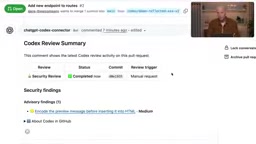
OpenAI demonstrates Codex Security PR Reviews, automatically discovering, fixing, and re-verifying vulnerabilities at the PR stage.
OpenAI's Dan Shanahan demonstrated Codex Security PR Reviews: after installing the ChatGPT Codex Connector, developers can @Codex in a PR comment to manually trigger a security scan, and Codex identifies vulnerabilities like XSS and generates fix commits, confirming they're cleared after re-verification. Teams can configure personal or repository-level automatic reviews with trigger timing (PR creation or every push) and severity-based alert thresholds. Codex reads agent markdown and security MD files for project context, embedding security review into the developer workflow—though quality depends on instruction files and permissions, and thresholds should be aligned with the security team.
Title
Codex Security: A Configuration Guide to Automatically Blocking Vulnerabilities at the PR Stage
Meta Description
OpenAI engineers demonstrate Codex Security PR Reviews: automatically scan for security vulnerabilities at the GitHub PR stage, have AI generate fix commits and re-verify, with support for repository-level automatic reviews and alert threshold configuration.
Article Content
Shifting security left is a core DevSecOps practice, but manual security audits often can't keep up with the pace of PR submissions. Dan Shanahan, an engineer on OpenAI's Cyber Deployment Engineering team, demonstrated Codex Security PR Reviews in an official demo: letting AI automatically scan for security vulnerabilities at the Pull Request stage and complete fixes and verification directly within the PR. This workflow turns security review from "remediation after the fact" into "block on submission."
Prerequisites: Installing the Codex Connector
To enable PR security reviews, you first need to install the ChatGPT Codex Connector app in your GitHub repository. Go to the repository's Settings → GitHub Apps and confirm that the Codex Connector is installed and configured.
If the environment doesn't have access to the app, you'll need to contact your workspace administrator and the GitHub repository or organization owner to complete the installation. Dan emphasized that the installation process itself is very straightforward—the real barrier is the permission approval chain.
Manually Triggering a Security Review
Create a new comment on the PR page, directly @Codex and type "do your security review," and Codex will scan this code change. Once the scan is complete, a summary from Codex Review appears in the PR comment section, with results displayed within the PR so developers can interact with them directly.
The demo uncovered a cross-site scripting (XSS) vulnerability. Next, Dan pasted the PR link into Codex and asked it to fix the security issue flagged by the comment. Codex analyzes the codebase, generates a fix, and publishes the fix commit to the PR. Scroll down on the PR page and you can see the commit Codex introduced.
After fixing, verification is still needed. @Codex again to run a security review, and this time the result returned is "No issues were found in this pull request."
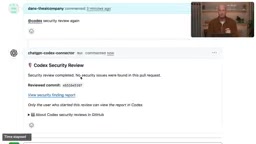
This "discover—fix—re-verify" loop is completed entirely within the PR workflow, with no need to switch tools or wait for the security team's schedule.
Cross-site scripting (XSS) is a common web security vulnerability in which attackers inject malicious scripts into a web page so that other users execute those scripts while browsing, thereby stealing cookies, session tokens, or tampering with page content. XSS is typically divided into three types: stored, reflected, and DOM-based, and its root cause is that the application does not adequately escape or filter user input. In code review, identifying issues such as unsanitized input being directly concatenated into HTML, the absence of a secure template engine, or the lack of a Content Security Policy (CSP) is key to preventing XSS. Codex Security Reviews can scan for such flaws at the PR stage precisely because its analysis model can trace the data flow path from input to output.
From Manual to Automatic: Repository-Level Review Configuration
Manual triggering is suitable for occasional checks, but what teams really need is automatic coverage on every submission. Go to the Codex app's Settings and scroll to the Code Review section at the bottom, where Codex's various review capabilities for PRs are configured.
At the very bottom are the personal security review preferences. Once enabled, every PR you open automatically gets a review. The trigger timing can be set to when the PR is created or on every push to the PR; alert thresholds can be set by severity level, and thresholds for manual and automatic reviews can be configured separately.
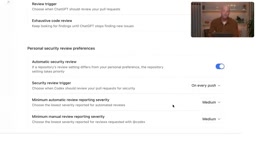
Dan then turned off the personal preference and instead demonstrated repository-level configuration—which is closer to what most organizations need. In the repository settings, enable the "review security vulnerabilities" toggle and change the review cadence from "follow personal preferences" to "all PRs," so that no matter who creates a PR, a scan is triggered. You can likewise set the trigger condition (only when the PR is opened, or on every push) and the alert threshold.
There's also an easily overlooked detail: Codex reads the agent markdown files and security MD files in the repository. These are repository-level instruction sets that help Codex understand the repository's specific conventions and security context—essentially giving the reviewer a project-specific checklist.
Agent markdown files are instruction files in a repository that define AI agent behavior, typically describing in natural language the project structure, coding standards, security requirements, and review priorities. Security MD files specifically carry security context, such as known risk points, compliance requirements, version constraints of dependency libraries, and sensitive data handling rules. Codex reads these files during review and uses them as a project-specific checklist, thereby improving the relevance of the review and reducing false positives. The quality of these files directly determines the accuracy of the AI review, so teams are advised to include them in version control and maintain them continuously as the project evolves.
Hands-On Verification of Automated Scanning
After configuration, Dan created a new PR from a branch pre-seeded with several vulnerabilities. Shortly after the PR was created, Codex Security Review appeared automatically and began analyzing, with the identified vulnerabilities displayed directly in the PR—no manual trigger command required.
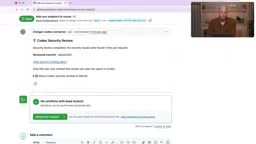
This step verified the real-world effectiveness of automation: from PR creation to the appearance of security feedback, the developer never needs to take any action, and the review results are presented in the same context as the code change.
The Value and Limits of This Workflow
Codex Security Reviews embeds security review into the workflow developers already use, shortening the time from vulnerability discovery to fix implementation. Manual mode is suitable for spot checks and verification, while repository-level automatic mode ensures coverage—combining the two forms a layered defense.
Note that the review quality in the demo depends on Codex's understanding of the codebase, and the quality of the security MD files directly affects false positives and false negatives. In addition, repository-level configuration requires the appropriate administrative permissions, and alert thresholds should be aligned with the security team before rollout to avoid noise from high-frequency, low-severity alerts. For teams looking to shift security left to the PR stage, this configuration workflow provides a template that can be reused directly.
One-line Summary
OpenAI demonstrates Codex Security PR Reviews, automatically discovering, fixing, and re-verifying security vulnerabilities at the PR stage.
Paragraph Summary
Dan Shanahan, an engineer on OpenAI's Cybersecurity Deployment Engineering team, demonstrated Codex Security PR Reviews: after installing the ChatGPT Codex Connector in a GitHub repository, developers can manually trigger a security scan by @Codex in a PR comment, and Codex identifies vulnerabilities (such as XSS) and directly generates a fix commit, confirming the issues are cleared after re-verification. Teams can also configure personal-level or repository-level automatic reviews, with trigger timing set to PR creation or every push, and alert thresholds set separately by severity level. Codex reads the agent markdown and security MD files in the repository to understand the project's security context. This workflow embeds security review into the developer workflow, achieving "block on submission," but review quality depends on the instruction files and permission configuration, and thresholds should be aligned with the security team before rollout.
Related articles

Daybreak Blue Application and Enablement: Complete Process Guide
Based on the official demo video, this guide details the Daybreak Blue application and enablement process, covering enterprise verification, intended use statements, role permission configuration, user access verification, and API key creation to help cybersecurity teams quickly onboard frontier AI models.

United Airlines Bans AI Agents from Booking Flights, Escalating the Battle Between Airlines and Intelligent Agents
United Airlines bans AI agents from booking flights for travelers, sparking Hacker News debate. This analysis examines channel control, risk logic, the trust gap in the agent economy, and practical impacts on travel AI developers.
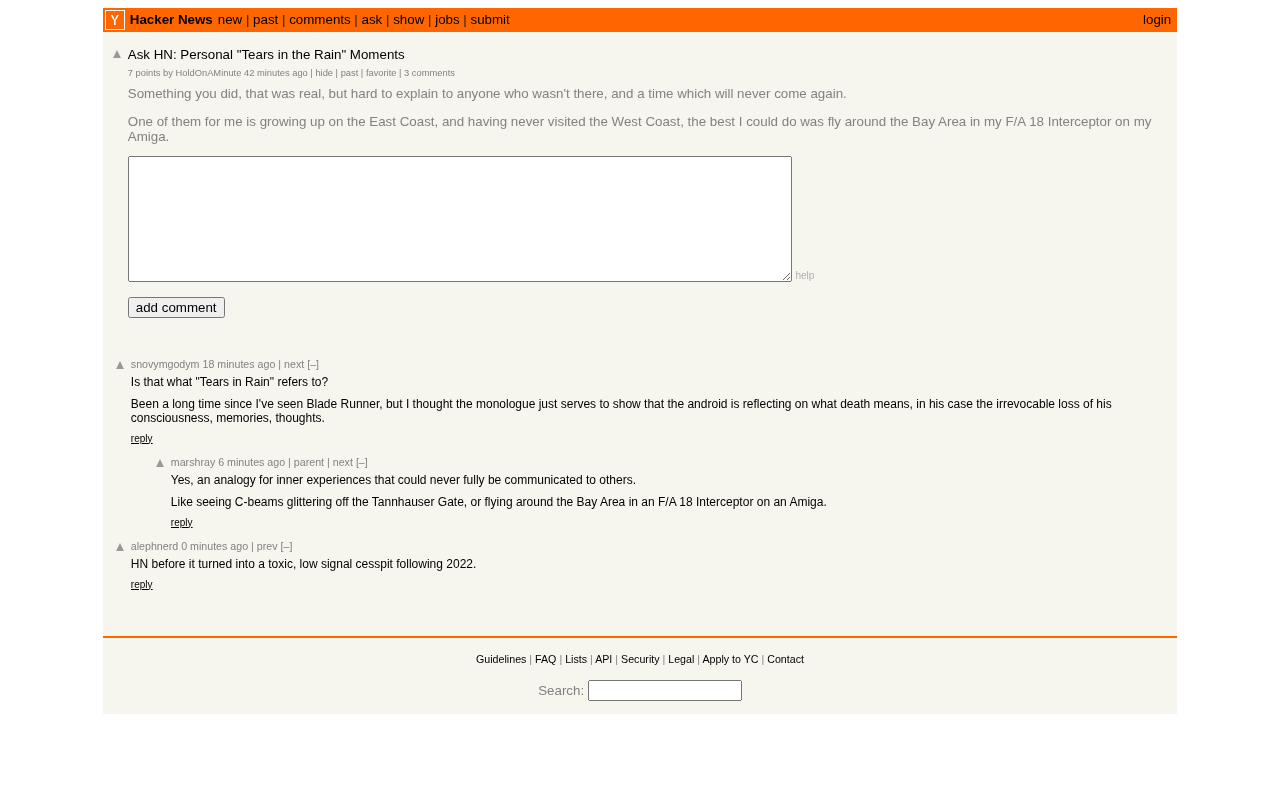
Tech Workers' 'Tears in the Rain' Moments: Hacker News Debates the Boundary Between AI and Humanity
A Hacker News post, "Personal Tears in the Rain Moments," sparks discussion of emotional experience in the tech community. This article interprets the tech-humanist thinking behind the topic and explores the unique value of tech workers in the AI era and the metaphor of fading memory.