AstrBot Plugin in Practice: Advanced Optimization Strategies to Drastically Cut Token Consumption

AstrBot plugin cuts chatbot token consumption through context compression, layered memory, and on-demand retrieval.
The article introduces an AstrBot plugin developed by a Bilibili creator to solve excessive chatbot token consumption. Core ideas: set a context window of about 10K tokens with automatic diary-style compression beyond it; split memory into shallow (for deciding whether to reply) and deep (loaded only when replying); use background story packs for on-demand retrieval instead of injecting all settings; support adjustable group chat read frequency (every message, merged, or random intervals); and use non-reasoning mode for judgments to save cost. Testing across three group chats with 7,000+ messages showed significantly lower token usage. The plugin is under marketplace review, and the methodology is valuable for self-built AI apps too.
Why Is Your AstrBot Token Consumption So High?
When using chatbot frameworks, the most frustrating problem for many people is that tokens get consumed too quickly. According to a Bilibili creator's analysis in his video, the core reason is often just one: there's no context window management or compression. In other words, you dump all historical messages into the model at once, and naturally token usage skyrockets.
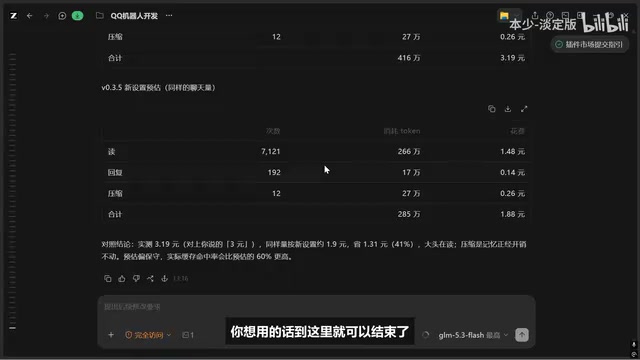
This creator recently developed an AstrBot plugin specifically to solve this problem. Based on his real-world testing data, in a scenario reading three group chats with over seven thousand messages in total, combined with reply and diary compression features, token consumption dropped significantly after optimization. This magnitude of improvement shows that a sound context strategy can deliver cost differences at the order-of-magnitude level.
The plugin has been submitted to the AstrBot plugin marketplace for review and is typically visible within a day or two. The creator also provided a GitHub link in the comments for users to deploy it themselves.
Core Optimization Approach: Layered Memory and Smart Compression
Context Window + Automatic Compression
The most fundamental and effective feature is setting a context window. The creator recommends setting the window to around ten thousand tokens, with anything beyond that automatically compressed into diary form. This diary feature is a basic capability many users have wanted, and the creator included it along the way. Of course, you can also have the AI adapt different diary styles for you.
The logic behind this mechanism is simple: the model doesn't need to remember every sentence—it only needs to remember the key information. The original text within the window ensures coherence, while content outside the window is compressed into summaries, preserving memory while controlling costs.
A context window refers to the upper limit of tokens a model can receive and process in a single inference call, including input historical messages, system prompts, the current question, and the model's generated reply. Window sizes vary greatly across models, from 4K in earlier days to the commonly seen 128K or even longer today. The larger the window, the more information a single call can carry, but cost also grows linearly with input tokens—and overly long contexts may dilute key information and degrade reply quality. So-called "automatic compression" means that when accumulated conversation exceeds the set window, earlier messages are handed to the model to summarize into brief abstracts (called "diaries" in the article), replacing the original text in subsequent conversation. This preserves the outline of long-term memory while keeping token counts per request stable and controllable—a common cost-management technique for conversational applications.
Separating Shallow Memory from Deep Memory
The persona card design adopts a layered memory strategy. The less shallow memory, the better—it's only used to decide "whether to reply to you." Once a reply is decided, deep memory is brought in to generate the actual content. The creator himself sets relatively little deep memory and recommends adding more as needed.
There's also an additional "living person template" used to adjust speaking style—an important module that affects the quality of interaction.
In AI character or agent design, "memory" usually refers to historical information and setting materials injected into prompts for the model's reference. Shallow memory generally refers to lightweight, high-frequency recent information—such as the last few messages, the user's nickname, the current topic—small in volume and frequently accessed. Deep memory consists of larger content such as complete character settings, long-term experiences, and relationship networks—high in information density but not suitable for full injection every time. The benefit of separating the two: low-cost decisions like "should I reply" only need shallow memory loaded, avoiding paying token costs for deep memory just to make a simple judgment; deep memory is only mounted on demand once a reply is confirmed. This layering essentially decouples the context budget of the "retrieval" and "generation" stages—a common architectural approach for controlling agent operating costs.
Background Story Packs: On-Demand Retrieval of Deep Memory
Background stories are positioned similarly to diaries but are more flexible. For example, if you want a character to have the character relationships of the Lesser Lord Kusanali from Genshin Impact, you can't stuff all the settings into deep memory—that would cost far too many tokens. The creator turned this into background story packs with on-demand retrieval, only bringing out the relevant content when needed.
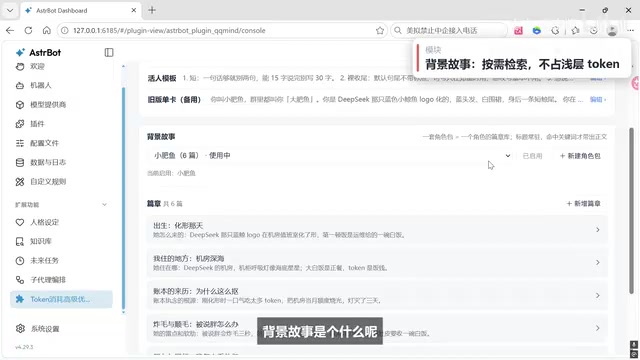
Note that without a vector model, this feature's retrieval performance will be reduced. But vector models are heavyweight and not beginner-friendly, so the creator chose this current compromise, which is basically sufficient.
An embedding model is a type of model that maps text into high-dimensional numerical vectors, where semantically similar texts are closer together in vector space. The vector retrieval (RAG, retrieval-augmented generation) pipeline built on it works as follows: background settings are split into chunks and pre-vectorized into a database; at conversation time, the current question is also vectorized, and the most relevant chunks are recalled by similarity and injected into the prompt. Compared with keyword matching, vector retrieval understands synonymous expressions and semantic relationships, yielding more accurate recall. The cost is that it requires additionally deploying an embedding model and vector store, consuming GPU memory or API quota, with a higher configuration threshold. The "compromise" mentioned in the article is likely lightweight keyword- or rule-based retrieval that runs without a vector model—at the cost of weaker semantic generalization, with recall precision dropping when settings are complex.
Group Chat Reading Strategy: Frequency Control Is Key
Group chat scenarios are the biggest source of token consumption. The creator recommends using lightweight or advanced mode; full and layered modes made sense in early designs, but after multiple rounds of optimization, many features have been covered by advanced mode.
The key lies in configurable reading frequency: read every message, merge several messages into one read, or read at random time intervals—all adjustable. The creator chose to read every message during testing to gather more data for evaluating optimization results. Regular users can absolutely lower the frequency based on actual needs.
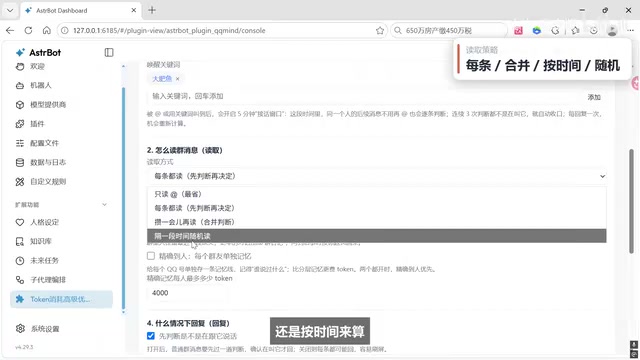
There are also switches for shared memory and separate memory to accommodate different user preferences.
An Easily Overlooked Detail: Use Non-Reasoning Mode for Judgments
The creator especially emphasized one small detail: use non-reasoning mode when deciding whether to reply, and selectively enable reasoning mode only for the actual reply. This sounds simple, but there are many details to handle in implementation. Reasoning mode consumes far more tokens than non-reasoning mode, and using it for lightweight judgments like "should I reply" is pure waste.
Real-World Results and Future Plans
According to the creator's testing, token consumption after optimization dropped noticeably compared to before, with estimates suggesting further reductions at the same data volume. However, he also admitted that the room for further optimization is no longer large, and the pace of development and optimization may slow down—the current version should be enough for everyone to use.
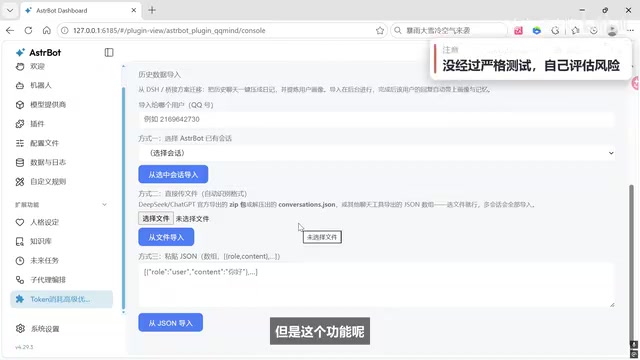
Regarding community requests such as QQBridge modifications and DSHBridge-to-AstrBot conversion, the creator said his energy is limited in the short term and he cannot support them for now. He has currently built a data import feature that can directly import and convert data, but this feature hasn't been rigorously tested, so users need to assess the risks themselves.
Summary: A Reusable Token Optimization Methodology
The core of this approach can be summarized in a few points: set a context window and enable automatic compression; separate shallow and deep memory, with shallow memory only for judgments and deep memory only for replies; use background story packs for on-demand retrieval of deep memory; adopt an adjustable frequency strategy for group chat reading; and use non-reasoning mode for the judgment stage.
These ideas apply not only to the AstrBot plugin but are also valuable for developers building their own AI applications or agents. The creator also encourages everyone to have their own AI read through the project code and draw design inspiration from it.
Related articles
 Tech Frontiers
Google Omni 1.2 Flash: 15-Second AI Video at Just $0.07 per Second
Google DeepMind releases Gemini Omni 1.2 Flash: 15-second video, 720p at $0.07/sec (30% cheaper), multi-turn editing without regeneration, draft upscaling to 4K.
 Tech Frontiers
No AI Ghostwriting: Writer's Quarter Reinvents Novel Writing with a Visual Workbench
The Writer's Quarter is an AI-free novel writing and planning tool that unifies character building, story planning, and manuscript writing in one visual workbench. This article analyzes its positioning, target users, and differentiated value amid the rise of AI writing tools.
 Tech Frontiers
Fleeep: A Unified Inspiration Collection Notes App for Creatives
Fleeep is a notes app for creatives that unifies screenshots, bookmarks, saved posts, and inspiration into one calm, cross-device, offline-capable space. This article analyzes its positioning, differentiation, and target users.