AWS AgentCore Gateway in Practice: Extending AI Agent Capabilities with MCP
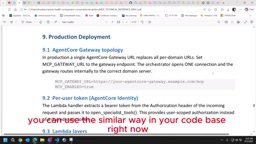
AWS AgentCore Gateway brings MCP to production as a managed gateway for AI agents to securely call external services.
This article introduces the core concepts and configuration workflow of AWS AgentCore Gateway (MCP Gateway). Since LLMs can't directly access external services, MCP gives agents the ability to call tools — and AgentCore Gateway is AWS's managed implementation. It serves as a unified entry point supporting four Target Types (Lambda ARN, REST API, MCP Server, Connectors), with Signature V4 inbound auth tied to Cognito and OAuth credentials stored securely in AWS Secrets Manager.
Why AI Agents Need MCP
Large language models can only handle text input and output — they have no way to directly access external services. When you ask ChatGPT, Gemini, or Claude to draw a diagram in draw.io, the model itself doesn't have the ability to invoke a drawing service. That's exactly the problem Model Context Protocol (MCP) was designed to solve.
MCP is a protocol designed by Anthropic that enables agents to proactively call external services from within a codebase. In other words, MCP gives LLMs a "hand to get things done" — whether that's generating draw.io diagrams, reading PDF documents, or processing text files, these capabilities can all be mounted onto an agent as additional tools. In the AWS ecosystem, the component that hosts this mechanism is called AgentCore Gateway (also known as MCP Gateway).
MCP (Model Context Protocol) was officially open-sourced by Anthropic in November 2024. It follows a client-server architecture: the LLM host program acts as the MCP Client, and external capability providers act as MCP Servers, communicating via a standardized JSON-RPC message format. The core value of this design is "implement once, reuse everywhere" — developers only need to wrap a tool service according to the MCP spec, and any Agent framework that supports MCP (such as Claude Desktop, LangChain, Bedrock, etc.) can plug right in, with no need to write separate adapters for each platform. Compared to the fragmented state of earlier Agent frameworks where each one defined its own tool-calling interface, MCP's arrival is essentially like establishing a "USB standard" for the AI tool ecosystem, dramatically reducing the coupling cost between tool development and Agent integration.
What Gateway Actually Is
A Gateway is essentially an "entry point" — a unified gateway through which agents invoke external capabilities. You register various external services here, allowing agents to call them just like built-in tools.
In AWS AgentCore Gateway, the Target Types you can attach include:
- Lambda ARN: Used when your code doesn't have an existing API, but you want to call one Lambda from another
- REST API: Describes the interface via an OpenAPI-style Schema
- MCP Server endpoint: Directly connects to an existing MCP service
- Connectors: A new connector type added to the platform
The value of this design lies in decoupling — agents don't need to care about the implementation details of each service; they simply make calls through Gateway's unified interface.
How Requests Flow Through the System
From a sequence perspective, a complete request flow looks roughly like this: after a mobile or web frontend initiates a request, it first arrives at the Orchestrator. The entire project code is deployed in AWS Lambda, and the Orchestrator handles incoming traffic.
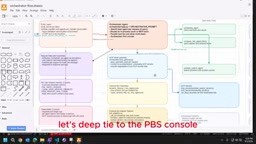
Inside the Orchestrator is an "intent classification Agent" responsible for recognizing the intent of a user's request. Based on the identified intent, it routes to the appropriate sub-Agent for processing. Taking a healthcare project as an example, internal sub-Agents might cover appointment scheduling, shift management, and various business domains such as hospitals, doctors, clinics, and medications.
For internal sub-Agents that already exist, they can be called directly within the codebase. For external Agents or services that need to be invoked, they connect through Gateway's four Target Types (Lambda ARN, Connectors, MCP Server, REST API). The demo in this walkthrough uses the REST API approach.
Creating a Gateway in the Console
In practice, search for Amazon Bedrock AgentCore in the AWS Console, navigate to the Gateways menu, and click "Create Gateway" to get started.
Basic Configuration and Role Permissions
During creation, you'll need to fill in the Gateway name, permissions, and description. A critical step is selecting the IAM Role: you need to confirm that the role's policy has the Bedrock AgentCore-related service permissions enabled. Only with the correct permissions configured can you successfully call the Gateway from Lambda.
Inbound Identity Authentication
The next step is configuring inbound authentication. AgentCore uses the Signature V4 mechanism and will automatically create a Cognito URL for you. Every time you call the Gateway from Lambda code, you need to carry this URL as an authentication credential. The system will use it to generate a Signature V4 token to verify the legitimacy of the request's origin, preventing attackers from forging calls.
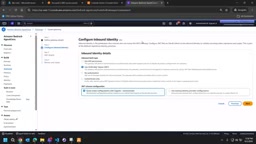
The video author particularly emphasizes: this inbound authentication must also be configured in production deployments — this is AWS's official recommended practice and must be handled with care.
Signature V4 (SigV4) is AWS's standard authentication mechanism for signing HTTP requests, widely used across almost all AWS service API calls including S3, DynamoDB, Lambda, and more. The core idea is: the caller uses AWS access credentials (Access Key + Secret Key) to perform HMAC-SHA256 hashing on the request's method, path, headers, and body, generating a signature string that changes with the timestamp and is appended to the request header. The server receives the request, recalculates the signature using the same key, and compares them — confirming that the request genuinely came from a caller holding valid credentials and that the content wasn't tampered with in transit. Compared to simple static API keys, SigV4 signatures include a timestamp (valid for 15 minutes by default), which effectively prevents replay attacks. In the AgentCore Gateway context, Lambda code needs to construct SigV4 signature headers via the AWS SDK or manually in order to successfully make authenticated requests to the Gateway.
Configuring Target Types and OAuth Authentication
Target Type is the most critical part of the entire MCP Gateway, because every external service mounted to a Gateway is defined here.
REST API Schema Configuration
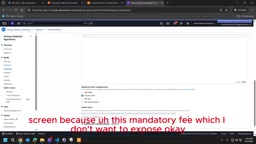
For REST API, you need to select OpenAPI as the interface type and provide the corresponding Schema. You can upload a JSON file describing the interface, or fill in an Inline Schema directly — which includes the Server URL and individual Paths. The author mentions that if you're unsure about the Schema format, you can absolutely use ChatGPT or Copilot to help generate it.
OpenAPI (formerly Swagger) is a specification standard for describing RESTful API interfaces using JSON or YAML, with the mainstream version currently at 3.x. A typical OpenAPI Schema includes the server base URL, each interface path (Path), HTTP methods, request parameter types and constraints, response structures, and more. The reason AgentCore Gateway relies on an OpenAPI Schema is that it needs to expose the interface's semantics (such as "this endpoint is for querying medication inventory") and parameter structure to the LLM, enabling the model to automatically determine when to call the tool and what parameters to pass during inference. The clearer the field descriptions (description) in the Schema, the higher the model's tool-selection accuracy. For developers not yet familiar with the OpenAPI format, you can hand an existing Postman Collection or curl example to ChatGPT and ask it to generate a JSON Schema compliant with OpenAPI 3.0 — usually only minor modifications are needed before it's ready to use.
OAuth Authentication for External Services
If the API being called requires token authentication, you'll need to configure the appropriate authorization method in the authentication section. AgentCore supports multiple identity providers, including pre-built options like GitHub, Google, and Microsoft SSO.
For manual configuration, select "Manual Config" in the Identity panel and fill in the following key fields:
- Client Name
- Issuer
- Token Endpoint
- Client ID and Client Secret
Sensitive credentials like Client ID and Secret must be securely stored via AWS Secrets Manager rather than hardcoded in your code. Once configured, associate them with the corresponding Target Type.
Summary: From Gateway to Code Invocation
Once the Gateway, authentication, and Target Types are all configured, you'll have a resource URL ready to call. From there, you simply invoke it from your Lambda code according to the spec, and the external service becomes available as a tool for the Agent.
Overall, AWS AgentCore Gateway brings the MCP concept to life as a manageable, hosted capability: a unified entry point, standardized Target Types, and built-in inbound/outbound authentication mechanisms. For teams looking to extend tool capabilities for AI Agents in production environments, this solution offers fairly comprehensive coverage in both security (Signature V4 + Secrets Manager) and extensibility (multiple Target Types).
Related articles

CSS Anchor Positioning: A New UI Positioning Approach Without JavaScript
A deep dive into CSS Anchor Positioning: from anchor-name and position-anchor to the anchor() function, position-area shorthand, position-try-fallbacks, anchor-size, and upcoming anchor queries.

New AI Chart Interaction: Continuous Follow-up Questions and Visualization in Conversation
Explore a new AI interaction method for continuously generating charts in conversation. Use the /visualize command to ask follow-up questions and visualize answers in the same chat window, improving data analysis efficiency.

Cursor Merges Into X Subscription: Paid Plans Share Unified Usage Pool, Grok Model Coding Usage Doubled
Cursor joins The X Subscription with a unified usage pool and doubled Grok coding quota. Third-party models shift to API pricing. Existing users can keep or migrate plans.