Azure AI Language + MCP: Giving AI Agents Real NLP Capabilities in Practice

Mount Azure AI Language as an MCP Server on Foundry Agent, but watch regional limits.
The article documents the complete hands-on process of connecting Azure AI Language's NLP capabilities to Microsoft Foundry Agent using MCP on Azure. The architecture involves three resources: Language, Foundry, and role permissions, with both resources requiring the Foundry User role or Agent creation is blocked. The workflow deploys the lightweight GPT-4.1 nano model, then uses Tools → Catalog to find Azure Language in Foundry Tools and establish a Key-based connection, exposing language detection, entity extraction, and PII detection as independent tools. The biggest pitfall was regional limitation: South India returned region not supported and MCP Server could not enumerate tools. Rebuilding all resources in East US worked, successfully extracting Person, Job Title, and Organization entities from "Satya Nadella is the CEO of Microsoft."
Building an AI Agent on Azure that can only chat is not hard. The hard part is making it actually understand text — detecting languages, extracting entities, and locating sensitive information. This hands-on video on YouTube shows how to use Azure AI Language together with the MCP protocol to mount a full suite of NLP capabilities onto a Microsoft Foundry Agent. The whole process hit a significant snag, which also exposed the real-world constraints of the current MCP toolchain when it comes to regional support.
Overall Architecture: Three Resources Chained Together
The core idea of this approach is to treat Azure AI Language as an MCP Server and call it through the Foundry Agent's Tool mechanism. Three resources are needed:
- Azure AI Language resource: hosts NLP capabilities such as language detection, entity extraction, and PII detection
- Microsoft Foundry resource: hosts the Agent itself and the model deployment
- Role permissions: both the Language resource and the Foundry resource need the Foundry User role assigned to the executor, otherwise the buttons will be locked when creating an Agent in the Foundry portal
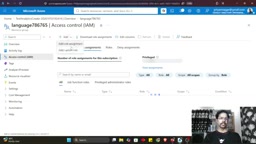
This permissions step is easy to skip. In practice, you go into Access Control → Role Assignments for each of the two resources, add Foundry User, and specify the member identity. Missing either one will block the subsequent steps.
Deploying a Model and Creating an Agent
Once permissions are configured, go to the Foundry portal. By default, creating an Agent selects GPT-5, but the video's author chose to manually deploy a lighter model first — GPT-4.1 nano. The reasoning is straightforward: it is the smallest model in that series, fast to deploy and cheap, and more than enough to verify whether the tool-calling chain works.
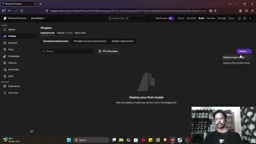
After deployment, go to Agents → create a new Agent, name it language agent interaction, choose text as the interaction mode, and open the Playground once created. At this point the Agent is running with a model, but it does not have any NLP capabilities yet.
Mounting Azure AI Language via MCP
This is the key step of the entire chain. In the Agent's Tools panel, choose Add Tool → Catalog, find Azure Language in Foundry Tools, and create a connection. The parameters to fill in include:
- Foundry resource name
- Authentication method: choose Key-based here, and copy a Key from the Language resource's Keys and Endpoints page and paste it in
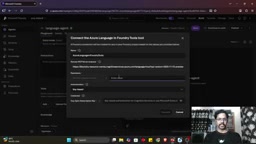
Once the connection succeeds, the various capabilities under the Language service appear in the Agent as independent tools — detect language, extract named entities, PII detection, entity linking, and so on. Each tool requires a manual user confirmation when invoked, which is the current security mechanism for MCP tool calling.
MCP (Model Context Protocol) is an open protocol standard proposed and open-sourced by Anthropic at the end of 2024, with the goal of unifying how large language models interact with external tools and data sources. Before MCP appeared, every Agent framework (LangChain, Semantic Kernel, Foundry, etc.) had its own tool description format, and cloud vendors had to repeatedly adapt their PaaS capabilities to plug into different Agents. MCP abstracts this into two sides: Client and Server. The Server declares with a standardized schema which tools it exposes and what parameters each tool accepts, and the Client (i.e., the Agent runtime) discovers these tools and forwards invocation requests.
It borrows the idea of LSP (Language Server Protocol) — LSP unified the interface between editors and language analyzers, while MCP unifies the interface between Agents and external capabilities. So you see Azure AI Language wrapped as an MCP Server, where detect language, extract named entities, and PII detection — capabilities that were originally REST API endpoints — automatically become tools that an Agent can select by semantics. Repackaging a cloud vendor's PaaS capabilities as an MCP Server essentially turns "writing code to call an API" into "letting the model decide whether to call it and which one to call."
The Pitfall: Unsupported Region Causes MCP Enumeration Failure
The author encountered a clear error when first trying in the South India region:
The remote MCP server rejected the request while enumerating tools. Response status code does not indicate success: region not supported.
This means the MCP Server for Azure AI Language is not available in all regions. The author's solution was to rebuild all resources in East US — the Foundry resource, Language resource, model deployment, and role assignments all redone from scratch.
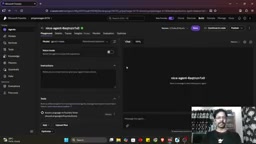
This detail deserves to be called out on its own. The MCP tools for Azure AI Language currently have hard regional requirements. If you do not confirm regional support before creating resources, the entire chain will not work later. In the video, the author also mentions that he did not know which region was supported at the start and only located East US through trial and error.
MCP tool enumeration is the first handshake action after an Agent connects to an MCP Server: the Client sends a tools/list request to the Server, and the Server returns the full list of tools it supports along with their JSON Schema. Only after enumeration succeeds does the Agent know which tools are available and what parameter format to use when invoking them. So the error here, "rejected the request while enumerating tools," is not a failure of some specific invocation, but a failure at the very step of "what tools do you have" — meaning the MCP Server endpoint in that region is simply unreachable or not deployed.
Azure PaaS services have long had regional feature differences. New capabilities usually reach GA (Generally Available) in only a few regions first, while other regions are either in Preview or entirely unavailable. MCP Server is a relatively new access layer, so its regional coverage is naturally narrower. What makes it worse is that this limitation is not indicated when you create the resource — a Language resource can be created normally in South India and can call REST APIs, but its MCP endpoint does not exist, and the problem only surfaces when the Agent tries to enumerate tools. This is also why the author recommends confirming regional support first: being able to create the resource does not mean the MCP chain will work.
Test Results: Entity Extraction Works
After switching to East US, the author verified the chain with one test sentence:
Satya Nadella is the CEO of Microsoft.
The Agent automatically connected to the MCP Server, requested approval for the extract named entities function call, and after approval returned the result: Satya Nadella (Person), CEO (Job Title), Microsoft (Organization).
The entire flow, from user input to structured output, was orchestrated autonomously by the Agent through tools. Besides entity extraction, NLP tasks such as detect language, PII detection, and entity linking can all be invoked in the same way.
Who This Approach Is For
If your Agent needs to handle multilingual text, extract structured information from unstructured content, or perform sensitive-information identification for compliance, the combination of Azure AI Language + MCP provides a relatively standardized path. The tool granularity is fine enough, with each NLP capability exposed independently, so the Agent can choose which one to call based on user intent.
The cost is a longer configuration chain — permission assignment for two resources, Key authentication, and region selection, each step with room for pitfalls. Regional limitations deserve special attention. It is recommended to start in a region already verified to be supported, such as East US, and only consider migrating after confirming the chain works.
MCP is maturing rapidly as a protocol layer between Agents and external tools, and the toolization of Azure AI Language is a signal worth watching: cloud vendors' PaaS capabilities are being repackaged as MCP Servers, and the supply of tools in the Agent ecosystem will only become richer.
One-line Summary
Using Azure AI Language as an MCP Server mounted to a Foundry Agent requires attention to regional limitations.
Paragraph Summary
The article documents the complete hands-on process of connecting Azure AI Language's NLP capabilities to a Microsoft Foundry Agent using the MCP protocol on Azure. The architecture involves three resources: the Language resource, the Foundry resource, and role permissions. Both resources must be assigned the Foundry User role, otherwise an Agent cannot be created. In the workflow, first deploy the lightweight GPT-4.1 nano model, then find Azure Language in Foundry Tools through Tools → Catalog and establish a Key-based authentication connection. Capabilities such as language detection, entity extraction, and PII detection are then exposed as independent tools. The biggest pitfall the author hit was the regional limitation: South India returned region not supported, the MCP Server could not enumerate tools, and the setup was ultimately made to work after rebuilding all resources in East US. In testing, it successfully extracted three entity types — Person, Job Title, and Organization — from "Satya Nadella is the CEO of Microsoft."
Related articles

How Big Can Stars Really Get? The Physical Limits of the Largest Stars
Red supergiants are the largest stars by volume, with radii up to 2,000 times the Sun, engulfing the inner solar system. But there is no precise upper limit on stellar size—models predict up to 15,000 solar radii. The most massive blue stars are far smaller than red supergiants—biggest and heaviest are two different things.

Apple HomeView Smart Display Full Feature Breakdown: Wall-Mount or Desktop, $299
Apple launches HomeView, a $299 smart display with wall-mount and desktop options, 12MP camera for facial recognition, smart home control, music playback, and recipe step-by-step cooking. Full breakdown of watch faces, apps, privacy, and cooking integration.

Where Did the Promised New Studio Go? Craft Computing Answers After Five Years
Craft Computing's host responds to viewer questions: the new studio promised five years ago was shelved as construction costs soared from $30,000 to $75,000, and was replaced by a 168-square-foot garage conversion.