Azure Savings Plans for Databases: How Flexible Spending Commitments Cut Database Costs

Azure Savings Plans for Databases replaces resource lock-in with hourly spend commitments, keeping discounts active across dynamic architectures.
Azure Savings Plans for Databases lets customers commit to a fixed hourly spend (e.g., $5/hour) to receive discounts across eligible database services without binding to a specific service, tier, or region. The system scans the environment hourly and applies discounts where the highest percentage can be achieved. Billing is straightforward: usage within the commitment is charged at the discounted rate; overages are billed at Pay-as-you-go prices. Avoiding over-commitment is critical, as the hourly rate is charged regardless of actual usage. Compared to Azure Reservations — which offer deeper discounts but lock in specific resources — Savings Plans suit dynamic, evolving workloads, and the best practice is to use both together. Azure Advisor provides purchase recommendations based on historical usage, and amortized cost views in Cost Management help track discount utilization at the resource level.
Database environments are becoming increasingly dynamic. Teams are continuously modernizing services, expanding into new regions, adopting serverless architectures, and introducing open-source options like MySQL alongside traditional SQL workloads. This constant change puts FinOps teams in a tough spot: how do you make cost savings "follow" an evolving architecture instead of getting locked into a specific configuration?
In a recent episode of the Azure Essentials Show, host Maya Cope sat down with Microsoft colleague Kyle to take a deep dive into Azure Savings Plans for Databases — a flexible, spending-commitment-based discount model designed to answer exactly that question.
Why Traditional Cost Management Struggles to Keep Up with Architectural Change
Kyle points out that today's database environments are highly dynamic. Architects and FinOps teams need a cost optimization strategy that can evolve alongside the architecture itself. Traditional approaches tend to tie discounts to specific services, tiers, or regions — so once a workload is migrated or refactored, any previously locked-in savings stop working.
This is exactly the pain point that Savings Plans aim to solve: instead of attaching discounts to a fixed resource, they attach to your spending commitment itself. As long as the commitment remains active, savings continue regardless of changes to the underlying services.
How Savings Plans Work
At its core, Azure Savings Plans for Databases is a spending-based commitment: customers commit to a fixed hourly spend amount over one or three years, with no binding to a specific service, tier, configuration, or region. In return, customers receive discounted pricing across a range of eligible database services.
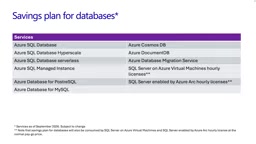
Kyle explained the automatic discount application logic: every hour, Microsoft scans the customer's environment, identifies eligible database services, and determines which service can receive the highest discount percentage. Once identified, the plan applies the discount to that service — and this scan repeats every hour to ensure that any eligible database service continues to benefit from the plan as long as remaining commitment balance exists.
This "hourly re-evaluation" mechanism is the key to the flexibility of Savings Plans — it ensures discounts always flow to whichever workload can benefit most at any given moment.
How Commitment Amounts Are Billed
Kyle walked through an example to illustrate the billing logic. Suppose a customer makes a commitment of $5 per hour through a Savings Plan:
- When actual usage is equal to or below $5/hour, that usage is billed at the lower Savings Plan price with no additional charges.
- When usage exceeds $5/hour, the excess is billed at Pay-as-you-go rates.

One important caveat: you are billed at the $5/hour commitment rate every hour, regardless of whether you actually use the corresponding services. This makes it critical to avoid over-committing. Kyle recommends using Azure Advisor, which analyzes historical usage data and suggests an appropriate commitment amount to help teams make more informed decisions.
Savings Plans vs. Azure Reservations: How to Choose
Savings Plans aren't the only cost optimization tool Azure offers. Kyle compared them with Azure Reservations:
- Azure Reservations are better suited for stable, predictable workloads. Because reservations require a commitment to a specific service or region, they work best for workloads you know will run long-term in a fixed location.
- Savings Plans are better suited for dynamic scenarios. You simply commit to an hourly dollar amount (e.g., $5/hour) without binding to a specific service or region — ideal for workloads that migrate across regions or are undergoing modernization.
Kyle emphasized that the best practice Microsoft observes is using both together: reservations for stable, predictable workloads and Savings Plans for dynamic ones. The right mix depends on the characteristics and behavior of each customer's actual workloads.
Azure Reservations is Microsoft's longer-standing commitment discount mechanism, where users prepay for a specific resource type — such as a SQL Managed Instance or virtual machine of a particular size in a given Azure region — typically yielding discounts of 30–72% compared to Pay-as-you-go pricing. The advantage is a larger potential discount, but the trade-off is high specificity: once purchased, the discount only applies to resources of the same service, same size, and same region within the same subscription. If a workload migrates to another region or is upgraded to a different size, the reservation becomes ineffective or requires additional exchange operations. This is precisely why FinOps teams encounter "wasted discounts" when dealing with frequent architectural changes — reservations designed for stable workloads simply can't keep pace with the speed of change in modern cloud environments. This limitation is what gave rise to the spending-commitment model, which ties discounts to spend rather than specific resources.
Hands-On: Purchasing and Tracking Usage
The episode demonstrated two key operations. The first was how to purchase a Savings Plan: the recommended starting point is Azure Advisor, where you can view cost optimization recommendations generated from actual historical usage. You select a look-back period, and the system recommends an appropriate Savings Plan for databases. Clicking the recommendation takes you to the purchasing blade, where you fill in the desired amount and relevant fields to complete the purchase.
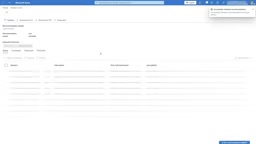
The second demonstration covered how to track usage. In the Azure portal, navigate to Cost Management, select Cost Analysis from the left panel, and click "Visualize Your Cost." Filter by date range (e.g., the last 7 days), switch the cost type to amortized cost, then set benefit as a filter and select Savings Plans for Databases. After applying, group by Product to see a detailed breakdown of all resources benefiting from the Savings Plan.
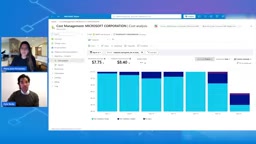
Kyle noted that this view provides resource-level detail; for tracking overall utilization, Microsoft has additional reference videos available.
Amortized Cost is a key concept for understanding Savings Plan usage tracking. Unlike Actual Cost — which records the full upfront payment for a Savings Plan or Reservation on the day of purchase, creating a pronounced cost spike that's hard to correlate with actual resource consumption — amortized cost spreads the commitment fee evenly across the usage period (1 or 3 years), hour by hour, and allocates it to the specific resources that consumed that commitment. This gives you a cost view that accurately reflects "which database service benefited from what discount, and when," enabling FinOps teams to precisely evaluate Savings Plan utilization, assess whether the current commitment level is too high or too low, and inform future purchasing decisions.
Getting Started
Kyle's recommended onboarding path is straightforward: start with Azure Advisor to review recommendations based on real usage data, then head to Cost Management and Billing in the Azure portal to complete the purchase. Microsoft's MS Learn pages also offer additional learning resources on Savings Plans and their applicable scenarios.
For FinOps teams, a cost strategy that remains effective as the architecture evolves means cost optimization is no longer a "one-time lock-in" — it becomes an ongoing capability that keeps pace with modernization. As database environments grow increasingly dynamic, flexible commitment models are emerging as the pragmatic choice for balancing cost and agility.
Related articles

AI Reverse-Engineers Monitor Firmware in 15 Minutes — Has the Hacking Barrier Been Flattened?
A security researcher used AI to reverse-engineer Dell monitor firmware in 15 minutes—entropy analysis, key extraction, MD5 verification—revealing encryption design flaws.

Mistral Voxtral 3: Real-Time Voice at 4 Cents per Minute, Challenging OpenAI
Mistral Voxtral 3 cuts real-time voice agent costs to 4 cents per minute, bundling three speech recognition models, a speech generation model, and a real-time voice toolkit, supporting 50+ languages and self-hosting. This article analyzes its pricing structure, sub-second response performance, and its strategic divergence from OpenAI and Gemini on data privacy versus out-of-the-box convenience.

WebMCP: Every Website as Its Own MCP Server, So AI Agents No Longer Rely on Screenshots
WebMCP lets websites expose tools via the document.modelcontext API, becoming directly callable MCP servers. This article explains its architecture, the Claude Code remote-debugging demo, Chrome's current support stage, and its impact on the agent ecosystem.