BaudBuddy: A Native macOS Serial Terminal with Built-in File Server for Embedded Debugging

A native macOS serial terminal with built-in file servers designed for embedded developers.
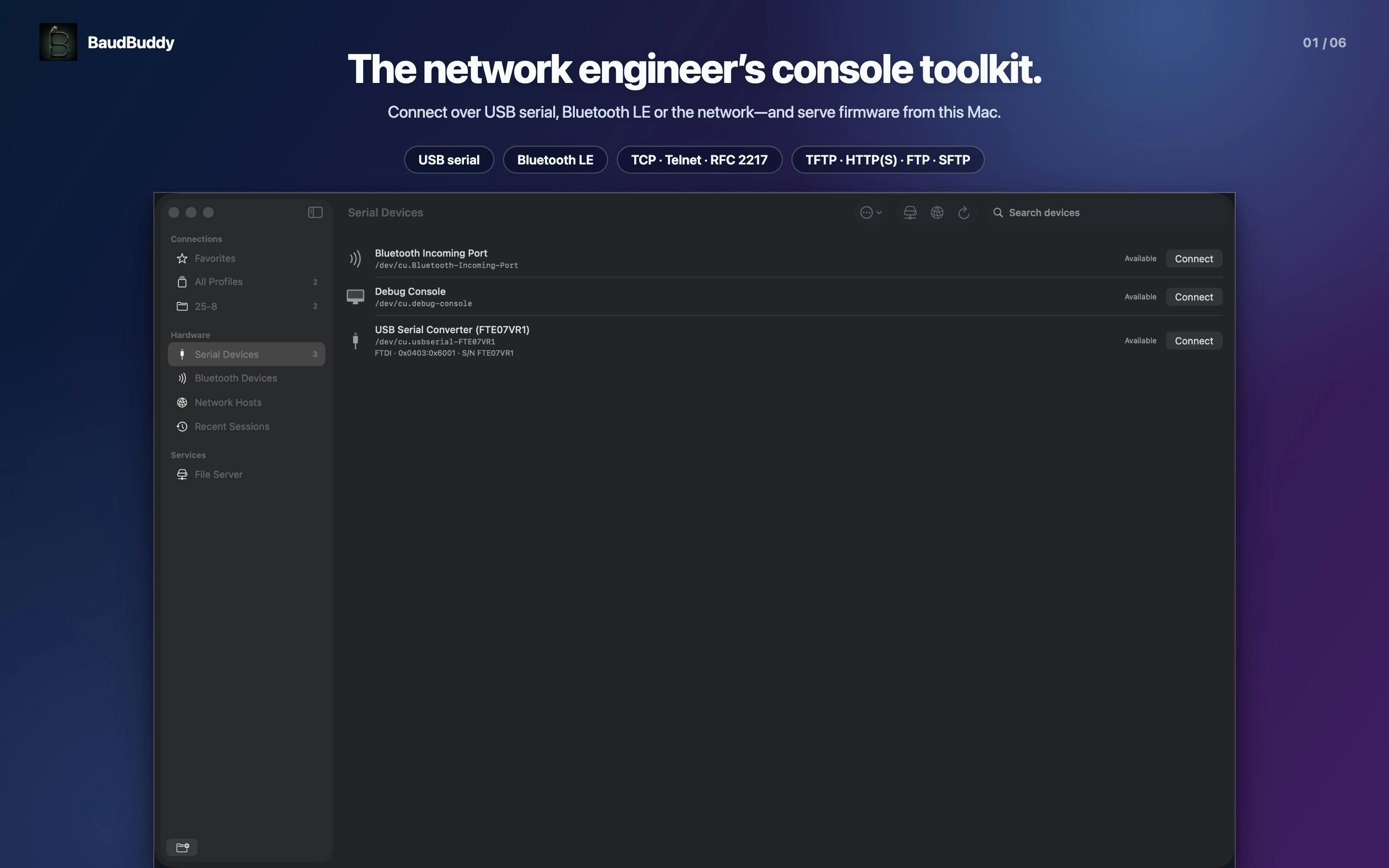
BaudBuddy is a native macOS serial terminal tool built for hardware engineers and embedded developers. It supports Serial, Bluetooth LE, Telnet, and RFC 2217 protocols, and uniquely integrates TFTP, HTTP, HTTPS, FTP, and SFTP file servers to streamline firmware transfer workflows. Professional features include USB adapter identification by name, hardware-level Break signals, and byte-exact logging. With a strict no-account, no-analytics, no-cloud privacy stance, it's designed for professionals handling sensitive firmware.
In the day-to-day work of embedded development, firmware debugging, and network device maintenance, serial terminals remain indispensable foundational tools. Serial port communication is one of the oldest and most reliable methods of communication between computers and external devices, with its history tracing back to the establishment of the RS-232 standard in the 1960s. In embedded development, the serial port serves as the "last resort debug channel" — when the network is down, the screen shows no output, and the system won't boot, the serial port is virtually the only way to obtain device status information. Although modern embedded devices offer increasingly diverse interfaces, nearly all SoCs (System on Chips) retain a UART (Universal Asynchronous Receiver/Transmitter) interface for debugging purposes. Engineers connect development boards to computers via USB-to-serial adapters and use terminal software at specific baud rates (commonly 115200bps) to read boot logs, kernel messages, and command-line interactions from the device.
However, on the macOS platform, developers have long lacked a native serial port tool that offers a smooth experience, complete functionality, and a focus on privacy. BaudBuddy, which recently launched on Product Hunt, aims to fill this gap — it's not just a native macOS serial terminal but also includes a complete built-in file server designed specifically for firmware transfer scenarios.
What Is BaudBuddy: More Than Just a Serial Terminal
BaudBuddy's positioning is very clear: providing an out-of-the-box debugging environment for hardware engineers and embedded developers. It supports four major console access methods — Serial, Bluetooth LE, Telnet, and RFC 2217. This multi-protocol coverage means that whether you're directly connecting to a device via a USB-to-serial adapter or remotely accessing one through a network serial server, developers can complete all operations within a single tool.
Each of these four protocols has its own technical background and applicable scenarios. Serial is the most fundamental physical layer connection method, implementing asynchronous data transmission via the UART protocol. Bluetooth LE is the low-power communication mode introduced with Bluetooth 4.0. In recent years, an increasing number of embedded devices (such as Nordic nRF series chips) expose serial debug interfaces through BLE's UART Service (also known as NUS, Nordic UART Service), making wireless debugging possible. Telnet is a TCP-based remote terminal protocol (port 23) that, while replaced by SSH in general computing due to its plaintext transmission, is still widely used in network device management (such as Cisco switch Console Servers).
Particularly noteworthy is the support for RFC 2217. RFC 2217 is an extension to the Telnet protocol that defines a set of commands for transmitting serial port control signals over TCP connections. This enables remote hosts not only to send and receive data but also to dynamically adjust baud rate, data bits, stop bits, flow control, and other parameters, achieving complete remote control of physical serial ports. Many networked serial servers (such as devices from Digi, Moxa, and other brands) rely on it to implement remote baud rate settings, flow control, and other functions. Native support for this protocol indicates that BaudBuddy is aimed at users with genuine professional needs, rather than simply providing basic terminal echo.
Built-in File Server: A One-Stop Solution for Firmware Transfer Pain Points
BaudBuddy's most differentiating feature is its built-in suite of file servers: TFTP, HTTP, HTTPS, FTP, and SFTP. This design directly addresses the core pain point of firmware flashing and updating in embedded development.
Understanding the technical background of these five protocols helps appreciate the value of this feature. TFTP (Trivial File Transfer Protocol) is a minimalist file transfer protocol that runs over UDP with no authentication mechanism — it was designed specifically for bootloaders to retrieve firmware images. Nearly all bootloaders (such as U-Boot, BIOS/UEFI PXE boot) have built-in TFTP client support. HTTP/HTTPS are the standard transfer protocols of the web era, with an increasing number of modern embedded devices supporting firmware downloads via HTTP; HTTPS adds a TLS encryption layer to ensure transfer security. FTP is a classic file transfer protocol still used in LAN device management. SFTP provides an encrypted file transfer channel based on the SSH protocol, offering the highest security for scenarios with strict transfer security requirements. By supporting all five protocols simultaneously, BaudBuddy covers the entire spectrum of firmware transfer needs, from the simplest embedded bootloaders to high-end devices with full network stacks.
In practice, when engineers flash or update firmware, devices (such as routers, switches, and development boards) often need to pull firmware images from a network file server. The traditional approach is to set up a separate TFTP or HTTP service, which is cumbersome to configure and error-prone. BaudBuddy integrates these services directly into the terminal software, meaning developers can monitor the device's serial output and provide firmware file downloads from the same interface, dramatically simplifying the workflow.
For developers who frequently use tftpboot or pull images via U-Boot, this integrated "serial terminal + file server" design saves significant environment configuration time. U-Boot (Universal Boot Loader) is the most widely used open-source bootloader in embedded Linux systems, supporting ARM, MIPS, RISC-V, and many other architectures. During development, engineers typically don't flash firmware directly to flash memory but instead iterate quickly through network booting. The typical workflow involves: connecting to the device via serial port, executing setenv serverip in the U-Boot command line to set the TFTP server address, then executing the tftpboot command to load the kernel image and device tree files into memory, and finally using bootm or booti to boot the system. Throughout this process, developers need to operate both a serial terminal and a TFTP server simultaneously — traditionally, this means opening at least two separate software windows and configuring them independently. BaudBuddy combines both into one, allowing the entire "configure → transfer → debug" cycle to be completed within a single interface.
Professional Serial Debugging Details: Adapter Identification, Break Signals, and Byte-Level Logging
Beyond multi-protocol support and file services, BaudBuddy puts effort into professional details that are often overlooked:
USB Serial Adapter Identification by Name
The tool supports "Adapters by name," identifying serial adapters by their names rather than obscure device paths (like /dev/tty.usbserial-xxxx). In macOS, USB-to-serial adapters are registered by the system as /dev/tty.* or /dev/cu.* device nodes, with names typically composed of chip type and serial number combinations (e.g., /dev/tty.usbserial-1420, /dev/tty.SLAB_USBtoUART). When developers connect multiple adapters simultaneously — which is common in multi-board debugging scenarios — it's difficult to distinguish which port corresponds to which device using only these obscure device paths. Even trickier, if the plug/unplug order changes or different USB ports are used, the device paths may change.
BaudBuddy's "identify by name" feature leverages the product name, manufacturer information, and serial number from USB device descriptors, mapping them to human-readable labels (like "FTDI FT232R - Board A"), allowing developers to select the correct device at a glance. On Linux, this typically requires manually writing udev rules; BaudBuddy makes it an out-of-the-box feature, significantly reducing the frustration of selecting the wrong port.
Hardware-Level Break Signal Support
BaudBuddy emphasizes support for "real break signals." In RS-232 serial communication, a Break signal is a special electrical state — it holds the transmit line (TX) continuously at Space level (logic 0) for longer than one complete character frame (typically at least 200-500 milliseconds). This differs from normal data transmission because even an all-zero byte has start bit and stop bit level transitions during transmission.
Many devices use this "extended low level" as an out-of-band signal to trigger special behavior: Sun/Oracle servers enter OpenBoot PROM (OBP) via a serial Break; Cisco routers enter ROMMON mode for password recovery when they receive a Break signal during boot; many ARM development boards use Break signals to interrupt U-Boot's auto-boot countdown. Software-simulated Break signals (such as simply sending specific character sequences) often cannot be correctly recognized by devices. Only hardware-level Break signals issued through the operating system's serial port driver API (on macOS, the tcsendbreak system call in the IOKit framework) work reliably. Many lightweight terminal tools cannot send true hardware-level Break signals, and BaudBuddy's native support for this demonstrates its professional orientation.
Byte-Exact Log Recording
"Byte-exact logs" means the tool records every byte of serial communication completely and losslessly. Data integrity issues in serial communication are more subtle than many developers realize — common terminal tools typically process received data through terminal emulation, such as interpreting ANSI escape sequences, filtering control characters, and handling line ending conversions (the CR/LF issue). These processes provide better display when used interactively but cause log files to be inconsistent with the actual raw byte stream transmitted.
When debugging serial protocol issues (such as Modbus RTU or custom binary protocols), a single byte difference or timing offset can lead to completely different parsing results. Byte-exact logging ensures every byte is recorded completely in its actual received order and content, including invisible control characters, non-standard escape sequences, and possible noise bytes. Such logs can be subsequently imported into logic analysis tools or custom scripts for offline analysis — an essential means of troubleshooting intermittent communication faults, protocol issues, data loss, or timing anomalies, and a must-have feature for professional embedded debugging scenarios.
Privacy First: No Account, No Analytics, No Cloud Dependency
In an era where various tools increasingly force logins and collect usage data, BaudBuddy clearly stands behind its "No account, no analytics, no cloud" banner — no account registration required, no analytics data collected, no cloud service dependency.
This philosophy is particularly important for developers handling sensitive firmware and internal enterprise devices. Embedded firmware often contains highly sensitive intellectual property and security information: encryption keys, boot signatures, proprietary algorithms, network configuration credentials, and more. In industrial control (ICS/SCADA), automotive electronics, medical devices, and defense sectors, firmware leaks could lead to serious security vulnerabilities or even physical safety risks. In recent years, supply chain security attacks have become increasingly frequent (such as SolarWinds, Codecov, etc.), making enterprises ever more strict in their security audits of development toolchains. Many enterprise security policies explicitly prohibit using development tools that upload data to the cloud, and security compliance frameworks like ISO 27001 and SOC 2 require complete traceability of data flows.
BaudBuddy's fully local design means all data — including serial logs, firmware files, and connection configurations — stays entirely on the local machine with no risk of third-party data processing. This not only effectively avoids data leak risks but also better aligns with enterprise security compliance requirements, making it easier to pass enterprise security reviews and compliance assessments.
BaudBuddy's Market Positioning and Competitive Advantages
On the Product Hunt leaderboard, BaudBuddy received 76 votes and was categorized under Mac, Productivity Tools, and Developer Tools. The product design clearly shows that developer Nicolas Maton has a clear understanding of the target users' needs.
From a competitive standpoint, serial terminal tool options on macOS are inherently limited, and most have their own limitations. screen is macOS's built-in terminal multiplexer that can quickly connect to a serial port via screen /dev/tty.usbserial 115200, but lacks log management and multi-session features. minicom comes from the Linux ecosystem, requires installation via Homebrew, and its configuration interface retains a 1990s-era TUI style. CoolTerm is one of the few graphical options, maintained by independent developer Roger Meier, supporting multiple platforms but with a rather plain interface. Serial (developed by Decisive Tactics) is a commercial product on the Mac App Store with a polished interface but focused on basic serial communication. ZOC and SecureCRT are commercial terminals primarily targeting SSH/Telnet scenarios, with serial port support being just an add-on feature.
As a native macOS application, BaudBuddy has inherent advantages in interface experience and system integration. Compared to the above competitors, its unique selling point is the deep integration of file servers into the workflow — an area that other competitors haven't touched at all. Combined with multi-protocol support and privacy protection as differentiating selling points, BaudBuddy is well-positioned to find its place in the embedded developer community.
Conclusion: A Focused Native macOS Serial Tool for Embedded Debugging
BaudBuddy is not a mass-market product — it precisely targets the vertical segment of embedded and hardware developers. By integrating a serial terminal, multi-protocol support, file servers, and privacy protection into a native macOS application, it demonstrates "the restraint and focus that professional tools should have." For engineers who have long been searching for a capable serial debugging tool on macOS, BaudBuddy is worth a try.
Related articles

Amphibious Transforming Drone: Beyond 100x Power Savings, What Are the Real Needs?
Is the amphibious transforming drone just a gimmick? Starting from the 100x power difference of the M4 Morphobot, explore real application scenarios and thesis topic ideas, analyzing boundary conditions where pure drones and pure ground robots both fail.

Warhound Raises $200 Million: Genetically Engineered "War Dogs" Paired with Anduril Gear
Warhound raises $200M, backed by Ben Lamm and Palmer Luckey, to genetically engineer dogs for military and law enforcement use and equip them with Anduril gear. This article analyzes its technology direction, funding logic, and ethical controversy.

Claude API Comes to Google Cloud: IAM Integration and SDK Access Guide
Anthropic hosts the full Claude API on Google Cloud with IAM-controlled permissions and unified billing. This guide covers the Vertex AI and Anthropic-hosted entry points, IAM role configuration, and SDK access.