BeeBranch: A Local-First Open-Source Git Client

BeeBranch is a local-first open-source desktop Git client with no telemetry and no AI.
BeeBranch debuted on Product Hunt as a local-first desktop Git client, ranking No. 10 for the day with 76 votes. It explicitly excludes proprietary cloud, vendor accounts, telemetry, and AI, with all Git operations done locally so repository metadata never leaves the user's machine. Aimed at teams using GitLab and GitHub, it positions itself as an open-source alternative to commercial Git clients, emphasizing auditable code, self-buildability, and freedom from vendor pricing and feature shutdowns. The trade-off is the lack of cloud collaboration features like cross-device state sync. The article finds it suitable for developers sensitive to data compliance, seeking cost control, or preferring lightweight account-free tools, while teams deeply reliant on cloud collaboration and AI assistance may not find it suitable for now.
At a time when AI is sweeping everything, one Git client is going against the grain, explicitly putting "no AI" in its product tagline. BeeBranch debuted on Product Hunt positioned as a "local-first desktop Git client," taking No. 10 for the day with 76 votes. It doesn't target everyone—it's aimed at development teams with clear requirements around data sovereignty and tool purity.
Why "Local-First" Deserves Its Own Section
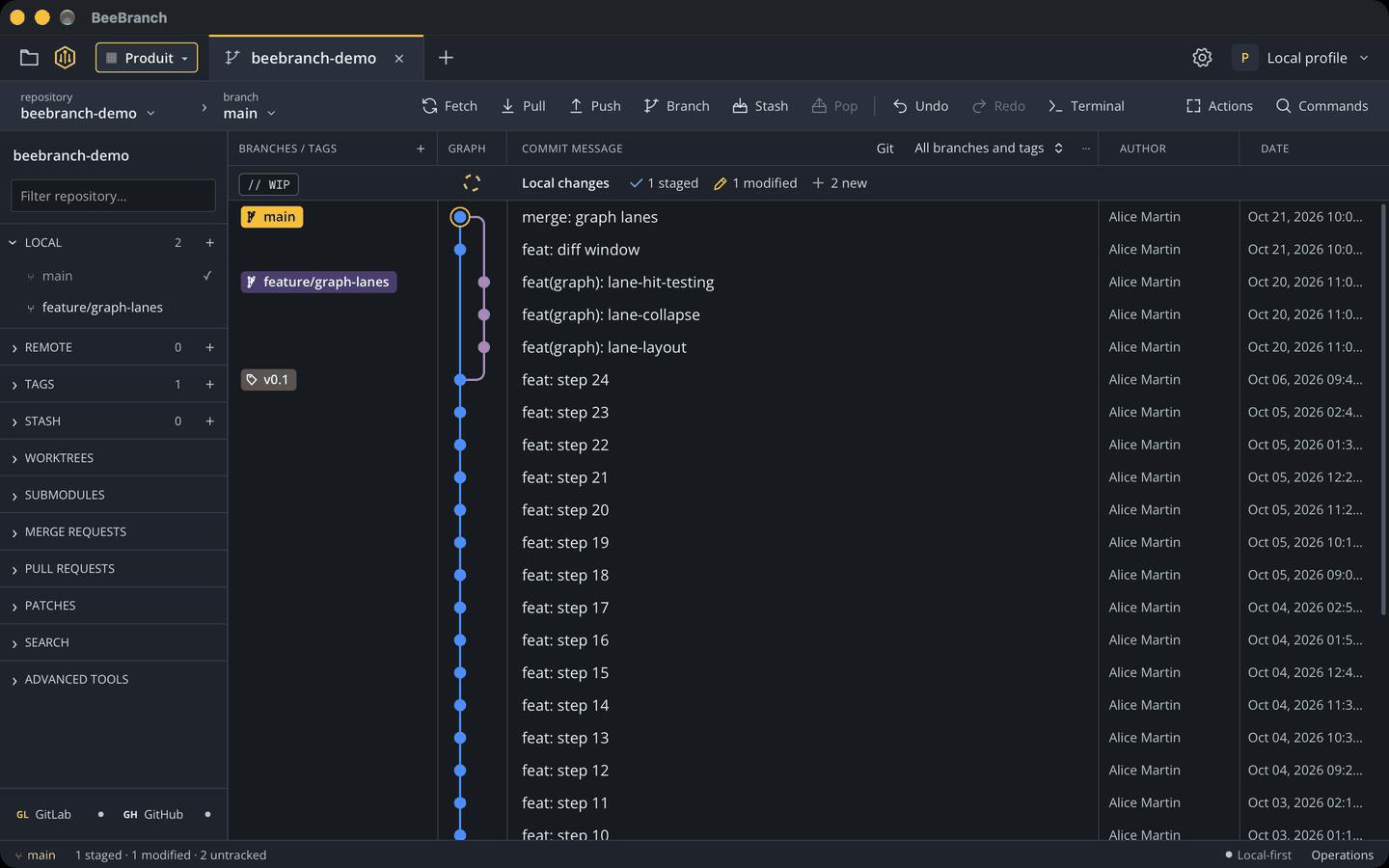
BeeBranch's core proposition is local-first: all Git operations happen locally, with no reliance on vendor-provided cloud services and no need to register any third-party account. Its description rules out four things in a row—proprietary cloud, vendor accounts, telemetry, and AI.
Behind these four negations lies a clear product philosophy. Commercial Git clients often build their moats through cloud sync, account systems, or usage data, while BeeBranch chooses to cut all of these out. For teams, this means repository metadata and operation traces never leave their own machines, and there's one less "data flows to a third party" explanation to worry about during compliance audits.
Local-first is a well-defined concept in software architecture in recent years, first systematically proposed by the Ink & Switch lab in a 2019 research paper. Its core claim is that the primary copy of user data lives on local devices, software works fully offline or when disconnected, and the cloud serves only as an optional sync and backup channel rather than a prerequisite for functionality. This philosophy typically encompasses seven ideals: data available locally, multi-device collaboration, offline usability, seamless collaboration, long-term preservation, privacy by default, and user ownership of data. For a Git client, local-first means repository reads and writes, commit history, and branch operations all happen entirely on the local file system, passing through no intermediate server—eliminating the possibility of data leakage at the architectural level.
Team Collaboration for GitLab and GitHub
The official target audience is defined as "teams using GitLab and GitHub." This positioning reveals two things: first, it doesn't adapt to self-hosted Git services, focusing its energy on the two major hosting platforms; second, it acknowledges itself as an open-source alternative to commercial clients, not an entirely new workflow invented from scratch.
For teams already running on GitHub or GitLab, migration cost depends mainly on daily working habits—whether high-frequency scenarios like branch management, code review integration, and conflict handling can be carried over smoothly is what really determines whether they stay. The materials don't disclose a specific feature list; that part requires hands-on trial to judge.
Although GitLab and GitHub both host Git repositories, they differ in API capabilities and collaboration models. GitHub centers on Pull Requests as its review unit, paired with ecosystems like Actions, Projects, and Codespaces; GitLab centers on Merge Requests and has built-in integrated capabilities like CI/CD and issue boards. A third-party Git client serving both platforms typically needs to implement integrations like authentication, pull request display, and code review comments through each platform's respective REST or GraphQL APIs. This means the client's "platform adaptation layer" must be maintained separately, and is subject to both providers' API rate limits and permission models. The article notes that BeeBranch focuses on these two platforms without adapting to self-hosted Git services—effectively narrowing its integration surface in exchange for deeper platform integration quality.
No Telemetry, No AI: A Restrained Product Choice
Putting "no telemetry and no AI" as a selling point in a one-line description is quite rare in today's tool market. Most products are racing to add capabilities like smart completion and AI code review, while BeeBranch draws a clear line.
This restraint cuts both ways. On one hand, it's trustworthy: no data collection, no model calls, more predictable tool behavior, and easier passage through enterprise security reviews. On the other hand, it's a trade-off: developers accustomed to LLM-assisted commit message generation or smart conflict suggestions may feel something is missing. It's more about serving people who "just want a clean, reliable Git GUI."
Telemetry refers to the mechanism by which software automatically collects usage data during operation and sends it back to vendor servers—commonly including feature click frequency, crash logs, performance metrics, and even operation paths. For developer tools, telemetry is an important data source for product iteration, but it's also often seen as a privacy risk, especially in regulated industries like finance, healthcare, and government, where unapproved telemetry may directly violate internal compliance policies. In enterprise security reviews, whether a tool enables telemetry by default, whether it can be fully disabled, and where data is sent are often key judgment criteria for admission. By putting "no telemetry" in its description, BeeBranch effectively gives a clear answer at the very first threshold of procurement evaluation.
Open-Source Identity vs. Commercial Clients
As an open-source alternative to commercial Git clients, BeeBranch's value proposition goes beyond being free. Open source means the code is auditable and can be built yourself, and that you won't be led around by a vendor's pricing strategy or feature shutdowns. For teams that treat their development toolchain as long-term infrastructure, this controllability is itself an asset.
You may not have noticed that it doesn't package itself as an "all-in-one" tool. No cloud collaboration panels, no account system, and therefore no cross-device state sync—this is the inevitable cost of the local-first approach, and whether it's acceptable depends on the team's actual collaboration model.
Commercial Git clients (such as Tower, SmartGit, GitKraken, etc.) typically use subscription or perpetual licensing and differentiate themselves through features like account systems, cloud workspaces, and team collaboration panels. Their business model dictates that they must continuously ship value-added features, and in recent years they've generally moved toward integrated AI assistance, cross-repository insights, and cloud sync. Open-source alternatives compete on a different logic: value lies not in feature stacking but in code transparency, licensing freedom, and community participation. For enterprises, the core advantages of open-source tools also include "low exit cost"—even if the original maintainer stops updating, the team can fork and maintain it themselves, avoiding single-vendor lock-in. Placing itself in this coordinate system, BeeBranch essentially trades controllability for some of the convenience features only commercial products offer.
Who Should Give It a Try
The following types of developers may be interested in BeeBranch: teams sensitive to telemetry whose organizations have strict data compliance requirements; small teams looking to replace commercial licenses with open-source tools to control costs; and independent developers who simply prefer lightweight desktop tools with no account dependency.
Conversely, teams that rely heavily on cloud collaboration state sync, or have already deeply embedded AI assistance into their daily commit workflow, may not adopt it as their primary tool in the short term. Its current result of 76 votes and 1 comment shows the product is still in an early exposure phase, with community feedback and feature iteration yet to be seen.
BeeBranch's emergence is a reminder of one thing: beyond the trend of tools becoming ever "smarter," there remains a path that sells on restraint and controllability—and that path's user base may be more solid than imagined.
One-line Summary
BeeBranch is an open-source desktop Git client emphasizing local-first operation with no telemetry and no AI.
Paragraph Summary
BeeBranch debuted on Product Hunt as a "local-first desktop Git client," taking No. 10 for the day with 76 votes. It explicitly rules out proprietary cloud, vendor accounts, telemetry, and AI, with all Git operations performed locally so repository metadata never leaves the user's machine. Aimed at teams using GitLab and GitHub, it positions itself as an open-source alternative to commercial Git clients, emphasizing auditable code, self-buildability, and freedom from vendor pricing and feature shutdowns. The trade-off is the lack of cloud collaboration capabilities like cross-device state sync. The article finds it suitable for developers sensitive to data compliance, looking to control costs, or preferring lightweight account-free tools, while teams deeply reliant on cloud collaboration and AI assistance may not find it applicable for now.
Related articles

Deleted Reddit Post Sparks Debate Over AI Content Moderation
A Reddit post removed with only a 'Removed by Reddit' notice highlights AI content moderation's transparency gaps, misjudgment risks, and appeal challenges for platforms and creators.

DSH + Ollama Local LLM Deployment in Practice: Free Chat with Da Fei Yu
Bilibili creator tests DSH + Ollama local LLM deployment end to end: Ollama install, Xunlei-accelerated downloads, ModelScope GGUF model import, DSH custom API address setup, and a comparison of Qwen 3.5 4B, 8B, Gemma, and other models on 8GB VRAM, with advice on choosing local deployment vs. API calls.

Tested: A $899 Mac Mini vs. a $200/Month AI Subscription
Real-world test of whether an M4 Mac mini can replace a $200 AI subscription: 16GB can't fit large models, and both speed and quality fall short—but privacy, no caps, and near-zero running costs make it an ideal host for an always-on agent. Includes buying advice per configuration and money-saving strategies.