Tested: A $899 Mac Mini vs. a $200/Month AI Subscription

The Mac mini isn't a subscription replacement—it's the host for a local always-on agent, and a hybrid architecture is the answer.
Through a creator's real-world testing of an M4 Mac mini, the article answers whether a $900 machine can replace a $200/month AI subscription. The conclusion: it can't simply replace it, but it can form part of a hybrid architecture. The core bottleneck is memory: a 16GB model leaves only 10 to 12GB actually free, not enough for mainstream 27B models, and agent scenarios require manually increasing the context window. A tested 7B model hit about 13 tokens/sec, but pre-filling a long prompt took 2 minutes 20 seconds versus under 3 seconds in the cloud. Frontier open-source models need about 236GB of memory, which even the top Mac mini can't fit; chasing the frontier would require a 256GB Mac Studio, taking about four years to pay off and still being slower and dumber. The real value of local is privacy, no quota caps, and near-zero running costs. The pragmatic strategy is to use local small models for private and scheduled tasks and outsource hard problems to the cloud, with 32GB of memory as the buying floor.
Can a roughly $900 Mac mini replace a $200/month AI subscription? The question looks simple, but it involves a complex trade-off between how models run, memory limits, task types, and cost accounting. A Bilibili creator put his M4 Mac mini through detailed real-world testing, and the conclusion is neither "yes" nor "no"—it's a smarter hybrid strategy.
Why would you want to replace your subscription with a Mac mini?
An AI agent can be split into two parts: the body and the brain. The body is an always-on computer that runs tasks; the brain is a large model in the cloud that does the thinking. A subscription fee essentially buys three things: the model itself, the inference compute in the data center, and usage quota. In theory, a Mac mini can handle all three on its own—it can host the model, do the inference itself, and has no quota cap. The question is: can it really handle the load?
Memory is the real bottleneck
The most important spec for running local models on any machine isn't the chip—it's memory. The entire model must fit into RAM; if it doesn't fit, it won't run. Macs use shared memory, and on a 16GB model macOS and everyday apps already take up nearly 14GB, leaving only 10 to 12GB for the AI model. A typical 27B-parameter model needs 16 to 18GB of memory and simply won't fit.

Model size is measured in parameter count; more parameters usually means smarter, but also bigger. On speed: for every token a model writes, the chip must read memory once, so speed is roughly memory bandwidth divided by model size. Apple's official figures put the M4 Mac mini's memory read speed at 120GB/s, which by that math suggests a model of around 7GB could reach 15 to 20 tokens per second. The creator measured a 7B-class model running on Ollama to summarize a Wikipedia page at about 13 tokens per second, but processing the prompt took 2 minutes 20 seconds, whereas the cloud model started answering in under 3 seconds.
Unified Memory is the design Apple has used since its M-series chips: the CPU and GPU share a single pool of physical memory, rather than having separate VRAM as in traditional PCs. This cuts both ways for running local models. The upside is that the GPU can directly access all system memory without first copying model weights into VRAM, so a 32GB Mac can in theory let the GPU use close to 32GB to run a model. The downside is that this same memory must also feed macOS, the browser, the editor, and every other app, so the amount actually available to the model is often 4 to 6GB less than the nominal figure. This is why the original article stresses "16GB nominal, 10 to 12GB actual"—when buying, estimate how large a model you can fit based on available headroom, not the nominal capacity.
The agent scenario exposes the real gap
Short Q&A speed tests aren't very meaningful. Every time an agent sends something to the model, it includes not just the user message but also instructions, memory, the list of available tools, and the full conversation history. Before the model writes its first character it must read through all of this, a process called pre-fill. On Macs with less than 24GB of memory, Ollama by default gives the model only about 4,000 tokens of context, while an agent needs at least 64,000, so you have to adjust it manually in the settings—otherwise the task loses its context halfway through.

With longer prompts, the local model's wait time stretches out significantly. But the creator points out that waiting itself isn't necessarily fatal—for tasks scheduled to run while you sleep, waiting 10 minutes versus 2 minutes makes no difference, because no one is there anyway. The real limitation is quality: small models lose on complex tasks, but are perfectly usable on clean, simple ones.
Pre-fill and token generation are two phases. Pre-fill is the process by which the model reads in the entire prompt at once and builds its attention cache; it can be processed in parallel and is usually faster than generating token by token, but its time grows linearly—or even faster—with prompt length. Token generation, by contrast, is serial, character-by-character output, and every step requires reading through the model weights. In agent scenarios, prompts contain system instructions, tool definitions, conversation history, and retrieved memories, often tens of thousands of tokens, so pre-fill becomes the main source of waiting—the original article's "2 minutes 20 seconds before it starts answering" is exactly where it gets stuck. The context window is the maximum number of tokens a model can hold at once; Ollama's default of about 4,000 tokens is far less than an agent needs, and anything beyond that gets truncated, which shows up as the model "forgetting" earlier instructions or tools, causing the task to break down.
Frontier open-source models: you can't run them even if you want to
According to Artificial Analysis's score charts, the best paid models score around 58, while the best open-source models are around 44 to 46, and the gap is narrowing. But the strongest open-source model on the entire chart has more than 1 trillion parameters—even heavily compressed, it needs about 236GB of memory just to load. The top-specced Mac mini has only 64GB and costs about $2,700; fitting such a model would require a 256GB Mac Studio, roughly $9,500. At a $200/month subscription, it would take about four years just to break even—and even after that, the machine would still be slower and dumber.
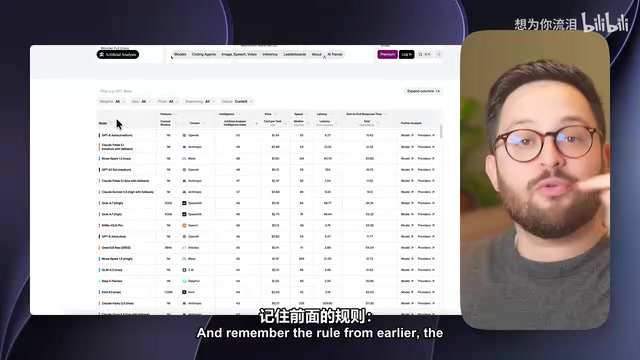
So the path of chasing frontier brains at home doesn't work on a Mac mini. That also means that when you run a small model locally, you're not replacing the $200 cloud large model—you're replacing the cost of renting that same model online, which is cheap enough to be almost negligible: about 10 cents per million tokens, a few dollars for an agent running all day. Money was never the reason for going local.
Quantization is the compression of model weights from 16-bit floating point to 8-bit, 4-bit, or even lower representations, trading a small loss of precision for large reductions in memory and big gains in speed. Common formats like GGUF's Q4_K_M can shrink a model to about a quarter of its original size, which is the key to running 7B to 14B models on consumer hardware. But quantization has a floor: the absolute parameter count doesn't disappear, a 1-trillion-parameter model still needs hundreds of GB even at 4 bits, and low-bit quantization noticeably degrades reasoning and tool-calling ability. So the original article's "still needs about 236GB even after heavy compression" isn't an exaggeration—quantization can squeeze small models into a Mac mini, but it can't cram frontier large models into 64GB of memory.
The three things local running genuinely can't be replaced on
The things no subscription can give you, no matter how expensive, are where the Mac mini's value lies. First, privacy: data never leaves the room—your inbox, calendar, and documents are never sent to any company. Second, no caps: no five-hour limits, no weekly quotas, running around the clock. Third, running costs approach zero: the creator says this Mac mini draws 4 watts at idle and 65 watts at full load; at the Netherlands' €0.26 per kWh, a full month of idle costs about 74 cents, and even a full month at full load is only about $12.

These three things point to the same positioning: the Mac mini isn't a subscription replacement—it's the best home for an always-on agent. Private tasks, repetitive tasks, and tasks that run while you sleep go to the local small model; when you hit a hard problem, hand that single task off to a paid brain.
A hybrid architecture is usually implemented in practice by a scheduling layer: the agent framework decides whether to go local or cloud based on task attributes. Private data (email, calendar, local files) is processed only by the local model, avoiding outbound transmission; repetitive, schedulable tasks (daily summaries, file organization) run locally overnight; hard problems requiring strong reasoning are forwarded as a single desensitized subtask to the cloud API. This preserves the privacy and unlimited quota of local inference while consuming cloud tokens only when truly needed, keeping costs under control. The original article's suggestion to "observe your usage for a week before deciding on a plan" is a simplified version of this idea—quantify your real needs first, then decide which parts go local and which stay in the cloud.
Which one should you buy? When does it pay off?
The base M6 Mac mini costs about $900, still has 16GB of memory, and can only run the same-sized models that were tested. What really changes the game is the 32GB version at about $1,300; the extra $400 is equivalent to two months of a $200 plan, but it lets larger, smarter models fit. The M5 Pro with 64GB starts at about $2,700, with double the memory bandwidth and faster performance, suited to people who treat local AI as a hobby. 32GB is the floor.
The creator ends with a zero-cost money-saving tip: before buying, spend a week observing your actual usage—if you never hit the quota cap, downgrade to the $20 or $100 plan, and you'll still get the same models while keeping more money in your pocket. The Mac mini's role isn't as a stand-in but as the host for a local always-on agent—it handles private and scheduled tasks, while hard problems are outsourced to the cloud. That's the most pragmatic hybrid architecture right now.
Related articles

Glasshand: Giving AI Agents a Real iPhone and Mac
Glasshand lets AI agents rent real iPhones and Macs, supporting Claude Code, Codex, and more to post, book services, and test iOS apps on real devices. This article explains how it works, its use cases, and potential boundaries.

ChatGPT Images 2.6 Released: GIF Generation, Reference Image Reuse, and 50% Speed Boost
ChatGPT Images 2.6 released: prompt-to-GIF animation with frame-by-frame editing, reusable reference images for yourself, pets, or characters, 50% faster generation, plus Flare and Sunburst API model variants and SVG export for developers.

Rerun: Turn Your AI Subscription into an AI Coworker Team
Rerun, #3 on Product Hunt, turns your ChatGPT or Claude subscription into a team of AI coworkers that run on schedules or triggers, each with tools, a computer, and a shared workspace. It asks before risky actions, is open source (AGPL v3), and supports self-hosting.