Beware the Gemini Free Membership Scam: The Account Security Risks of Leaked Backup Codes

Beware "free Gemini Pro" tutorials that steal your backup codes and hijack your account.
So-called "free Gemini Pro membership" tutorials on video platforms are phishing traps that lure users into handing over passwords and 2FA backup codes, enabling full account takeover. This article dissects the workflow technically, explains why free membership defies economic logic, and shares four tips to protect your account.
The Hidden Danger Behind a "Free Lunch" Tutorial
Recently, a large number of tutorials claiming to offer a "free year of Gemini Pro membership" have appeared on certain video platforms. Such content is often packaged with gimmicks like "2-minute reveal" or "latest technique" to entice users to click and follow the steps. However, from a technical and security standpoint, these so-called "tutorials" pose enormous account security risks—and may even be carefully designed account-theft traps.
This article takes a technical analysis perspective to break down the workflow of such "tutorials," reveal the risk points involved, and help readers develop a proper security awareness. This article is intended as a risk warning, not a promotion of such practices.
Breaking Down the "Tutorial" Workflow
Based on the original source material, the core workflow of these "tutorials" is roughly as follows:
Step 1: Remove Payment Information
The tutorial first instructs users to log into their account dashboard and delete or disable the payment information associated with the account. On the surface, this is presented as a way to "avoid automatic charges," but in reality this step primarily serves to lower the victim's guard—making them think, "Since there's no card linked, there's nothing to lose anyway."
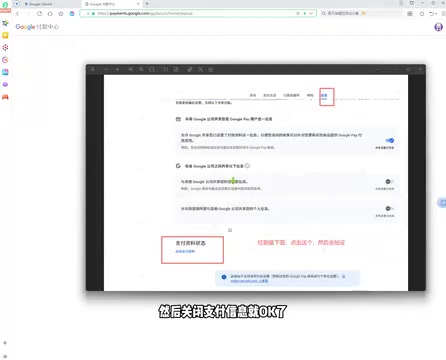
By design, this step aligns closely with the classic attack patterns of Social Engineering. Social engineering does not rely on technical vulnerabilities; instead, it exploits human psychological weaknesses—such as greed for small gains, trust in authority, and lowered vigilance—to obtain sensitive information.
As an attack methodology, social engineering traces its history back to the phone phreaking era of the 1980s. Early phreakers gained network access by impersonating telephone company employees, and this technique was systematically transplanted and evolved into the internet age. The most representative figure of that time was Kevin Mitnick, who systematically documented the attack framework of social engineering in his book The Art of Deception, defining it as "bypassing technical defenses to directly attack the people who use the technology." In the 21st century, the rise of generative AI has given birth to a new generation of social engineering threats: attackers use large language models to mass-produce personalized phishing text, or leverage deepfake technology to clone the voices of a target's relatives to launch voice phishing (vishing) attacks—rendering the traditional defensive strategy of "detecting suspicious tone" increasingly ineffective. Notably, deepfake voice fraud has moved from proof-of-concept to industrialization—in a 2023 Hong Kong case, attackers used real-time voice synthesis technology to impersonate a company executive and, through a video conference, induced a finance staff member to transfer HK$200 million, marking a dramatic drop in the technical barrier to entry for such attacks.
In the modern cybersecurity context, social engineering has developed into a highly systematic attack framework, encompassing multiple variants such as pretexting (constructing a false scenario in advance to gain trust), baiting (using physical or virtual incentives to lure targets into dangerous actions), and tailgating (following authorized personnel into restricted areas). The cybersecurity academic field classifies these techniques collectively as "Human Vulnerability Exploitation," ranking them alongside technical attacks such as SQL injection and buffer overflow as major threat vectors. The "remove payment information" design falls, in the academic classification of attacks, under the "reduce perceived risk" strategy—analogous to the common phishing email pitch, "Your bill has been canceled, please click to confirm." Its core purpose is to pave the way for subsequent operations by eliminating the user's intuitive vigilance. Verizon's Data Breach Investigations Report (DBIR) has long shown that over 80% of account breaches involve a human factor rather than purely technical attacks, confirming the widespread harm of such techniques.
"Removing payment information" is a textbook "cognitive load offloading" technique: it builds in the victim a false sense of security based on "no financial risk," thereby drastically reducing their awareness of protecting account credentials in subsequent steps. This step appears harmless, but in reality it is the first psychological line of defense to be breached in the entire workflow, causing users to unknowingly relax their vigilance over account security.
Step 2: Enable Two-Factor Authentication and Obtain Backup Codes
Next, the tutorial guides users into their account security center to enable two-factor authentication (2FA) and obtain the account's backup recovery codes. This is the highest-risk step in the entire workflow.

The key to understanding the risk of this step lies in grasping the technical nature of two-factor authentication and backup codes. Two-Factor Authentication (2FA) is based primarily on the TOTP (Time-based One-Time Password, RFC 6238) and HOTP (HMAC-based One-Time Password, RFC 4226) protocols published by the IETF. Its core principle is: during initial registration, the server and the user's device share a secret key. Thereafter, every 30 seconds, both parties independently perform an HMAC-SHA1 hash operation based on "shared secret key + current Unix timestamp" and truncate the result to a 6-digit number. Because the results are identical, the server can verify whether the dynamic code submitted by the user is valid without ever transmitting the secret key itself over the network. Mainstream implementations such as Google Authenticator and Authy all follow this standard, building a dual-identity verification system of "something you know" (password) and "something you have" (phone, hardware key, etc.) on top of the password. Because the dynamic code refreshes every 30 seconds and is time-limited, it cannot be reused even if intercepted over the network, theoretically enhancing the account's resistance to replay attacks significantly.
It's worth noting that 2FA is not impregnable. In recent years, the rise of real-time phishing proxy frameworks—Adversary-in-the-Middle (AiTM) attacks, such as the open-source tool Evilginx2—can insert a reverse proxy between the user and the real server, stealing the full login traffic containing a valid session token in real time. This allows the attacker to silently hijack an authenticated session even as the user completes a normal 2FA verification. The technical principle of AiTM attacks lies in this: the attacker's reverse proxy server plays both the "client" and "server" roles simultaneously—disguising itself as the legitimate website to the user, and as a normal user's browser to the real server. The user completes genuine 2FA verification without realizing it, while the session cookie issued by the server is intercepted and reused in real time by the proxy, allowing the attacker to maintain an authenticated state as the user on another device. This means that even accounts with 2FA enabled still face the risk of takeover when confronted with such man-in-the-middle attacks—and the leakage of backup codes bypasses this technical hurdle entirely, directly granting the attacker the highest level of static access.
Backup recovery codes, on the other hand, are static random strings pre-generated by the platform when a user sets up 2FA. They are typically produced by a Cryptographically Secure Pseudo-Random Number Generator (CSPRNG), yielding a set of 8-10 digit random codes, designed to provide "circuit-breaker protection" when a user loses their primary verification device such as a phone. The fundamental difference between a CSPRNG and an ordinary pseudo-random number generator is that its output is computationally unpredictable—even if an attacker obtains a large number of historical output samples, they cannot infer the next output value with a polynomial-time algorithm. This property is guaranteed by the cryptographic "next-bit unpredictability" theorem and forms the mathematical basis of the high security strength of backup codes. Because backup codes complete verification without any dynamic device, their privilege level is architecturally higher than the ordinary 2FA flow—meaning they can independently complete a full identity verification of the account without relying on any user-held device. Google's official security guidelines classify them as "credentials as sensitive as passwords," and security documentation from mainstream platforms such as Apple and Microsoft likewise explicitly note that once backup codes are leaked, it is equivalent to fully exposing the account. Official recommendations advise storing them offline in printed form or via encrypted storage, and never storing them on internet-connected devices or disclosing them to any third party.
Backup recovery codes are essentially a "master key" that bypasses two-factor authentication. Yet these "tutorials" ask users to "copy and record" their backup codes and enter them into a third-party website in a subsequent step—the danger is self-evident.
Step 3: Submit Full Account Credentials to a Third-Party Website
In the final step, the tutorial asks users to purchase a so-called "redemption code," then visit an unfamiliar "redemption website," where they enter their account, password, and backup recovery codes, and wait to be "queued for activation."


At this point, the security danger is fully exposed: the user has voluntarily handed over their account's complete login credentials (account + password + backup codes that bypass 2FA) to an unknown third-party website.
Why Is This a Textbook Phishing Trap?
The "Triple-Layer Protection" of an Account Falls All at Once
From a technical standpoint, an account's security protection typically relies on three layers: the password, two-factor authentication, and backup recovery codes. The crux of this "tutorial" is that, using a "membership upgrade" as bait, it induces users to voluntarily hand over all three layers of credentials.
Once a third party obtains this information, they can fully log into your account from any device. Even if you change your password afterward, the attacker may maintain access through an already-established session (session hijacking, i.e., using a still-valid login token to maintain access) or by other means—at which point the account is effectively no longer under your control. Even more dangerous, the attacker may immediately bind their own 2FA device after gaining access, permanently locking the original owner out. This operation is technically known as Account Takeover (ATO) and is a key precursor step to financial fraud and identity theft.
In the field of digital identity security, the harm of ATO attacks goes far beyond the loss of a single account. Because most users habitually reuse passwords across platforms (according to a Google user survey, about 65% of users use identical or highly similar passwords across multiple sites), attackers often import stolen credentials into credential-stuffing automation tools to launch batch attempts against mainstream platforms. Credential stuffing has reached a high degree of industrialization: databases like Have I Been Pwned have collected over 12 billion leaked credential records, which attackers can purchase directly and combine with open-source tools like OpenBullet to launch automated login attempts against target platforms at thousands per second. A compromised Google account can become a springboard for attackers to penetrate the victim's linked bank accounts, social media, and even corporate intranets—causing chain-reaction losses far exceeding the AI membership fee itself. In addition, attackers may exploit the API access of stolen AI service accounts to resell their computing resources or use them to train unauthorized models. Such "Compute Hijacking" behavior has frequently appeared in terms-of-service violation reports from platforms like OpenAI and Anthropic, with victims often only noticing the loss after receiving an account-suspension notice or an abnormal bill.
The Economic Logic of "Free Membership" Simply Doesn't Hold Up
The cost of AI subscription services like Gemini Pro is rooted in the real hardware consumption required for large language model inference. Take the Transformer architecture that Gemini Pro relies on as an example: each inference request requires passing the input sequence through dozens or even hundreds of layers of attention mechanisms for matrix operations, and the GPU compute consumed is proportional to the total number of input and output tokens. The complexity of the Transformer's attention mechanism is O(n²), meaning that as the input sequence length increases, the computational load grows quadratically—this is precisely the fundamental reason why large model inference costs remain high.
To address this challenge, academia and industry have developed various optimization techniques: Flash Attention reorganizes the GPU memory access pattern to compress the memory complexity of attention computation from O(n²) to O(n); quantization compresses model weights from 32-bit floating point to 4-8 bit integers to reduce memory footprint and transmission bandwidth; and speculative decoding improves throughput by having a small model pre-generate drafts and a large model verify them in parallel. Even so, public pricing data from companies like Anthropic and OpenAI show that inference costs per million tokens range from roughly $0.5 to $15, with a single complex conversation on a high-end model costing $0.05-0.3. The monthly average compute consumption of a high-frequency user easily exceeds the subscription fee itself. Google maintains globally distributed A100/TPU v5 inference clusters for Gemini, where the TPU (Tensor Processing Unit) is a chip Google designed specifically for neural network matrix operations—compared to general-purpose GPUs, TPUs have higher energy efficiency when handling large-scale matrix multiplication, but their hardware depreciation cycle is typically 3-5 years. Combined with data center electricity (a single A100 at full load consumes about 400W) and operational costs, all of this is factored into the subscription pricing model. This means AI service providers have real marginal cost accounting for every paying user—there is no economic room for a third party to "give it away for free."
The so-called "redemption codes" have a mature supply chain within the cybercrime underground: on the supply side, the main sources include buying legitimate subscriptions in bulk using leaked credit card information (carding) and reselling them, mass-registering new user accounts through botnet networks to exploit platform promotional benefits, and directly reselling stolen accounts. On the distribution side, Telegram channels, dark web marketplaces, and some gray-market e-commerce platforms are the main trading venues, with prices typically 10%-30% of market value. Notably, even the "cheapest" bulk-registration-of-zombie-accounts route in the underground must bear real infrastructure costs: renting proxy IP pools, the labor cost of phone number verification (usually from Southeast Asian "SIM box" farms), and the technical maintenance cost of countering platform risk-control systems. These costs form the floor of black-market pricing, further confirming that "completely free" is economically self-contradictory. Users who participate in buying such redemption codes may unknowingly become downstream beneficiaries of a fraud chain—the U.S. Computer Fraud and Abuse Act (CFAA), the EU's Network and Information Systems Security Directive (NIS2), and China's Cybersecurity Law all contain corresponding criminal or civil liability provisions for knowingly participating in transactions of illegally sourced goods, and even "downstream buyers" may face conspiracy charges.
Even if an account genuinely shows "upgrade successful" in the short term, benefits obtained through gray-market means can be identified and banned by the official risk-control system at any moment—at which point the membership is gone, and the account itself faces the dual risk of being stolen or banned.
How to Identify and Guard Against Such Scams
Three Warning Signs You Must Watch For
Based on the analysis above, the following three characteristics are key to identifying such scams:
- Requesting backup recovery codes: No legitimate service will ever ask you for your 2FA backup codes—if you encounter this, you can immediately conclude it's a scam.
- Entering account and password on a third-party website: Official benefit activation never requires you to log in on an unfamiliar website.
- Offering high-value services with "free" as bait: A "benefit" that defies basic economic logic must have a cost behind it.
Four Tips for Properly Protecting Your Account
-
Store backup codes—never transmit them: Treat backup recovery codes like your bank password. Keep them offline and never disclose them to anyone or any website. It's recommended to print them and store them in a physically secure location, or use a cryptographically encrypted local password manager (such as Bitwarden or KeePassXC) for offline storage. These open-source password managers use the AES-256 encryption algorithm to protect the local database, with the master password completing key derivation locally (typically using the PBKDF2 or Argon2 algorithm). The entire decryption process passes through no server whatsoever, architecturally eliminating the risk of cloud data leaks.
-
Only log in under official domains: Before entering account credentials, always verify that the URL is the official domain, and be wary of imitation sites. Modern browsers support verifying a site's authenticity by checking the Certificate Authority (CA) that issued its TLS certificate, but note that phishing sites can also apply for legitimate certificates—so checking domain spelling (e.g., the difference between "g00gle.com" and "google.com") remains the most reliable line of defense. You can also watch for the EV certificate indicator in the browser's address bar, and use built-in malicious-site databases like Google Safe Browsing and Microsoft SmartScreen for real-time blocking. It's worth adding that Internationalized Domain Name (IDN) homograph attacks are another covert threat: attackers register imitation domains using Unicode characters that look similar to Latin letters (e.g., the Cyrillic letter "а" is visually identical to the Latin letter "a"), making them hard to detect even when users carefully inspect the address bar. Therefore, cross-verifying with the browser's Certificate Transparency (CT) logs is especially important.
-
Retain exclusive control of your 2FA: Two-factor authentication effectively improves security, provided that you alone control the verification method. Users who are able to are advised to use a hardware security key (such as YubiKey) instead of a software-based TOTP app, because hardware keys are based on the FIDO2/WebAuthn protocol and their private keys physically cannot be extracted, completely defending against remote account takeover attacks. The FIDO2 protocol binds to specific domains via public-key cryptography, meaning that even if a user is directed to an imitation site, the hardware key will refuse to respond to authentication requests from illegitimate domains—this mechanism is cryptographically known as "Origin Binding." The key pair is bound to the hash of a specific domain at registration time, and if the domain doesn't match during verification, the signing process halts at the hardware level, closing off the opportunity for AiTM proxy attacks at the protocol level. FIDO2's hardware security model also introduces two dimensions—User Presence (UP) and User Verification (UV): the former requires the user to physically touch the key button to confirm authorization intent, while the latter supports a PIN or biometrics for local identity confirmation. Together they ensure that even if the key is stolen, an attacker cannot remotely trigger authentication without human operation. By comparison, SMS-based 2FA (SMS OTP), which relies on the telecom signaling protocol (SS7), faces inherent risks from SIM swapping and SS7 protocol-layer attacks, and is noticeably less secure than TOTP apps and hardware keys—it should be upgraded first when conditions permit.
-
Subscribe through official channels: AI membership services should be paid for through the official app store or website—this is the only reliable way to safeguard account and financial security. The payment process of official channels typically connects to PCI DSS-compliant payment processors, with cardholder data protected by end-to-end encryption during both transmission and storage, and purchase records can gain additional protection through the card issuer's dispute-resolution mechanism. Paying through third-party gray-market channels completely forgoes this layer of financial regulatory protection.
Conclusion: Surrendering Control of Your Account Is the True Cost
As AI tools proliferate, all kinds of gray-market "tutorials" surrounding AI memberships keep emerging. This content precisely exploits users' desire to "save money," while quietly transferring account security and even legal risk onto the users themselves.
From a technical essence, trading full control of your account for a so-called "free membership" is an extremely bad deal. Recognizing the basic logic that "there's no such thing as a free lunch" and using AI services through legitimate channels is the correct choice for protecting the security of your personal digital assets.
Related articles

CSS Anchor Positioning: A New UI Positioning Approach Without JavaScript
A deep dive into CSS Anchor Positioning: from anchor-name and position-anchor to the anchor() function, position-area shorthand, position-try-fallbacks, anchor-size, and upcoming anchor queries.

New AI Chart Interaction: Continuous Follow-up Questions and Visualization in Conversation
Explore a new AI interaction method for continuously generating charts in conversation. Use the /visualize command to ask follow-up questions and visualize answers in the same chat window, improving data analysis efficiency.

Cursor Merges Into X Subscription: Paid Plans Share Unified Usage Pool, Grok Model Coding Usage Doubled
Cursor joins The X Subscription with a unified usage pool and doubled Grok coding quota. Third-party models shift to API pricing. Existing users can keep or migrate plans.