Bilibili Open-Sources Index-Translate: Complete Guide to Local Deployment on a Home PC

Run Bilibili's open-source Index-Translate locally with just 2GB VRAM using LM Studio and Immersive Translate.
Index-Translate is Bilibili's open-source translation-focused LLM series covering 150 languages in 2B, 9B, and 35B sizes, with strong instruction-following for tone control, format preservation, and structured output. The 2B model needs ~2GB VRAM, runs via LM Studio using GGUF format at ~37 tokens/sec, and connects to Immersive Translate through a local OpenAI-compatible endpoint (port 1234) for a fully offline translation workflow.
What Is Index-Translate
Index-Translate is a series of translation-focused large language models open-sourced by Bilibili. It covers 150 languages and, while improving generalization across less common languages, places particular emphasis on instruction-following and real-world translation capabilities. Unlike traditional translation models that compete purely on BLEU scores, Index-Translate prioritizes understanding how you want something translated — for example, outputting in a specific tone, preserving formatting, or generating structured content.
The series comes in three parameter sizes: 2B, 9B, and 35B. The 2B version is the star of this tutorial, as it requires only about 2GB of VRAM — something nearly every home computer can handle. According to official benchmarks, even the smallest 2B model outperforms some lightweight versions of mainstream closed-source models on tasks like subtitle translation.
Beyond the core translation model, Bilibili has also released three derivative versions: Index-Echo (end-to-end speech input and speech-to-text), Index-Humana (speech translation with tone preservation), and a Native-Log model with length control. This tutorial focuses on the main Index-Translator model.
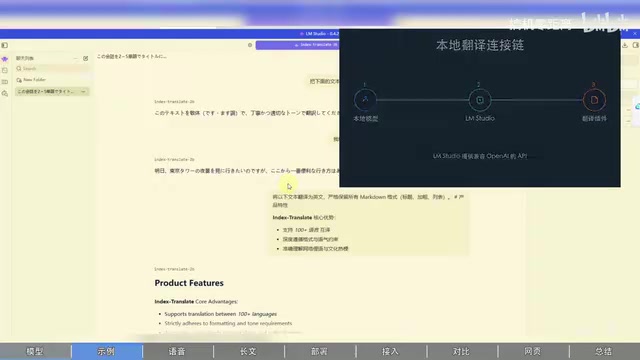
Official Demo: Instruction-Following and Format Preservation
Bilibili provides a publicly accessible online demo covering four main features: text translation, speech translation, syllable control, and long-text translation. The text translation section lets you freely switch between the 2B, 9B, and 35B models.
Several practical capabilities stand out from the instruction-following examples:
- Tone control: You can request a translation into Japanese using formal/polite speech, and the model will strictly comply.
- Markdown preservation: The model faithfully preserves the original Markdown formatting during translation, keeping the output structure intact.
- JSON structured output: For backend development needs, the model can output specific JSON fields directly, making integration straightforward.
When running the 2B model locally, these capabilities are essentially on par with the cloud service. In testing, translating a Markdown document to English produced output identical to the cloud version with full formatting preserved, at a speed of 53.2 tokens/sec — the entire passage took only about 0.44 seconds. That's impressive for a 2B-scale model.
The speech capabilities are also worth noting. Speech translation from Chinese to English not only transcribes accurately but also attempts to preserve the speaker's tone. Additionally, the model supports dragging in MP4/MP3 and other audio/video files (up to one minute) for automatic subtitle recognition with timestamp output — usable as a local subtitle extraction tool.

Local Deployment: Running It with LM Studio
To use Index-Translate on a home computer, the core tool you need is LM Studio. Once installed, type index-tr in the search bar to find the main model index-translator-2B-GGUF.
One critical point: always select the GGUF format, as it is optimized for backends like LM Studio. If your machine has better specs, you can also choose the 9B version and select different quantization parameters based on your available VRAM — larger parameters mean better performance but higher VRAM requirements. For most users, 2B is more than sufficient.
After downloading and loading the model, run a quick test translation inside LM Studio to confirm everything is working. In testing, the local 2B model translated at around 37 tokens/sec — smooth and usable.
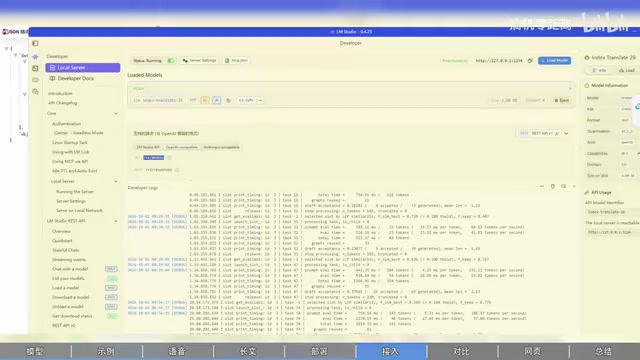
LM Studio starts a local backend service using the standard OpenAI API format, which means it can seamlessly integrate with any translation plugin that supports custom OpenAI-compatible endpoints. In the LM Studio console, go to Settings — the default port is 1234 and the request path is /v1/models. A successful request will return the name of the currently loaded model; note it down for later.
GGUF is a model file format introduced by the llama.cpp project, standing for GPT-Generated Unified Format. It packages model weights, tokenizer configuration, and metadata into a single file and natively supports multiple quantization levels (e.g., Q4_K_M, Q8_0), enabling efficient inference on CPU or hybrid CPU/GPU environments. The core idea behind quantization is compressing model weights from 32-bit or 16-bit floating point to 4-bit or 8-bit integers, dramatically reducing VRAM and memory usage at the cost of a slight drop in precision. For a 2B model, Q4 quantization results in a file size of roughly 1–2GB, whereas the original FP16 weights would require about 4GB. LM Studio's underlying inference engine is built on llama.cpp, giving it full native support for GGUF — which is the direct reason to prefer GGUF over safetensors or PyTorch formats.
Connecting to Immersive Translate
With the local service configured, open the Immersive Translate settings page, navigate to "Translation Services," and select "Add Custom Service."
Key configuration values:
- API endpoint: Enter the standard OpenAI-compatible endpoint provided by LM Studio, using port
1234. - Model name: Select custom model and enter the exact name of the model loaded in LM Studio (e.g.,
translator-2b) — it must match exactly. - API Key: For local service, any value will work.
Once configured, click "Test" to verify the connection. You should see the request logged in the LM Studio console. Confirm success and save the settings.
Immersive Translate is a widely used browser translation extension whose core design is "bilingual side-by-side" — it inserts the translated text below each original paragraph rather than replacing it, making it easy to read both versions together. It supports sending translation requests to any backend compatible with the OpenAI Chat Completions API, so it integrates seamlessly with the local service started by LM Studio. The key here is that LM Studio's exposed endpoint fully conforms to the OpenAI /v1/chat/completions specification — Immersive Translate requires no protocol adaptation whatsoever; you simply swap the request address from OpenAI's official servers to local localhost:1234. The entire pipeline runs completely offline: webpage content never leaves your machine, translation requests are handled locally, protecting your privacy and eliminating API costs entirely.
Real-World Results: Translating a Long BBC Article
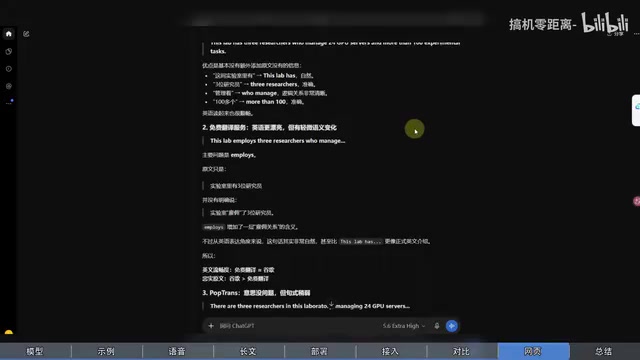
In Immersive Translate's "online service comparison" test, the author ran a head-to-head comparison between Index-2B, Google Translate, and a free AI translation service, then had ChatGPT score the results. The outcome was interesting: ChatGPT gave Google Translate the highest score, while Index-Translator and the free service both received four stars. The author noted that the Google Translate being tested may have been a standard machine translation API rather than a premium version, so there's some variability in the scoring — but overall, all three services landed in the "usable" range.
Where the model really proved its worth was on a long-form BBC English article. The initial model load takes a moment, but once complete, the translation flows naturally with clear logic. More notably, its handling of finer details stood out:
- Supplementary notes in parentheses in the original text (such as "local time" annotations) were fully preserved rather than crudely deleted or merged.
- Proper nouns and technical terms (such as EL AL, Accra, and other organization names and place names) were kept in the original form, maintaining authenticity.
- For supplementary information like "with 9 years of driving experience," the model marked it separately in parentheses, resulting in clean formatting.
In practical use, the 2B model running locally delivered both speed and quality sufficient for everyday long-text translation.
Summary
Index-Translate's greatest value lies in making local deployment accessible to everyone. The 2B model requires only about 2GB of VRAM, and paired with LM Studio and Immersive Translate, you can set up a fully local, offline translation workflow on a home computer. It performs strongly on real-world capabilities including instruction-following, format preservation, and terminology handling. Add to that the fact that it's open-source and free, with additional speech and subtitle capabilities, and it becomes a very compelling option for users who value privacy and want a customizable translation solution.
Related articles

Amphibious Transforming Drone: Beyond 100x Power Savings, What Are the Real Needs?
Is the amphibious transforming drone just a gimmick? Starting from the 100x power difference of the M4 Morphobot, explore real application scenarios and thesis topic ideas, analyzing boundary conditions where pure drones and pure ground robots both fail.

Warhound Raises $200 Million: Genetically Engineered "War Dogs" Paired with Anduril Gear
Warhound raises $200M, backed by Ben Lamm and Palmer Luckey, to genetically engineer dogs for military and law enforcement use and equip them with Anduril gear. This article analyzes its technology direction, funding logic, and ethical controversy.

Claude API Comes to Google Cloud: IAM Integration and SDK Access Guide
Anthropic hosts the full Claude API on Google Cloud with IAM-controlled permissions and unified billing. This guide covers the Vertex AI and Anthropic-hosted entry points, IAM role configuration, and SDK access.