buddylist: Chat with AI Coding Agents Like It's 2005 MSN

buddylist manages multiple AI coding agents via an MSN-style buddy list with worktree isolation and task handoff.
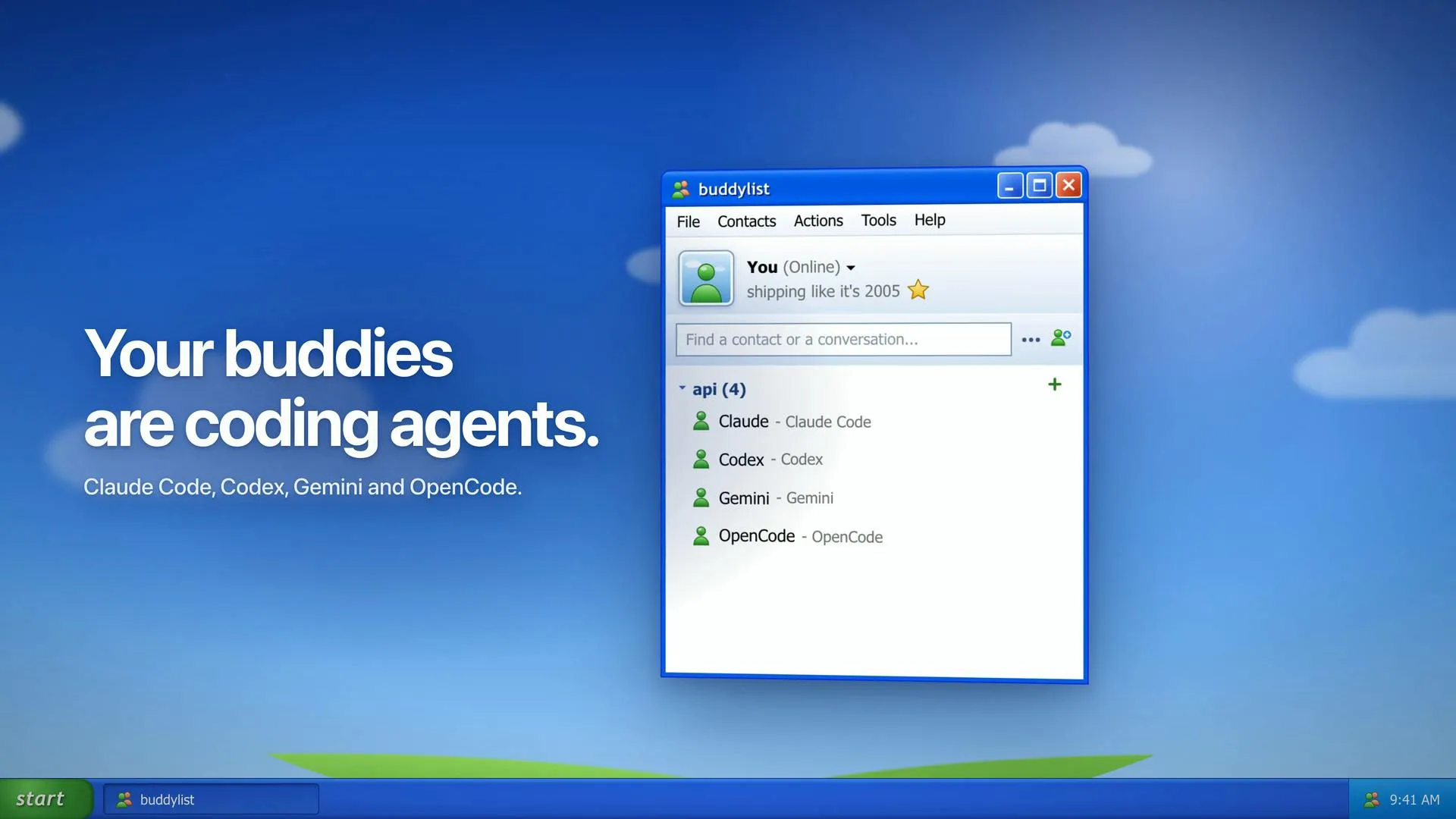
buddylist is a free cross-platform desktop app that integrates command-line AI coding assistants like Claude Code, Codex, Gemini, and OpenCode into an MSN-style buddy list. Its core value is multi-agent orchestration: each task can use an isolated Git worktree to avoid conflicts, support multi-agent group chat, turn-taking, and task handoff, and integrate diff review, terminal, app preview, and PR check status tracking beside the chat window. The app is free, but users bring their own agent accounts and bear the corresponding costs. Currently at 74 upvotes on Product Hunt and in an early niche stage, it suits developers already using multiple agents and familiar with Git worktree.
A Retro Agent Management Portal
Ranked 11th on Product Hunt with 74 upvotes, buddylist nails its core pitch with one line: "Chat with your coding agents like it's 2005." It puts command-line AI coding assistants—Claude Code, Codex, Gemini, and OpenCode—into an MSN-style desktop buddy list. Created by developer Safa Elmali, this free app supports macOS (Apple Silicon), Windows, and Linux, using a nostalgic UI shell to solve a very contemporary problem: the management chaos of multi-agent collaboration.
More Than a Reskin: A Multi-Agent Workflow
buddylist's real value isn't the UI—it's its orchestration of multi-agent collaboration. Each task can spin up an isolated Git worktree so different agents don't trample each other in the same workspace. You can also drop multiple agents into a shared folder to "group chat," letting them take turns, answer together, or hand off unfinished tasks to another agent to continue.
This design reflects a real trend in AI coding today: the capability boundaries of a single agent are fairly clear, and developers are starting to use multi-agent division of labor to cover more complex engineering tasks. buddylist abstracts this collaboration into a chat-room-style interaction layer, reducing the friction of manually switching terminals and copy-pasting.
Task Handoff and Taking Turns
"Let them take turns, answer together or hand unfinished tasks to another agent" captures the three most notable actions in the official description. Taking turns is great for comparing outputs from different models; answering together aggregates multi-perspective answers; and task handoff solves the pain of lost context—when one agent gets stuck or exceeds budget, another can pick up where it left off.
Git worktree is a feature available since Git 2.5 that allows multiple branches of the same repository to be checked out into different working directories simultaneously. Unlike traditional git checkout branch switching, worktree gives each branch its own filesystem path and index, so multiple processes (here, multiple AI agents) can read and write their own workspaces in parallel without interference. For multi-agent scenarios, this means one agent can modify code on the feature-a branch while another works on feature-b at the same time—both share the underlying .git object store, but their working directories are fully isolated. This mechanism avoids file-lock conflicts and mutual overwrites of uncommitted changes, and is the infrastructure behind buddylist's task isolation.
Developer Tooling: Diff, Terminal, Preview, and PR Checks
Beside the chat window, buddylist integrates common code-review tools: viewing diffs, running a terminal, previewing the app, and tracking PR check status. These features aren't new, but putting them on the same screen as the agent conversation means developers don't have to bounce between IDE, terminal, and browser.
This "chat as workbench" approach is similar in direction to AI editors like Cursor, but buddylist opts for a lighter desktop-app form and explicitly stays decoupled from agent account systems—users bring their own accounts, and provider access and usage are billed separately.
PR check status typically refers to the automated check results displayed on a Pull Request on a code hosting platform (such as GitHub), including CI pipelines (build, test, lint), code scanning, and security audits. Developers can see directly on the PR page whether each check passed, failed, or is in progress, and decide whether it's safe to merge. buddylist integrates this status tracking next to the chat window, meaning after an agent commits code or creates a PR, developers can see CI feedback without jumping to a browser—quickly deciding whether to have the agent fix issues or proceed.
The Trade-offs Behind a Free App
Free is another label for buddylist, but its boundaries are worth noting: the app itself costs nothing, but subscriptions or API fees for Claude Code, Codex, and other services are still on the user. For a tool that aggregates multiple paid agents, this model is reasonable—and it also means buddylist's long-term maintenance depends on the developer's personal investment.
With 74 upvotes and only 3 comments on Product Hunt, it's still in a relatively niche early stage. The MSN-style UI is a clever memory hook, but what will really determine whether it retains users is the reliability of task handoff, the stability of worktree isolation, and whether multi-agent group chat is actually more efficient than a single agent in real projects.
Claude Code, Codex, Gemini, and OpenCode are today's mainstream command-line AI coding assistants, but each has its own account system and billing. Claude Code is typically used via an Anthropic subscription (such as Claude Pro/Max) or an API key, billed by token or subscription quota; Codex relies on OpenAI's API or a ChatGPT subscription; Gemini is accessed via Google AI Studio or Vertex AI API keys; and OpenCode, as an open-source project, lets users configure multiple model providers, with costs depending on the chosen backend. buddylist doesn't proxy these requests—it directly invokes the CLI tools already configured locally—so users must manage their own credentials and usage quotas.
Who Should Try It
Developers who already use multiple AI coding agents simultaneously and have a basic understanding of Git worktree are buddylist's most direct target audience. If you're used to running Claude Code in one terminal and Codex in another, and you often move context around by hand, this tool is worth a try. If you only use one agent—or prefer AI embedded in your IDE—buddylist's group chat may not be useful to you yet.
Its retro look is the hook; multi-agent orchestration is the substance.
Related articles
DeepSeek Open-Sources DeepInfer: What Is an Inference Framework Actually For?
DeepSeek open-sources its inference framework DeepInfer under Apache 2.0, supporting DeepSeek V4.1 Flash offline inference. This article explains its request scheduling, FlashMLA/DeepGEMM compute optimization, DSPark speculative verification acceleration, and what it means for developers and ordinary users.
Open-Source AI Learning Agent: A Full Workflow Experience from Topology Graphs to Exam Generation
Explore an open-source AI learning agent: built on DeepSeek API, it constructs knowledge systems via topology graphs, with automatic document generation, notes, super documents, and exams. Learn about its Agent workflow and design highlights.

DeepSeek Whale Girl Open-Source MV Meme: AI Industry Coded Slang About Pivoting to Closed Source
Bilibili's DeepSeek Whale Girl rap MV uses fictional memes to tease the AI open-source vs. closed-source debate, with lyrics full of industry slang. This article explains the meme culture, the Whale Girl symbol, and the open/closed tension.