Open-Source AI Learning Agent: A Full Workflow Experience from Topology Graphs to Exam Generation
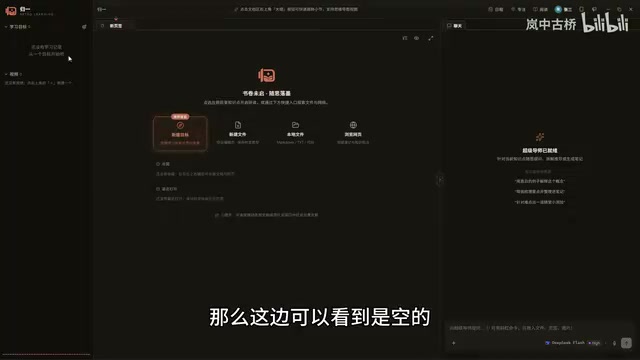
An open-source learning tool that restructures knowledge management with an AI Agent, automating the full workflow from topology graphs to outlines, documents, and exams.
The article introduces an open-source agent-based learning software that went viral on Bilibili and has reached 60 GitHub stars. Centered on an Agent, the tool automatically generates knowledge topology graphs, expands outlines, and writes documents with authoritative citations around user-set learning goals, and supports notes, interactive super documents, and non-mandatory exam generation with anti-cheating features. It integrates the DeepSeek API and Web search with out-of-the-box configuration, but currently only supports Windows and DeepSeek, and the topology graph still has early-stage issues such as node overlap and orphan nodes requiring manual cleanup. The author believes its value lies in embedding the Agent into every link of knowledge management, shifting AI from passive responding to actively building knowledge structures.
Recently I came across a Bilibili creator sharing an open-source agent-based learning software they developed independently, which quickly reached 60 GitHub stars. The tool attempts to restructure the knowledge management workflow with an AI Agent, forming a closed loop from topology graph construction to automatic exam question generation. Based on the video content, I've organized its core features and design approach, along with some personal observations.
Product Positioning: An Agent-Driven Personal Knowledge Workbench
The software is currently available only for Windows, with the installer downloadable from the Releases page of its GitHub repository. Its core logic is to have the Agent automatically work around the learning goals set by the user, rather than merely providing a chat window. Users need to configure an API Key first; the author used a DeepSeekAd API Key in the demo. If a Key is provided, a provider configuration is automatically generated after creating a user, requiring no further manual setup.
Upon entering the interface, the configured provider (e.g., DeepSeek official) is displayed in the bottom-right corner. In the settings, you can see the default context length is 128K (about 120K tokens). The author mentioned that image presets and web search configuration will be optimized later. If the DeepSeek official provider is already configured, the web search configuration will automatically reuse DeepSeek's Web Search API. This "out-of-the-box" configuration process lowers the barrier to entry, but it also means users are tied to a specific API provider.
API Key and Provider Configuration
The "API Key" mentioned repeatedly in the article is the credential for calling large language model services. Taking DeepSeek as an example, users need to register an account on the DeepSeek open platform, top up, and create a key so that the software can make requests to the model through this key and be billed by token. The so-called "provider configuration" refers to a set of parameters recorded internally by the software: endpoint address, key, default model, context length, etc. The auto-generation logic designed by the author essentially pre-writes the chain of "key → provider → model," so users can skip tedious manual configuration by entering the Key once. This also explains why additional configuration is needed when switching to other models—different providers have inconsistent API protocols, model names, and billing methods, and generality requires an additional adaptation layer.
Topology Graph Workflow: From Goals to Knowledge Nodes
After creating a goal, the system generates an empty topology graph. Users can start tasks by dragging in documents or outlines, or by entering requirements in the Agent chat area. In the video, a "High-Speed" learning goal was created, and the Agent automatically created nodes and wrote content. The first node typically leans toward an overall roadmap, after which the user can continue by asking "Please help me expand the outline," and the Agent will expand on its own; alternatively, users can manually drag outline nodes to connect to existing nodes.
This dual-mode design (Chat tab and Task tab) allows users to both converse freely and exercise fine-grained control over the topology graph. However, the video also showed orphan nodes that needed to be manually deleted.
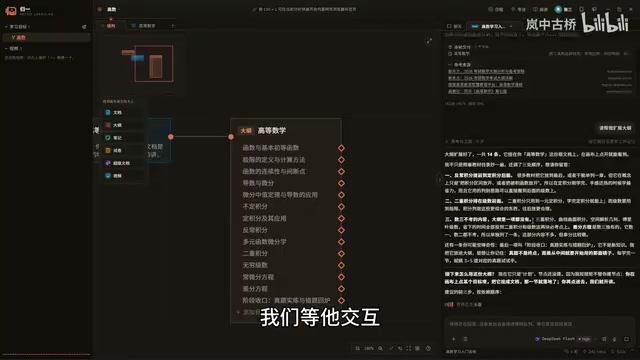
Once the outline is created, clicking on an outline node automatically creates an empty document. Clicking the "Generate Document" button prompts the Agent to start filling in content. Interestingly, each time it writes content, the Agent uses Web search to obtain authoritative articles as references, and provides reference materials and authoritative sources at the end of the document. The Agent's message list also displays the reference sources and files delivered in that round. This citation mechanism enhances the credibility of the content, making it especially suitable for learning scenarios.
Knowledge Topology Graph and Node-Based Knowledge Organization
The topology graph here is not topology in the mathematical sense, but rather borrows the "node-edge" graph structure to express hierarchies and associations between knowledge points. Each node can be a document, an outline, a note, or an exam paper, and edges represent semantic relationships such as "belongs to," "extends from," or "assesses." Compared to traditional folder tree structures, a graph structure allows a node to be referenced by multiple parent nodes and is better suited for presenting non-strictly tree-shaped learning paths like "overall roadmap → subtopic → detailed document." The Agent's role here is to automatically create nodes and fill in content, semi-automating the knowledge decomposition work that would otherwise require manual organization, while users retain final control over the structure through dragging and connecting.
Notes and Super Documents: Extensions of Knowledge Management
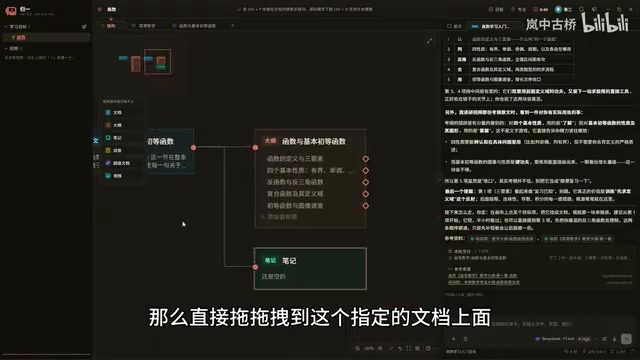
Notes are attached as child nodes of documents; users can create one by dragging a note onto a specified document. Clicking the note title link allows editing the content, and Ctrl+S saves it. A Super Document is an interactive HTML file that can call functions in the application's environment, mainly for experimental interactions. In the video, the Agent was asked to generate a Super Document, and the result was similar to an interactive web page.
For topology graph operations, the video introduced shortcuts: Ctrl+scroll wheel to zoom, hold the mouse wheel or Space+right-click to drag the canvas, left-click to drag nodes, double-click to fit the canvas or focus on a node. You can also change the line style (from straight to curved) and automatically arrange nodes. These interaction details show that the author put considerable thought into the user experience.
Super Documents and Interactive HTML
A "Super Document" can be understood as a sandboxed web page embedded in the application environment: it is essentially an HTML/JS file, but it can call function interfaces exposed by the host application to read and write notes, query the topology graph, or trigger Agent tasks. The difference from ordinary Markdown notes is that it upgrades static content into an executable mini-application, for example, a formula demonstration with adjustable parameters or a knowledge point self-test mini-game. The cost is a more complex security boundary—if an interactive document loads external scripts, its permissions need to be restricted; otherwise, it could access local data beyond its authority. For learning scenarios, this format is suitable for carrying knowledge that requires "hands-on operation," but at this stage it remains an experimental feature with limited stability and ecosystem.
Exam Paper Generation and Testing: A Non-Mandatory Self-Assessment Step
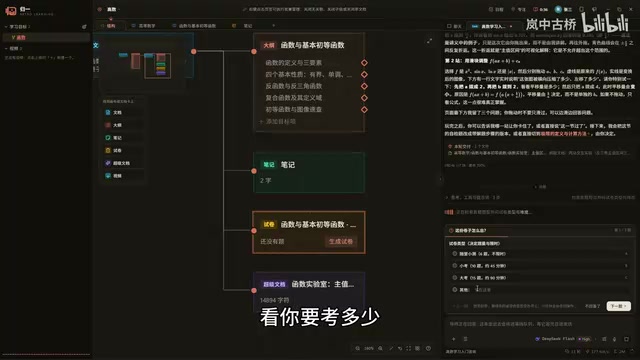
The exam paper feature is designed as an addable node rather than being mandatorily generated. Users drag an exam paper node under the document to be tested, and the Agent asks for the number of questions. If the preset options don't meet the requirements, users can customize the number of questions (e.g., 30, 40, or 100 questions). After generating the exam paper, clicking "Start Exam" pops up a window, and the entire main application window turns black and is covered by a mask to prevent cheating.
The exam interface supports multiple-choice, fill-in-the-blank, and true/false questions (the video's exam paper did not include true/false questions). Answers can be uploaded by scanning a QR code with a phone to take photos or by uploading images locally. Scanning the QR code pops up a QR code, and the phone accesses a page via the local network to upload files. After submission, the Agent enters the grading process. The topology graph can be quickly browsed and navigated on any page by pressing F1. After grading is complete, answer records appear under the exam paper node, including grading status, exam analysis, and explanations, along with a screenshot detection feature.
LAN QR Code Upload and Screenshot Detection
The QR code photo upload relies on LAN communication: the software starts a lightweight HTTP service on the local machine and encodes the local intranet IP and port into the QR code; after the phone connects to the same Wi-Fi and scans the code, the browser opens the upload page, and the selected image is transferred directly to the computer over the LAN without going through a public server, making it fast and relatively private. Screenshot detection typically monitors the system's screenshot shortcut keys or detects screen capture behavior, and records an anomaly if triggered during the exam mask period. Such mechanisms can only serve as a deterrent to "raise the cost of cheating" and cannot prevent bypass methods such as taking photos with another device. It is a design that guards against honest people but not dishonest ones, which also suggests that the exam feature is more suitable for self-testing than for serious assessment.
Design Highlights and Areas for Improvement
From the video, the core competitiveness of this tool lies in embedding Agent capabilities into every link of knowledge management: goal setting, outline generation, document writing, note supplementation, and self-testing exams. AI participates in every link, but users retain control (e.g., manually adjusting the topology graph, customizing question counts). The citation of sources and anti-cheating design also reflect deep thinking about learning scenarios.
However, currently it only supports Windows and the DeepSeek API, limiting cross-platform users and users of other models. Issues such as overlapping topology graph nodes and orphan nodes requiring manual cleanup also indicate that the product is still in an early stage. The author mentioned that image presets and web search configuration will be optimized later, and we look forward to future versions resolving these details.
For users who want to try AI-assisted learning tools, this open-source project provides a good starting point. It demonstrates how an Agent can shift from passive responding to actively building knowledge structures, an approach worth watching.
Related articles

Building an AI Agent with Claude Code from Scratch: From Workspace to Cloud Autonomy
No coding required: build an AI Agent in four steps with the Claude Code desktop app—from workspace setup and Agent Designer to Skills, Memory, and cloud autonomy.

No Python Required: How Cursor AI Coding Is Reshaping Automated Testing and Test Development
Test engineers can do automated testing without learning Python? This article examines how Cursor and other AI coding tools empower functional testing, automation scripts, test platform development, and performance tuning, compares the cost and access restrictions of mainstream domestic and foreign tools, and offers capability transformation advice for testers.

Nearly 5,000 Affected! AI Coding Plugin Found with Backdoor, Officials Urgently Remove It
Claude Code's VS Code extension version 2.1.313 was maliciously tampered with, implanting a backdoor for remote login and persistent control, potentially affecting up to 5,000 users. Officials have removed the malicious version; this article details the attack method and cleanup steps.