Build a Free Supply Chain AI Agent with Claude AI + Cloudflare Workers

Build a free Claude AI supply chain agent with Cloudflare Workers and MCP to automate inventory analysis and reorder drafts.
A YouTube creator demonstrates a zero-cost AI Agent that connects Claude AI to a Google Spreadsheet-based supply chain database via MCP (Model Context Protocol), enabling natural-language-driven inventory checks, vendor evaluation, and automated reorder draft generation. The stack — Cloudflare Workers, Claude Web's free tier, and a Google Service Account — requires no VPS or credit card. With just a natural language prompt, Claude accurately reads live inventory data, identifies low-stock items, and generates complete reorder requests. Built on open-source GitHub code, the setup requires only a Service Account key and a single custom connector in Claude.
A YouTube creator shared a highly practical AI Agent project: no VPS, no credit card, completely free — and it lets Claude AI directly read and analyze a company's inventory database to automatically generate reorder request drafts. The entire solution is built around supply chain management, demonstrating MCP (Model Context Protocol)'s real-world business applicability.
The Real Business Problem It Solves
This demo focuses on supply chain and procurement scenarios. The creator built a Google Spreadsheet-based database containing multiple sheets: inventory, vendors, purchase orders, and reorder requests. The core goal is to let Claude AI read and analyze this data, then trigger "actions" — specifically, automatically generating reorder request drafts.
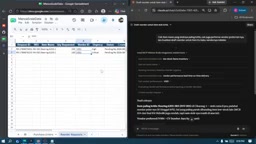
In the live demo, users simply type a natural language instruction into Claude's chat window — for example, "Check which item has the most critical inventory level, who the corresponding vendor is, and if the vendor performs well, generate a reorder request draft for me." The AI immediately returns results: the most critically low item is a bearing, with a current stock of only 8 against a reorder point of 50; the recommended vendor is CV Sumber Jaya Spare Part, with an average lead time of 5 days and a 92% on-time delivery rate. It then directly generates a reorder draft complete with request ID, item, quantity, and vendor fields.
How the AI Actually "Understands" the Database
To verify the AI isn't hallucinating data, the creator opened a new conversation and asked it to list all out-of-stock items. Expanding Claude's thought process reveals it called the database context and returned a list of items including bearings, MCBs, silkit, and others.
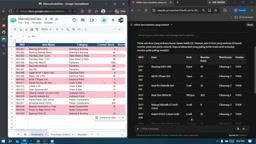
Cross-checking item by item, the data matched perfectly: INV001 had a current stock of 8 with a reorder point of 50 — clearly critical; item 010, MCB1P10A, had a current stock of 3 against a reorder point of 15 — equally urgent. This confirms that Claude AI, via the MCP connection, accurately understands real-time data from the Spreadsheet rather than making things up. This verifiability is exactly what determines whether an enterprise AI application can be trusted.
MCP (Model Context Protocol) is an open standard protocol released by Anthropic in late 2024, designed specifically to solve the connectivity problem between large language models and external data sources or tools. Previously, every AI application required custom integration code for each data source — expensive to maintain and difficult to reuse. MCP's core idea is to abstract "data providers" into standardized Servers and "consumers" (like Claude) into Clients, with both sides communicating through a unified protocol. This means the same MCP Server can be called by any AI model that supports the protocol, and developers only need to implement the connection logic once. In this project, Cloudflare Workers acts as the MCP Server — it receives query requests from Claude, calls the Google Sheets API to read actual data, and returns results to the model. This architecture ensures Claude always operates on real, live data rather than knowledge baked in during training, which is the key leap from AI "knowing things" to AI "handling business."
Tech Stack: MCP + Cloudflare Workers, Completely Free
The technical combination used here is worth noting — and it's all on free tiers:
- Claude AI (Web version): Serves as the conversational interface and reasoning engine; works on the free plan;
- Cloudflare Workers and Pages: Hosts the MCP Server; the free tier is sufficient;
- Google Cloud Console Service Account: Can be generated without a credit card; used to connect to Google Spreadsheet.
The creator emphasizes that this is not a coding tutorial but a project showcase. The complete code is available on a GitHub repository — viewers can clone it directly, since core functions like inventory checking and reorder draft generation are already pre-defined.
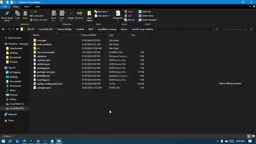
The code itself is adapted from the remote-mcp example in Cloudflare's official repository. After cloning, navigate to the remote-mcp directory and open it in any code editor (the demo uses Antigravity).
Key Steps: Connecting Cloudflare to the Spreadsheet
While the code works out of the box, there is one configuration step that cannot be skipped — establishing the connection between Cloudflare Workers and Google Spreadsheet. The process goes roughly like this:
1. Create a Google Service Account
Go to console.cloud.google.com, search for "service account" and create one — the name doesn't matter. Once created, you'll get an email address. You'll need to invite this account as an Editor on the target Spreadsheet.
2. Download the Credential JSON
Go to the Service Account's detail page, click Keys → Add Key → Create New Key, select JSON format, and download the resulting credential.json. This credential is the key that allows Cloudflare to read Spreadsheet data.
3. Write the Secret and Deploy
Run npx wrangler secret put GOOGLE_SERVICE_ACCOUNT_KEY in your editor's terminal. When prompted to enter the secret value, paste the entire contents of credential.json and press Enter.
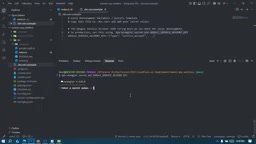
Afterward, deploy the MCP directly. A successful deployment will generate a URL in the Cloudflare Workers dashboard in the form of remote-mcp-server-xxx.workers.dev.
4. Add the Connector in Claude
Copy the MCP URL, open Claude Web → Customize → go to Connector settings → Add Custom Connector, then paste the URL. The creator notes that Claude's free plan only supports 1 custom connector — a limitation of the free approach. Once the connector is mounted, you can perform inventory checks, vendor quality assessments, reorder draft generation, and more against the database.
A Google Service Account is a non-human identity credential provided by Google Cloud, designed for automated authentication between server-side programs. Unlike regular user accounts, Service Accounts use a JSON-format private key file (rather than a username and password) to prove identity — suitable for running in unattended backend environments. The way it works: the program signs a JWT (JSON Web Token) with the private key and sends it to Google's authentication server in exchange for a short-lived Access Token, which is then used to call the Google Sheets API. Writing the contents of credential.json into Cloudflare's encrypted environment variables via wrangler secret put means the private key never appears in plaintext in the code repository — a reasonably secure approach. It's worth noting that a Service Account has no data access permissions by default; you must explicitly add its email address as a collaborator on the target Spreadsheet, which is exactly why the "invite as Editor" step in Step 1 is necessary.
What This Solution Teaches Us About Enterprise AI Adoption
The value of this demo isn't the technical complexity — it's that it validates a replicable path with extremely low barriers: using MCP to let a large language model securely connect to internal data and drive concrete business actions. For small-to-medium businesses or individual developers, you don't need to maintain servers or pay for subscriptions to turn Claude into an assistant that understands your business data.
Of course, Spreadsheet-based solutions like this are better suited for prototype validation and small-scale scenarios. The number of free connectors, Spreadsheet data size limits, and permission and security controls for production environments are all factors to consider when scaling up. But as a showcase of MCP's practical capabilities, it clearly illustrates how to build the bridge between an AI Agent that "can chat" and one that "can get things done."
Related articles

JobRunner MCP Server: AI Agents Can Now Fix Failed Java Jobs
JobRunner launches an open-source MCP server enabling AI agents to view cluster status, diagnose failures, and recover Java jobs—incident response from any cloud coding environment or existing agent.

MLAI Digital Launches 9 Security Agents: MCP Server Safeguards the Full Lifecycle of Agentic AI
MLAI Digital launches Security MCP Server with nine built-in specialized security agents covering vulnerability discovery, attack simulation, prompt injection detection, API and infrastructure assessment, and accelerated remediation—embedding security validation across the full Agentic AI lifecycle from development to production.

Running Isaac Lab on H100 GPUs: Exploring Better Approaches
Exploring optimization methods for running Isaac Lab on NVIDIA H100 GPUs, including MIG configuration, mixed precision, TensorRT acceleration, and community experience to improve robotics simulation and reinforcement learning efficiency.