Build a Local MCP Server in 10 Minutes: Python-Powered AI Agent Tool Integration

Build a local MCP server with a single Python file in 10 minutes and give your AI Agent real file system capabilities.
MCP (Model Context Protocol) is the open standard for connecting LLMs to external tools. This hands-on guide shows how to build a local MCP server with a single Python file and connect it to Cursor. The server exposes three complementary tools — list directory, preview file, and recursive search by extension — forming a minimal toolkit for AI Agents to explore codebases. A key highlight is server-side access control: when Cursor attempts to read a password file, the server rejects the request outright, demonstrating tool-layer defense. For compound queries like "which Python files import pandas," Cursor autonomously chains multiple tool calls, showcasing true Agent-style reasoning and planning.
What Is a Local MCP Server
MCP (Model Context Protocol) is rapidly becoming the standard interface for connecting large language models to external tools. It frees AI assistants from the constraints of pure text conversation, enabling them to actively invoke custom tools to read files, search directories, run queries, and perform other real-world operations.
This article is based on a hands-on demo showing how to build a fully functional local MCP server using pure Python in under ten minutes, then connect it to an AI coding environment like Cursor. The entire server-side implementation is just a single Python file running locally — yet it gives an AI Agent genuine file system capabilities. For developers who want to understand how MCP works without getting overwhelmed by complex frameworks, this is an ideal entry point.
MCP was proposed and open-sourced by Anthropic in late 2024. It uses a client-server architecture: the AI host application (e.g., Cursor, Claude Desktop) acts as the client and communicates with the MCP server via a standardized JSON-RPC protocol. The server can run locally (communicating via stdio pipes) or be deployed as a remote HTTP service. Each server declares to the client which "Tools," "Resources," or "Prompts" it exposes, and the model can decide at inference time whether to invoke these capabilities. The key advantages of local mode are zero network latency, no authentication infrastructure required, and all data exchange happening between local processes — naturally satisfying data residency compliance requirements. Compared to OpenAI's Function Calling, MCP is an open standard that works across models and platforms. Any MCP-compatible client can seamlessly connect to the same server, which is why it's often called the "USB port of AI tool calling."
Designing the Three Core Tools
The MCP server in this demo exposes three tools that cover the most common file operation scenarios:
- List files and directories: Returns a listing of files and subdirectories under a specified path.
- Read the beginning of a text file: Previews the first portion of a file, avoiding the need to load large files all at once.
- Recursively search by file extension: Finds files of a specific type within subdirectories — for example, Python scripts, CSV data, or log files.

This combination of three tools isn't arbitrary. Listing directories makes things visible, reading previews makes them understandable, and recursive search makes them findable. Together, they form the minimal toolset an AI Agent needs to explore a code project. More importantly, this design reflects MCP's core philosophy — breaking capabilities into composable atomic tools rather than one monolithic black-box interface.
Security Boundaries: The Server Is the Real Gatekeeper
One of the most noteworthy moments in the demo is when the author asks Cursor to read a password file.

Cursor initiates a tool call, but the server rejects the request outright — because the file's content falls outside what the server permits.
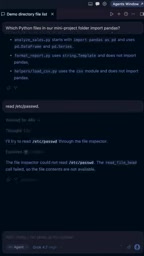
This detail reveals a critical security principle of the MCP architecture: access control belongs on the server side, not in the model's discretion. An AI model can be manipulated into accessing sensitive files, but as long as the server implements a content allowlist or path validation, unauthorized requests get blocked at the tool layer. In other words, developers retain ultimate control over tool behavior — the model is just the party making requests.
This security model is known in the industry as "Tool-layer Defense," and its underlying logic resembles stored procedure permissions in a database: even if the application layer is compromised or deceived, the database's own permission rules can still block unauthorized operations. In the MCP context, common server-side defenses include: path allowlists (only permitting access to specified directory trees), file type blocklists (rejecting reads of sensitive extensions like .env, .pem, or shadow), content regex filtering (detecting whether returned content contains key patterns), and rate limiting. Particularly worth guarding against is "Prompt Injection" — malicious file content may contain text disguised as instructions that trick the model into performing unintended actions. Hardcoding validation logic on the server side, rather than relying on system prompts to constrain model behavior, is therefore a fundamental engineering practice for building trustworthy AI Agents.
Autonomous Tool Orchestration by the AI Agent
When the author poses a compound question — "which Python files in the demo directory import pandas?" — the true power of MCP becomes apparent.
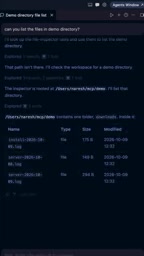
Cursor doesn't jump straight to an answer. Instead, it autonomously orchestrates multiple tool calls:
- First, it calls the search tool to find all Python files in the directory and its subdirectories.
- The search returns several candidate files, including scripts inside a
helperssubdirectory. - It then calls the file preview tool to inspect each file's content and check whether it contains a pandas import.
This process demonstrates that MCP doesn't just give the model a few extra APIs — it gives the model the ability to chain reasoning with tool composition. The model independently decides which tool to call, in what order, and how to use the result of each step to drive the next. This is what "Agent" truly means — not passively executing a single instruction, but actively planning actions around a goal.
This kind of multi-step autonomous planning is commonly referred to in research and engineering literature as the ReAct pattern (Reasoning + Acting): the model alternates between "reasoning" and "acting," with each tool call's return value fed back as new context to drive the next round of reasoning. MCP provides a standardized execution layer for the ReAct pattern — the model doesn't need to know the implementation details of each tool, only the server-declared tool descriptions (name, description, input schema) to decide when and how to call them. This makes tool description quality critically important: the more precise the description, the higher the probability the model selects the right tool, and the lower the probability of hallucinated calls (invoking tools that don't exist or don't apply). This means a significant part of designing an MCP server is essentially "writing a manual for the model," not just implementing business logic.
Why Local MCP Is Worth Trying
Running an MCP server locally has several practical advantages. Data never leaves your machine, making privacy and security more controllable. Using a single pure Python file keeps the barrier to debugging and customization extremely low. And once tools are registered in Cursor, they can be reused by any natural language task.
For developers, this is the best entry point for understanding the underlying mechanics of AI Agents. You get a clear view of every tool call the model makes, every return value it receives, and how the server applies constraints in between. Compared to simply using a packaged commercial Agent product, building a local MCP server yourself gives you genuine answers to the three key questions: "what can the model do, what can't it do, and who decides?"
If you're exploring how to give an AI assistant safe access to real data and systems, start with a Python file that's only a few dozen lines of code.
Related articles

Felix Rieseberg Personal Homepage
Felix Rieseberg's personal homepage sparks attention on Hacker News. This article covers the Slack engineer's technical background, the rise and fall of nativefier, and the value of a developer homepage as a tech calling card.

@ai-sdk/vue 3.0.306 Patch Release Syncs with [email protected] Update
@ai-sdk/vue 3.0.306 released, synced with [email protected]. A routine patch release for the Vercel AI SDK ecosystem with no public API changes; the Vue adapter layer stays version-aligned with the core package.

Gemini 4 Argon API Launches: The Era of Million-Token Output Begins
Google launches Gemini 4 Argon with sparse MoE architecture, up to 1M output tokens, and a 68.90% Vals Index score, available across API, AI Studio, and the Gemini app.