Build an AI Agent from Scratch with ~100 Lines of Python, No Framework Needed

Build an AI Agent from scratch with ~100 lines of code: language model, tools, and loop—the core of every framework.
The article argues that the essence of an AI Agent is just three things: a language model, tools, and a loop—all mainstream frameworks are fundamentally this pattern. The author starts from an empty folder and, in about a hundred lines of code without any framework, builds an Agent that can search Wikipedia, do math, and remember context. Steps include preparing Python 3.10+ and a virtual environment, accessing multiple models via OpenRouter with one key using GPT-4o mini, and storing the API Key in a .env file. In the core implementation, tools are ordinary Python functions, JSON Schema serves as the manual for the model to understand tools, and the description directly determines tool selection; the run_agent loop judges whether the model requests a tool call, executes and feeds back results if so, or returns the final answer if not, with max_steps preventing infinite loops. The growing messages list serves as memory, with no vector database needed. The live test demonstrates multi-step reasoning and context tracking with search plus calculation.
What Actually Counts as a Real AI Agent
Discussion around AI Agents is often shrouded in mysticism. But strip away all the packaging, and the essence of an Agent comes down to just three things: a language model, tools, and a loop. A regular chatbot simply answers from its training data; an Agent is a language model running in a loop, able to judge whether it needs external information, actively call tools, hand the tool results back to the model, and decide again, until it produces a final answer. According to the YouTube tutorial author, every Agent framework you've heard of is fundamentally this same pattern.
The video's approach: start from an empty folder and, in about a hundred lines of code, build an Agent that can look things up on Wikipedia, do math calculations, and remember context. All without relying on any Agent framework.
Environment Setup: Three Steps to Lay the Foundation
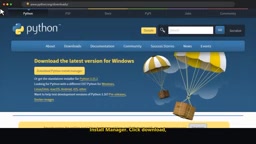
The first step is Python, requiring version 3.10 or newer. Windows users can now download the Python install manager from the official site for one-click installation, or use the traditional installer but remember to check "add python.exe to path." After installation, verify with python --version in the terminal.
The second step is an isolated environment. Use python -m venv venv to create a virtual environment so this project's dependencies don't interfere with the rest of your system. The third step is installing three packages: openai (to communicate with the model), python-dotenv (to load keys), and requests (to call Wikipedia).
Model Access: One Key for Multiple Providers
The tutorial chose OpenRouter as the model entry point. Its value lies in using a single API Key to call models from OpenAI, Anthropic, Google, and other vendors, and being fully compatible with OpenAI's standard interface format—meaning what you learn today can be migrated elsewhere by just changing the base URL. The author's chosen model is GPT-4o mini, for its low cost, speed, and strong tool-calling capabilities.
Key management is where beginners most easily stumble. The author emphasizes: never hardcode keys directly into your code; instead put them in a .env file and read them with python-dotenv. If using Git, be sure to add .env to .gitignore.
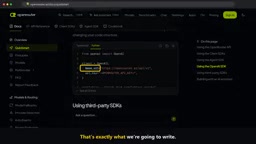
Before writing the Agent, first write a hello.py that sends a message to verify the connection, confirm the model responds correctly, then layer on features—this habit will save you a lot of troubleshooting time.
OpenRouter can achieve "one key for multiple providers" because it acts as a model routing middleware, connecting to each vendor's API on the backend and exposing a unified OpenAI-compatible interface on the frontend. Being OpenAI-compatible means the request body, response structure, and tool-calling fields all follow the same conventions, so developers only need to change the base_url and model name to switch backends. Tool calling (function calling) matters because it's the standardized signal for the model to interact with the outside world: the model no longer directly outputs a natural language answer but returns a structured tool-call request containing the tool name and parameters, which the program uses to execute the real function. This also explains why the author specifically values "strong tool-calling capabilities" when choosing a model—a model that isn't good at outputting tool requests according to a Schema, no matter how cheap, cannot support an Agent.
Three Core Building Blocks: Tools, Schema, Loop
Tools Are Just Ordinary Functions
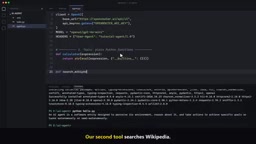
The Agent's first tool is a calculator: it receives a math expression as text and returns the result. The author offers a pragmatic reminder: using eval with built-ins disabled is acceptable in the example, but a real product must switch to a proper math parser. The second tool searches Wikipedia—first find the title of the best-matching entry, then fetch that page's summary and return the text. Finally, a dictionary maps tool names to their corresponding functions for the loop to dispatch.
Schema Is the Manual for the Model to Understand Tools
The model can't read your Python code, so each tool must be described with a JSON Schema: name, brief description, and parameter structure. The author specifically points out that the description's importance exceeds most people's expectations—the model relies on it to decide which tool to call, so write it clearly as if explaining to a new colleague. The calculator takes one string parameter (the expression), and the Wikipedia tool takes one string parameter (the query).
The role of JSON Schema here is not to validate data but to serve as a contract between the model and the code. When the tool Schema is sent with each request, the model sees the tool's "self-documentation," based on which it selects among many tools and generates a call request that fits the parameter structure. The description is critical because the model has no other channel to understand the function's true intent—the function name and parameter names are just clues; a clear text explaining "what this tool does, when to use it, and what input format it expects" is the basis for decision. Therefore, descriptions should be specific and actionable, avoiding vague adjectives; parameter descriptions should also specify format, e.g., the expression must be a valid math operation string, not a natural language sentence.
The Loop Is the Heart of the Entire Agent
run_agent receives the list of conversation messages so far. In the loop, it sends the messages along with the tool Schema to the model, appending the reply to the conversation. Then comes the key judgment: did the model request a tool call? If not, it means it has thought it through and directly returns the answer; if so, parse each tool call's name and parameters, execute the corresponding Python function, and append the result back to the conversation as a tool message, linked via the call ID. Then the loop continues.
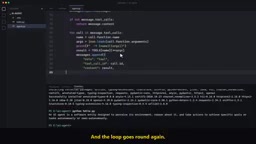
The author also adds a max_steps limit as a safety net to ensure a "confused" Agent doesn't loop indefinitely. This is a defensive design that should not be omitted in production-grade implementations.
Tool call results need to be "linked back to the conversation via the call ID" because the model may request multiple tools in parallel in the same round, and each request carries a unique ID. The tool's return message must carry the corresponding ID so the model can pair results with requests one-to-one. This is the established format of the OpenAI-compatible interface and the key to avoiding cross-talk in multi-tool scenarios. max_steps as a safety valve essentially limits the number of loop iterations: each loop means at least one model call; if the model repeatedly requests tools but doesn't get what it considers useful results, or misjudges due to unclear Schema descriptions, it will spin idle. Adding a limit along with logging helps quickly identify whether the tool return format is wrong, the description is ambiguous, or the model itself lacks capability.
Memory: A Continuously Growing List
The chat part has only one system message (setting the Agent's identity and requiring it to use tools for factual and math questions), then enters an infinite loop: read user input, append to the message list, call run_agent. Because everything is appended to the same messages list, this list itself is the Agent's memory. No vector database, no fancy session storage—the context window is the memory.
Live Test: How Multi-Step Reasoning Happens
The author asks a question that can't be answered from memory alone: In what year was Python released? How many years ago is that (with 2026 as the baseline)? You can clearly see the Agent first search Wikipedia to get Python's release year, then call the calculator to subtract that year from 2026, and finally give an answer assembled from real tool results.
Then follows up with "What about JavaScript, same question," and the Agent understands what "same question" refers to, searches again, calculates again, and answers. This step demonstrates not just tool calling but also context tracking capability.
From a Hundred-Line Demo to a Usable Agent
The value of this minimal implementation lies in its decomposability: tools are ordinary functions, Schema is the manual, the loop handles dispatch, and the message list handles memory. Understand these four things and you understand the core of all Agent frameworks; when you look at wrappers like LangChain, you won't be confused by the abstraction layers.
The extension path is also straightforward—any capability you can write as a function can become a tool: read files, send emails, query databases. The author's closing advice is very practical: try adding your own tool today. Compared to starting with a heavy framework, writing the loop by hand first is far more helpful for debugging and troubleshooting.
One-line Summary
Build an AI Agent from scratch with about a hundred lines of code combining a language model, tools, and a loop—understand the core of all frameworks.
Paragraph Summary
The article argues that the essence of an AI Agent is just three things: a language model, tools, and a loop, and all mainstream frameworks are fundamentally this pattern. The author starts from an empty folder and, in about a hundred lines of code without relying on any framework, builds an Agent that can look things up on Wikipedia, do math calculations, and remember context. The implementation steps include: preparing Python 3.10+ and a virtual environment, accessing multiple models through OpenRouter with a single key using GPT-4o mini, and putting the API Key in a .env file. In the core implementation, tools are ordinary Python functions, JSON Schema serves as the manual for the model to understand tools, and the description directly determines tool selection; the run_agent loop judges whether the model requests a tool call, executes and feeds back results if so, or returns the final answer if not, with max_steps preventing infinite loops. The continuously growing messages list serves as memory, with no need for a vector database. The live test demonstrates multi-step reasoning and context tracking with search plus calculation.
Related articles

Claude Code + Agent: Building a Fully Automated AI Testing Loop
Bilibili course breakdown: how test developers can use Claude Code terminal-based Agents to build a fully automated AI testing loop. Compares permission boundaries of terminal vs. device Agents, explains why enterprise projects choose Claude Code over Open Claude-type tools, and outlines the Node.js environment setup and DeepSeek model integration path.

Working with AI Agents Requires Nerves of Steel
The more autonomous AI agents become, the heavier the user's psychological burden. Drawing from a Hacker News discussion, this article analyzes black-box anxiety, behavior drift, and monitoring fatigue in agent collaboration, and offers practical approaches like sandbox isolation, permission control, and task granularity management to reduce cognitive load.

To Replace Adobe Acrobat, I Built My Own Open-Source PDF Reader Folio
A developer unhappy with Adobe Acrobat's bloat built Folio, a lightweight open-source PDF reader. Learn the design philosophy and use cases of this alternative.