Build an AI Email Sorting Workflow with n8n: 4 Steps to Inbox Automation

Use n8n to chain Gmail and AI together — 4 steps for automatic email sorting, summaries, drafts, and urgent alerts.
This article introduces an AI-powered email processing workflow built on n8n, an open-source automation platform. New emails automatically trigger the workflow, where an AI model classifies them into four categories (urgent, sales, support, noise) and generates a two-line summary. For emails requiring a reply, the system creates a Gmail draft without auto-sending — keeping the user in control (human-in-the-loop design). Urgent emails trigger real-time Telegram notifications, while others wait for batch review. Built once, it runs continuously — shifting email decision-making to AI while protecting user attention through tiered alerts.
Every day you open your inbox to dozens — sometimes hundreds — of emails, but only two or three actually need your immediate attention. The rest are either marketing promotions or notifications you can deal with later. Instead of letting these emails drain your focus, why not hand them off to an AI workflow that sorts everything automatically? This article breaks down a practical n8n solution shared by a YouTube creator, showing how four simple steps can keep your inbox running on its own.
The Core Idea: Let Your Inbox Do the First Pass
The premise of this workflow is straightforward — your inbox doesn't need you to personally look at every single email. The only messages that truly warrant human attention are the urgent ones, those requiring a reply, or those with real business value. Everything else can be categorized and set aside by the system.
The entire solution is built on n8n, an open-source automation platform. n8n's strength lies in its visual node-based orchestration, which lets you chain together services like Gmail, AI models, and Telegram like building blocks — no coding from scratch required. Once set up, it runs automatically every time a new email arrives, continuously and without intervention.
n8n (pronounced "nodemation") is an open-source, node-based workflow automation tool that supports self-hosted deployment, meaning your data can stay entirely on your own servers without passing through third parties. Its biggest differentiator from commercial platforms like Zapier or Make (formerly Integromat) is that it's open-source, free, supports private deployment, and doesn't charge per task execution. n8n comes with hundreds of built-in integration nodes covering major services like Gmail, Slack, Telegram, and OpenAI. In this email workflow, n8n plays the role of "orchestrator" — it doesn't process email content itself, but instead chains together individual services (Gmail reading, AI analysis, Telegram notifications) in logical order, executing along a defined path each time it's triggered.
Four Steps: From Trigger to Alert
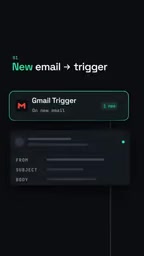
Step 1: Gmail Triggers the Workflow
When a new email arrives in Gmail, the workflow is triggered immediately. This is the entry point for the entire automation chain — n8n monitors inbox activity through its Gmail node without requiring any manual clicks. This trigger mechanism is what allows the whole system to run "invisibly" in the background.
Step 2: AI Reads, Classifies, and Summarizes
Once an email comes in, the AI model reads the full message and places it into one of four categories: urgent, sales, support, or noise. Alongside the classification, the model generates a two-line summary so you can quickly grasp the key points without ever opening the original email.
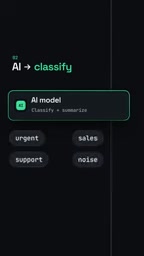
This step is the brain of the entire workflow. The accuracy of the classification directly determines whether the downstream actions make sense, while the two-line summary reduces the cost of "reading emails" to an absolute minimum.
Step 3: Auto-Generate Reply Drafts as Needed
If the AI determines that an email warrants a reply, the workflow automatically creates a draft in Gmail. The key detail here: the system only drafts — it never sends automatically. Every reply must be reviewed and confirmed by you before it goes out.
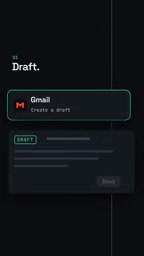
This design reflects the Human-in-the-Loop (HITL) principle. The AI handles the tedious work of writing an initial draft, while the final judgment and sending authority always remain with the user — boosting efficiency while eliminating the risk of accidental sends.
Human-in-the-Loop (HITL) is an important design principle in AI systems. It means preserving human review or decision-making at critical points in an automated process, rather than letting the system run entirely on its own. This is especially important in high-risk or context-sensitive scenarios — and email fits both descriptions: a poorly worded automated reply can damage business relationships, and an important contract misclassified as spam can cause real losses. In an era of rapidly improving AI capabilities, HITL isn't a sign of distrust in AI — it's a risk allocation strategy. Let AI handle high-frequency, low-risk drafting work; leave low-frequency, high-consequence final decisions to humans. This is precisely why many mature AI products (like GitHub Copilot and various AI writing assistants) adopt a "suggest, don't execute" interaction model.
Step 4: Real-Time Telegram Alerts for Urgent Emails
For emails flagged as urgent, the workflow sends a Telegram notification with a summary, ensuring you're informed immediately. Non-urgent emails don't trigger any interruption — they can be reviewed in batch whenever you have time.
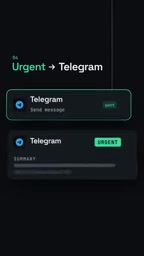
This tiered notification approach is essentially treating attention as a scarce resource — only truly urgent content earns the right to interrupt you.
The Value and Limitations of This Approach
The entire workflow only needs to be built once, after which it runs continuously on every incoming email. Its core value isn't in technical complexity — it's in using a clear, logical framework to transfer the "decision burden" of email processing to AI.
From a practical standpoint, this solution embodies several design principles worth adopting: automatic classification reduces filtering costs, summaries lower the cost of reading, drafting instead of auto-sending preserves control, and tiered alerts protect focus. These ideas apply equally well to other information-overload scenarios.
That said, the solution does have limitations worth noting. AI classification isn't 100% accurate — noise and important emails can be mislabeled, so periodically checking the "noise" category remains worthwhile. Two-line summaries may also lose detail when handling complex emails. Additionally, connecting to AI models and the Gmail API involves trade-offs around privacy and cost. Users with high email volume and relatively consistent processing patterns will see the greatest benefit from this workflow.
If your inbox is weighing you down, consider this a starter template — adjust the categories and notification preferences to fit your own needs. n8n's visual interface keeps the customization barrier refreshingly low.
Related articles

Receipt Forgery Detection Near Random? Real-World Struggles and Solutions in Document Image Forensics
A receipt forgery detection project with ROC-AUC near random reveals the pitfalls of small-sample document forensics. Explores anomaly detection, self-supervised pre-training, and numerical consistency as viable alternatives.

From Workflows to Eval-Driven Development: A Paradigm Shift in How We Solve Problems with AI
AI problem-solving is shifting from deterministic workflows to "define evals + hillclimb." This piece explores how eval-driven development reshapes tasks, data vendors, human roles, and Agent UX.

Tesla Powerwall + Electric Vehicle: A Dual Backup Power Solution for Outages
Tesla Powerwall combined with EV bidirectional charging can provide multi-layer home backup power during outages. We break down runtime, V2H realities, and Supercharger loop feasibility.